


1. Introduction
Modern gardening and agriculture increasingly rely on automation to optimize resource use, particularly water — a scarce resource in many regions. A smart irrigation controller automates watering based on real-time soil conditions rather than fixed timers, reducing waste, preventing over- or under-watering, and supporting healthier plant growth.
This case study focuses on the behavioral modeling of such a system using a UML state machine diagram (also called a statechart diagram). The diagram captures the system’s lifecycle, decision points, and responses to events such as moisture readings, timeouts, and user intervention.
The design uses PlantUML syntax, similar to the coffee shop example provided, which elegantly models composite states, guards, actions, and error/recovery paths.
2. Problem Statement & Requirements
An automated irrigation controller for a home garden or small greenhouse must:
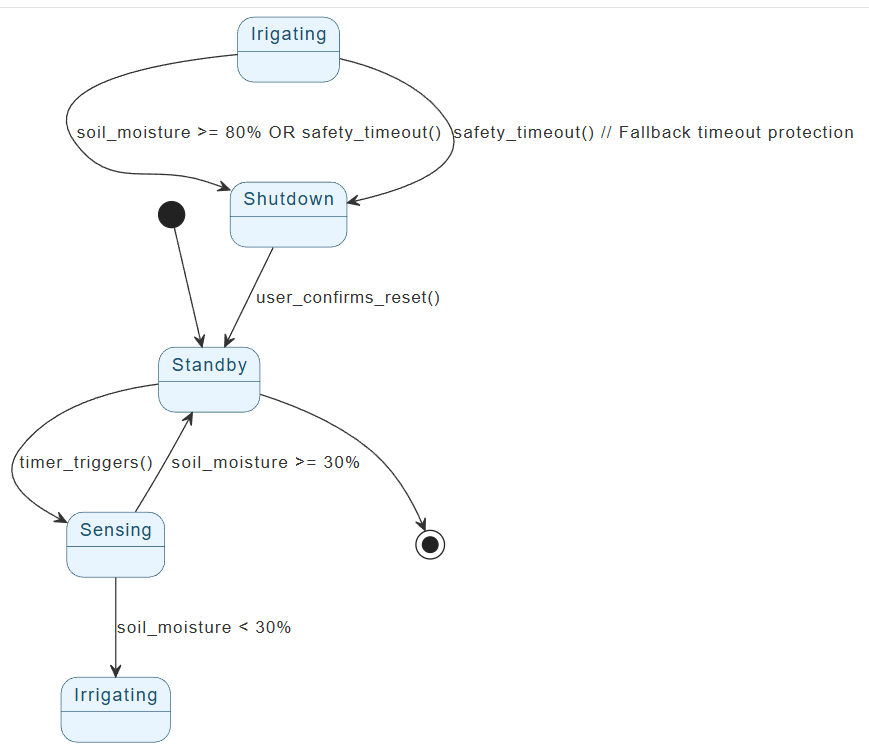
- Start in a low-power Standby mode most of the time.
- Periodically wake up according to a schedule (timer trigger) to check conditions.
- Enter a Sensing state to read soil moisture level (via capacitive or resistive sensor).
- If moisture < 30% (configurable dry threshold), start Irrigating by opening a solenoid valve or activating a pump.
- If moisture ≥ 30%, return to Standby (no watering needed).
- While Irrigating, continuously (or periodically) monitor moisture.
- Stop irrigating and close the valve when:
- Moisture reaches 80% (configurable wet threshold) → target achieved.
- A Safety Timeout expires (e.g., 30 minutes) → prevents flooding, pipe bursts, or electrical issues if sensor fails.
- After stopping irrigation, move to Shutdown state.
- In Shutdown, wait for manual confirmation (button press or app command) before returning to Standby — this allows the user to inspect the system or override if needed.
- Handle faults gracefully (e.g., sensor failure, valve stuck) by transitioning to an Error state with recovery options.
Additional desirable behaviors (kept simple here):
- No irrigation during certain hours (handled by schedule/timer).
- Logging or notifications are out of scope for this core state machine.
3. Key State Machine Concepts Used
- States: Idle/Standby, Sensing, Irrigating, Shutdown, Error.
- Composite state: Irrigating includes internal monitoring logic (though kept flat here for simplicity).
- Transitions:
- Triggered by events (timer, moisture reading, timeout).
- Guarded by conditions [moisture < 30%], [moisture >= 80%].
- Actions: /open_valve(), /close_valve(), /notify_user(), etc.
- Initial / final pseudostates: [*] for start/end.
- Self-transitions and recovery loops.
4. State Diagram in PlantUML
Below is the complete PlantUML code implementing the described behavior. It follows conventions from the coffee shop example (skinparam styling, composite states where appropriate, guards in [], actions with /).
@startuml

skinparam {
' Overall style
' Colors
ArrowColor #333333
ArrowFontColor #333333
BackgroundColor #FFFFFF
BorderColor #333333

' State styling
State {
BorderColor #005073
BackgroundColor #E6F5FF
FontColor #005073
}
}

[*] --> Standby

Standby --> Sensing : timer_triggers()

Sensing --> Irrigating : soil_moisture < 30%
Sensing --> Standby : soil_moisture >= 30%

Irigating --> Shutdown : soil_moisture >= 80% OR safety_timeout()
Irigating --> Shutdown : safety_timeout() // Fallback timeout protection

Shutdown --> Standby : user_confirms_reset()

Standby --> [*]

@enduml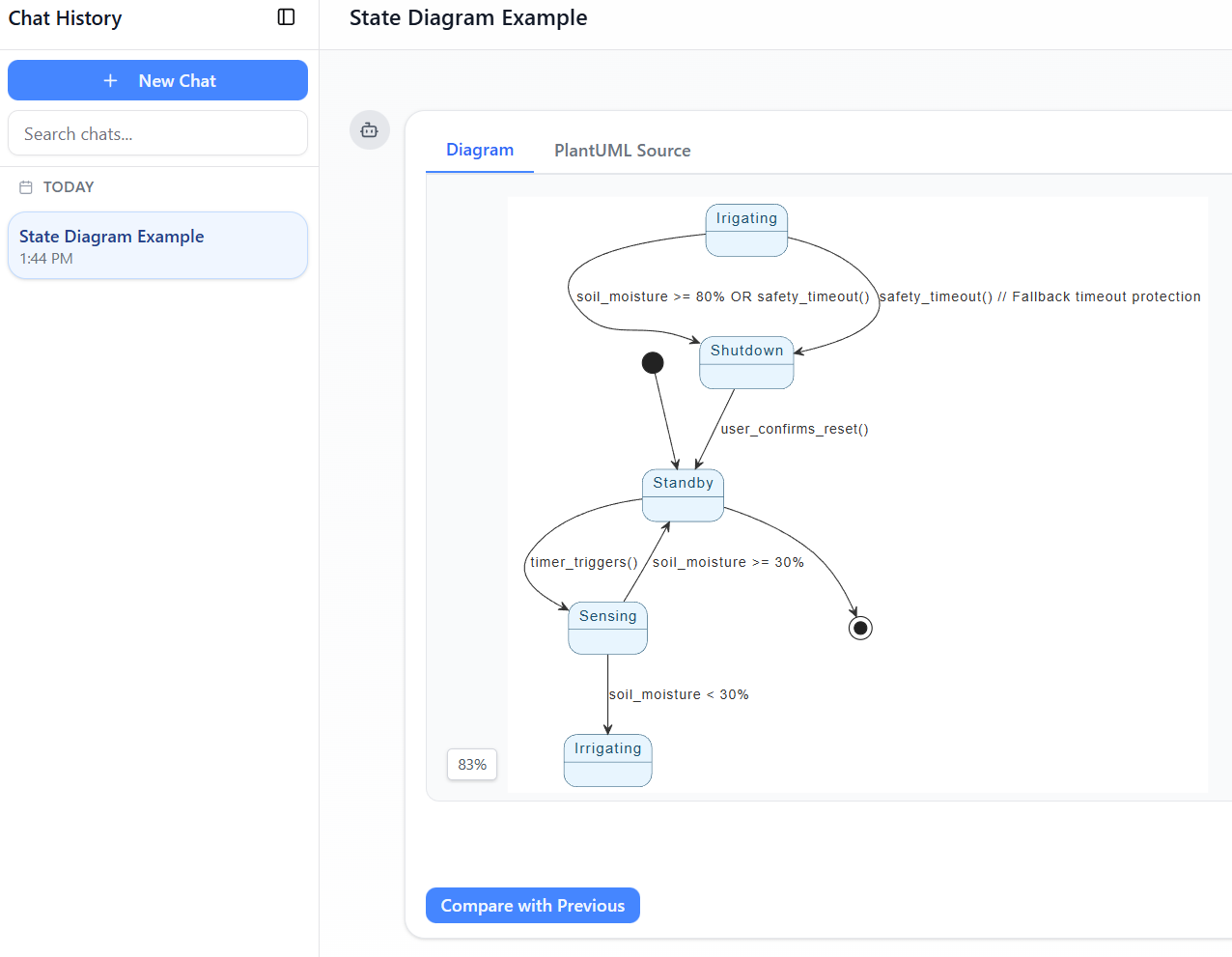
Explanation of the Diagram
- Standby — Default low-power/idle state.
- Sensing — Quick check triggered by timer; avoids unnecessary watering.
- Irrigating (composite) — Active watering phase with internal Watering sub-activity.
- Exits on target moisture or safety timeout.
- Shutdown — Post-irrigation hold state requiring confirmation to resume automation (safety feature).
- Error — Fault containment state with manual recovery transition.
5. Design Rationale & Benefits
- Water conservation — Only irrigates when actually needed (soil moisture-based instead of time-based).
- Flood prevention — Dual exit conditions from Irrigating (moisture target + timeout).
- User safety & control — Manual confirmation after abnormal stop prevents automatic restart after potential issues.
- Extensibility — Easy to add states (e.g., Rain Detected, Low Battery, Winter Mode) or adjust thresholds.
- Low complexity — Flat where possible, composite only where logical grouping adds clarity (Irrigating).
This design balances robustness, safety, and simplicity — suitable for embedded microcontroller implementation (Arduino, ESP32, etc.).
6. Conclusion
State machines provide an excellent formalism for modeling reactive control systems like smart irrigation controllers. By clearly defining states, events, guards, and actions, engineers can reason about system behavior, edge cases, and error recovery before writing code.
The PlantUML representation above serves as both documentation and a blueprint for implementation. Rendering it (via PlantUML tools or online servers) produces a clean, professional diagram ready for requirements reviews, code generation, or teaching UML concepts.
Future extensions could include:
- Weather API integration (skip Sensing if rain forecast).
- Multiple zones with per-zone moisture thresholds.
- Mobile app notifications on timeout or error.
This case study demonstrates how a seemingly simple automation problem benefits greatly from structured state-based modeling.
- Comprehensive Step-by-Step Guide to the 3D Printer State Machine: This guide applies state machine concepts to 3D printing systems, detailing their operational logic and automation pathways.
- Interactive State Machine Diagram Tool: A specialized web-based tool for creating and editing state machine diagrams that leverages GenAI capabilities for real-time behavior modeling.
- Understanding State Machine Diagrams in UML: This tutorial provides a comprehensive overview of modeling system behavior using state machine diagrams in UML.
- Definitive Guide to UML State Machine Diagrams with AI: This resource provides a detailed look at using AI-powered tools to accurately model object behavior with UML state machine diagrams.
- How to Draw a State Machine Diagram in UML?: This tutorial provides detailed instructions for creating diagrams and naming transitions to model entity history and events.
- Mastering State Diagrams with Visual Paradigm AI: A Guide for Automated Toll Systems: This guide provides a walkthrough on using AI-enhanced state diagrams to model and automate the complex logic required for toll system software.
- State Machine Diagram Tutorial: This tutorial explains the symbols and syntax required to model the dynamic behavior of individual class objects, use cases, and entire systems.
- Visual Paradigm AI Suite: A Comprehensive Guide to Intelligent Modeling Tools: This overview details how the platform’s AI Chatbot supports technical modeling, including state machines and other behavioral diagrams.
- Visual Paradigm – UML State Machine Diagram Tool: An overview of a feature-rich online tool designed for architects to build, edit, and export precision state machine models using a cloud-based interface.
- State Diagram Quick Tutorial: Master UML State Machines in Minutes: A beginner-friendly tutorial for creating and understanding state diagrams, focusing on core concepts and practical modeling techniques.


