
Introduction: The Evolution of Enterprise Modeling in a Post-AI Era
Visual Paradigm 18.0, released on January 19, 2026, marks a transformative milestone in the evolution of enterprise modeling tools. For decades, enterprise architects and business analysts have relied on manual diagramming, iterative refinement, and disjointed workflows to translate complex business challenges into actionable models. However, the rapid advancement of artificial intelligence—particularly in natural language processing, pattern recognition, and contextual reasoning—has created a paradigm shift. VP 18.0 embraces this shift not as a gimmick, but as a foundational reimagining of how professionals interact with enterprise architecture and process design.

Why VP 18.0 Represents a New Standard in Professional Modeling
Unlike earlier versions where AI was introduced as a supplementary feature, VP 18.0 embeds intelligent automation at the core of its workflow. This isn’t about replacing human judgment—it’s about augmenting it. The platform now enables users to describe a business problem in plain language, and within seconds, generate compliant, structured, and contextually relevant models. The result? A significant reduction in time-to-insight, increased fidelity of outputs, and improved alignment between stakeholder expectations and technical deliverables.
1. AI-Powered TOGAF Compliance Engine: From Concept to Enterprise Architecture in Minutes
One of the most impactful upgrades in VP 18.0 is the AI TOGAF Tool, a fully integrated module that generates TOGAF-compliant enterprise architecture artifacts directly from natural language prompts.
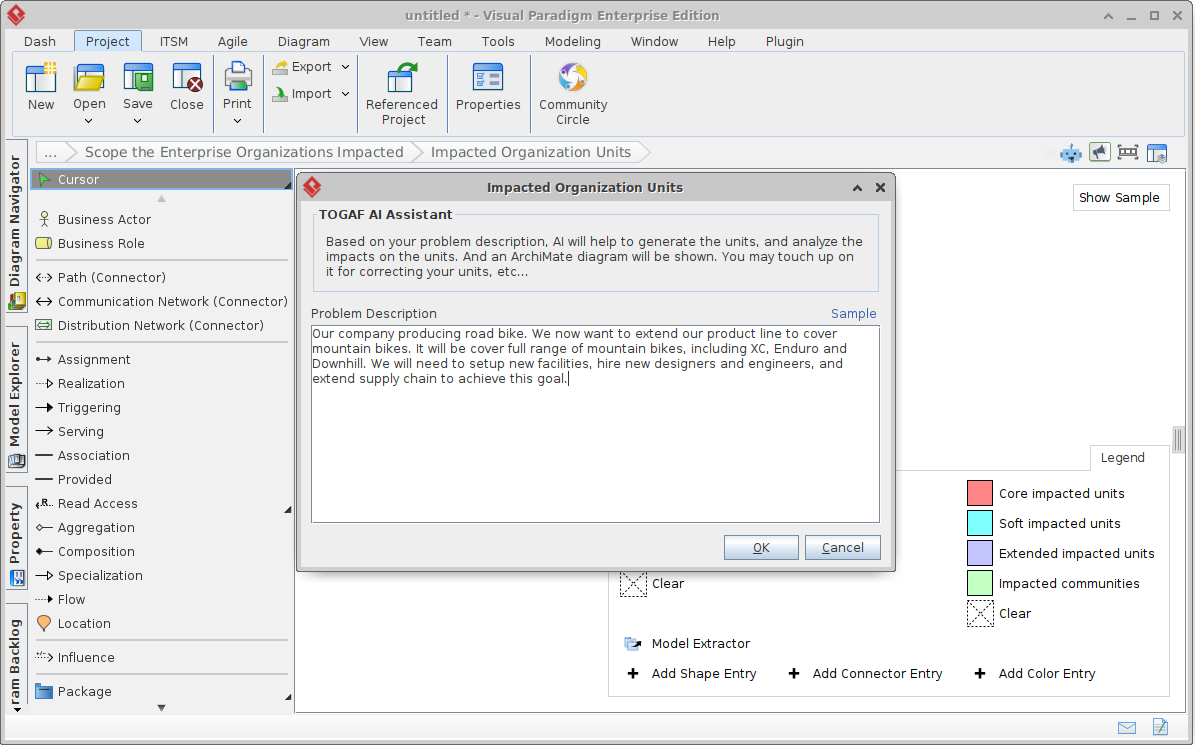
Consider a scenario in enterprise consulting: a client wants to modernize their legacy point-of-sale (POS) system to support omnichannel retail, improve inventory visibility, meet PCI-DSS compliance, and reduce total cost of ownership (TCO).
- Before VP 18.0: A typical architecture effort would involve days of manual work—designing ArchiMate layer diagrams, constructing gap analyses, creating maturity radar charts, mapping capabilities across business, data, application, and technology domains, and developing a detailed work breakdown structure (WBS) with timelines and governance impacts.
- With VP 18.0: A single prompt—”Modernize our client’s legacy POS system to support omnichannel retail, improve inventory visibility, and comply with PCI-DSS while reducing TCO.”—triggers an automated response that delivers a complete suite of TOGAF-aligned deliverables in under 10 seconds.
The output includes:
- Baseline, target, and transition ArchiMate diagrams with clear domain alignment
- Capability maturity radar charts across four dimensions (business, data, application, technology)
- Gap analysis tables and visualizations, clearly identifying capability deficits
- Impact matrices that map organizational units and governance responsibilities
- A full Work Breakdown Structure (WBS) with phased deliverables and dependencies
- A detailed migration roadmap with risk-assessed timelines and key milestones
The output is not only accurate and structured but also adheres to TOGAF’s established standards for visual styling, layering, and naming conventions. Colors and styles match corporate templates, ensuring brand consistency. This allows architects to shift focus from data entry to strategic refinement—spending 20 minutes on editorial adjustments, contextual notes, and stakeholder feedback, rather than days of reconstruction.
Use Case Impact: In a recent digital transformation bid, this feature reduced preparation time from 18 hours to under 2 hours, directly contributing to faster proposal cycles and stronger client confidence.
Platform Availability: Available exclusively in the Desktop Enterprise Edition. Ideal for consulting firms, internal EA teams, and government agencies requiring strict compliance frameworks.
2. AI Value Stream Mapping: Lean Analysis with Real-Time Intelligence
For organizations operating in manufacturing, services, or logistics, operational efficiency is a cornerstone of success. Value Stream Mapping (VSM) has long been a staple of Lean and Six Sigma practices—but it has traditionally been a labor-intensive process, requiring manual data entry, time-consuming layout adjustments, and post-hoc waste identification.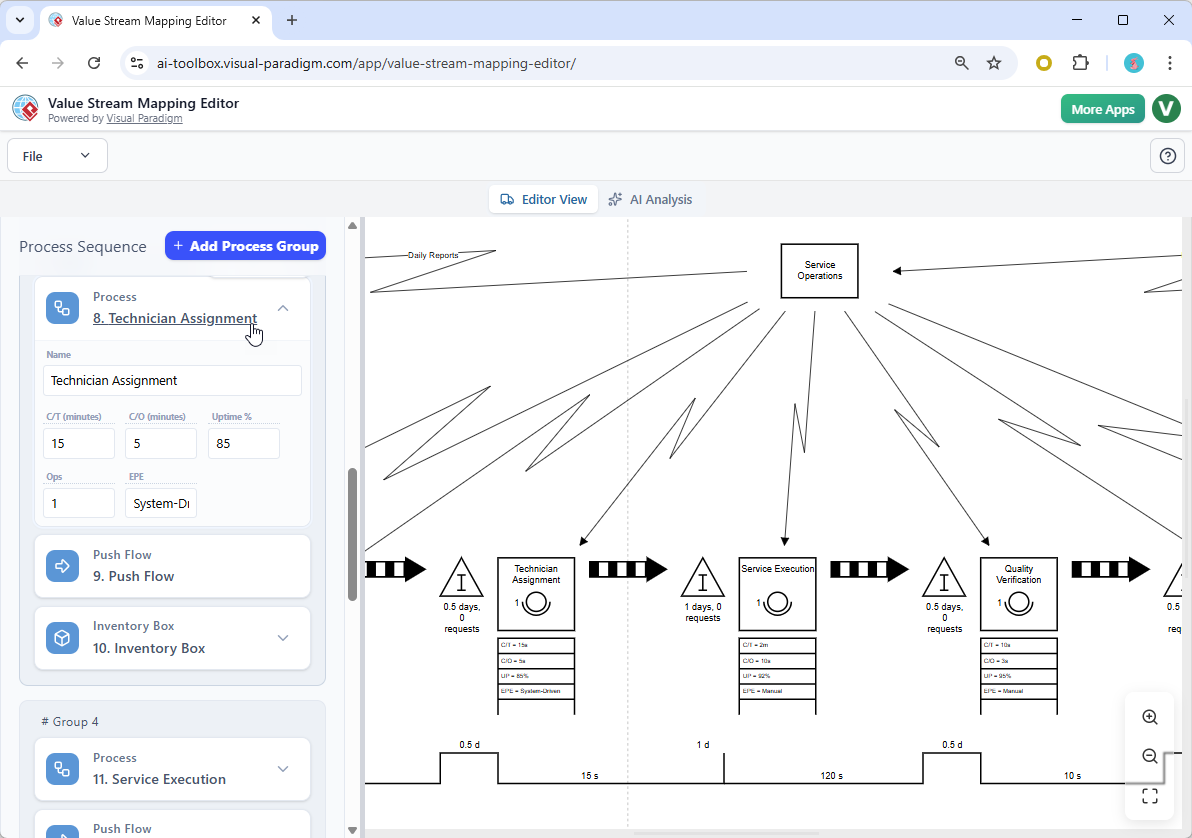
VP 18.0 introduces an AI-Enhanced Value Stream Mapping module that transforms this process into a dynamic, real-time analysis experience.
The interface features a split-screen editor:
- Left panel: Users enter structured operational data—cycle times, changeover durations, inventory levels, staffing levels, and process flow points
- Right panel: The AI engine automatically constructs and updates the current-state value stream map in real time, with intelligent auto-layout, process sequencing, and flow alignment
Once the data is populated, users can trigger the AI Analyst function, which performs automated root-cause analysis and generates actionable insights:
- Identifies “waiting waste” at inspection stations—23% of total lead time
- Detects overproduction due to batch sizing inefficiencies
- Flags transport waste between facilities with high throughput variance
The AI doesn’t just identify issues—it provides quantified recommendations:
- “Implement a pull-based system with kanban cards to reduce work-in-progress (WIP) by 35% and reduce lead time by 2.1 days”
- “Adjust batch sizes based on demand variability to reduce inventory holding costs by 18%”
These insights are supported by visual charts, process heatmaps, and trend overlays—making them immediately actionable for operations managers or Lean coaches.
Real-World Impact: A client in the automotive parts supply chain used this tool to identify a 14% reduction in idle time at a key inspection station, leading to a 10% improvement in throughput. The executive summary was exported in under 10 minutes as a clean PNG, ready for boardroom presentation.
Platform Availability: Available in Desktop Professional and Online Deluxe editions. Particularly powerful for process improvement teams, operations consultants, and Lean Six Sigma practitioners.
3. AI Infographic Generator: Bridging the Gap Between Technical Detail and Stakeholder Understanding
One of the most persistent challenges in enterprise projects is translating complex technical concepts into compelling narratives that resonate with non-technical stakeholders.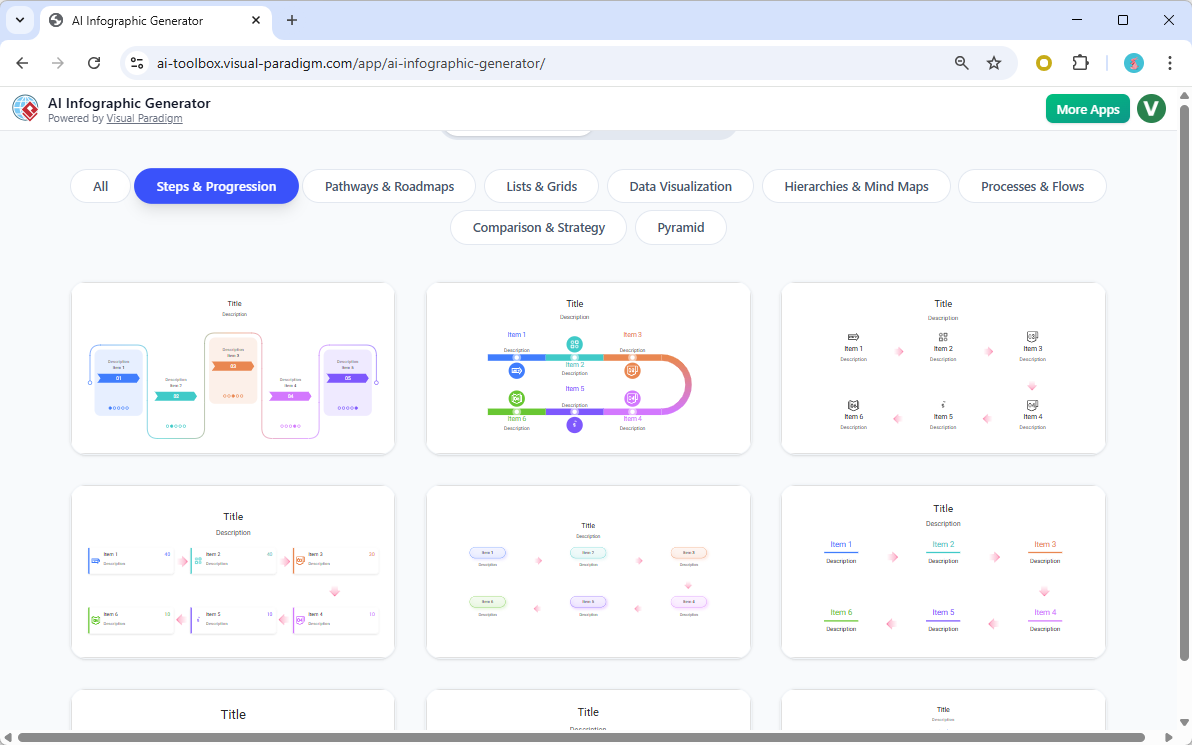
VP 18.0’s AI Infographic Generator eliminates this friction by enabling users to generate professional-grade, visually engaging infographics directly from natural language prompts.
Examples of effective prompts include:
- “Infographic: Top 5 benefits of migrating to cloud-native architecture in 2026”
- “Visual summary: Our proposed 18-month ERP modernization roadmap”
- “Key stats: How AI-driven process mining reduces operational waste by 40%”
The AI processes the input through a multi-step reasoning pipeline:
- Identifies key themes and data points
- Structures the content into a logical narrative flow (problem → solution → benefits)
- Generates appropriate icons, symbols, and charts
- Applies a responsive design template with mobile-ready formatting
- Exports the result as an editable SVG or PNG
The output is not only visually appealing but structured to follow cognitive psychology principles—beginning with a clear headline, using concise bullet points, and ending with a call to action or strategic insight.
Use Case: An enterprise project manager used this to present a cloud migration strategy to the C-suite. The resulting infographic was adopted as the official communication tool in the quarter, reducing the need for repeated technical walkthroughs.
Platform Availability: Available in Desktop Professional and Online Combo editions. A must-have for architects, project managers, and change managers who need to present complex ideas quickly and effectively.
4. OpenDocs: The Living Knowledge Base for Long-Term Project Success
For years, enterprise teams have struggled with knowledge silos—architectural decisions, process requirements, diagram versions, and meeting notes scattered across Confluence, OneNote, SharePoint, and standalone tools like draw.io.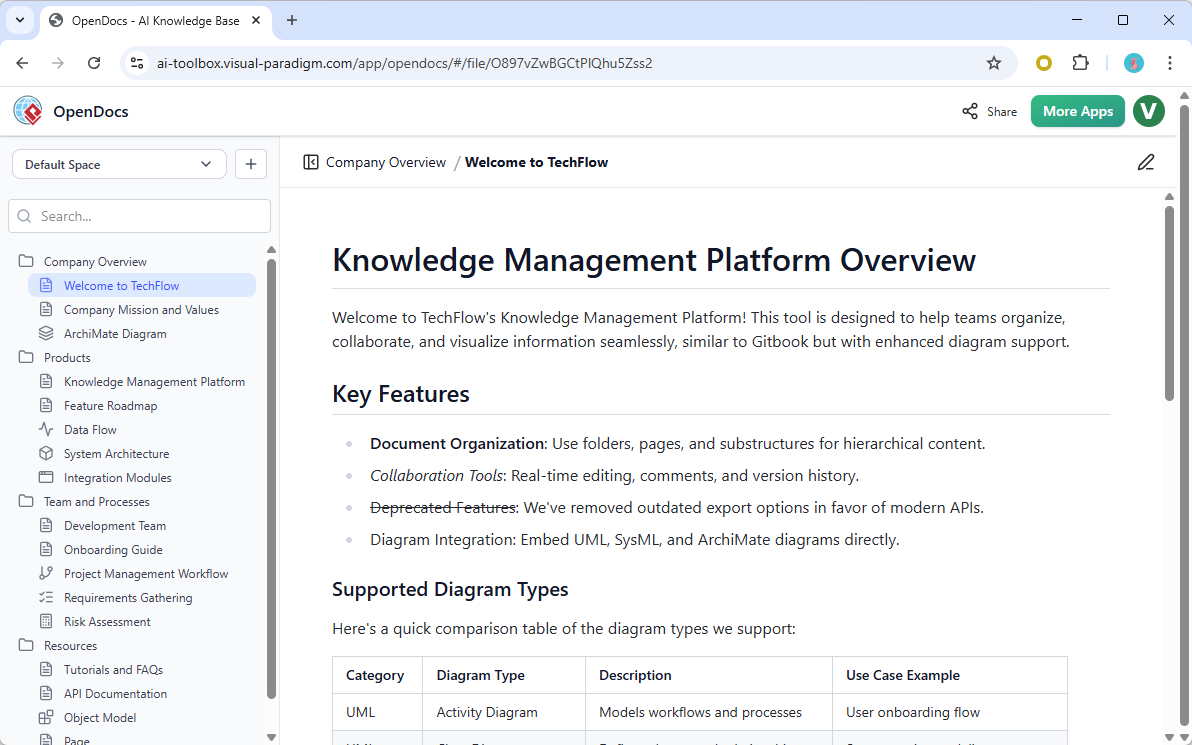
VP 18.0 introduces OpenDocs, a dedicated, secure, and fully integrated knowledge repository designed to centralize all aspects of an enterprise’s living architecture and process documentation.
OpenDocs offers the following key capabilities:
- Rich Markdown support with syntax highlighting and code blocks
- Live-embedded diagrams (ArchiMate, UML, mind maps, flowcharts) that update in real time
- Drag-and-drop folder hierarchy for intuitive navigation
- Distraction-free editing mode to maintain focus
- Secure sharing with read-only access links for onboarding and review
For example, during a project involving the modernization of a client’s supply chain platform, a team built a full system architecture knowledge base in a single day. The base included:
- Textual explanations of system components
- Interactive diagrams showing data flows and integration points
- Version-controlled change logs
- Searchable metadata and tags
This not only improved internal knowledge sharing but also enabled new team members to onboard swiftly—reducing ramp-up time from weeks to hours.
Strategic Value: OpenDocs is not just a documentation tool—it’s a collaborative working memory for long-term projects. It enables teams to reference diagrams directly, maintain version history, and ensure that documentation evolves with the system.
Why VP 18.0 Is More Than Just a Tool—It’s a Workflow Revolution
VP 18.0 is not merely a collection of new features. It represents a fundamental shift in how professionals approach modeling, analysis, and communication.
By replacing repetitive, manual tasks with intelligent automation, the platform enables users to:
- Focus on high-level strategy and stakeholder engagement
- Reduce time-to-insight from days to minutes
- Build more accurate, context-aware models
- Improve cross-functional alignment through shared, living knowledge
Moreover, the AI is not implemented as a black box. Every output is traceable, contextual, and grounded in established frameworks like TOGAF and Lean. The platform provides transparency—users can see how each model component was derived, and refine or override any suggestion with confidence.
Implementation Recommendations
For organizations considering adoption:
| Use Case | Recommended Edition | Key Benefit |
|---|---|---|
| Enterprise Architecture Consulting | Desktop Enterprise Edition | TOGAF-compliant, compliant, scalable, and audit-ready outputs |
| Lean Operations / Process Improvement | Desktop Professional or Online Deluxe | Real-time VSM with AI-driven waste detection and recommendations |
| Stakeholder Presentation & Change Management | Desktop Professional or Online Combo | Instantly generate high-impact infographics for executive audiences |
| Long-Term Project Management & Knowledge Retention | All editions with OpenDocs | Centralized, searchable, living documentation with embedded visuals |
Conclusion: The Future of Enterprise Modeling Is Intelligent, Integrated, and Human-Centered
Visual Paradigm 18.0 doesn’t promise to replace human expertise. Instead, it empowers it. By leveraging AI as a co-pilot—capable of generating robust, compliant, and insightful models from simple prompts—architects, process consultants, and project managers can finally work the way they always intended: by solving real problems, not by managing complex workflows.
For existing users, the upgrade is seamless and fast—no retraining required. The AI features are accessible through the existing interface and integrate deeply with existing models. For new users, the free trial includes all core AI capabilities and is an excellent starting point to explore the full potential of AI-powered modeling.
Whether you’re in enterprise architecture, operations, product management, or consulting, VP 18.0 is a transformative leap forward. The future of modeling is not about drawing more diagrams—it’s about thinking more clearly. And with VP 18.0, that clarity is now within reach.
Further Reading: Full Release Notes & Feature Demos
-
AI-Powered Visual Modeling and Design Solutions by Visual Paradigm: This site allows users to explore cutting-edge AI-driven tools for visual modeling, diagramming, and software design to enable faster development workflows.
-
AI Chatbot Feature – Intelligent Assistance for Visual Paradigm Users: This feature enables users to leverage AI-powered chatbot functionality to get instant guidance, automate tasks, and enhance productivity.
-
AI Textual Analysis – Transform Text into Visual Models Automatically: This tool uses AI to analyze text documents and automatically generate diagrams such as UML, BPMN, and ERD for faster modeling and documentation.
-
Visual Paradigm AI Diagram Generation Guide: A comprehensive step-by-step guide to using AI-powered tools for generating various diagram types quickly and accurately.
-
C4-PlantUML Studio | AI-Powered C4 Diagram Generator: An AI-powered tool that automatically generates C4 software architecture diagrams from simple text descriptions.
-
AI-Powered UML Class Diagram Generator by Visual Paradigm: This is an advanced AI-assisted tool that automatically generates UML class diagrams from natural language descriptions.
-
AI Development Plan Generator – Visual Paradigm: This tool is designed to revolutionize project planning by transforming ideas into actionable roadmaps and visualizing timelines.
-
AI-Powered 3-Aspect Infographic Designer Tool: This application allows users to generate professional infographics instantly using an AI-driven designer based on three specific aspects.
-
Mastering the Visual Paradigm AI Diagram Generator – Method Post: A guide for leveraging AI-driven diagram generation in Visual Paradigm to create efficient design workflows.
-
Visual Paradigm AI Chatbot: The World’s First Purpose-Built AI Assistant for Visual Modeling: This article discusses the launch of the AI chatbot designed to assist users with natural language interactions and intelligent guidance.