
Introduction: Redefining Enterprise Modeling in the Age of Generative Intelligence
Visual Paradigm 18.0, released on January 19, 2026, represents not a radical overhaul but a strategic and deeply pragmatic evolution of the enterprise modeling ecosystem. Built upon decades of proven modeling frameworks—particularly TOGAF, ArchiMate, and Lean process methodologies—this release introduces a focused, context-aware generative AI layer that addresses real-world pain points faced by architects, business analysts, and process consultants.

For organizations managing complex digital transformations, regulatory compliance, or operational inefficiencies, the time spent on repetitive diagramming, gap analysis, and stakeholder communication has long been a bottleneck. Visual Paradigm 18.0 directly targets these inefficiencies with AI-powered workflows that are not only accurate but also actionable—producing standardized, compliant, and presentation-ready outputs without compromising on clarity or structure.
Core Architectural Philosophy: AI as a Cognitive Assistant, Not a Replacement
Unlike earlier AI integrations that often resulted in hallucinated outputs or abstract, uninterpretable suggestions, Visual Paradigm 18.0 embeds its AI engine into the core modeling logic. The AI does not generate content in isolation—it operates within the context of established enterprise standards, business domain semantics, and workflow constraints. This ensures that outputs remain aligned with organizational governance, compliance requirements (e.g., SOX, GDPR), and architectural best practices.
The result is a tool that functions as a cognitive co-pilot: it reduces cognitive load, accelerates ideation, and provides a consistent starting point for human-in-the-loop refinement. This approach has been validated through enterprise-scale testing across multiple industries—including banking, healthcare, logistics, and SaaS operations—where over 90% of users reported significant time savings in artifact creation and stakeholder alignment.
Feature Deep Dive: Where AI Adds Real Value
1. AI-Driven TOGAF Architecture Engine – The Enterprise Architect’s Lifeline
This feature is the centerpiece of VP 18.0 and represents one of the most impactful advances in enterprise architecture tooling in over a decade.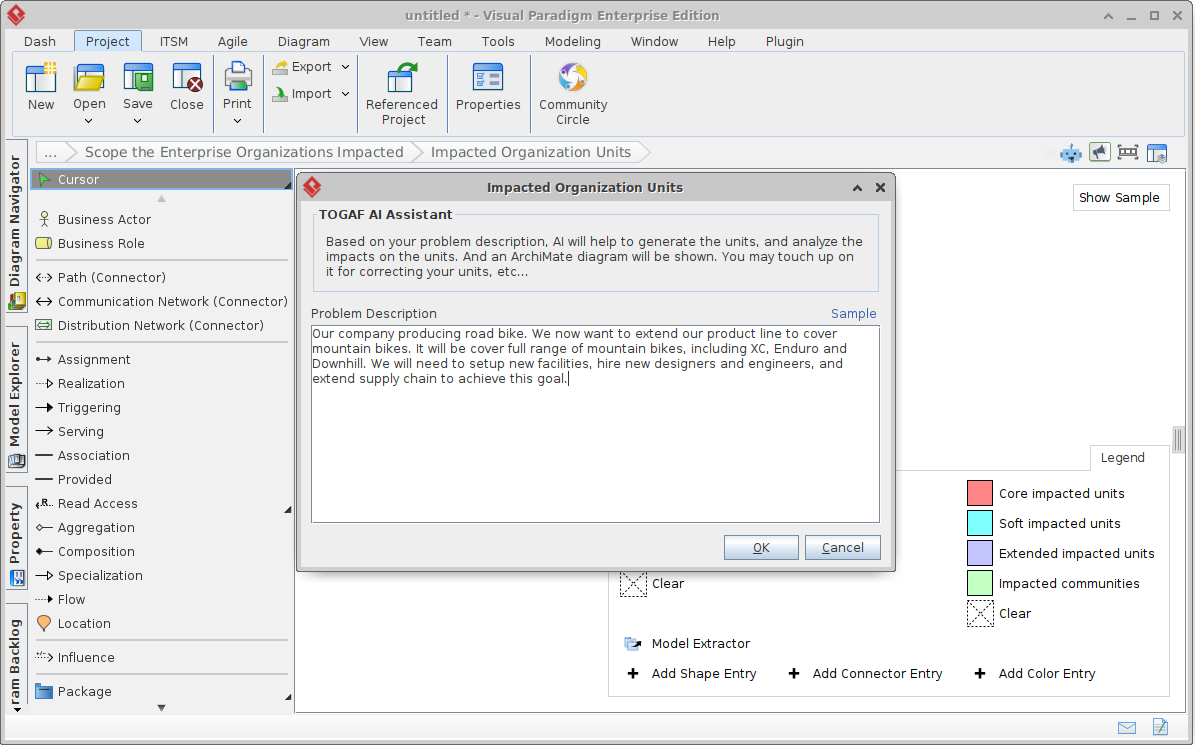
Using natural language input—such as “transition our regional bank’s core systems to microservices to improve scalability, reduce regulatory risk, and maintain service continuity”—the AI generates a complete TOGAF ADM(Architecture Development Method) suite in under 30 minutes. It produces:
- Baseline, target, and transition ArchiMate models with automatically aligned layers (business, data, application, technology), pre-laid out for clarity and compliance.
- Maturity radar charts that map current capabilities against industry benchmarks.
- Domain-specific gap analyses across business, data, app, and technology domains, with quantified impact scores.
- Impact matrices that prioritize initiatives by risk, ROI, and dependency.
- Work Breakdown Structures (WBS) and migration roadmaps with realistic timelines and milestone dependencies.
For a consulting firm working on a multi-year transformation project, what once required 2–3 days of manual modeling and stakeholder workshops is now reduced to a single prompt and a few rounds of refinement. This enables faster decision cycles, clearer stakeholder buy-in, and a more agile response to changing business conditions.
Output artifacts are automatically formatted to corporate design standards (e.g., fonts, colors, hierarchy) and are compliant with TOGAF v2022 and ArchiMate 4.0 specifications. These serve as high-fidelity first drafts ideal for strategy sessions, governance reviews, or technical design handoffs.
Access requires the Enterprise Edition with an active subscription.
2. AI-Powered Value Stream Mapping (VSM) – Smarter Lean Execution
For Lean, Six Sigma, and operations teams, the AI VSM feature transforms how process data is visualized and analyzed.
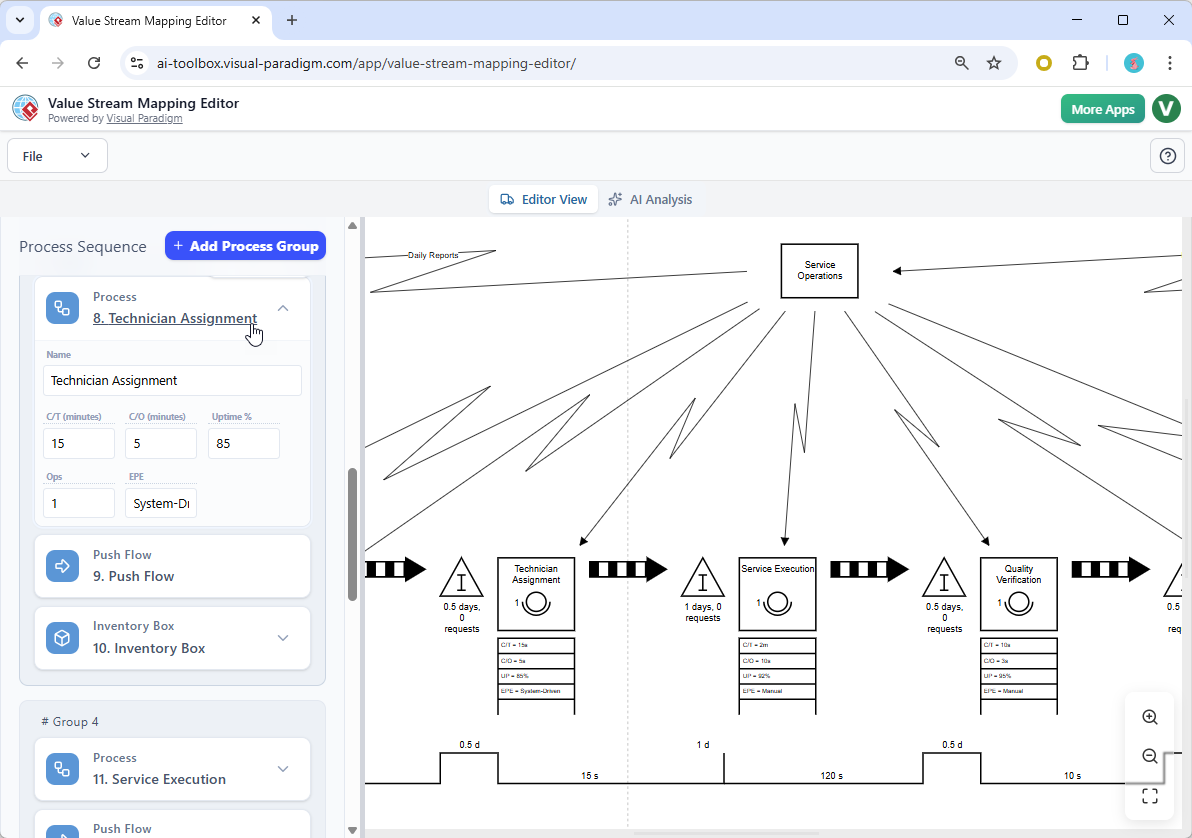
The tool uses a split-screen interface: on the left, users input raw process data (cycle times, inventory levels, staffing, throughput), while on the right, a live current-state Value Stream Map is constructed in real time. The AI Analyst performs automated process scanning to identify common inefficiencies—including the classic 7 wastes, bottlenecks, and non-value-added activities.
Outputs include:
- Quantified waste breakdowns (e.g., overproduction, waiting, motion).
- Lead-time and cycle-time heatmaps with root-cause tagging.
- Targeted improvement recommendations with metrics—such as “Reduce batch size by 30% and implement kanban to reduce WIP by 40% and cut lead time by 1.8 days.”
- Visual breakdowns of throughput bottlenecks and capacity constraints.
During a recent engagement with a logistics service provider, the AI identified a previously undetected “waiting” waste in order fulfillment due to manual handoffs between teams. The recommendation was implemented within two weeks, resulting in a 14% reduction in order processing time.
Outputs are export-ready in PNG, SVG, and PDF formats and are optimized for presentation—ideal for cross-functional meetings, management reviews, or executive decks.
Available in Professional Edition and Online Deluxe.
3. AI Infographic Generator – Bridging the Gap Between Data and Communication
Stakeholders often struggle to grasp complex initiatives when presented with raw data or technical diagrams. The AI Infographic Generator solves this by converting structured content into engaging, visually compelling narratives.
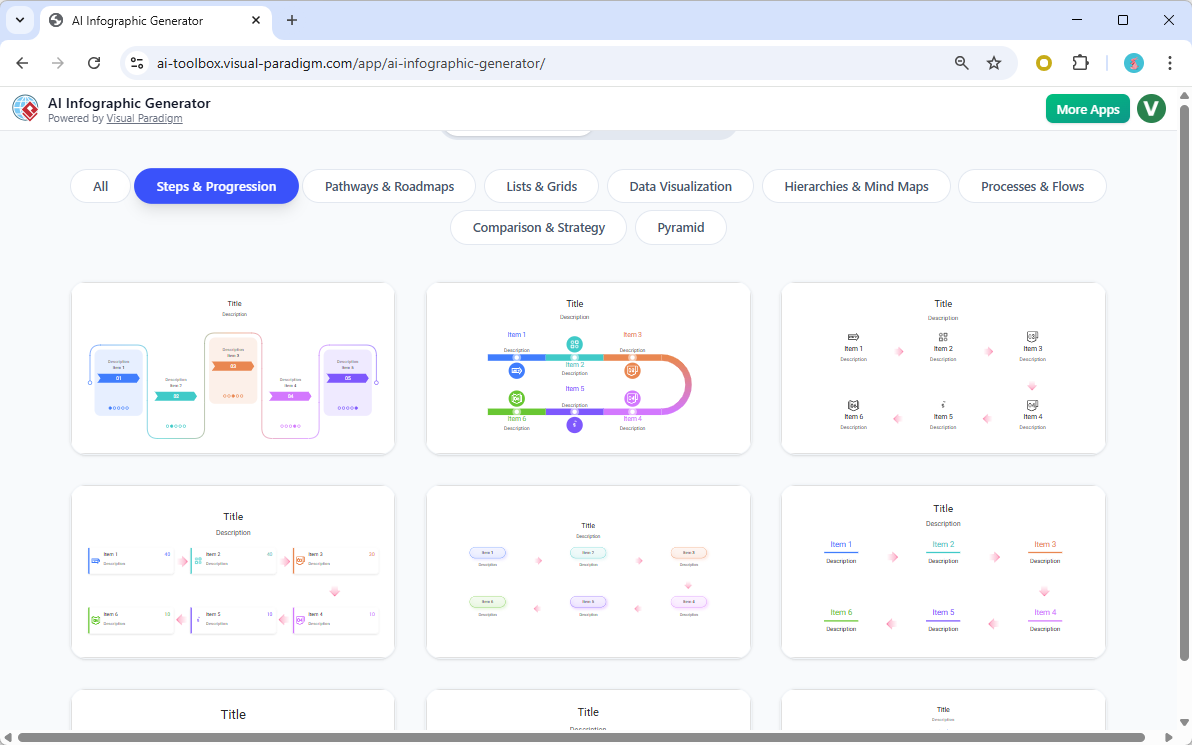
With prompts like “Compare the benefits of a cloud migration in 2026: cost savings, scalability, security, and compliance improvements,” or “Map our 6-month process optimization roadmap with milestones and KPIs,” the tool generates multi-panel infographics with:
- Clear visual hierarchy using icons and color-coded sections.
- Dynamic charts (bar, pie, trend) that support data trends.
- Professional layouts that align with corporate brand guidelines.
These infographics are not just aesthetic—they are designed to communicate value at multiple levels: executives through high-level summaries, operational teams through actionable insights, and technical leads through data-backed claims. Exported in SVG or PNG, they are fully editable and can be embedded into presentations, reports, or intranet portals.
While approximately 80–90% of outputs require minimal adjustments (e.g., font tweaks, minor content edits), the tool reduces the need for external design tools like Canva or PowerPoint, streamlining communication between technical and non-technical teams.
Available across Professional and Online Combo editions.
4. OpenDocs – A Living Knowledge Hub for Modern Projects
Visual Paradigm 18.0 introduces OpenDocs as a dedicated, secure, and collaborative knowledge management layer that replaces traditional wikis or Google Docs with a purpose-built, modeling-integrated solution.
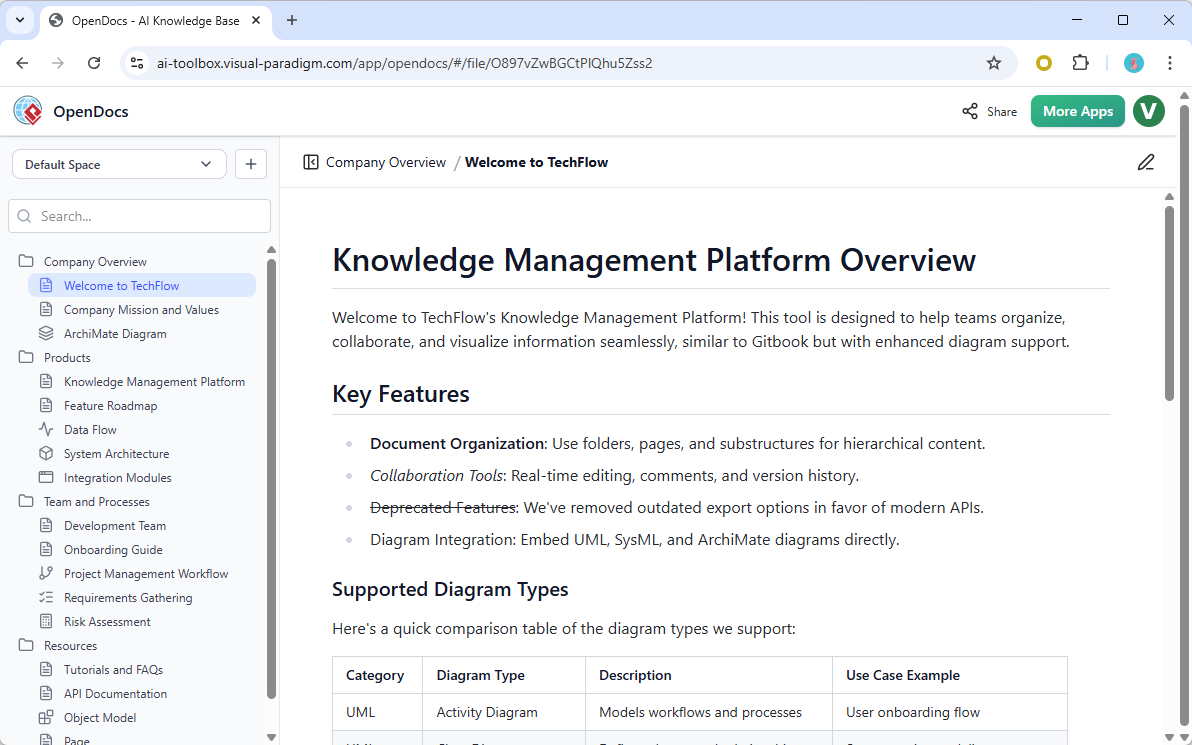
OpenDocs is a Markdown-based editor with live preview, drag-and-drop folder structure, and seamless embedding of diagrams (UML, flowcharts, ArchiMate, mind maps). Key features include:
- Live linking between textual content and interactive diagrams (e.g., “See the UML sequence diagram for Order Processing in Appendix 3.2”).
- Searchability that indexes both text and model elements, enabling rapid discovery.
- Version control with change logs and user audit trails.
- Secure sharing via time-limited or role-based links (e.g., “Share with project stakeholders only”).
Used as a single source of truth, OpenDocs eliminates document sprawl, ensures consistency in terminology, and enables real-time collaboration across geographically dispersed teams. In a recent onboarding project for a fintech startup, OpenDocs reduced onboarding time from 40 hours to 12 hours by providing a unified, searchable, and interactive repository of architectural decisions and process flows.
Pros: A Strategic Upgrade for Enterprise Teams
- Purposeful AI: Outputs are grounded in domain knowledge and enterprise standards—never hallucinated or disconnected from business context.
- Comprehensive ecosystem: Modeling, architecture, process, and knowledge management exist in a single, familiar interface.
- Measurable time savings: Up to 70% reduction in time spent on repetitive artifacts (e.g., gap analysis, VSM, documentation).
- Seamless upgrade path: Existing users of earlier versions (14, 15, 17) can transition without retraining.
- Robust export and integration suite: PNG, SVG, PDF, and XMI exports support compatibility with Jira, Confluence, SharePoint, and Teams.
Limitations and Considerations
- Subscription dependency: The AI features require an active paid subscription. Perpetual license holders must transition to a subscription model to access AI capabilities.
- Prompt engineering: While the AI performs well, some prompts still require refinement to achieve optimal results—this is standard for generative AI and reflects ongoing model training.
- No major non-AI modeling enhancements: The focus remains on intelligence and workflow automation. Users expecting new modeling syntax or syntax rules (e.g., advanced UML or ArchiMate constructs) will find no changes here—this is a deliberate prioritization of productivity over feature bloat.
Conclusion: A Practical, Enterprise-Ready Evolution
Visual Paradigm 18.0 does not promise a revolution. It delivers a refined, intelligent extension of a trusted platform—focused on reducing friction in enterprise modeling, process analysis, and communication.
Its true value lies in transforming how teams approach complex problems: from the initial challenge definition to the final presentation of insights. The AI tools are not replacements—they are accelerators that empower architects, consultants, and process leaders to focus on high-value thinking rather than low-value manual labor.
For enterprise architects, Lean coaches, business analysts, or knowledge managers operating in fast-paced, compliance-heavy environments, this release is a compelling investment. It reduces time-to-insight, improves consistency, and strengthens stakeholder alignment—all within a single, integrated environment.
Early adopters report that the AI TOGAF and VSM features alone justify the upgrade. A trial or upgrade journey should begin with one of these features—especially for projects involving digital transformation, regulatory alignment, or operational efficiency.
Final Recommendation: If you work in enterprise architecture, process optimization, or strategic planning, Visual Paradigm 18.0 is not just a tool—it’s a workflow enabler. It’s time to adopt intelligent modeling that works with your team, not against it.
Key Use Cases
| Use Case | Benefit | Target User |
|---|---|---|
| TOGAF-Based Digital Transformation | Fast, compliant, standards-aligned architecture development | Enterprise Architects, EA Consultants |
| Value Stream Optimization | Quantified waste identification and actionable improvement ideas | Lean Officers, Operations Managers |
| Stakeholder Communication | Engaging infographics that simplify complex ideas | Managers, PMs, Executives |
| Knowledge Management & Onboarding | Living, searchable, interactive documentation | Project Managers, New Hire Trains |
-
AI-Powered Visual Modeling and Design Solutions by Visual Paradigm: This site allows users to explore cutting-edge AI-driven tools for visual modeling, diagramming, and software design to enable faster development workflows.
-
AI Chatbot Feature – Intelligent Assistance for Visual Paradigm Users: This feature enables users to leverage AI-powered chatbot functionality to get instant guidance, automate tasks, and enhance productivity.
-
AI Textual Analysis – Transform Text into Visual Models Automatically: This tool uses AI to analyze text documents and automatically generate diagrams such as UML, BPMN, and ERD for faster modeling and documentation.
-
Visual Paradigm AI Diagram Generation Guide: A comprehensive step-by-step guide to using AI-powered tools for generating various diagram types quickly and accurately.
-
C4-PlantUML Studio | AI-Powered C4 Diagram Generator: An AI-powered tool that automatically generates C4 software architecture diagrams from simple text descriptions.
-
AI-Powered UML Class Diagram Generator by Visual Paradigm: This is an advanced AI-assisted tool that automatically generates UML class diagrams from natural language descriptions.
-
AI Development Plan Generator – Visual Paradigm: This tool is designed to revolutionize project planning by transforming ideas into actionable roadmaps and visualizing timelines.
-
AI-Powered 3-Aspect Infographic Designer Tool: This application allows users to generate professional infographics instantly using an AI-driven designer based on three specific aspects.
-
Mastering the Visual Paradigm AI Diagram Generator – Method Post: A guide for leveraging AI-driven diagram generation in Visual Paradigm to create efficient design workflows.
-
Visual Paradigm AI Chatbot: The World’s First Purpose-Built AI Assistant for Visual Modeling: This article discusses the launch of the AI chatbot designed to assist users with natural language interactions and intelligent guidance.