
In the landscape of software development and systems engineering, ambiguity is the enemy of delivery. When stakeholders, developers, and testers operate without a shared understanding of functionality, projects drift, budgets inflate, and quality suffers. Use Case Modeling stands as a foundational technique within Object-Oriented Analysis and Design (OOAD) to bridge this gap. It provides a structured method to capture functional requirements from the perspective of the user, ensuring that the system behaves exactly as intended.
This guide explores the mechanics of use case modeling, moving beyond simple diagramming to focus on the rigorous analysis required for robust system design. By defining actors, interactions, and boundaries clearly, teams can establish a contract of functionality that guides the entire development lifecycle.
Understanding the Core Concepts 🧠
At its heart, a use case represents a sequence of actions that a system performs to yield an observable result of value to an actor. It is not merely a list of features; it is a story of interaction. When applied to requirement analysis, it shifts the focus from technical implementation to user goals.
- Focus on Value: Every use case must deliver a measurable benefit to the user or system.
- System Boundary: Clearly defines what is inside the system and what remains in the external environment.
- Interaction Flow: Describes the steps taken to achieve the goal, including error conditions and alternative paths.
Unlike data modeling, which focuses on information storage, use case modeling focuses on behavior. This behavioral view is critical for understanding how data moves through the system and how it is manipulated. It serves as the primary input for identifying objects and classes later in the design phase.
Key Components of a Use Case Diagram 🛠️
Visualizing the requirements often begins with a diagram. While the text description is the contract, the diagram provides the map. To construct an effective model, you must understand the atomic elements that compose it.
1. Actors 👤
An actor represents a role played by a user or an external system. It is crucial to distinguish between the role and the person. A single human may play multiple roles, and a single role may be played by multiple humans.
- Primary Actors: These initiate the use case to achieve a specific goal.
- Secondary Actors: These support the system, often handling tasks like authentication or logging.
- External Systems: Other software applications that interact with the system under construction.
2. The System Boundary 🧱
The box representing the system defines the scope of the project. Anything outside this box is considered external. Use case lines should only cross this boundary at specific points, indicating an interaction.
3. Use Cases ⚡
A use case is an oval shape containing the name of the goal. It encapsulates a complete unit of functionality. A well-named use case starts with a verb and ends with a noun (e.g., “Process Refund” rather than “Refund”).
Relationships and Interactions 🔗
Systems rarely exist in isolation. Use cases interact with each other and with actors in specific patterns. Understanding these relationships prevents redundancy and ensures maintainability.
| Relationship Type | Symbol | Description |
|---|---|---|
| Association | Line | Connects an actor to a use case. Indicates the actor initiates or participates in the interaction. |
| Include | Dashed Line + <<include>> | One use case mandates the inclusion of another. The included behavior is always executed. |
| Extend | Dashed Line + <<extend>> | One use case adds behavior to another under specific conditions. It is optional. |
| Generalization | Solid Line + Hollow Triangle | Represents inheritance. A specialized actor or use case inherits properties from a general one. |
Deep Dive: Include vs. Extend
Confusion often arises between include and extend. The distinction lies in control and necessity.
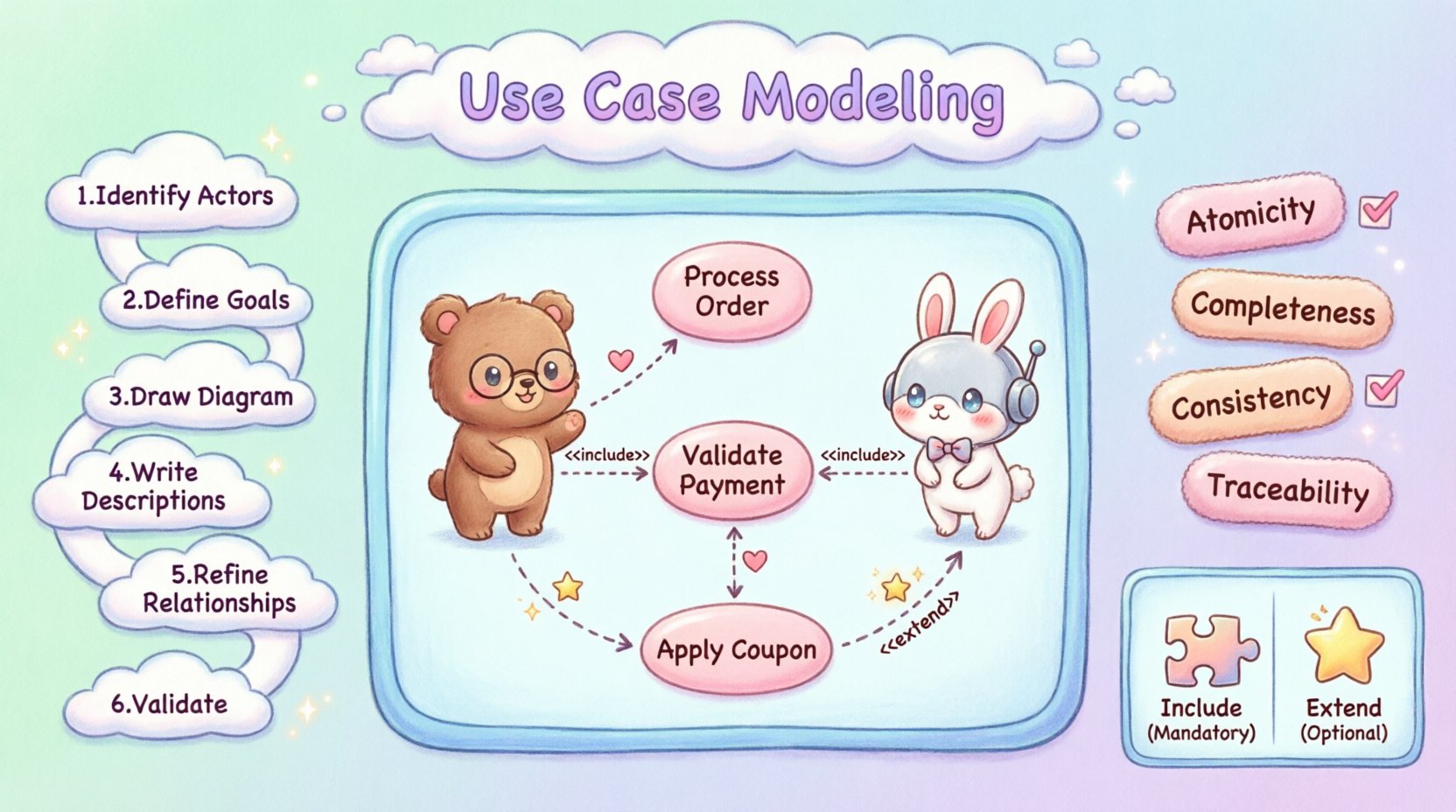
- Include: Think of this as a reusable subroutine. If you are building a “Place Order” use case, you might include “Validate Payment” because it is mandatory for every order. If the payment validation fails, the order cannot proceed.
- Extend: Think of this as an optional feature. A “Place Order” use case might be extended by “Apply Coupon Code.” The base flow works without it, but under specific conditions (e.g., user has a coupon), the extra behavior executes.
The Modeling Process 🚀
Building a use case model is an iterative process. It requires collaboration with domain experts to ensure accuracy. The following steps outline a rigorous approach to requirement analysis.
- Identify the Actors: Brainstorm all entities that interact with the system. Ask: “Who uses this? Who sends data? Who receives results?”
- Define Primary Goals: For each actor, list the high-level goals they want to achieve. These become the primary use cases.
- Draw the Diagram: Create the initial visual model. Place actors and use cases within the system boundary.
- Write Descriptions: For each use case, write a detailed narrative. This is the textual contract.
- Refine Relationships: Add include, extend, and generalization links to reduce redundancy and clarify logic.
- Validate: Review with stakeholders to ensure no requirements are missing and the flow matches reality.
Writing Effective Use Case Descriptions 📝
The diagram is the summary; the description is the truth. A high-quality use case description contains specific sections that eliminate ambiguity. This text is what developers read to write code.
1. Pre-Conditions
What must be true before the use case starts? This sets the stage.
- Example: “User is logged in.”
- Example: “Product inventory exists.”
2. Post-Conditions
What is true after the use case completes successfully? This defines the outcome.
- Example: “Order status is confirmed.”
- Example: “Email notification sent.”
3. Main Success Scenario
This is the happy path. It lists the steps taken by the actor and the system to achieve the goal without errors.
- Step 1: Actor enters search criteria.
- Step 2: System queries database.
- Step 3: System displays results.
4. Alternative Flows
Real-world interactions are rarely perfect. This section covers variations, errors, and exceptions.
- Step 2a: If no results found, system displays “No items match.”
- Step 2b: If connection fails, system requests retry.
Integrating with Object-Oriented Analysis 🔄
Use case modeling is not an isolated activity; it feeds directly into the object-oriented design phase. The relationships identified in the use cases often translate directly into class relationships.
From Actors to Classes
While actors are not always classes, they often hint at the existence of domain objects. For instance, if an “Admin” actor manages “Users,” there is likely a User class and an Admin class in the object model.
From Use Cases to Methods
Each use case scenario typically corresponds to a public method or operation on a class. The steps in the Main Success Scenario map to the logic within that method.
Identifying Domain Objects
By analyzing the nouns in the use case descriptions, analysts can identify potential domain objects. If the text repeatedly mentions “Invoice,” “Customer,” and “Payment,” these become candidates for the domain model.
Ensuring Requirement Quality ✅
A model is only as good as the requirements it captures. To ensure the use case model drives clear analysis, apply these quality checks.
- Atomicity: Does the use case do one thing? If it does too much, split it.
- Completeness: Are all user goals covered? Are all error paths defined?
- Consistency: Do the diagrams match the text descriptions?
- Traceability: Can each use case be traced back to a business requirement?
Common Pitfalls and How to Avoid Them ⚠️
Even experienced teams stumble when modeling requirements. Awareness of common errors helps maintain the integrity of the analysis.
1. Mixing Requirements and Design
Do not specify *how* the system should do something in the use case. Focus on *what* it does. Mentioning database tables or specific UI buttons belongs in the design phase, not the requirement analysis.
2. Too Many Actors
Creating a unique actor for every single user leads to clutter. Group users by role. If two users perform the same actions, they share an actor.
3. Vague Descriptions
Avoid terms like “handle” or “manage” without context. Be specific. Instead of “Handle data,” use “Calculate tax based on region.”
4. Ignoring Non-Functional Requirements
Use cases primarily cover functional behavior. However, performance, security, and usability constraints must be noted. Add these as supplementary notes or separate non-functional requirement documents linked to the use cases.
Validation and Quality Assurance 🔍
Once the model is drafted, it must be validated. This is not a one-time event but a continuous process throughout the project.
- Walkthroughs: Walk through the scenarios with stakeholders. Ask them to act out the steps.
- Gap Analysis: Compare the use cases against the original project charter. Are the goals met?
- Feasibility Check: Discuss with technical leads. Are the identified interactions technically viable within the constraints?
Validation ensures that the model reflects reality. If a stakeholder says, “I never actually do step 4,” that step must be removed or the process must be redesigned. This agility in requirement analysis saves significant cost in the development phase.
Conclusion on Modeling Practices 📝
Effective use case modeling is a discipline that balances visual clarity with textual precision. It serves as the translation layer between business intent and technical execution. By adhering to structured definitions, avoiding design leakage, and engaging stakeholders continuously, teams can produce a requirement model that is stable, testable, and aligned with user needs.
The effort invested in this analysis phase pays dividends in reduced rework, clearer communication, and a product that solves the right problems. It transforms vague ideas into concrete specifications that guide the construction of complex systems.