
In the complex landscape of software architecture, the structure of code is just as critical as the logic it contains. Packages serve as the fundamental containers for organizing functionality, yet the connections between them often hold the key to stability or decay. Understanding dependent relationships in packages is not merely about drawing arrows on a diagram; it is about comprehending the flow of control, data, and resource allocation across a system. When these relationships are managed with precision, the system becomes resilient. When ignored, technical debt accumulates silently.
This guide explores the mechanics of package dependencies. We will examine how these relationships are defined, visualized, and maintained. We will look at the nuances of coupling, the lifecycle of dependencies, and the strategies required to keep a modular design healthy without relying on specific tools or proprietary platforms.
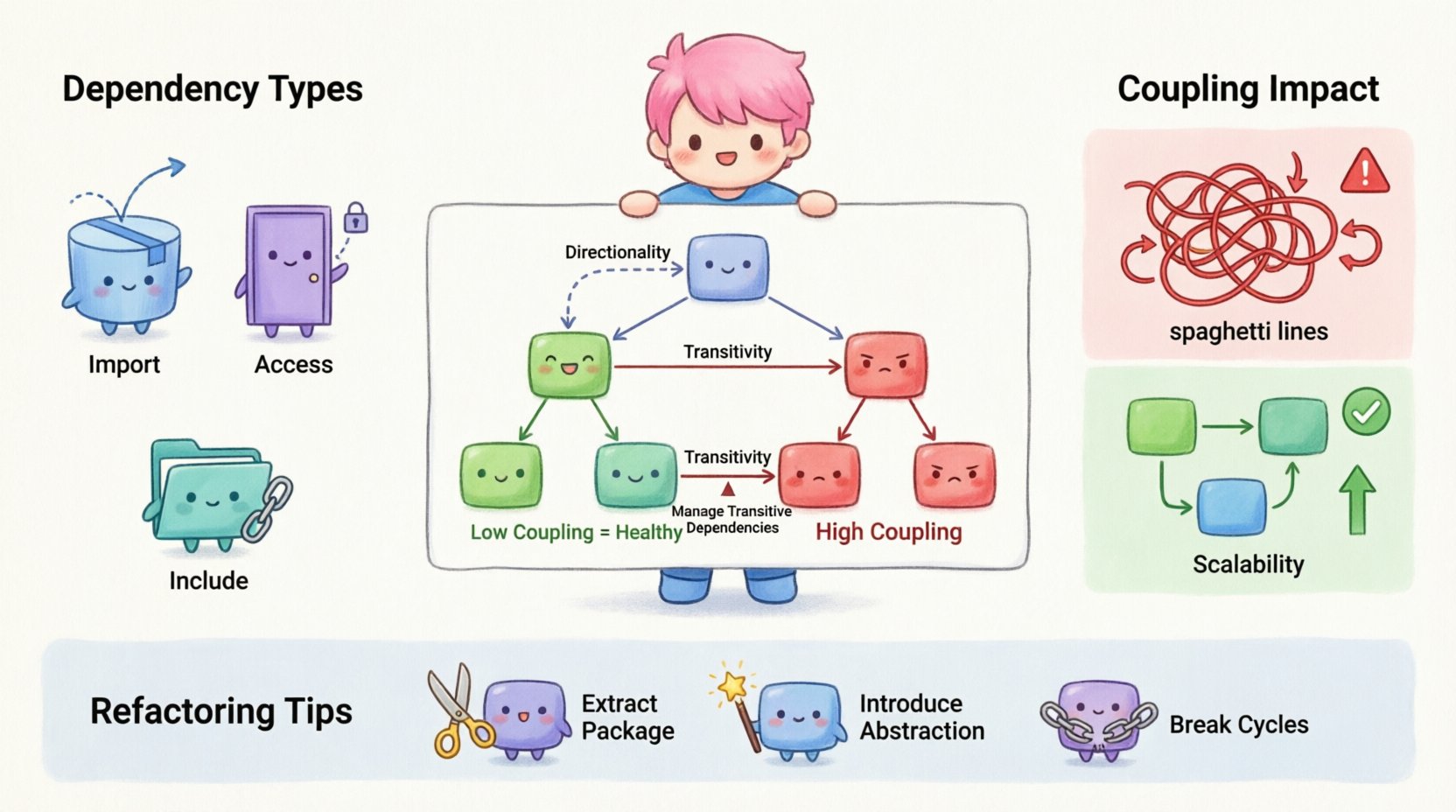
What Defines a Package Dependency? 🤔
A package dependency exists when one package requires the services, classes, interfaces, or data structures defined within another package to function correctly. This is a directional relationship. Package A depends on Package B, but Package B does not necessarily know about Package A. This asymmetry is the foundation of hierarchical design.
Dependencies are not inherently negative. They represent the necessary connections that allow a system to be composed of smaller, manageable units. However, the nature of these connections determines the health of the architecture. We categorize dependencies based on the strength of the connection and the type of resource being shared.
Key Characteristics of Dependencies
- Directionality: Dependencies flow from the dependent package to the supplier package. The arrow points toward the supplier.
- Visibility: Some dependencies are public and visible to all consumers, while others are internal implementation details.
- Scope: Dependencies can exist at the compile-time level (requiring imports) or runtime level (requiring dynamic loading).
- Transitivity: If Package A depends on B, and B depends on C, then A implicitly depends on C.
Types of Relationship Models 🏗️
Different modeling contexts require different types of dependency relationships. Understanding the distinction between these types helps in creating clear diagrams that accurately reflect the system’s behavior. In package diagrams, we typically observe three primary forms of interaction.
1. Import Dependencies 📥
Import dependencies are the most common form of relationship. They indicate that a package uses the public interface of another package. This is a static dependency, often resolved at compile time. The dependent package includes references to types or functions defined in the supplier package.
- Use Case: Utilizing a utility library for string manipulation.
- Impact: Changes in the supplier package may require recompilation of the dependent package.
- Visual: Often represented by a dashed line with an open arrow head.
2. Access Dependencies 🚪
Access dependencies imply a tighter coupling than imports. They suggest that a package needs to access internal implementation details of another package, bypassing standard public interfaces. This is generally discouraged in high-level design because it exposes internal logic.
- Use Case: A testing framework needing to inspect private methods of the production code.
- Impact: High fragility. Refactoring the supplier package often breaks the dependent package.
- Visual: Similar to import but may use specific labeling to denote restricted access.
3. Include Dependencies 📂
Include dependencies often refer to the physical composition of the system. This might involve merging source files or linking binary artifacts. It suggests that the code from the supplier is physically brought into the dependent package’s build context.
- Use Case: Copying header files or including modules in a build script.
- Impact: Creates physical coupling. The structure of the file system matters.
- Visual: Sometimes represented with a different line style or specific stereotype notation.
Visualizing Relationships in Package Diagrams 📊
Clarity in documentation is essential for maintenance. Package diagrams serve as the map for developers navigating the system. When drawing these diagrams, consistency is paramount. Ambiguity in arrow styles or labels leads to confusion and implementation errors.
Below is a breakdown of standard notations used to represent these relationships in a neutral modeling context.
| Relationship Type | Visual Symbol | Meaning | Strength of Coupling |
|---|---|---|---|
| Dependency (Import) | Dashed line, open arrow | Uses public interface | Low |
| Association | Solid line | Structural connection | Medium |
| Realization (Interface) | Dashed line, filled triangle | Implements contract | Medium |
| Generalization (Inheritance) | Solid line, filled triangle | Extends parent package | High |
| Access (Internal) | Dashed line, specific label | Uses private details | Very High |
The Impact of Coupling on System Health ⚖️
Coupling describes the degree of interdependence between software modules. In the context of packages, we aim for low coupling. High coupling creates a fragile system where a change in one area causes unintended ripple effects in others. This is often referred to as the “butterfly effect” in software maintenance.
Signs of High Coupling 🔴
- Dependency Cycles: Package A depends on B, and B depends on A. This prevents independent deployment.
- Spaghetti Architecture: Excessive crossing lines in the diagram make it impossible to trace logic flow.
- Shared State: Multiple packages modifying the same global variables or configuration files.
- Knowledge of Implementation: Packages knowing the internal structure of other packages rather than their interfaces.
Benefits of Low Coupling 🟢
- Modularity: Packages can be developed, tested, and replaced independently.
- Scalability: Adding new features does not require restructuring the entire system.
- Testability: Mocking dependencies is easier when interfaces are clearly defined.
- Maintainability: Bugs can be isolated to specific packages without affecting the whole.
Managing Transitive Dependencies 🔄
One of the most challenging aspects of package management is handling transitive dependencies. When Package A imports Package B, and Package B imports Package C, Package A now relies on Package C indirectly. This chain can grow deep and complex.
Uncontrolled transitive dependencies lead to “dependency hell,” where incompatible versions of libraries clash, or where the build system becomes unbearably slow due to unnecessary inclusions.
Strategies for Control
- Dependency Whitelisting: Explicitly define which packages are allowed to be used, ignoring indirect requirements that are not needed.
- Interface Segregation: Split large packages into smaller, focused packages. This limits the surface area for transitive imports.
- Dependency Injection: Pass required objects as parameters rather than importing them directly. This decouples the creation of objects from their usage.
- Version Pinning: Specify exact versions for dependencies to prevent automatic updates from breaking the build.
Refactoring for Cleaner Dependencies 🛠️
Even in well-designed systems, dependencies can drift over time. Code evolves, requirements change, and old patterns remain. Refactoring is the process of restructuring existing code without changing its external behavior. When applied to package dependencies, the goal is to reduce coupling and increase cohesion.
Common Refactoring Techniques
- Extract Package: Move a subset of classes from a large package into a new, dedicated package. This clarifies the responsibility of the original package.
- Remove Dependency: If a package uses a feature from another package infrequently, consider duplicating the code locally or creating a local adapter to avoid the import.
- Introduce Abstraction: Replace a direct dependency on a concrete package with a dependency on an interface. This allows the underlying implementation to change without affecting the consumer.
- Break Cycles: If a circular dependency exists, extract the shared concepts into a third, neutral package that both original packages can depend on.
Documentation Standards for Dependencies 📝
Diagrams are not enough. Dependencies must be documented in the code and in the build configuration. Clear documentation ensures that new developers understand why a package exists and who relies on it.
What to Document
- Dependencies List: A clear inventory of all packages required for the module to function.
- Version Constraints: Minimum and maximum versions of dependent packages.
- Public vs. Private: Distinguish between dependencies that are part of the public contract and those that are internal implementation details.
- Change Impact: Notes on what happens if a dependency is updated or removed.
Build Systems and Dependency Resolution 🏗️
The physical realization of dependencies happens in the build system. This is where the logical relationships defined in diagrams become compiled artifacts. The build system is responsible for ordering the compilation, managing the classpath, and linking the final output.
If the build system is not aligned with the package design, the architecture becomes theoretical rather than practical. For instance, if a package diagram shows no dependency, but the build script requires it, the documentation is lying.
Alignment Checklist
- Compile Order: Ensure packages are compiled in the correct topological order (no cycles).
- Artifact Management: Ensure that only necessary artifacts are packaged for distribution.
- Isolation: Prevent packages from accidentally accessing files outside their designated directory structure.
- Cache Usage: Leverage build caches to speed up compilation without bypassing dependency checks.
Future-Proofing Your Architecture 🔮
Software is rarely static. It must adapt to new requirements and environments. A dependency strategy that works today may fail tomorrow. To maintain flexibility, architects must design with change in mind.
This means avoiding tight bindings to specific implementations. It means preferring protocols and interfaces over concrete classes. It means recognizing that the cost of a dependency is not just the lines of code, but the cognitive load required to understand the connection.
Regular reviews of the package diagram are essential. These reviews should not just look at the current state but ask “If this package disappears, does the system break?” If the answer is yes, that dependency is critical and requires extra care in documentation and testing.
Final Thoughts on Package Logic 💡
Mastering the hidden logic of dependent relationships in packages is a continuous process. It requires discipline to resist the temptation of shortcuts and the courage to refactor when necessary. By adhering to principles of low coupling and high cohesion, teams can build systems that are robust, understandable, and adaptable.
Remember that diagrams are living documents. They should evolve alongside the code. When you update a package, update the relationship. When you remove a dependency, remove the arrow. Consistency between the visual model and the physical code is the hallmark of professional software engineering.
Focus on clarity. Focus on maintainability. Focus on the logic that connects your modules. With these principles, the complexity of your system becomes a manageable asset rather than an overwhelming liability.