

Now Reading: UML vs. C4 Models: A Comprehensive Guide to Choosing the Right Software Architecture Modeling Approach – And How Visual Paradigm Supports Both Seamlessly
-
01
UML vs. C4 Models: A Comprehensive Guide to Choosing the Right Software Architecture Modeling Approach – And How Visual Paradigm Supports Both Seamlessly



UML vs. C4 Models: A Comprehensive Guide to Choosing the Right Software Architecture Modeling Approach – And How Visual Paradigm Supports Both Seamlessly

Introduction
In the world of software engineering, modeling is a critical practice for designing, communicating, and documenting complex systems. Two prominent modeling frameworks have emerged as leaders in architectural visualization: UML (Unified Modeling Language) and C4 Model. While both aim to improve clarity and collaboration in software design, they differ significantly in philosophy, scope, and application.
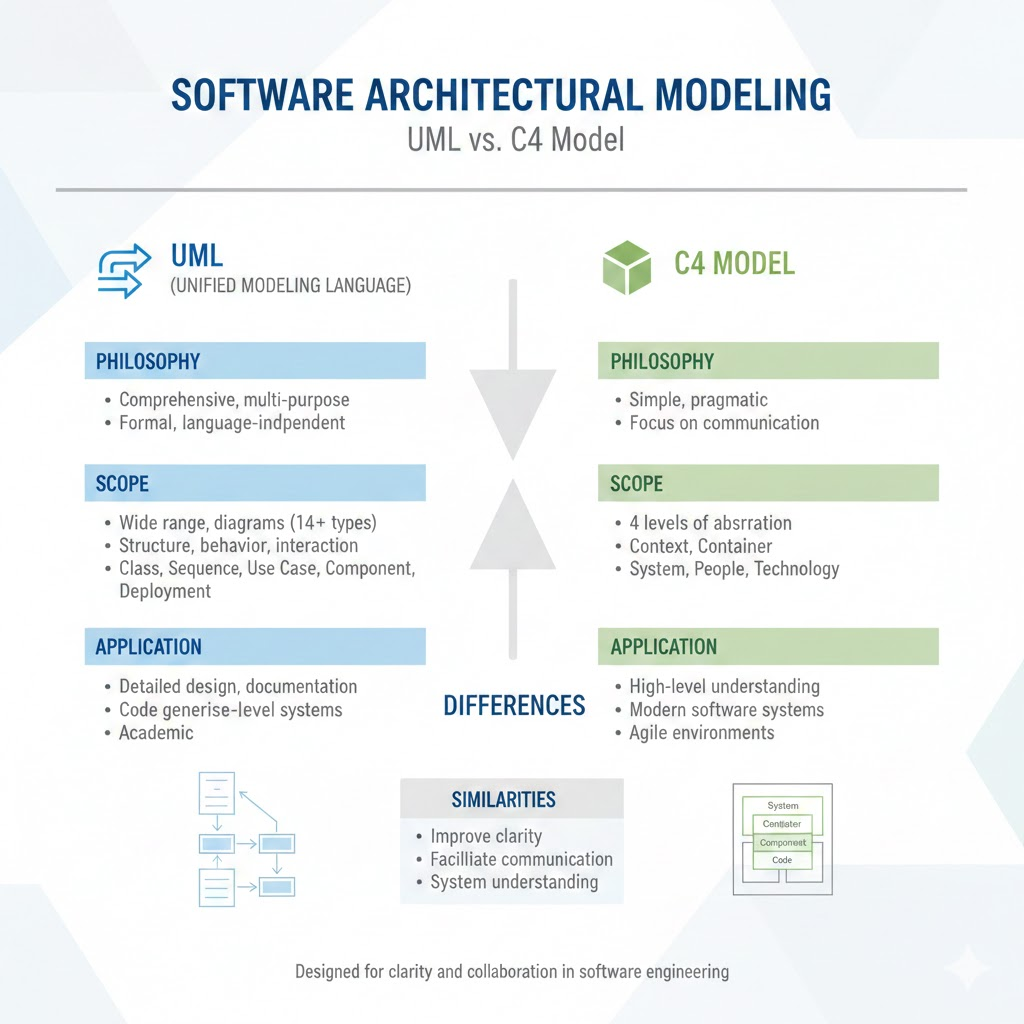
This article explores:
-
The fundamental differences between UML and C4 models
-
When to use each approach
-
How Visual Paradigm, a leading UML and software modeling tool, supports both frameworks seamlessly
-
Practical insights on integrating both models in real-world projects
1. Understanding UML: The Industry Standard for Software Modeling
UML (Unified Modeling Language) is a standardized modeling language developed by the Object Management Group (OMG). It has been the de facto standard for software design since the late 1990s.
Core Components of UML
UML provides a rich set of diagrams to represent different aspects of a system:
-
Structural Diagrams: Class, Component, Object, Package, Deployment, and Composite Structure Diagrams
-
Behavioral Diagrams: Use Case, Activity, State Machine, Sequence, Communication, and Interaction Overview Diagrams
Strengths of UML
-
Comprehensive: Offers detailed modeling capabilities for both structure and behavior.
-
Standardized: Widely adopted across industries, making it easy to collaborate across teams.
-
Tool Support: Strong support in most enterprise-grade modeling tools (e.g., Enterprise Architect, StarUML, Visual Paradigm).
-
Extensible: Can model everything from low-level code to high-level system architecture.
Weaknesses of UML
-
Complexity: Can be overwhelming for non-technical stakeholders.
-
Over-Engineering Risk: Detailed diagrams can lead to “diagram bloat” without clear communication goals.
-
Less Focus on Architecture: While UML can model architecture, it doesn’t enforce a specific architectural thinking process.
Best for: Developers, architects, and teams needing detailed design documentation, especially in large-scale enterprise systems.
2. Introducing C4 Model: A Simpler, More Human-Centric Approach
The C4 Model, introduced by Simon Brown in 2014, is a modern approach to software architecture modeling that emphasizes clarity, simplicity, and communication—especially with non-technical stakeholders.
Core Principles of C4
C4 stands for:
-
Context: High-level view of the system and its interactions with external actors.
-
Containers: High-level components (e.g., web apps, databases, APIs).
-
Components: Subsystems or modules within containers.
-
Code: The actual source code (classes, functions, files).
Each level builds upon the previous one, enabling a “zoom-in” approach that starts broad and becomes increasingly detailed.
C4 Diagram Types
-
C1 – Context Diagram: Shows the system in its environment.
-
C2 – Container Diagram: Breaks down the system into major components.
-
C3 – Component Diagram: Focuses on internal components and their relationships.
-
C4 – Code Diagram: Focuses on code-level details (e.g., class diagrams, package diagrams).
Strengths of C4
-
Easy to Understand: Designed for both technical and non-technical audiences.
-
Focus on Communication: Prioritizes clarity and purpose over formality.
-
Scalable: Ideal for agile teams and continuous delivery environments.
-
Encourages Simplicity: Avoids over-documentation by focusing on what matters.
Weaknesses of C4
-
Less Formal: Not as standardized as UML; can vary in interpretation.
-
Limited Behavioral Modeling: Doesn’t include activity or state machine diagrams.
-
Not Ideal for Code-Level Design: While C4-Code is useful, it’s not a replacement for full UML modeling.
Best for: Agile teams, startups, DevOps environments, and teams that value architectural documentation that’s easy to maintain and understand.
3. UML vs. C4: A Side-by-Side Comparison
| Feature | UML | C4 Model |
|---|---|---|
| Primary Goal | Detailed system modeling | Clear architectural communication |
| Focus | Structure, behavior, and relationships | Zoom-in architecture from context to code |
| Audience | Developers, architects, technical teams | Developers, product owners, stakeholders |
| Complexity | High (many diagram types) | Low to moderate (structured and simple) |
| Standardization | High (ISO standard) | Medium (community-driven) |
| Best For | Large-scale enterprise systems, detailed design | Agile projects, clear documentation, onboarding |
| Diagram Types | 14+ types (class, sequence, activity, etc.) | 4 levels (Context, Containers, Components, Code) |
| Tool Support | Excellent | Good, but more niche |
Key Insight: UML is comprehensive; C4 is purpose-driven. They are not mutually exclusive—many teams use both in tandem.
4. Can Visual Paradigm Support Both UML and C4 Models Seamlessly?
Yes. Visual Paradigm—a powerful, cloud-based modeling and design platform—supports both UML and C4 models seamlessly, allowing teams to leverage the strengths of both approaches within a single environment.
How Visual Paradigm Enables UML Support
Visual Paradigm offers full-featured UML modeling capabilities:
-
All 14 UML diagram types are supported (Class, Sequence, Activity, Use Case, Component, Deployment, etc.)
-
Real-time collaboration: Multiple users can work on the same model.
-
Code generation and reverse engineering: Generate code from diagrams or reverse-engineer code into models.
-
Integration with IDEs: Supports integration with IntelliJ IDEA, Eclipse, VS Code.
-
Model validation and consistency checking: Ensures diagrams adhere to UML standards.
Use Case: A financial institution uses Visual Paradigm to create detailed UML class and sequence diagrams for a new trading system, ensuring precise design before development.
How Visual Paradigm Supports C4 Model
Visual Paradigm has embraced the C4 philosophy through dedicated C4 Model templates and workflows:
-
Pre-built C4 templates: Includes C1 (Context), C2 (Containers), C3 (Components), and C4 (Code) diagrams.
-
Simplified diagramming: Focuses on clarity and readability—ideal for documentation and stakeholder presentations.
-
Automatic alignment with UML: C4 diagrams can be created using UML components, class diagrams, or deployment diagrams, ensuring consistency.
-
Export to Markdown, PDF, or presentations: Ideal for documentation and agile sprint reviews.
Use Case: A startup uses Visual Paradigm to create a C4 context diagram for their SaaS product. They then zoom into the container level, using UML component diagrams to refine internal structure.
Seamless Integration: Using UML and C4 Together
Visual Paradigm allows cross-referencing and integration between UML and C4 models:
-
Create a C4 Context Diagram using a UML deployment or component diagram.
-
Use UML sequence diagrams to detail interactions within a C4 container.
-
Convert C4 Component Diagrams into UML component diagrams for deeper technical analysis.
-
Link diagrams via hyperlinks and references, maintaining traceability.
Example Workflow:
-
Start with a C4 Context Diagram (C1) → Define system and external actors.
-
Create a C4 Container Diagram (C2) → Use UML component diagrams to represent web app, mobile app, database.
-
Break down containers into C4 Component Diagrams (C3) → Use UML class and component diagrams.
-
Use UML sequence/activity diagrams for detailed behavior modeling.
-
Export documentation with embedded diagrams for stakeholder reviews.
5. Best Practices for Using UML and C4 in Visual Paradigm
-
Start with C4 for Clarity
-
Begin with C1 (Context) and C2 (Containers) to align stakeholders and define scope.
-
Use Visual Paradigm’s C4 templates for quick, professional-looking diagrams.
-
-
Use UML for Deep Technical Design
-
When diving into component-level details, use UML class, sequence, and activity diagrams.
-
Leverage Visual Paradigm’s modeling tools to ensure consistency.
-
-
Maintain Traceability
-
Use model links and comments to connect C4 diagrams to UML diagrams.
-
Tag elements with “C4” or “UML” labels for clarity.
-
-
Automate Documentation
-
Use Visual Paradigm’s report generator to export C4 and UML diagrams into structured documentation (PDF, Markdown, HTML).
-
Integrate with Confluence or Notion via plugins.
-
-
Collaborate in Real-Time
-
Share models with team members via cloud workspace.
-
Use version control and change tracking to manage architectural evolution.
-
6. Conclusion: Choose the Right Tool, Not the Right Model
While UML offers comprehensive, detailed modeling for technical precision, and C4 delivers simplicity and clarity for better communication, the real power lies in using both.
Visual Paradigm stands out as a unified platform that supports both UML and C4 models with seamless integration, making it ideal for modern software development teams.
✅ Use C4 to communicate
✅ Use UML to design
✅ Use Visual Paradigm to bridge the gap
By combining the best of both worlds, teams can build systems that are not only technically sound but also clearly understood by everyone involved—from developers to product managers to executives.
Final Thoughts
In today’s agile and DevOps-driven world, architectural documentation must be both accurate and accessible. UML and C4 represent two powerful paradigms that, when used together in a tool like Visual Paradigm, create a synergistic workflow that enhances collaboration, reduces ambiguity, and accelerates delivery.
The future of software architecture isn’t about choosing between UML and C4—it’s about using both, smartly and seamlessly.
Resources & Tools
-
The Ultimate Guide to C4-PlantUML Studio: Revolutionizing Software Architecture Design: This resource explains how the studio combines AI-driven automation, the structural clarity of the C4 model, and the flexibility of PlantUML (an open-source UML tool) to solve documentation bottlenecks.
-
Ultimate Guide to C4 Model Visualization Using Visual Paradigm’s AI Tools: A comprehensive guide on leveraging specialized AI features to automate and enhance the creation of hierarchical C4 model diagrams for faster system design.
-
AI-Powered UML Class Diagram Generator by Visual Paradigm: This page details an advanced tool that automatically generates UML class diagrams from natural language descriptions, significantly streamlining the software design process.
-
Visual Paradigm – AI-Powered UML Sequence Diagrams: This article demonstrates how to produce professional UML sequence diagrams directly from text prompts using an integrated AI modeling suite.
-
Comprehensive Tutorial: Generating and Modifying C4 Component Diagrams with AI Chatbot: A step-by-step guide illustrating how to use a conversational assistant to create and refine the internal structure of software systems through the C4 model’s component level.
-
Major Upgrade to AI UML Component Diagram Generation in Visual Paradigm AI Chatbot: An official update detailing enhancements that make the AI chatbot an indispensable tool for generating modular UML component structures.
-
AI-Powered Sequence Diagram Refinement Tool | Visual Paradigm: This resource discusses how AI can automatically optimize and suggest improvements for existing sequence diagrams, ensuring structural correctness and clarity.
-
Beyond the Code: How AI Automates C4 Model Diagrams for DevOps and Cloud Teams: A detailed guide on using an AI assistant to automate the full C4 modeling lifecycle through simple conversational prompts, ensuring consistency across all abstraction levels.
-
AI Diagram Generator: Complete C4 Model Support: An announcement regarding the release of a specialized AI engine capable of automated creation of C4 model diagrams to support complex architectural documentation.
-
How AI Enhances Class Diagram Creation in Visual Paradigm: This blog post explores how the integration of AI automates and improves the accuracy of creating UML class diagrams, making software design faster for development teams.


