


Introduction to AI-Assisted System Modeling
In the rapidly evolving landscape of system architecture and design, efficiency and precision are paramount. Visual Paradigm has unveiled a groundbreaking feature set to redefine how professionals approach complex documentation: AI Diagram Generation. This innovative functionality launches with full support for Timing Diagrams, enabling users to transform simple text inputs into intricate, high-fidelity models instantly.
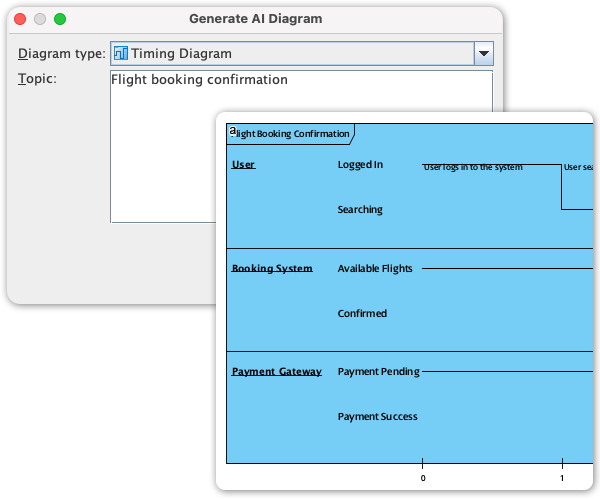
For system architects, hardware designers, and software engineers, this development marks a significant shift away from laborious manual drafting toward a logic-focused design methodology. This guide explores how this new AI capability addresses historical challenges and provides a step-by-step workflow for leveraging it in your projects.
The Bottleneck of Manual Timing Diagram Creation
Before the integration of Artificial Intelligence, modeling a Timing Diagram was often regarded as a meticulous and frustrating necessity. These diagrams are critical for visualizing state changes, precise interactions, and time-dependent behaviors in real-time systems and hardware design. However, the manual creation process presented several inherent hurdles that slowed down development cycles:
1. The Demand for High Precision
Accurately drawing waveforms, lifelines, and specific state constraints requires painstaking manual adjustment. In traditional modeling tools, even minor modifications to a timeline could necessitate a complete redrawing of the sequence to maintain accuracy.
2. Tedious Repetition
Verification phases often require creating multiple similar timing scenarios to test various conditions. Manually replicating these diagrams with slight variations is a repetitive task that is highly prone to human error, potentially compromising the integrity of the design verification.
3. Analysis Paralysis
The sheer effort required to translate design specifications into visual diagrams often created a bottleneck. Instead of focusing on analysis and logic validation, engineers spent disproportionate amounts of time on the drafting mechanics, slowing down the initial phases of the project.
AI Diagram Generation: From Text to High-Fidelity Models
Visual Paradigm’s AI Diagram Generation solves these precision challenges by automating the rendering process. The core philosophy is simple: describe the timing sequence you need, and let the AI handle the drawing.
This shift allows teams to focus on validating design logic rather than aligning pixels. By utilizing natural language processing, the tool ensures that the resulting diagrams adhere to strict notational rules while maintaining professional aesthetic standards.
Core Benefits of Automating Timing Diagrams
- Instant Generation: Create complex, complete Timing Diagrams in seconds. This bypasses the steep learning curve of manual drafting tools and provides immediate visual feedback based on text prompts.
- Guaranteed Accuracy: The AI engine automatically manages scaling, alignment, and standard notation. This ensures that every generated diagram is technically correct and professional, reducing the risk of misinterpretation.
- Rapid Prototyping: Design verification cycles are significantly accelerated. Users can quickly test and visualize multiple timing scenarios simply by tweaking the text prompt, allowing for iterative refinement at unprecedented speeds.
- Streamlined Documentation: This feature effectively bridges the gap between text-based requirements and visual models. Detailed specification requirements can be converted directly into visual documentation, ensuring that the model always reflects the current specs.
Step-by-Step: How to Generate Timing Diagrams with AI
Leveraging the power of AI within Visual Paradigm Desktop is designed to be seamless and intuitive. Follow this workflow to generate your first AI-powered Timing Diagram:
- Initialize the Project: Open Visual Paradigm Desktop and start a new project or open an existing one where the diagram is required.
- Access the Tools Menu: Navigate to the top toolbar and select the Tools menu.
- Activate AI Generation: Locate and click the AI Diagram icon.
- Select Diagram Type: From the dropdown list of available diagram types, select Timing Diagram.
- Input Requirements: Enter a specific topic or a natural language description of the timing sequence you wish to model.
- Generate: Click OK. The AI will process the text and render a fully formed Timing Diagram instantly.
Conclusion: The Future of System Verification
The introduction of AI Diagram Generation for Timing Diagrams represents a significant milestone in Visual Paradigm’s mission to simplify complex modeling. By offloading the manual labor of drawing to artificial intelligence, professionals can dedicate their energy to high-stakes system design and logic verification. This feature not only saves hours of work but also ensures a higher level of precision and consistency across project documentation.