
The Business Model Canvas (BMC) remains a cornerstone tool for entrepreneurs, particularly within the technology sector where agility is paramount. Understanding the nuances between traditional and digital implementations is critical for founders who need to iterate rapidly while maintaining strategic clarity. This guide explores the operational differences, advantages, and limitations of each approach to help your startup choose the right framework.
Understanding the Foundation 🧱
The Business Model Canvas was designed to visualize strategic business logic across nine key building blocks. For tech startups, these blocks represent the core mechanics of value creation, delivery, and capture. The physical version of this tool emerged from whiteboards and sticky notes, while the digital version leverages cloud computing and collaborative software.
The Nine Building Blocks
- Key Partners: Suppliers and alliances necessary for the model.
- Key Activities: The most important actions the company must take to operate.
- Key Resources: Assets required to create and offer the proposed value.
- Value Propositions: The bundle of products and services that create value.
- Customer Relationships: The types of relationships established with specific customer segments.
- Channels: How the company communicates with and reaches customer segments.
- Customer Segments: The different groups of people or organizations the enterprise aims to reach.
- Cost Structure: All costs incurred to operate a business model.
- Revenue Streams: The cash a company generates from each customer segment.
Whether on paper or screen, these elements remain constant. The difference lies in how information is captured, shared, and evolved over time.
The Traditional Business Model Canvas 📝
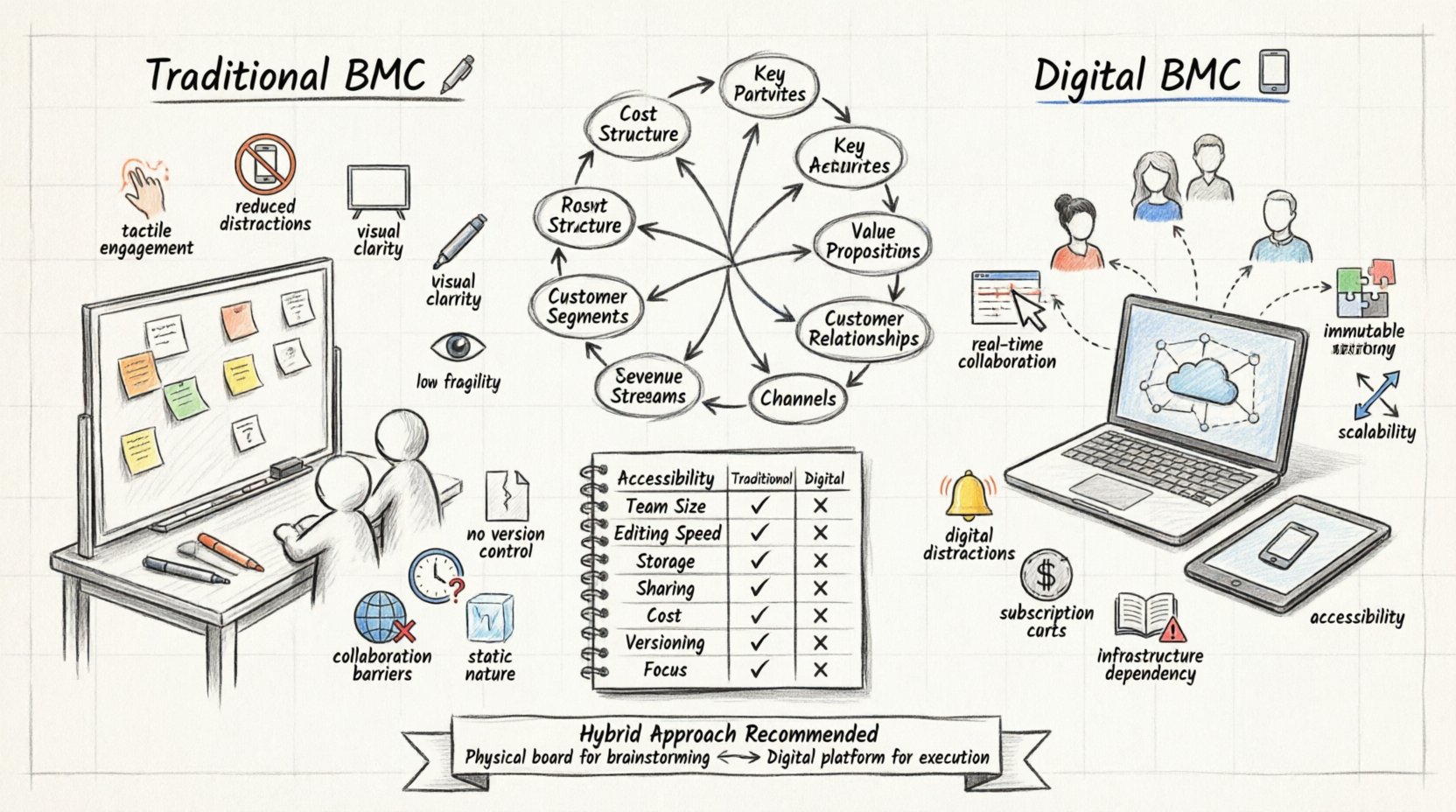
The traditional approach relies on physical media. Typically, this involves a large printed canvas, a whiteboard, or a sheet of paper. Teams gather around a table with markers, sticky notes, and index cards. This method has been the standard for over a decade, particularly during early-stage brainstorming sessions.
Advantages of the Physical Method
- Tactile Engagement: Moving physical notes around a board encourages active participation. The act of standing up and writing can spark different cognitive processes compared to typing.
- Reduced Distractions: A whiteboard in a conference room limits the ability to check emails or browse the internet. Focus remains on the strategic discussion.
- Visual Clarity: A large format allows the entire team to see the big picture simultaneously without needing to zoom in or scroll.
- Low Barrier to Entry: No login credentials or software subscriptions are required. You only need a marker and a surface.
Limitations for Tech Startups
- Fragility: A physical canvas is easily damaged, moved, or lost. If the whiteboard is wiped clean, the work is gone unless photographed.
- Lack of Version Control: It is difficult to track changes over time. Comparing last month’s strategy with this month’s often requires digging through photo archives.
- Collaboration Barriers: Remote team members cannot easily contribute. If your engineering team is distributed across time zones, the physical board becomes an exclusive tool for those in the office.
- Static Nature: Once notes are placed, they are fixed until physically moved. This can discourage frequent updates, which are vital in software development cycles.
The Digital Business Model Canvas 💻
The digital variant utilizes cloud-based platforms to host the canvas. These tools allow users to create, edit, and share the model via a web browser or application. The structure mirrors the physical board but adds layers of functionality suited for distributed teams.
Advantages of the Digital Method
- Real-Time Collaboration: Multiple users can edit the canvas simultaneously from different locations. This is essential for modern tech startups with remote or hybrid workforces.
- Immutable History: Changes are saved automatically. You can revert to previous states or view the evolution of ideas over weeks and months.
- Integration Capabilities: Digital tools often link to project management software, analytics dashboards, or document storage systems.
- Scalability: As the startup grows, the canvas can be duplicated, archived, or expanded without running out of physical space.
- Accessibility: Access the model from any device with internet connectivity. Founders can review strategy on a tablet during a commute.
Limitations of the Digital Method
- Digital Distractions: The same device used for work may also host email, social media, and messaging apps.
- Subscription Costs: Advanced features often require paid plans, which can be a burden for early-stage startups with limited capital.
- Learning Curve: Teams need to familiarize themselves with the interface, which can take time away from actual strategy work.
- Dependency on Infrastructure: Without internet access, the canvas is inaccessible. Power outages or connectivity issues can halt progress.
Comparing the Two Approaches 📊
To clarify the distinctions, we can analyze specific operational dimensions. The following table outlines how traditional and digital models perform across key metrics relevant to a tech startup environment.
| Feature | Traditional (Physical) | Digital (Cloud-Based) |
|---|---|---|
| Accessibility | On-site only | Anytime, Anywhere |
| Team Size | Small groups (5-10) | Unlimited |
| Editing Speed | Slow (Physical movement) | Fast (Drag and drop) |
| Storage | Physical space required | Cloud storage |
| Sharing | Difficult (Photos/Scans) | Instant (Links) |
| Cost | Low (Markers, Paper) | Variable (Subscription) |
| Versioning | Non-existent | Automatic |
| Focus | High (No distractions) | Moderate (Notifications) |
Deep Dive: Collaboration and Distribution 🌐
For a tech startup, the ability to collaborate is often the difference between success and stagnation. In a distributed team, a physical canvas creates a bottleneck. Only those in the room can see the current state of the strategy.
Remote Work Considerations
- Time Zone Management: If your team spans multiple continents, a physical board is useless for asynchronous work. Digital canvases allow members to log in when they are active and leave comments for others.
- Feedback Loops: Digital tools often include comment threads or task assignments. This turns the canvas into a project management hub rather than just a static diagram.
- Documentation: Digital platforms automatically save the state of the canvas. You do not need to schedule a meeting to take a photo for the record.
Workshop Dynamics
While digital tools excel at remote collaboration, physical boards still hold value for in-person workshops. The energy of a room full of people standing around a wall can drive creative breakthroughs. Many successful startups use a hybrid approach.
- Use the physical board for initial brainstorming sessions to generate high-energy ideas.
- Migrate the finalized concepts to a digital platform for long-term tracking and execution.
- This ensures the creative spark is captured while maintaining a digital record for the future.
Deep Dive: Iteration and Agility ⚡
Lean Startup methodology emphasizes the build-measure-learn feedback loop. The speed at which a business model can be updated correlates with the startup’s ability to pivot.
Speed of Change
In a physical environment, changing a value proposition requires erasing a sticky note and writing a new one. This is a low-friction action, but it does not preserve history. If you change your mind, the old idea is gone.
In a digital environment, you can duplicate a block. You can keep the old version in a “Draft” section while working on the “Active” section. This preserves the lineage of decisions. Investors and stakeholders can see why a pivot occurred, which builds trust.
Pivoting Strategies
- Customer Segments: If you shift focus from B2C to B2B, a digital canvas allows you to archive the old segment block and create a new one without losing the context of the previous research.
- Revenue Models: Transitioning from subscription to freemium involves complex calculations. Digital tools often include calculation fields that update automatically, whereas physical models require manual math.
- Resource Allocation: As funding changes, the cost structure needs adjustment. Digital tools can link to budget spreadsheets, ensuring the canvas always reflects current financial realities.
Deep Dive: Data Integration and Analytics 📈
Tech startups rely heavily on data. The business model should not exist in a vacuum; it should reflect real-world performance metrics.
Connecting Strategy to Execution
Digital canvases can integrate with external data sources. This means you can pull live data into your Value Proposition or Key Metrics blocks.
- Customer Acquisition Costs: Link this to your Cost Structure to see if your marketing spend is sustainable.
- Churn Rates: Visualize this in the Customer Relationships block to identify where retention is failing.
- Conversion Rates: Display this in the Channels block to optimize marketing spend.
Traditional models cannot do this. They rely on manual updates, which are prone to error and delay. By the time you update a physical board with new metrics, the data may already be outdated.
Implementation Strategies for Startups 🛠️
Choosing between traditional and digital methods depends on your current stage and operational needs. Here is a framework for implementation.
Phase 1: Ideation (Months 0-6)
Focus on speed and creativity. A physical whiteboard or large paper sheet is often sufficient. The goal is to get ideas out of heads and onto a surface. Do not worry about perfect formatting or digital storage yet.
- Set up a dedicated wall space.
- Use colorful markers to differentiate blocks.
- Take photos of every session for your records.
Phase 2: Validation (Months 6-12)
As you begin testing hypotheses, you need to track changes. Move to a digital platform. This allows you to compare the “Test A” model against the “Test B” model side-by-side.
- Invite external advisors to view the digital canvas remotely.
- Set up permissions so only founders can edit, while investors can view.
- Begin linking data sources if available.
Phase 3: Scaling (Year 1+)
With a growing team, the canvas becomes a central command tool. It must be accessible to all departments, not just strategy.
- Ensure the tool integrates with your project management software.
- Automate updates where possible.
- Use the canvas to communicate vision to new hires during onboarding.
Common Pitfalls to Avoid ⚠️
Regardless of the medium, founders often make mistakes when using the Business Model Canvas.
- Over-Complexity: Do not fill every block with text. Keep it visual. If a section requires a paragraph to explain, you may not have a clear strategy yet.
- Static Thinking: Treating the canvas as a one-time document. It is a living artifact that must evolve with the market.
- Ignoring the Team: Creating the model in isolation. The best insights come from cross-functional collaboration between engineering, sales, and product.
- Tool Obsession: Spending more time configuring the software or buying the perfect markers than actually doing the work. The tool serves the strategy, not the other way around.
Future Trends in Business Modeling 🔮
The landscape of strategic planning is evolving. Artificial intelligence is beginning to influence how business models are constructed and analyzed.
Predictive Analytics
Future digital tools may offer predictive insights based on your input. For example, entering a target customer segment might suggest potential marketing channels based on historical data from similar startups.
Dynamic Simulation
Imagine a canvas where changing a price point automatically recalculates the entire revenue stream and cost structure in real-time. This level of simulation moves the canvas from a planning document to a financial modeling engine.
Integration with Ecosystems
As startups become part of larger ecosystems, their canvas will need to reflect dependencies on other platforms. Digital tools are better positioned to map these external relationships than physical ones.
Final Thoughts on Selection 🤔
There is no single correct answer for every startup. The decision rests on the specific context of your team and product.
- Choose Traditional if: You are in the very early stages, working in a single location, and need to generate high-volume creative ideas without digital overhead.
- Choose Digital if: You have a remote team, need to track changes over time, require data integration, or plan to share the model with external stakeholders frequently.
- Choose Hybrid if: You want the best of both worlds. Use physical boards for brainstorming and digital tools for execution and record-keeping.
The goal is not to perfect the canvas itself, but to use it as a vehicle for understanding your business. Whether on paper or screen, the clarity of thought matters more than the medium. Prioritize the logic of your model over the aesthetics of the presentation.
By carefully evaluating your needs against the strengths and weaknesses of each approach, you can build a robust foundation for your startup’s growth. The technology you choose should support your strategy, not define it.
As you move forward, remember that the Business Model Canvas is a starting point. It is a hypothesis that requires constant testing. Stay flexible, remain open to feedback, and ensure your chosen tool facilitates rather than hinders that process.