


The Evolution of Visual Modeling in the AI Era
Visual modeling has long been a cornerstone of software engineering, business analysis, and enterprise architecture. Traditionally, creating diagrams like UML, SysML, or BPMN required manual effort, strict adherence to syntax rules, and significant time spent on layout rather than logic. The advent of Artificial Intelligence has disrupted this workflow, introducing tools that can translate natural language into complex visual structures instantly.

Visual Paradigm, a veteran in the modeling space, has reimagined its platform with a comprehensive suite of AI-powered solutions. From the Visual Paradigm AI Chatbot to specialized tools like Agilien for Jira backlogs, the platform aims to bridge the gap between abstract concepts and production-ready diagrams. This guide explores the capabilities of Visual Paradigm’s AI ecosystem and provides a critical comparison between specialized modeling AI and general-purpose assistants.
What is the Visual Paradigm AI Chatbot?
The Visual Paradigm AI Chatbot is a specialized tool designed to interpret natural language descriptions and generate compliant, professional diagrams. Unlike standard drawing tools where users drag and drop shapes, this chatbot functions as an intelligent assistant. Users simply describe a scenario—such as “a customer placing an order” or “a SWOT analysis for a new market entry”—and the AI generates a structured visual representation.
The chatbot is trained specifically on modeling standards, including:
- UML (Unified Modeling Language): Class, Sequence, Use Case, State, and Activity diagrams.
- SysML (Systems Modeling Language): For systems engineering requirements.
- C4 Models: System context and deployment diagrams for software architecture.
- Business Frameworks: SWOT, PESTLE, Ansoff Matrix, and Eisenhower Matrix.
- ArchiMate: Enterprise architecture viewpoints.
General AI Assistants vs. Visual Paradigm AI Chatbot
With the rise of Large Language Models (LLMs) like ChatGPT, Claude, and Gemini, users often wonder if a general AI assistant is sufficient for diagramming. While general AIs are powerful text engines, they fundamentally differ from Visual Paradigm’s specialized AI in the context of visual modeling.
1. Output Modality and Editability
General AI Assistants: Most general AIs output text, code snippets (like Mermaid.js or PlantUML code), or static raster images (generated by tools like DALL-E). While useful for quick concepts, these outputs are often not natively editable. If the AI makes a mistake in the logic or syntax, the user must regenerate the entire prompt or manually debug code.
Visual Paradigm AI: This tool generates models, not just images. The output is a fully editable diagram within the Visual Paradigm ecosystem. Users can drag elements, rename classes, change relationships, and continue modeling manually after the AI does the heavy lifting. The result is a professional artifact ready for documentation or development.
2. Domain-Specific Knowledge and Syntax
General AI Assistants: General models are trained on the entire internet. They might hallucinate UML syntax or mix notations (e.g., confusing an Activity Diagram with a Flowchart). They lack an inherent understanding of the strict rules governing standards like ArchiMate or SysML.
Visual Paradigm AI: The underlying engine is fine-tuned for modeling standards. It understands that a “Use Case” requires Actors and System Boundaries, or that a “Sequence Diagram” implies a time dimension. It ensures the generated diagram adheres to the specific constraints of the requested standard.
3. Integration with Workflow
General AI Assistants: Using a general AI creates a siloed workflow. You generate a diagram description in the chatbot, copy the code, find a renderer, and then paste the image into a document. There is no link to your actual project data.
Visual Paradigm AI: The chatbot is integrated into the Visual Paradigm suite. A diagram generated by AI can be imported directly into the Desktop Client (Professional/Enterprise editions). It becomes part of the project repository, allowing for versioning, team collaboration, and code engineering (generating Java/C# code from the AI-generated class diagram).
Core Features of the Visual Paradigm AI Ecosystem
Beyond the chatbot, Visual Paradigm offers a suite of “Intelligent Tools” that leverage AI for specific domains.
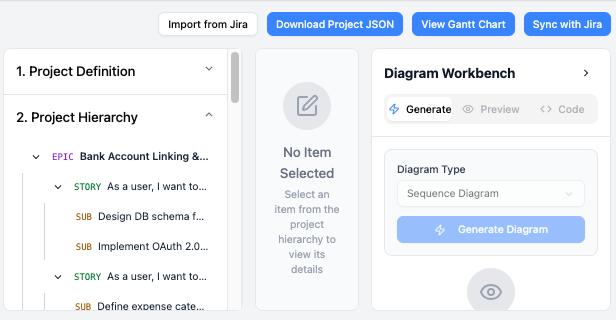
Agilien: AI-Powered Jira Backlog Planner
Agilien is an extension designed to bridge the gap between project management and development. It analyzes high-level concepts and translates them into detailed Jira backlogs. It can generate User Stories from requirements and automatically plan sprints, reducing the administrative burden on Product Owners and Scrum Masters.
Business and Strategic Analysis
For Business Analysts, the platform offers automated strategic tools. Users can input raw data or broad market descriptions, and the AI generates structured analyses. This includes Process Analysis tools that identify bottlenecks in workflows and Strategic Analysis generators for creating instant SWOT or PESTLE diagrams to map out business landscapes.
Multi-Language Support
Recognizing the global nature of development teams, Visual Paradigm has introduced robust multi-language capabilities. The AI Chatbot UI and content generation now support languages including Spanish, French, Chinese (Simplified/Traditional), Portuguese, Japanese, German, and Polish.

This feature goes beyond simple translation. If a user prompts in Spanish, “Dibuja un diagrama de casos de uso,” the AI detects the language, generates the diagram with Spanish labels, and provides explanations in Spanish. This reduces the inertia for non-English speakers and enhances cross-border team collaboration.
How to Use the AI Chatbot: A Step-by-Step Workflow
Using the Visual Paradigm AI Chatbot is designed to be intuitive for both technical and non-technical users.
- Access the Tool: Users can access the chatbot via the web interface or directly inside the Visual Paradigm Desktop application (for Professional/Enterprise users).
- Define the Prompt: Enter a natural language description.
Example: “Create a Sequence Diagram for a banking app login process involving a User, Mobile App, API Gateway, and Authentication Server.” - Review and Refine: The AI generates the diagram instantly. Users can ask follow-up questions to refine the model, such as “Add an alternative path for failed login attempts” or “Explain the relationship between the API Gateway and the Server.”
- Export or Integrate: The final diagram can be exported as an image (PNG/SVG) or imported into the Visual Paradigm workspace for further detailed modeling and code generation.
Licensing and Access Models
Visual Paradigm offers a flexible access model for its AI tools.
- Free Tier: Includes core AI applications and fundamental functionality for workflow and content generation. This is not just a trial but a permanently free tier for basic use.
- Paid Subscriptions: Unlocks advanced features such as real-time processing, enterprise-level security, and priority access to specialized tools like advanced Strategic Analysis.
- Desktop Integration: Users with existing Visual Paradigm Desktop licenses (Professional or Enterprise) receive a unified account benefit. They can access VP Online features without additional purchase and import AI-generated diagrams directly into their desktop environment for a seamless transition from ideation to production.
Conclusion
While general AI assistants have democratized access to information, Visual Paradigm’s AI Chatbot democratizes structural design. By combining the ease of natural language processing with the rigor of industry-standard modeling, it allows professionals to move from abstract thoughts to concrete, technical specifications in seconds. For teams serious about architecture, business analysis, and software design, the specialized capabilities of Visual Paradigm offering a distinct advantage over generic text-based AI tools.