


The Evolution of Visual Modeling
For decades, system architects, project managers, and business analysts have faced the same challenge: the time-consuming gap between a conceptual idea and a presentation-ready diagram. Traditional modeling tools require manual drag-and-drop operations, precise alignment, and a deep understanding of notation standards. However, the landscape is shifting with the advent of AI-powered visual modeling chatbots.
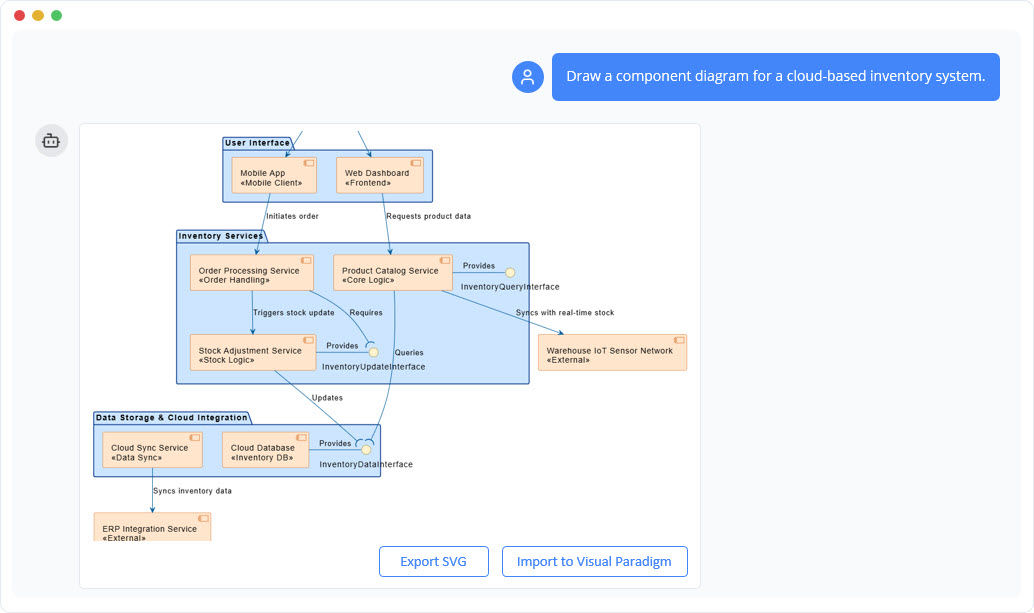
This technology acts as a creative co-pilot, allowing professionals to go from a simple text prompt to a complex, accurate diagram in seconds. By offloading the mechanical task of drawing to artificial intelligence, users can focus on the high-value tasks of architecture decisions, system design, and strategic planning.
Core Capabilities of AI Diagramming
Modern AI modeling tools are not just drawing engines; they are intelligent architects capable of understanding context and intent. Here is how they supercharge the design workflow:
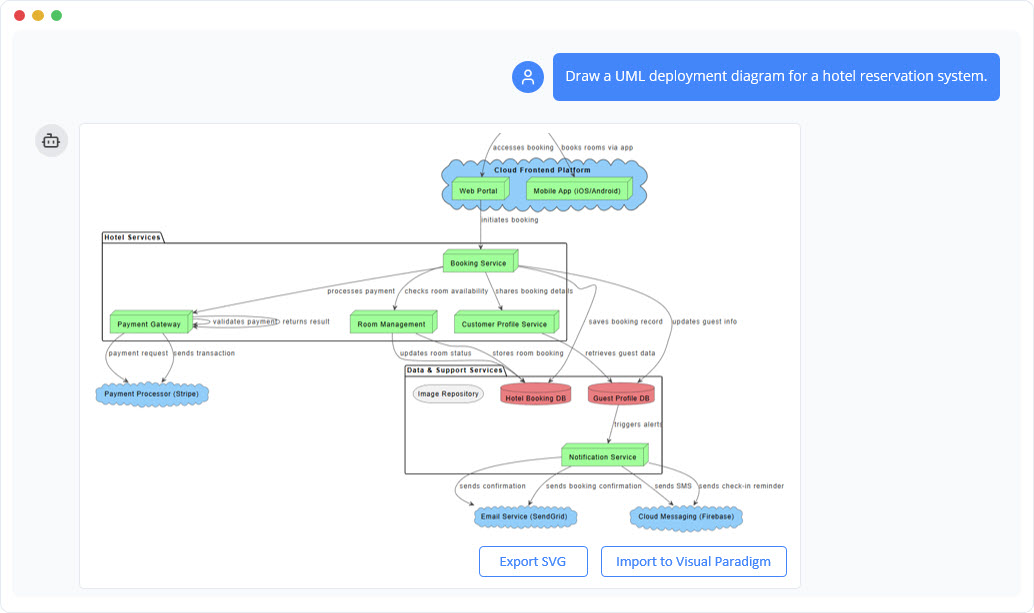
1. Instant Text-to-Diagram Generation
The primary function of an AI visual modeler is to eliminate the “blank canvas” paralysis. Users simply describe their idea in plain English—for example, “Create a use case diagram for an online shopping system.” The AI parses this natural language, identifies the necessary actors and use cases, and maps out a detailed, accurate diagram instantly. This capability spans various domains, from software engineering to business strategy.
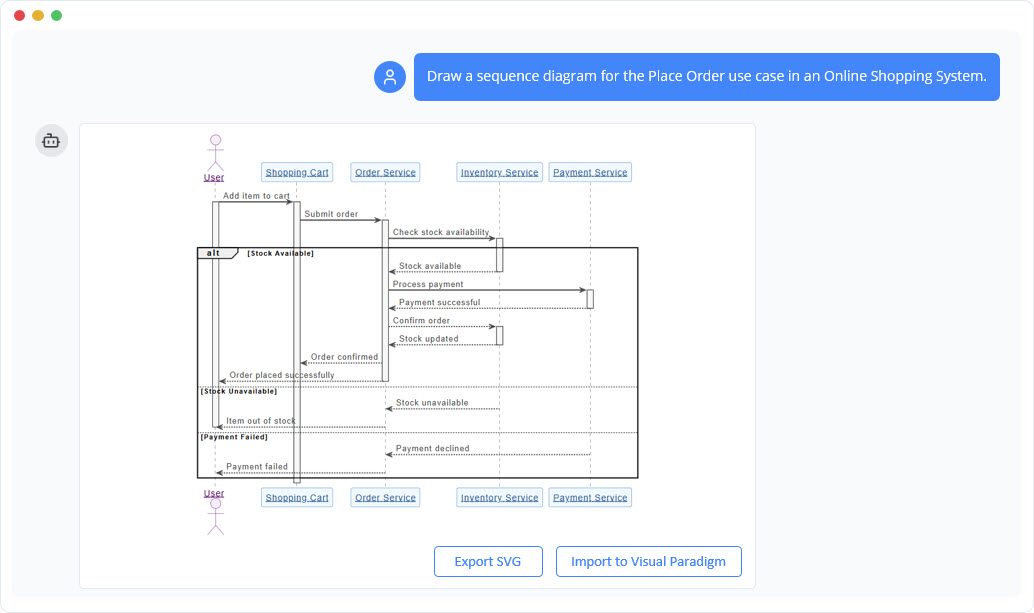
2. Conversational Editing
Refining a diagram no longer requires navigating complex menus. Users can edit their models using simple commands, treating the AI as a collaborator. Commands such as “Add a payment gateway,” “Rename User to Customer,” or “Change the relationship style” are executed immediately. This natural language processing (NLP) capability ensures that the tool adapts to the user’s thought process, not the other way around.
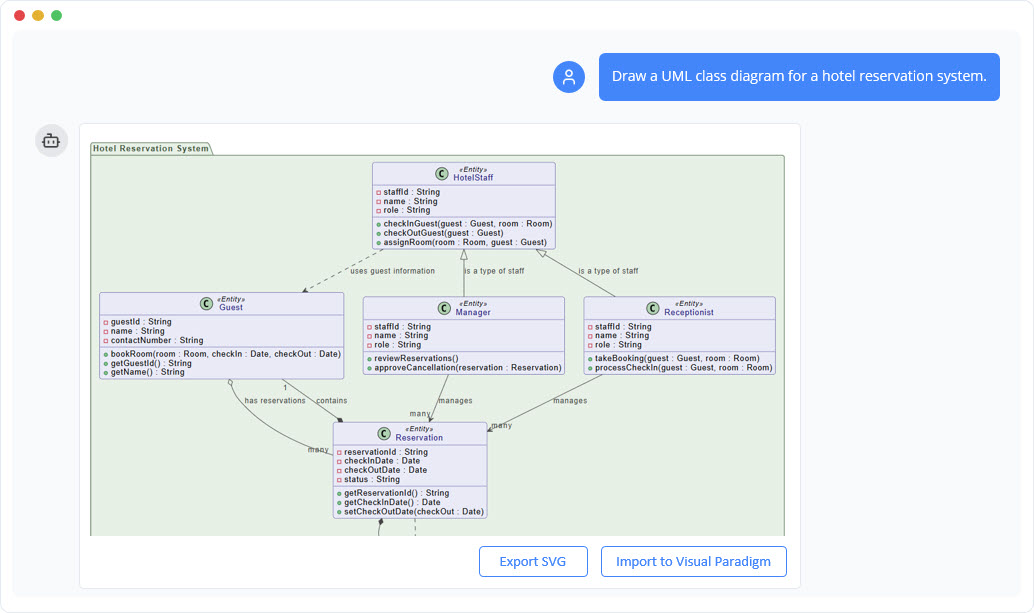
3. The Diagram as a Knowledge Base
Beyond visuals, the AI turns diagrams into interactive knowledge bases. Users can interrogate the generated model to gain deeper insights. You might ask, “How do I implement this deployment?” or “What are the main scenarios in this use case?” The AI analyzes the visual data and structure to provide context-aware answers, effectively bridging the gap between visual design and technical implementation.
Supported Standards and Frameworks
A robust AI modeling tool supports a comprehensive suite of standards to cater to diverse professional needs. Below is an overview of supported categories and specific diagram types:
| Category | Description | Examples |
|---|---|---|
| Software Engineering | Standard modeling languages for software development and architecture. | UML (Class, Sequence, Use Case), C4 Model, Entity Relationship Diagram (ERD) |
| Systems Engineering | Modeling for complex systems and hardware-software integration. | SysML, Block Definition Diagrams |
| Business & Enterprise | Strategic planning and enterprise architecture visualization. | ArchiMate, BPMN, Ansoff Matrix, Blue Ocean Strategy |
| General Visualization | Broad-use diagrams for brainstorming and organization. | Mind Maps, Flowcharts, Organizational Charts |

Documentation and Workflow Integration
Visuals are only one part of the equation. To truly accelerate project delivery, diagrams must be documented and integrated into the broader development lifecycle.
Automated Documentation Generation
One of the most time-consuming aspects of project management is writing reports based on technical models. AI chatbots solve this by offering documentation on demand. Users can request a detailed report, a project summary, or a proposal directly derived from the visual model. This ensures that documentation is always synchronized with the latest design iteration.
From AI Concept to Professional Tooling
While AI is excellent for rapid prototyping and brainstorming, complex projects often require granular control. Leading AI solutions offer seamless export capabilities to professional desktop applications, such as Visual Paradigm. This allows teams to start with the speed of AI and finish with the advanced features of enterprise modeling software, facilitating deep collaboration and version control.
How to Get Started: A 4-Step Process
Transforming a concept into a finished model follows a streamlined, four-step approach:
- Step 1: Describe Your Idea. Type a prompt describing what you want to create. The AI interprets your intent instantly.
- Step 2: Generate Instantly. Watch as the text is converted into a presentation-ready diagram without manual drawing.
- Step 3: Refine with Commands. Use natural language to iterate on the design. Add elements, change names, or restructuring flows simply by typing.
- Step 4: Explore and Document. Ask the AI questions about the system, generate summaries, and export the final result for team collaboration.
Conclusion
AI-powered visual modeling is revolutionizing how we think about design and documentation. By handling the drawing process, the AI enables Solution Architects, Project Managers, and Founders to focus on what truly matters: solving problems and building great systems. Whether utilizing the tool for brainstorming product ideas or defining complex cloud architectures, the integration of conversational AI into diagramming tools represents a massive leap forward in professional productivity.
-
AI Chatbot Feature – Intelligent Assistance for Visual Paradigm Users: Leverage AI-powered chatbot functionality to get instant guidance, automate tasks, and enhance productivity within Visual Paradigm.
-
Visual Paradigm AI Chatbot Enhances Multi-Language Support …: 7 hours ago · Discover the latest updates to Visual Paradigm ‘s AI -Powered visual modeling software, including multi-language UI and improved chat content localization. Experience seamless AI diagram generation in languages like Spanish, French, Chinese, and more with our AI chatbot for UML and other diagrams.
-
AI Chatbot for Diagramming: How It Works with Visual Paradigm: The Visual Paradigm AI chatbot is an AI -powered modeling assistant that turns natural language into diagrams. It doesn’t require users to learn specific modeling standards or syntax.
-
Case Study: Enhancing System Modeling Efficiency with Visual Paradigm’s AI-Powered Chatbot: This case study demonstrates how Visual Paradigm’s AI chatbot improves productivity and accuracy in system modeling by enabling conversational diagram creation.
-
Visual Paradigm AI Chatbot: The World’s First Purpose-Built AI Assistant for Visual Modeling: Visual Paradigm launches its groundbreaking AI chatbot, designed specifically to assist users in visual modeling tasks with natural language interactions and intelligent guidance.
-
Introducing Visual Paradigm AI Chatbot: Intelligent Design Assistance: Discover how Visual Paradigm’s AI chatbot enhances design workflows by offering real-time suggestions and automating repetitive tasks.
-
Mastering Sequence Diagrams with Visual Paradigm: AI Chatbot Tutorial: A beginner-friendly tutorial using Visual Paradigm to create sequence diagrams, illustrated through a real-world e-commerce chatbot use case.
-
Integrating AI Activity Diagrams into Your Visual Paradigm …: Sep 12, 2025 · Learn how to use AI -powered modeling software to generate and refine activity diagrams with natural language. Discover the benefits of AI chatbot diagram generation in UML workflows.
-
Beginner’s Tutorial: Create Your First Professional Sequence Diagram in Minutes: A beginner-friendly guide to generating professional sequence diagrams quickly using Visual Paradigm’s AI chatbot feature.
-
Comprehensive Tutorial: Generating and Modifying C4 Component …: Dec 16, 2025 · This tutorial is based on the official Visual Paradigm product demo video, demonstrating how to use the AI-powered Chatbot to create and iteratively refine a C4 Component Diagram for a car park booking system. The C4 model (Context, Containers, Components, and Code) is a popular approach for visualizing software architecture, and the Component level focuses on the internal structure of a …
-
SWOT Analysis via AI Chat in Visual Paradigm: This interactive page allows users to generate SWOT analyses through an AI-powered chat interface within the Visual Paradigm environment.
-
Meet the AI SWOT Assistant: How Visual Paradigm’s Chatbot …: Sep 11, 2025 · Discover how the visual paradigm chatbot provides natural language diagram generation for business frameworks like SWOT , PEST, and more—turning ideas into clear strategic models with AI -powered analysis .
-
How to Create SWOT Analysis Instantly with AI-Powered Diagramming: How to Create a SWOT Analysis Instantly Using Visual Paradigm’s AI Chatbot Creating a SWOT analysis traditionally requires time, manual effort, and a clear understanding of business frameworks.
-
Turn SWOT Insights into Action Plans with AI-Powered Modeling: The shift from static SWOT analysis to dynamic, AI -powered modeling for business strategies is already underway. Visual Paradigm leads this transformation by combining deep knowledge of business frameworks with real-time diagram generation. For users looking to turn SWOT insights into action plans, the AI chatbot provides an accessible, accurate, and practical solution. Whether you’re a …
-
How Visual Paradigm’s Chatbot Outperforms Generic AI Tools for SWOT Analysis: Discover how the visual paradigm chatbot delivers accurate swot analysis with AI, enabling natural language to diagram conversion for business & strategic …
-
Visual Paradigm AI Suite: A Comprehensive Guide to Intelligent Modeling Tools – Cybermedian: 6 days ago – Strategic Frameworks: SWOT Analysis, PEST/PESTLE Analysis, Ansoff Matrix, and Blue Ocean Four Actions Framework. Systems Engineering: SysML Block Definition, Internal Block, and Requirement diagrams. Architecture: ArchiMate diagrams and C4 models. General Business: Organization Charts, Mind Maps, and PERT Charts. While the AI Chatbot is a cloud-based feature of VP Online, it is seamlessly integrated into the Visual Paradigm Desktop environment.
-
PESTLE Analysis – AI Chatbot: Get a 360-degree view of your market with an AI PESTLE analysis tool. Analyze Political, Economic, Social, Technological, Legal, and Environmental factors.
-
Launch SaaS with AI-Powered PESTLE Analysis: Visual Paradigm’s AI is not a generic chatbot. It is trained on established business frameworks and real-world industry data. It understands the nuances of SaaS …
-
What Makes Visual Paradigm’s AI Chatbot Different from Other AI Diagram Tools? – Visual Paradigm Blog: October 14, 2025 – Business Frameworks: SWOT, PEST, PESTLE, SOAR, Eisenhower Matrix, Ansoff Matrix, Blue Ocean Four Actions · Data Visualization: Bar, line, area, pie, scatter, radar charts · This coverage enables users to transition seamlessly between technical and strategic modeling—something most ai …
-
Why I’m Ditching Generic AI for Visual Paradigm ’s Modeling Chatbot: The team at Visual Paradigm quietly rolled out one of the most powerful AI modeling assistants I’ve seen yet — and it’s not just another ChatGPT wrapper. This thing actually understands modeling languages, business frameworks, and systems engineering standards at a scary level of…
-
How to Do a PESTLE Analysis with AI: Identify Market Threats …: Sep 19, 2025 · How to Do a PESTLE Analysis with AI : Identify Market Threats & Opportunities Concise Answer for Featured Snippet A PESTLE analysis identifies political, economic, social, technological, legal, and environmental factors affecting a business. With an AI chatbot for visual modeling, you can generate a PESTLE diagram quickly, refine it with context, and understand how each factor impacts strategy.
-
PESTLE Analysis Explained: The Ultimate AI Guide: Sep 10, 2025 · Visual Paradigm ’s AI chatbot supports the generation of diagrams for several key business frameworks, including SWOT, PESTLE , Ansoff, BCG, and C4 models. These are not standalone tools but components of a holistic strategic analysis toolkit.
-
AI Chatbot for Diagram and Model Generation: This page features an AI-powered chatbot that enables users to generate diagrams and models through natural language input.
-
Introducing Visual Paradigm AI Chatbot: A Smarter Way to …: Sep 29, 2025 · Discover how the Visual Paradigm AI Chatbot enables natural language diagram generation, smart editing, and contextual analysis for enterprise modeling and planning.
-
Visual Paradigm AI Chatbot – Intelligent Diagram Generation …: A Visual Paradigm Online Feature: The AI Chatbot is a powerful cloud-based feature from VP Online, made accessible directly within your desktop software. Access for Desktop Users: If you have a VP Desktop license and subscribe to VP Online, you can use the Chatbot without ever leaving your desktop application.
-
Visual Paradigm AI Chatbot: Turn Your Ideas into Diagrams Instantly – Visual Paradigm Blog: October 13, 2025 – The AI Chatbot in Visual Paradigm Online is an advanced assistant that lets you create diagrams using natural language .
-
How to Turn Requirements into Diagrams with an AI Chatbot – Visual Paradigm Blog: October 13, 2025 – The AI chatbot is just the beginning—your diagrams can grow from text into full system designs. Ready to turn your project requirements into clear, visual models? Start your conversation today at https://chat.visual-paradigm.com/.
-
How AI Chatbot Can Help You Learn UML Faster – Visual Paradigm Blog: October 17, 2025 – AI is not just changing how diagrams … Online’s AI Chatbot, you can practice UML interactively, visualize every concept instantly, and receive feedback that helps you improve continuously ….
-
Visual Paradigm Desktop Product Updates – Visual Paradigm Product Updates: 1 month ago – We are excited to announce significant improvements to our AI-Powered visual modeling software, the Visual Paradigm AI Chatbot.