
Introduction
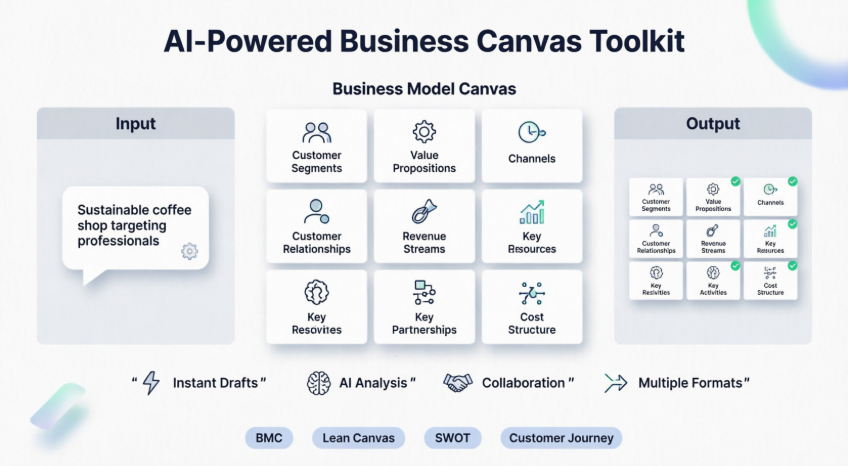
- ✨ What the Business Model Canvas is and why it’s the perfect starting point for strategic thinking
- 🤖 How to use AI to instantly generate a structured canvas from a simple idea description
- 🔍 Practical, step-by-step examples showing exactly how to refine, analyze, and export your work
- 🧭 Which of the 20+ available frameworks to choose for your specific goal
- 💡 Pro tips to avoid common beginner mistakes and get the most value from the tool
Transform your business ideas into strategic plans in seconds with AI-driven insights and a comprehensive library of proven frameworks.

Introduction: What Is the Business Model Canvas?
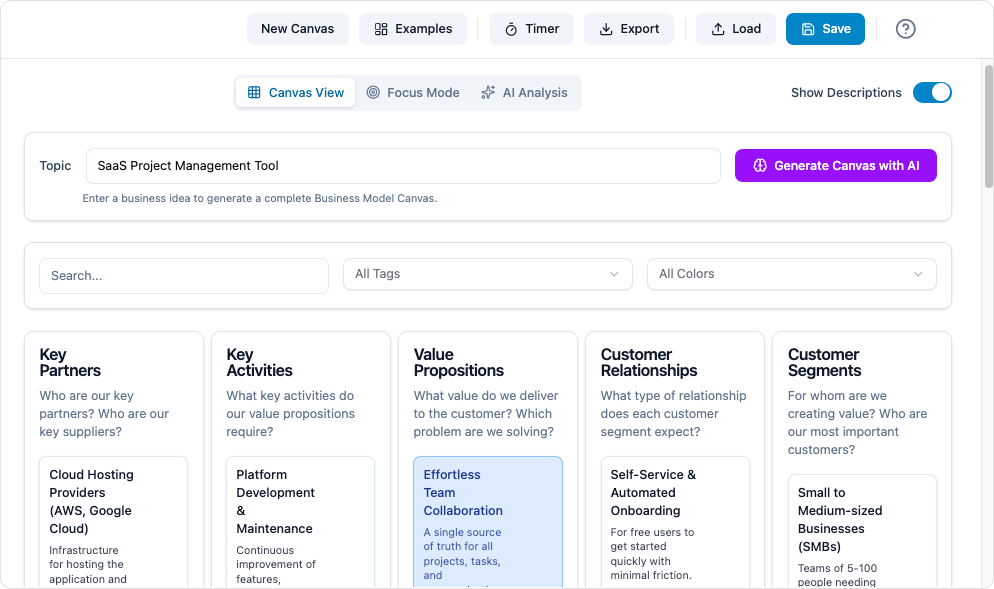
If you’re new to business strategy, the Business Model Canvas (BMC) is your friendly starting point. Think of it as a one-page blueprint that helps you visualize how your business creates, delivers, and captures value.
The 9 Building Blocks Explained (Simply)
| Building Block | What It Means | Beginner Example |
|---|---|---|
| Customer Segments | Who are you creating value for? | Busy urban professionals aged 25-40 |
| Value Propositions | What problem do you solve? | Quick, high-quality coffee with sustainable sourcing |
| Channels | How do customers find you? | Mobile app, social media, storefront |
| Customer Relationships | How do you interact with customers? | Loyalty program, personalized recommendations |
| Revenue Streams | How do you make money? | Coffee sales, subscription plans, merchandise |
| Key Resources | What do you need to operate? | Skilled baristas, quality beans, POS system |
| Key Activities | What must you do well? | Sourcing ethically, brewing consistently, marketing |
| Key Partnerships | Who helps you succeed? | Local roasters, delivery apps, sustainability certifiers |
| Cost Structure | What are your major expenses? | Rent, labor, ingredients, marketing |
The Visual Paradigm Business Canvas tool brings this framework to life with AI assistance, making strategic planning accessible even if you’ve never created a business plan before.
Getting Started: Your First AI-Powered Canvas in 6 Simple Steps
Step 1: Access the Tool
Visit Visual Paradigm’s Canvas Toolbox and log in or create a free account. No technical skills required—everything runs in your browser.
Step 2: Choose Your Framework
From the library of 20+ frameworks, select Business Model Canvas for general business planning. Other beginner-friendly options include:
-
Lean Canvas: Ideal for startups testing ideas quickly
-
Customer Journey Canvas: Map how users experience your product
-
SWOT Analysis: Evaluate strengths, weaknesses, opportunities, threats
Step 3: Describe Your Idea to the AI
Type a simple, clear description of your business concept. The more specific you are, the better the AI can help.
Beginner Prompt Examples:
"A mobile app that connects local tutors with students for on-demand homework help"
"A subscription box service delivering eco-friendly home products to young families"
"A co-working space designed specifically for freelance graphic designers in Austin, Texas"
Step 4: Generate and Review Your Canvas
Click “Generate Canvas with AI”. Within seconds, you’ll see all nine blocks populated with intelligent suggestions.
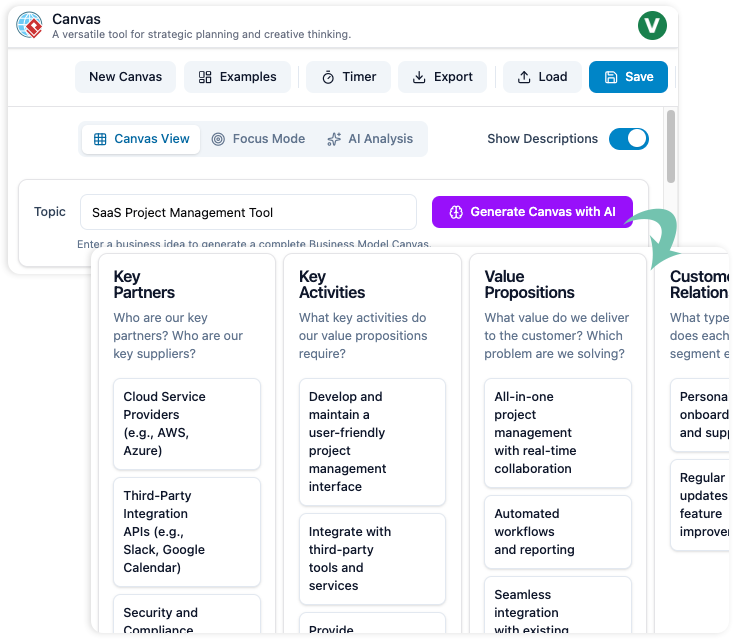
What to Expect:
-
Each block contains 3-5 relevant, actionable items
-
Suggestions are tailored to your industry and target audience
-
Content is written in clear, jargon-free language
Step 5: Refine with AI Assistance
Don’t like a suggestion? Need more detail? Use the AI chat to refine specific sections:
Helpful AI Commands for Beginners:
-
“Suggest three more revenue streams for a coffee shop”
-
“What are common risks for subscription box businesses?”
-
“Help me make my value proposition clearer”
-
“Show me examples of customer segments for a fitness app”
You can also manually edit any text, drag items to reorder, or add your own notes.
Step 6: Analyze and Export
Before sharing your canvas, use the AI Analysis tab to gain deeper insights:
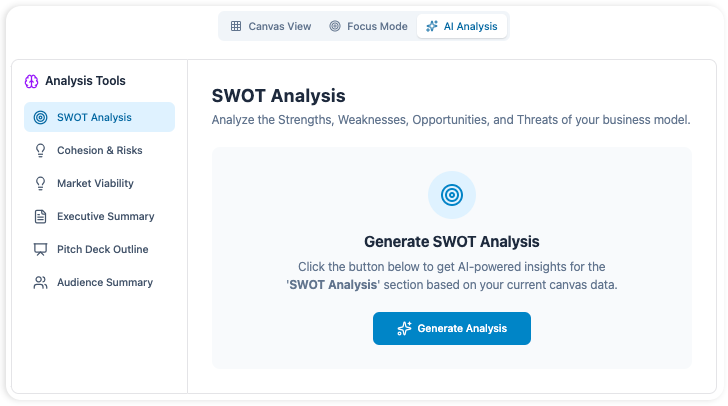
Beginner-Friendly Analysis Features:
-
SWOT Analysis: Automatically identifies your Strengths, Weaknesses, Opportunities, and Threats
-
Cohesion Score: Shows how well your revenue streams match customer needs (green = strong alignment)
-
Risk Flags: Highlights potential vulnerabilities you might have missed
-
Pitch Deck Outline: Generates a simple 10-slide structure for investor presentations
When ready, export your work in multiple formats:
-
PDF/PNG: For presentations and printing
-
Word/Markdown: For editing and documentation
-
JSON: For developers integrating with other tools
Key Concepts Every Beginner Should Understand
Concept 1: Iteration Over Perfection
Your first canvas doesn’t need to be perfect. The power of this tool is rapid iteration:
-
Generate a draft with AI
-
Review and refine
-
Test assumptions with real customers
-
Update your canvas based on feedback
-
Repeat
Concept 2: Connections Matter More Than Individual Blocks
The BMC’s real value comes from seeing how blocks relate. For example:
-
Do your Value Propositions actually solve problems for your Customer Segments?
-
Do your Channels effectively reach your target audience?
-
Do your Revenue Streams align with what customers are willing to pay?
The AI’s cohesion analysis helps spot these connections automatically.
Concept 3: Start Simple, Then Expand
Begin with the core Business Model Canvas. Once comfortable, explore related frameworks:
Progression Path for Beginners:
Business Model Canvas → Lean Canvas → Customer Journey → SWOT Analysis
Each framework builds on the last, adding depth without overwhelming you.
Practical Example: Building a Sustainable Coffee Shop Canvas
Let’s walk through a complete beginner example to see the tool in action.
Scenario
You want to open “Green Brew,” a sustainable coffee shop in downtown Portland targeting environmentally conscious professionals.
Step-by-Step AI Interaction
1. Initial Prompt:
"A sustainable coffee shop in urban Portland targeting eco-conscious professionals who value ethically sourced coffee and community space"
2. AI-Generated Value Propositions (Example Output):
-
Direct-trade, organic coffee beans with transparent sourcing
-
Zero-waste operations: compostable cups, reusable mug discounts
-
Community hub with local art displays and sustainability workshops
-
Fast, mobile-order pickup for busy professionals
3. AI-Generated Customer Segments:
-
Remote workers seeking productive, values-aligned workspaces (25-45)
-
Environmentally conscious millennials and Gen Z consumers
-
Local businesses looking for sustainable catering partners
-
Tourists interested in Portland’s eco-friendly culture
4. Refinement Request:
You ask the AI: “Suggest three low-cost marketing channels for a new local coffee shop”
AI Response:
-
Partner with nearby offices for “sustainable morning” coffee deliveries
-
Host free “latte art + sustainability tips” weekend workshops
-
Collaborate with local eco-influencers for authentic social media content
Final Output Preview
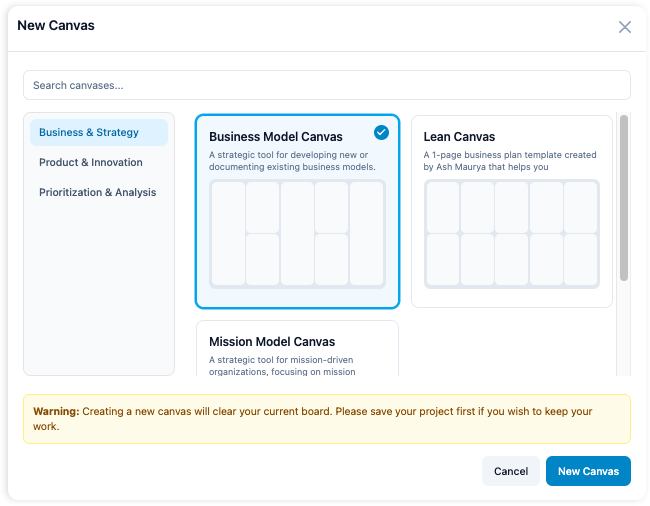
Your completed canvas now provides a clear, actionable strategic foundation—ready to share with potential partners, investors, or your team.
Framework Library: Choose the Right Tool for Your Goal
Visual Paradigm offers 20+ frameworks. Here’s how beginners can choose:
For Validating Business Ideas
| Framework | Best For | Beginner Tip |
|---|---|---|
| Business Model Canvas | Overall business strategy | Start here for comprehensive planning |
| Lean Canvas | Startup idea validation | Focuses on problems/solutions; faster to complete |
| Mission Model Canvas | Non-profits or social enterprises | Replaces “Revenue” with “Mission Impact” |
For Understanding Customers
| Framework | Best For | Beginner Tip |
|---|---|---|
| Customer Journey Canvas | Mapping user experiences | Identify pain points at each touchpoint |
| Empathy Map Canvas | Deepening customer understanding | Answer: What do they see, hear, think, feel? |
For Strategic Analysis
| Framework | Best For | Beginner Tip |
|---|---|---|
| SWOT Analysis | Internal/external assessment | Use after your BMC to identify risks/opportunities |
| PESTLE Analysis | Understanding market forces | Examine Political, Economic, Social, Tech, Legal, Environmental factors |
| Porter’s Five Forces | Industry competition analysis | Evaluate supplier power, buyer power, competition, substitutes, new entrants |
For Product Development
| Framework | Best For | Beginner Tip |
|---|---|---|
| Lean UX Canvas | Validating product ideas quickly | Focus on assumptions and tests, not just features |
| Product Canvas | Aligning product vision with execution | Connects user needs to specific features and metrics |
For Prioritization & Planning
| Framework | Best For | Beginner Tip |
|---|---|---|
| Impact Effort Matrix | Deciding what to do first | Plot tasks: high impact/low effort = do first |
| Eisenhower Matrix | Personal/team time management | Categorize tasks: urgent/important quadrants |
| OKR Canvas | Setting and tracking goals | Define 3-5 ambitious objectives with measurable key results |
All frameworks include pre-built templates with expert tips and real-world examples to accelerate your planning.
Advanced Features Made Simple
Once you’re comfortable with the basics, explore these powerful capabilities:
AI-Powered Insights

Go beyond generation: ask the AI to identify gaps, suggest alternatives, or simulate “what-if” scenarios. Example prompt: “What if our main supplier raises prices by 20%? How does that affect our cost structure?”
Multiple Views for Focused Work

-
Canvas View: See all nine blocks together for holistic thinking
-
Focus View: Zoom into one block (like Value Propositions) to deep-dive without distraction
Professional Exports for Sharing

Export options designed for real-world use:
-
PDF with Analysis: Share a complete strategic report with stakeholders
-
Word Document: Edit and customize before finalizing
-
Markdown: Perfect for documentation in tools like Notion or GitHub
-
PNG Images: Embed visuals in presentations or websites
Collaboration Features
-
Real-time Co-editing: Work with team members simultaneously
-
Comments & Feedback: Add notes directly on canvas elements
-
Version History: Track changes and revert if needed
-
Workshop Timer: Built-in timer keeps brainstorming sessions focused
Common Beginner Mistakes (And How to Avoid Them)
Mistake 1: Being Too Vague in Your Prompt
❌ “A coffee business”
✅ “A specialty coffee shop in downtown Seattle targeting remote workers, featuring ethically sourced beans, quiet workspaces, and subscription options”
Why it matters: Specific prompts yield specific, actionable AI suggestions.
Mistake 2: Treating the First Draft as Final
The AI provides a starting point, not the finished strategy. Always:
-
Review each suggestion critically
-
Validate assumptions with real customer research
-
Iterate based on feedback
Mistake 3: Ignoring Block Connections
Don’t fill blocks in isolation. After generating content, ask:
-
“Do my revenue streams actually match what my customer segments value?”
-
“Can my key resources realistically support my value propositions?”
Use the AI’s cohesion analysis to spot misalignments.
Mistake 4: Overcomplicating Early On
Start with 3-5 strong items per block, not 20. You can always expand later. Clarity beats comprehensiveness in early stages.
Availability and Getting Started
Who Can Use It?
-
Visual Paradigm Online Users: Available in Combo and Deluxe Editions
-
Desktop Users: Professional or Enterprise Edition with active maintenance
-
New Users: Start with a free trial at canvas.visual-paradigm.com
Access Options
✅ Cloud-Based: Use directly in your browser—no installation needed
✅ Desktop Integration: Sync with Visual Paradigm Desktop for advanced diagramming
✅ Team Plans: Real-time collaboration, admin controls, SSO support
✅ Export Flexibility: Share outputs in formats your stakeholders prefer
Quick Start Checklist
-
Create account at canvas.visual-paradigm.com
-
Select Business Model Canvas framework
-
Write a specific, detailed prompt about your idea
-
Generate initial canvas with AI
-
Refine at least 3 blocks using AI suggestions
-
Run SWOT or Cohesion analysis
-
Export as PDF for your first review
Next Steps for Beginners
-
Practice with a Personal Project: Try mapping a side hustle, club, or even your career plan
-
Join the Community: Explore templates and examples shared by other users
-
Schedule a Team Workshop: Use the built-in timer and collaboration features for group brainstorming
-
Combine Frameworks: Start with BMC, then add SWOT or Customer Journey for deeper insights
-
Iterate Regularly: Revisit your canvas quarterly as your business evolves
Conclusion
Your Quick Recap:
✅ Refine intentionally: Use AI assistance to deepen specific sections, not just accept the first draft
✅ Check connections: Ensure your value propositions, customers, and revenue streams align
✅ Analyze before sharing: Run SWOT or cohesion checks to strengthen your strategy
✅ Iterate often: Your canvas is a living document—update it as you learn
What to Do Next:
- Try it now: Visit canvas.visual-paradigm.com and generate your first AI-powered canvas (it takes less than 2 minutes)
- Practice with purpose: Map a real idea you’re working on—or even a hypothetical one—to build confidence
- Share and collaborate: Export your canvas and get feedback from a colleague or mentor
- Explore further: Once comfortable with the BMC, try the Lean Canvas or Customer Journey framework to deepen your strategic toolkit
Reference List
- AI Business Model Canvas Tool – Visual Paradigm: Official Visual Paradigm solution page for the AI-powered business model canvas tool, featuring product overview and key capabilities.
- Comprehensive Guide to Visual Paradigm’s AI-Powered Business Model Canvas Tool: In-depth guide covering features, usage workflows, and strategic benefits of Visual Paradigm’s AI canvas toolkit.
- AI-Powered Business Model Canvas Software: Overview of Visual Paradigm’s canvas software with AI capabilities for rapid strategic planning and business model validation.
- What is the Business Model Canvas?: Educational resource explaining the nine building blocks, strategic value, and practical applications of the BMC framework.
- Canvas Tool Features – Visual Paradigm: Detailed feature documentation for the AI-powered canvas tool including generation, analysis, collaboration, and export capabilities.
- Comprehensive Tutorial: Visual Paradigm Model Canvas Tool: Step-by-step tutorial for using Visual Paradigm’s canvas tool for business strategy development, from setup to export.
- Comprehensive Tutorial: AI-Powered Business Canvas Toolkit with Visual Paradigm: Practical tutorial demonstrating how to leverage AI for rapid business canvas creation, refinement, and team collaboration.
- From Blank Page to Business Strategy: A Business Professional’s Guide to Visual Paradigm’s AI Model Canvas Tool: Professional guide for overcoming creative blocks and building comprehensive, investor-ready business strategies using AI assistance and strategic frameworks.