
In the complex ecosystem of modern information systems, communication gaps between technical teams and business stakeholders are frequent sources of friction. A robust architecture documentation tool is essential for aligning these two worlds. The package diagram serves as a critical visual language, translating abstract business logic into concrete technical structures. This guide explores the mechanics, benefits, and strategic application of package diagrams within information systems.
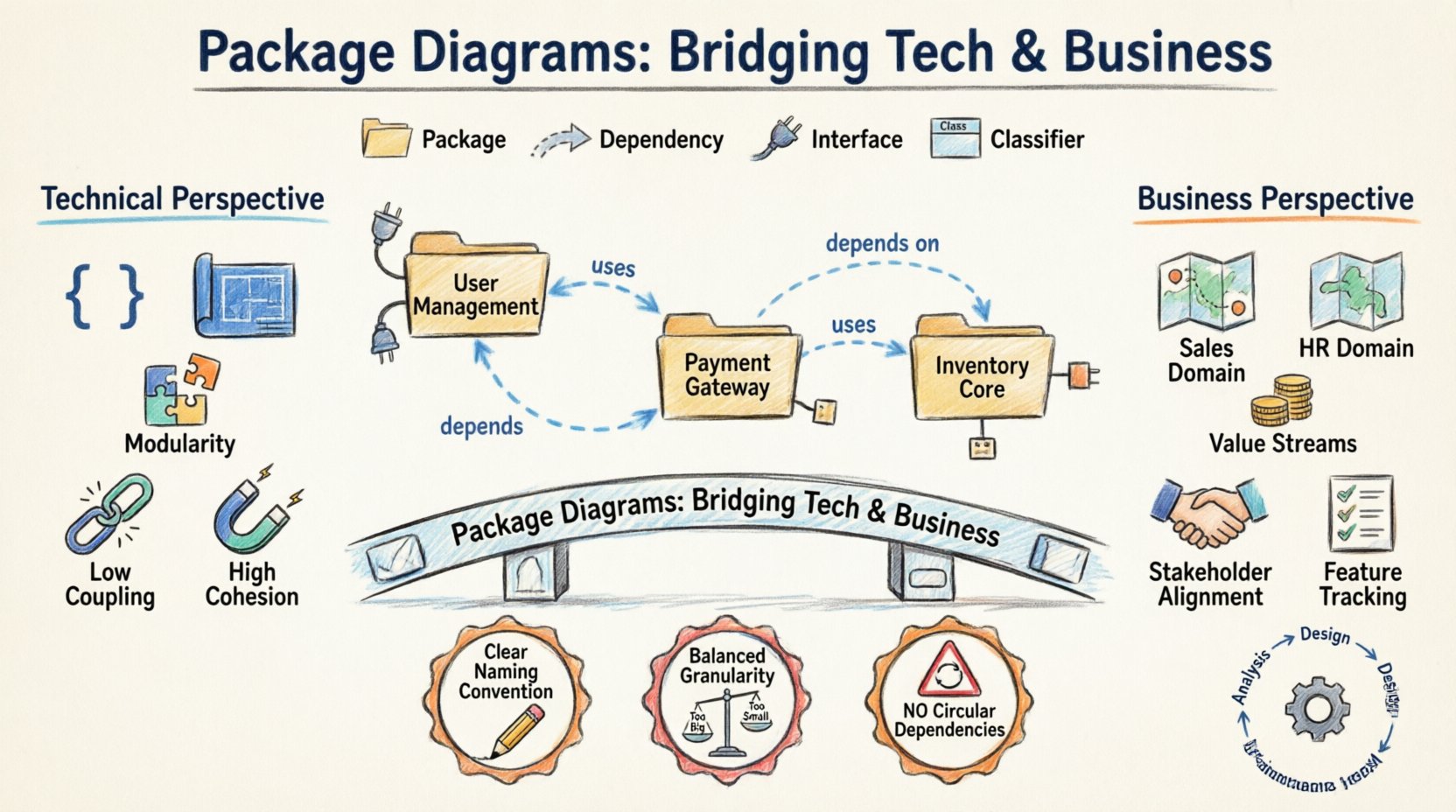
🔍 Understanding the Package Diagram
A package diagram is a structural diagram used in Unified Modeling Language (UML). It groups elements of the system into related sets, known as packages. Unlike class diagrams that focus on individual objects, package diagrams focus on high-level organization. They provide a bird’s-eye view of the system’s modular structure.
Think of a package as a folder within a file system, but with semantic meaning. It represents a cohesive unit of functionality or a domain area. This abstraction allows architects to manage complexity without getting lost in the details of every single class or component.
🏗️ Core Components
- Package: A namespace that groups related elements. It can contain classes, interfaces, other packages, or use cases.
- Dependency: A relationship indicating that changes in one package might affect another. Represented by a dashed arrow.
- Interface: A collection of operations that specify services a package provides or requires.
- Classifier: Classes or interfaces that reside within the package.
💻 The Technical Perspective: Architecture & Modularity
For software engineers and system architects, package diagrams are not merely drawings; they are blueprints for maintainability. They dictate how code is organized, compiled, and deployed.
🛠️ Managing Complexity
As systems grow, the number of classes increases exponentially. Without organization, this leads to a “spaghetti code” structure where dependencies are tangled and difficult to untangle. Package diagrams impose order through:
- Separation of Concerns: Dividing the system into distinct areas like Data Access, Business Logic, and User Interface.
- Encapsulation: Hiding internal implementation details. A package can expose only specific interfaces to the outside world.
- Namespace Management: Preventing naming collisions by isolating classes with similar names in different contexts.
🔗 Dependency Management
One of the most critical aspects of technical design is understanding how modules interact. The package diagram visualizes dependencies clearly.
- Low Coupling: Ideally, packages should depend on abstract interfaces rather than concrete implementations. This reduces the ripple effect of changes.
- High Cohesion: Elements within a package should be closely related. If a package contains unrelated functions, it is likely a candidate for splitting.
- Directionality: Arrows indicate the direction of dependency. Understanding this flow prevents circular dependencies, which can cause runtime errors or compilation failures.
💼 The Business Perspective: Alignment & Scope
Technical teams speak in code; business stakeholders speak in processes and value. Package diagrams act as a translation layer, mapping technical assets to business capabilities.
📊 Visualizing Business Domains
Business users often struggle to understand how their requirements translate into software. A package diagram can be structured around business domains rather than technical layers.
- Domain-Driven Design (DDD): Packages can represent bounded contexts. For example, a “Billing” package contains all logic related to invoicing, regardless of whether it is front-end or back-end code.
- Feature Tracking: New features can be mapped to specific packages. This helps in estimating effort and identifying which parts of the system will be impacted.
- Stakeholder Communication: Executives can see which business areas are covered by the system without needing to read technical specifications.
🤝 Bridging the Gap
When technical and business views are aligned, project risks decrease. The following table illustrates how a package diagram serves both audiences.
| Aspect | Technical View | Business View |
|---|---|---|
| Package Name | com.app.payment.gateway |
Payment Processing |
| Dependency | Imports SecurityModule |
Requires Authentication for transactions |
| Interface | Provides ProcessTransaction() |
Enables Checkout Functionality |
| Granularity | Microservices, API endpoints | Business Capabilities, User Workflows |
🧩 Relationships and Interactions
Understanding the relationships between packages is vital for system stability. These relationships define the flow of information and control.
1. Dependency (Uses Relationship)
This is the most common relationship. It implies that one package uses another to function. If the target package changes, the source package might need to change. This is often depicted with a dashed arrow.
2. Association (Uses Link)
Indicates a structural link between packages. It suggests that instances of one package hold references to instances of another. This is usually a solid line.
3. Generalization (Inheritance)
One package extends the functionality of another. This is rare at the package level but occurs when a module inherits behavior from a core library package.
4. Realization (Implements)
A package implements an interface defined by another package. This enforces contracts and ensures that specific services are available.
📝 Best Practices for Design
Creating a package diagram requires discipline. Poorly designed diagrams can be more confusing than helpful. Follow these guidelines to ensure clarity and utility.
🎯 Naming Conventions
- Consistency: Use a standard naming pattern across all packages. Avoid abbreviations that are not universally understood.
- Hierarchy: Reflect the directory structure or domain hierarchy in the names. For example,
HR.EmployeevsHR.Payroll. - Clarity: Names should describe the content, not just the location. Avoid generic names like
Module1orUtils.
📏 Granularity Control
- Too Coarse: One package for the entire system. This defeats the purpose of modularity.
- Too Fine: Hundreds of packages with single classes each. This creates unnecessary overhead and visual clutter.
- Balanced: Group related classes by function or domain. A package should typically contain between 5 to 50 classes, depending on complexity.
🚫 Avoiding Circular Dependencies
A circular dependency occurs when Package A depends on Package B, and Package B depends on Package A. This creates a loop that makes it impossible to compile or deploy the system independently. To prevent this:
- Introduce an abstract interface layer that both packages can depend on.
- Refactor code to move shared logic into a third, independent package.
- Review the architecture during the design phase, not after implementation.
🔄 The Lifecycle of a Package Diagram
A package diagram is not a one-time artifact. It evolves as the system evolves. It is a living document that requires maintenance.
Phase 1: Analysis
During the initial analysis, identify the major functional areas. Create high-level packages that correspond to business domains. At this stage, the focus is on scope and boundaries.
Phase 2: Design
As technical design progresses, refine the packages. Define the interfaces each package must expose. Map out the specific dependencies between them. This is where the technical architecture takes shape.
Phase 3: Implementation
Developers use the diagram to organize their code repositories. The directory structure in the version control system should mirror the package diagram to maintain alignment.
Phase 4: Maintenance
When requirements change, update the diagram. If a new feature is added, determine if it belongs in an existing package or requires a new one. Outdated diagrams lead to technical debt.
⚠️ Common Pitfalls and Anti-Patterns
Even experienced architects make mistakes. Recognizing these patterns helps in avoiding them.
- The God Package: A single package that contains everything. This indicates a lack of modularization and makes the system brittle.
- Swiss Army Knife: A package that contains unrelated functionality (e.g., logging, database access, and UI logic all in one). This violates the Single Responsibility Principle.
- Ignoring Dependencies: Creating packages without mapping how they talk to each other. This leads to integration issues later.
- Static Views Only: Treating the diagram as static. If it is not updated with code changes, it becomes a liability rather than an asset.
📈 Impact on Project Success
Investing time in creating accurate package diagrams yields tangible returns.
- Faster Onboarding: New developers can understand the system structure quickly by reviewing the packages.
- Reduced Errors: Clear boundaries reduce the risk of accidental changes in unrelated modules.
- Better Estimation: Knowing the scope of each package allows for more accurate time and cost estimates.
- Scalability: A modular design allows teams to work on different packages in parallel without conflicts.
🧭 Strategic Implementation Steps
To effectively integrate package diagrams into your workflow, consider the following approach.
- Identify Stakeholders: Determine who needs to see the diagram. Executives need high-level business packages; developers need technical implementation packages.
- Define Standards: Establish rules for naming, grouping, and relationships. Ensure the whole team follows the same conventions.
- Integrate with Tools: Use modeling tools that support code generation or reverse engineering. This keeps the diagram in sync with the actual codebase.
- Review Regularly: Include diagram reviews in sprint planning or architecture governance meetings.
- Document Rationale: Explain why a package is structured a certain way. This context is invaluable for future maintenance.
🔮 Future Considerations
As software architecture evolves, the role of package diagrams adapts. Microservices and cloud-native architectures introduce new challenges.
- Service Boundaries: In microservices, each service often acts as a package. The diagram defines the API contracts between services.
- Cloud Regions: Packages may need to reflect deployment regions or availability zones for resilience planning.
- Automated Validation: Tools are emerging that can automatically verify if the code structure matches the package diagram, flagging drift immediately.
📝 Summary
The package diagram is a powerful tool for structuring information systems. It bridges the divide between technical implementation and business requirements. By organizing code into logical groups, it enhances maintainability, reduces complexity, and facilitates communication. When used correctly, it serves as a foundational element of a healthy software architecture.
Success depends on discipline. The diagram must be accurate, up-to-date, and aligned with the code. It is not a decorative artifact but a functional blueprint. Teams that prioritize this alignment will find their systems more resilient, easier to extend, and better understood by all stakeholders.