

Now Reading: Mastering Dynamic Views in the C4 Model: Integrating UML Sequence Diagrams with Visual Paradigm AI
-
01
Mastering Dynamic Views in the C4 Model: Integrating UML Sequence Diagrams with Visual Paradigm AI



Mastering Dynamic Views in the C4 Model: Integrating UML Sequence Diagrams with Visual Paradigm AI
In the realm of software architecture, the C4 model is renowned for its ability to visualize static structural hierarchies through Context, Container, and Component diagrams. However, a complete architectural definition requires more than just knowing where components reside; it requires an understanding of how they interact. This is where UML Sequence Diagrams serve as critical Dynamic Views. While the core C4 levels illustrate the structural “map” of the system, Sequence Diagrams reveal the execution flow, effectively complementing static abstractions with behavioral reality.
The Strategic Necessity of Sequence Diagrams in C4
Static diagrams are excellent for high-level overviews and structural abstraction, yet they often fail to capture the complexity of runtime interactions. Integrating Sequence Diagrams into the C4 workflow addresses several critical documentation needs.
1. Modeling Runtime Behavior
The primary function of a Dynamic View is to move beyond the static placement of boxes and arrows. Static diagrams do not illustrate how components interact during a specific time-bound process. Architects require Sequence Diagrams to visualize precise message exchanges and behavioral flows for specific scenarios, such as a “Checkout Process” or “User Login.” This visualization helps identify potential bottlenecks or logic errors that static views might conceal.

2. Providing “The Fine Print”
If the C4 model represents the narrative overview of a system, Sequence Diagrams provide the necessary implementation details. Stakeholders, particularly those involved in integration, need to see the exact order of operations. For example, detailing how a Frontend application calls a Payment Service, which subsequently updates a transactional Database, clarifies the sequence of events and data consistency requirements.
3. Bridging Architecture and Code
One of the most valuable aspects of dynamic modeling is its utility for developers. Sequence diagrams bridge the gap between abstract architecture and actual code implementation. By understanding behavioral dependencies before writing code, developers can ensure that the implementation adheres strictly to the intended design, reducing refactoring costs later in the lifecycle.
Accelerating Design with Visual Paradigm AI C4 Studio
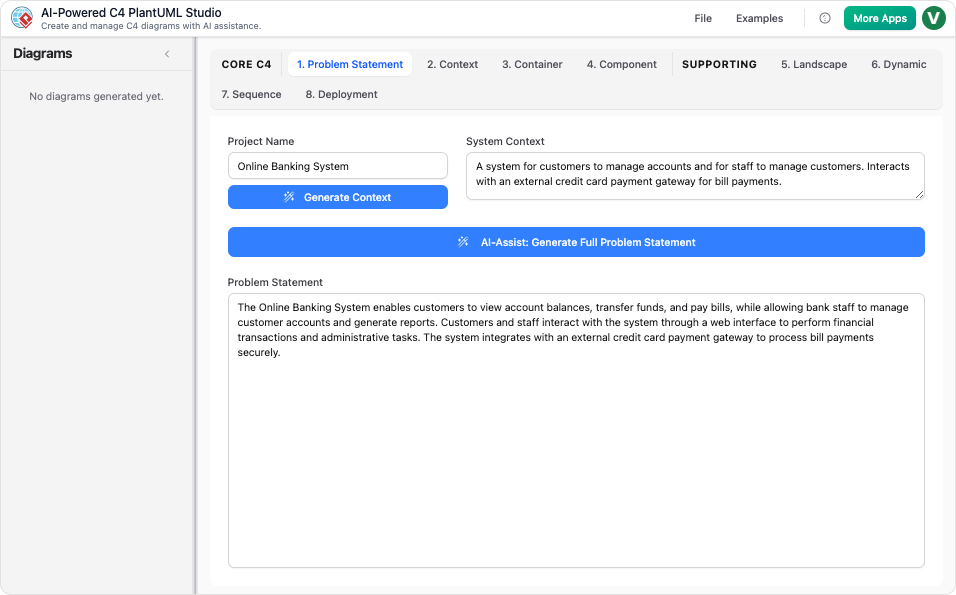
Creating detailed sequence diagrams has traditionally been a time-consuming manual process. Visual Paradigm’s AI-powered ecosystem, including the C4-PlantUML Studio and the AI Diagramming Chatbot, revolutionizes this workflow by automating the translation of requirements into visual models.
Instant AI Generation from Natural Language
The barrier to entry for creating complex UML diagrams is significantly lowered through AI text-to-diagram capabilities. Users can describe a runtime flow in plain English—for instance, “Generate a UML sequence diagram for the order processing flow between the Web API and the Payment Gateway”—and the AI instantly renders a professional, syntactically correct diagram. This feature allows architects to prototype dynamic views in seconds rather than hours.
Structured Hierarchical Workflow
Accuracy is paramount in architectural modeling. To maintain consistency between static structure and dynamic behavior, the tool enforces a tabbed workflow. This guides users to select the appropriate parent Container or Components before generating a nested Sequence Diagram. This contextual awareness ensures that the dynamic flows for specific scenarios remains aligned with the established static hierarchy of the system.
Conversational Refinement with AI
Architecture is an iterative process. Using the AI Chatbot, architects can refine their models through natural dialogue. Commands such as “Add a step where the API validates the token” or “Rename the ‘Auth Service’ to ‘Identity Provider'” are executed immediately. The AI updates both the visual model and the underlying code, ensuring that the diagram evolves alongside the conversation.
PlantUML Integration for Living Documentation
Visual Paradigm AI C4 Studio translates descriptions into valid PlantUML code. This code-centric approach makes sequence diagrams version-controllable via systems like Git. Consequently, architectural diagrams can be integrated into CI/CD pipelines, transforming them into “living documentation” that stays synchronized with the codebase, rather than becoming static artifacts that quickly become obsolete.
Seamless Multi-Standard Support
Modern architecture often requires a blend of methodologies. The tool allows users to establish high-level architecture using C4 standards and strictly switch to UML for detailed behavioral views. This seamless transition ensures consistency across different modeling standards within a single, unified platform.
Conceptualizing the Model: A Theater Analogy
To fully grasp the relationship between C4 structure and UML behavior, consider the analogy of staging a theater production:
- The Set Design (C4 Levels 1-3): The structural diagrams are akin to the set design. They dictate where the furniture, doors, and props are placed on the stage, establishing the environment in which the actors exist.
- The Script (Sequence Diagram): The Sequence Diagram represents the script. It details exactly when each actor enters the stage, what lines they deliver to one another, and the precise order of these interactions.
- The Automated Director (Visual Paradigm AI): Visual Paradigm AI C4 Studio acts as an automated director. It takes a verbal description of the scene and instantly sketches out the blocking and movement of every actor, allowing architects to refine their models based on the playwright’s vision.
By leveraging both structural and dynamic views, architects ensure that their systems are not only well-designed in theory but also robust and logical in execution.
-
Ultimate Guide to C4 Model Visualization Using Visual Paradigm’s AI Tools: A comprehensive guide on leveraging Visual Paradigm’s AI-powered tools to automate and enhance C4 model visualization for faster, smarter software architecture design.
-
Leveraging Visual Paradigm’s AI C4 Studio for Streamlined Architecture Documentation: A detailed guide on using Visual Paradigm’s AI-enhanced C4 Studio to create clean, scalable, and maintainable software architecture documentation.
-
The Ultimate Guide to C4-PlantUML Studio: Revolutionizing Software Architecture Design – Visual Paradigm Blog: 2 weeks ago – Software architecture documentation is often a bottleneck—time-consuming, error-prone, and quickly outdated. The C4-PlantUML Studio, developed by Visual Paradigm, changes this by combining AI-driven automation, the C4 model’s clarity, and PlantUML’s flexibility into a single, powerful tool.
-
A Comprehensive Guide to Visual Paradigm’s AI-Powered C4 …: Dec 3, 2025 · Enter Visual Paradigm ’s AI-Powered C4 PlantUML Studio, released November 14, 2025 — a purpose-built tool that transforms natural language into correct, layered C4 diagrams. But how is it different from just asking ChatGPT or Claude to “draw a system diagram”? And can it really generate valid C4? Let’s unpack it all.
-
C4-PlantUML Studio | AI-Powered C4 Diagram Generator – Visual Paradigm: An AI-powered tool to automatically generate C4 software architecture diagrams from simple text descriptions.
-
Comprehensive Tutorial: Generating and Modifying C4 Component …: Dec 16, 2025 · This tutorial is based on the official Visual Paradigm product demo video, demonstrating how to use the AI-powered Chatbot to create and iteratively refine a C4 Component Diagram for a car park booking system. The C4 model (Context, Containers, Components, and Code) is a popular approach for visualizing software architecture, and the Component level focuses on the internal structure of a …
-
AI-Powered C4 Diagram Generator – Visual Paradigm AI: C4 & Supporting Diagrams The AI-Powered C4 Diagram Generator supports the four core levels of the C4 Model (Context, Container, Component, Deployment) plus essential supporting views to provide comprehensive architectural documentation. Core C4 Diagrams The Core C4 Diagrams are fundamental for documenting the static structure of your software system, detailing how it is broken down …
-
Visual Paradigm Full C4 Model Support Release: This release announcement details the integration of full C4 model support in Visual Paradigm, enabling users to create and manage architecture diagrams at multiple abstraction levels.
-
New: Full C4 Model Support Added to Visual Paradigm Desktop – ArchiMetric: 6 days ago · The C4 Model: A Comprehensive Guide to Visualizing Software Architecture with AI-Powered Tools …
-
Visual-paradigm: Our AI supports a wide range of diagrams across various domains, including UML, C4 models for software architecture, and strategic frameworks like SWOT and PESTLE analysis.
-
Visual Paradigm AI Suite: A Comprehensive Guide to Intelligent Modeling Tools – Cybermedian: 6 days ago – Strategic Frameworks: SWOT Analysis, PEST/PESTLE Analysis, Ansoff Matrix, and Blue Ocean Four Actions Framework. Systems Engineering: SysML Block Definition, Internal Block, and Requirement diagrams. Architecture: ArchiMate diagrams and C4 models. General Business: Organization Charts, Mind Maps, and PERT Charts. While the AI Chatbot is a cloud-based feature of VP Online, it is seamlessly integrated into the Visual Paradigm Desktop environment.
-
Visual-paradigm: Our AI supports a wide range of diagrams across various domains, including UML, C4 models for software architecture, and strategic frameworks like SWOT and PESTLE analysis.

