


Visual Paradigm has announced a game-changing update for content creators and digital storytellers. The powerful Animation Maker, known as AniFuzion, previously exclusive to the Deluxe Edition, is now fully available in the Combo Edition of Visual Paradigm Online. This expansion democratizes professional-grade animation tools, allowing a wider range of users to create, edit, and export stunning animations in MP4 format without requiring a top-tier subscription.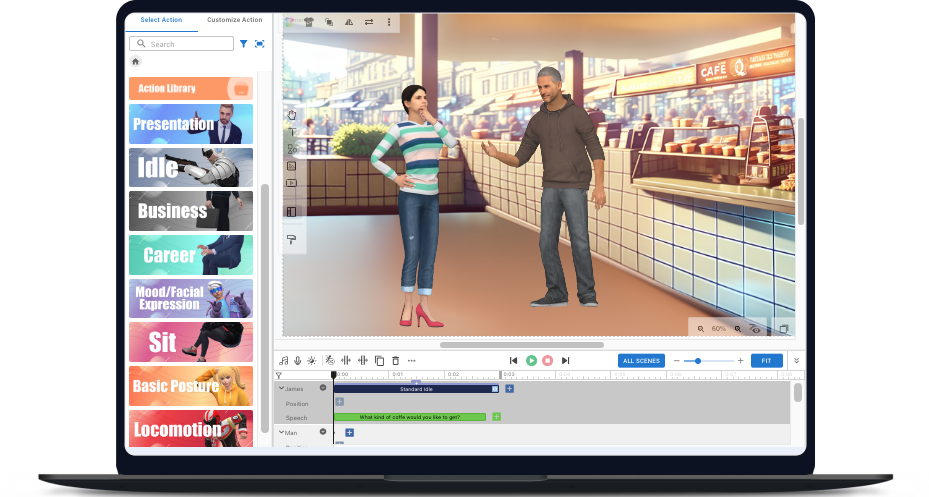
Whether you are looking to create educational materials, marketing videos, or engaging presentations, AniFuzion offers a robust platform to bring your ideas to life. In this tutorial, we will walk you through how to leverage this newly accessible tool to create your first professional animation.
Step 1: Accessing the Animation Maker in Combo Edition
If you are a current user of the Combo Edition, you no longer need to upgrade to Deluxe to access high-end animation features. To get started:
- Log in to your Visual Paradigm Online account.
- Navigate to your dashboard workspace.
- Locate the AniFuzion icon or the Animation Maker section.
- If you are not yet a subscriber, consider upgrading to the Combo Edition to unlock this feature alongside a full suite of office and design tools.
Step 2: Setting Up Your Canvas
Once you launch the editor, you will be greeted by a user-friendly, drag-and-drop interface. AniFuzion is designed to be intuitive for beginners while offering depth for seasoned pros.
- Choose a Template: Start with a blank canvas or select from pre-made templates designed for various industries.
- Define Settings: Set your aspect ratio suitable for your target platform (e.g., social media, website embed, or presentation).
Step 3: Adding Characters and Actions
The core power of AniFuzion lies in its massive library of assets. You aren’t just moving static images; you are directing dynamic characters.
- Select Characters: Browse through customizable character families. You can adjust their appearance to fit your brand identity.
- Apply Actions: This is where the magic happens. Select a character and choose from over 2,000 pre-built dynamic actions. Whether it is walking, waving, or complex gestures, simply drag and drop the action onto the timeline.
- Layering: Use the timeline to sequence actions and overlay text animations or shape effects.
Step 4: Integrating Audio with AI
Visual Paradigm has integrated advanced AI features to save you time on voiceovers.
- Text-to-Speech (TTS): Type your script into the TTS engine.
- Automatic Lipsync: The system automatically synchronizes your character’s lip movements with the generated audio, eliminating the tedious manual work of matching mouth shapes to sound.
Step 5: Exporting and Sharing
With the Combo Edition, you now have full export capabilities.
- Review your animation in the preview window.
- Click the Export button.
- Select MP4 for a high-quality video file suitable for YouTube, Instagram, or local playback.
- Alternatively, convert your project into an animated flipbook for sharing via hyperlinks or embed codes.
VP Features: Deep Dive into AniFuzion
The transition of AniFuzion to the Combo Edition unlocks specific Visual Paradigm features that streamline the creative process:
- Comprehensive Animation Suite: AniFuzion supports 2D and 3D animations, animated flipbooks, text animations, and complex shape effects, making it a versatile tool for any visual medium.
- AI-Powered Lipsync: This feature utilizes advanced algorithms to match audio waves with character mouth positioning, ensuring professional-looking dialogue scenes without manual keyframing.
- Cross-Platform Compatibility: Being a web-based tool, AniFuzion allows you to edit animations from any device with a browser, ensuring your workflow remains uninterrupted.
- Extended Combo Suite Access: The Combo Edition is an all-in-one platform. Alongside AniFuzion, users gain access to the Flipbook Maker, Online PDF Tool Suite, Office Tool Suite (for documents and spreadsheets), and the Visual Design Editor. This integration allows you to create assets in the design editor and import them into your animations seamlessly.
Tips and Tricks for AniFuzion Users
To get the most out of your new Animation Maker capabilities, keep these optimization strategies in mind:
Leverage the Ecosystem: Don’t use AniFuzion in isolation. Use the Visual Design Editor (included in Combo) to create custom vector assets or backgrounds, and then import them into AniFuzion for a unique look that standard libraries can’t match.
- Start with Scripts: Before animating, use the Office Tool Suite to write your script. This helps when using the TTS feature, as you can copy-paste dialogue directly into the engine.
- Flipbook Distribution: If MP4 files are too heavy for your email newsletter, export your animation as a Flipbook. You can send a lightweight hyperlink that opens an interactive experience for the viewer.
- Use Pre-built Families: To maintain visual consistency, stick to specific “Character Families” provided in the library. This ensures that all characters in your video share the same art style.
Ready to dive into the world of animation? Head over to the Visual Paradigm Online dashboard and start exploring AniFuzion today. Innovation meets simplicity in this powerful update, now accessible to more creators than ever before.
Resources
- Mastering AniFuzion: A Comprehensive Guide to Creating Professional Animations
- Creating Seamless Animations in AniFuzion with Automatic …
- Animated Explainer
- A Comprehensive Guide to Creating Animated Videos with …
- Flipbook Maker Archives
- ADKAR Model | ADKAR Template
- Genie Script Amazon
- Creating Animated Video Presentations with Visual Paradigm …
- UML Archives
- Animated Explainer Archives
- Home – Visual Paradigm Blog
- Create Culinary Magic with AniFuzion: The Most Powerful 3D Animation Too
- Bring the Wild West to Life with AniFuzion: The Leading 3D Animation Tool
- Bring the Train Platform to Life with AniFuzion: The Ultimate 3D Animation Tool
- How to Add Enter & Exit Effect to a Character