


Visual Paradigm has recently announced significant improvements to its AI-Powered visual modeling software. The Visual Paradigm AI Chatbot, a leading tool for UML and AI diagram generation, now features enhanced localization capabilities. These updates are designed to break down language barriers, making it easier for a global audience to create, refine, and analyze diagrams in their native languages.

Whether you need to generate a UML diagram in Spanish, discuss SysML requirements in Japanese, or create ArchiMate viewpoints in French, this tutorial will guide you through the new multi-language features effectively.
Key Concepts
Before diving into the tutorial, it is helpful to understand the core technologies and terms associated with this update:
- AI-Powered Visual Modeling Software: A tool that uses artificial intelligence to interpret natural language text prompts and convert them into structured visual diagrams, such as UML, flowcharts, or mind maps.
- Localization: The process of adapting a product’s user interface (UI) and content to meet the language, cultural, and other requirements of a specific target market (locale).
- UML (Unified Modeling Language): A standardized modeling language enabling developers to specify, visualize, construct, and document artifacts of a software system.
- AI Diagram Generator: A specific function within the software that automatically draws diagrams based on user descriptions, significantly reducing manual drawing time.
Guidelines: A Step-by-Step Tutorial
Follow these steps to leverage the new multi-language support for both the user interface and the generated chat content.
Step 1: Access the AI Chatbot Interface
Navigate to the Visual Paradigm AI Chatbot. By default, you may see the interface in English. This tool supports a wide range of diagram types, including UML (Class, Sequence, Activity), SysML, C4 models, strategic matrices (SWOT, PEST), and various charts.
Step 2: Change the Interface Language
To make the software feel native, you can switch the User Interface (UI) language from English to your preferred language.
- Look at the top bar of the application window.
- Locate and click the ‘Earth’ icon.
- A drop-down menu will appear. Select your desired language from the list.
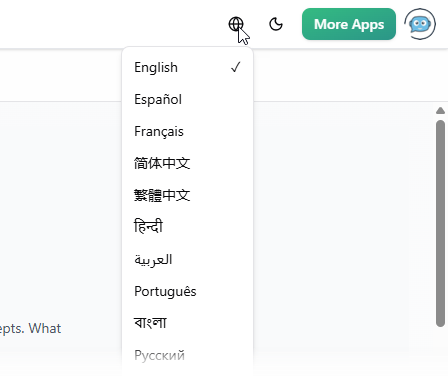
Supported languages include: Español, Français, Simplified Chinese, Traditional Chinese, Português, Japanese, Deutsch, Polski, and many more.
Step 3: Generate Diagrams in Your Native Language
The AI assistant has been refined to detect the language of your input prompts automatically. This reduces the “inertia” towards English responses and ensures the output matches your language.
- Type your prompt in your target language. For example, if you want a Use Case Diagram in Spanish, type:
“Dibuja un diagrama de casos de uso UML para un sistema de gestión de biblioteca”
- The AI diagram generator will process the request.
- Review the output. You will notice that the generated diagram, including actors and use case labels, appears in Spanish (or your chosen language).

Step 4: Engage in Multilingual Analysis and Refinement
The multi-language support extends beyond just drawing; it applies to explanations and reports as well.
- Ask a follow-up question in the same language to refine the diagram or ask for clarity. For example:
“Explica este diagrama”
- The AI will provide a detailed explanation of the diagram elements in that language.
- Use this feature to generate reports, perform diagram touch-ups, or discuss specific requirements without needing to translate back and forth from English.
Tips and Tricks
Maximize your productivity with these insights into the enhanced AI Chatbot capabilities:
- Seamless Language Switching: You do not need to restart the session to change languages. The AI is context-aware and will adapt to the language of the most recent prompt, even if the UI language is different.
- Export for Further Editing: While the AI creates the initial model, you can import these diagrams into the full Visual Paradigm software for advanced editing. The language settings of the generated elements are preserved during import.
- Complex Modeling Support: Don’t limit yourself to simple charts. The multi-language support covers complex standards like SysML for systems engineering and ArchiMate for enterprise architecture. Try generating technical requirements in your native language to test the accuracy.
- Share Sessions: You can share your multilingual modeling session via a URL. This is excellent for international teams where members might want to view the diagram generation process in the context of the localized conversation.
These enhancements make the Visual Paradigm AI Chatbot a truly global tool, empowering professionals and educators to work efficiently without language hurdles. Visit the Visual Paradigm AI Chatbot landing page to try these features today.
Resources
- How to Change Visual Paradigm’s Language?
- Multi- Languages support of Visual Paradigm
- How to switch Visual Paradigm to another language
- Miscellaneous – Visual Paradigm
- Visual Paradigm User’s Guides
- Multilingual Support – Visual Paradigm
- Visual Paradigm AI Chatbot Enhances Multi-Language Support …
- What is nickname in Visual Paradigm
- How can I change the user language? – General Questions/Discussions – Discuss the Visual Paradigm
- Data Type Project Options in Visual Paradigm
- VP-UML CE Multilanguage : French? – General Questions/Discussions – Discuss the Visual Paradigm
- How to Draw ONE Class Diagram for Java, C# and VB?
- Configure programming language – General Questions/Discussions – Discuss the Visual Paradigm
- Generate code for different Language – General Questions/Discussions – Discuss the Visual Paradigm
- Visual Paradigm Frequently Asked Questions