
Transform your static documents into measurable, high-performing digital experiences—no coding required.
Introduction
If you’re still sharing static PDFs, Word docs, or PowerPoints as attachments, you’re missing a massive opportunity. In today’s digital-first world, content isn’t just about what you say—it’s about how people experience it, and whether you can measure that experience to improve results.
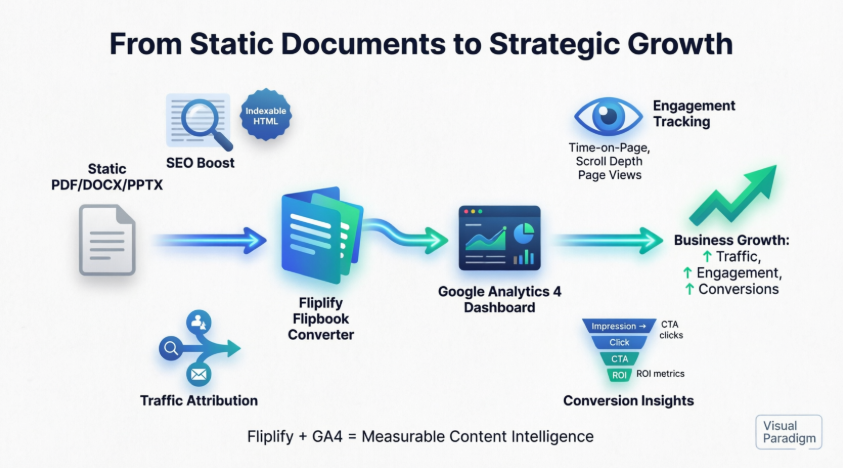
Enter Visual Paradigm Fliplify: a cloud-based tool that transforms your static documents into beautiful, page-turning HTML5 flipbooks that work on any device. But Fliplify isn’t just about aesthetics. It’s built with two powerful engines under the hood: **search engine optimization **(SEO) and **native Google Analytics 4 **(GA4).
This guide is written for absolute beginners. Whether you’re a small business owner, educator, marketer, or nonprofit professional, you’ll learn:
-
✅ Why animated flipbooks outperform static PDFs for engagement and SEO
-
✅ How Fliplify makes professional flipbooks economical and easy to create
-
✅ Exactly who benefits most from flipbook technology
-
✅ Step-by-step instructions to connect your flipbooks to Google Analytics 4
-
✅ How to use data to boost traffic, conversions, and business growth
Let’s turn your content from “just published” to “strategically optimized.”
Part 1: Beginner’s Guide – Why Flipbooks + SEO = Smarter Content
🤔 Why Should You Care About SEO for Your Documents?
Search Engine Optimization (SEO) isn’t just for blog posts and landing pages. When your PDFs, reports, catalogs, or training materials are trapped in static file formats, search engines like Google struggle to read and rank them. That means potential customers, students, or partners may never find your valuable content.
With Fliplify, your documents become searchable web pages. Here’s why that matters:
| Benefit | What It Means for You |
|---|---|
| 🔍 Indexable Content | Google can crawl and rank your flipbook pages like any webpage |
| 📝 Text Extraction | Keywords inside your document become discoverable via search |
| 🌐 Shareable URLs | Each flipbook gets a clean, public link that’s easy to share and track |
| 📱 Mobile-Ready | Responsive design ensures great experience on phones, tablets, and desktops |
✨ Why Animated Flipbooks Work Better Than Static PDFs
People don’t just read content—they experience it. Flipbooks add subtle animations, page-turn effects, and interactive elements that:
-
Increase time-on-page: Readers engage longer with dynamic content
-
Improve comprehension: Visual flow guides users through complex information
-
Boost shareability: Beautiful, interactive content is more likely to be shared on social media
-
Enhance brand perception: Professional flipbooks signal quality and attention to detail
💰 Why This Approach Is Economical & Effective
You don’t need a developer, designer, or big budget to get started:
| Traditional Approach | Fliplify Approach |
|---|---|
| Hire a web developer to convert PDFs to HTML | Upload your file; Fliplify handles conversion automatically |
| Pay for separate SEO tools and analytics plugins | Built-in SEO + native GA4 integration included |
| Manage multiple hosting platforms | Choose VP Online portal or your own domain—flexible options |
| Guess what’s working with no data | Track real reader behavior with Google Analytics 4 |
Bottom line: Fliplify delivers enterprise-grade features at a fraction of the cost and complexity.
Part 2: Product Review – Visual Paradigm Fliplify at a Glance
🎯 What Is Fliplify?
Fliplify is Visual Paradigm’s cloud-based flipbook converter that transforms PDFs, DOCX, and PPTX files into interactive, page-turning HTML5 publications. Think of it as turning your static document into a mini-website with analytics built in.
👥 Who Is Fliplify For?
| User Type | Use Case | Value Delivered |
|---|---|---|
| 📈 Marketers | Product catalogs, campaign reports | Track which pages drive conversions; optimize CTAs |
| 🎓 Educators | Course materials, student handouts | Measure engagement; identify confusing sections |
| 💼 Business Professionals | Proposals, training docs, internal comms | Prove content ROI; improve stakeholder communication |
| 🏢 Enterprises | Brand guidelines, annual reports | Maintain brand control while gaining engagement insights |
🌟 Why Fliplify Stands Out
✅ No coding required – Upload, publish, and track in minutes
✅ Mobile-responsive by default – Looks great on any device
✅ SEO-ready out of the box – Content is indexable and searchable
✅ Native GA4 integration – Connect to Google Analytics without custom code
✅ Flexible hosting – Publish to VP Online portal or your own domain
Part 3: How Flipbooks Boost Your Business & Website Traffic
🚀 Drive More Organic Traffic with SEO-Optimized Flipbooks
When Fliplify converts your document to HTML5, it creates a semantic structure that search engines love. This means:
-
Your flipbook pages can appear in Google search results for relevant keywords
-
Internal text search helps users find content faster once they’re on your flipbook
-
Publishing to the Visual Paradigm Online community portal gives you an instant, crawlable landing page with domain authority benefits
📊 Turn Readers Into Leads with Engagement Tracking
Flipbooks aren’t just pretty—they’re powerful conversion tools. With GA4 integration, you can:
-
See which pages keep readers engaged longest
-
Identify where users drop off and optimize those sections
-
Track clicks on embedded links, CTAs, or download buttons
-
Attribute traffic sources to measure campaign ROI
🔁 Create a Content Flywheel
-
Publish an SEO-optimized flipbook → gets found via search
-
Readers engage with interactive content → spend more time on page
-
Analytics reveal high-performing sections → inform future content strategy
-
Improved content drives more traffic and conversions → repeat
Part 4: Google Analytics 4 Integration – The Most Economical Way to Track Success
🎯 Why GA4 Is the Smart Choice for Flipbook Analytics
Google Analytics 4 is free, powerful, and built for the modern web. When integrated with Fliplify, it gives you:
| Feature | Business Benefit |
|---|---|
| 📈 Behavioral Metrics | Understand how readers interact with each page |
| 🌍 Audience Insights | Know where your readers are and what devices they use |
| 🔗 Traffic Attribution | See which channels (email, social, search) drive the most engagement |
| 🎯 Conversion Tracking | Measure actions that matter: clicks, downloads, sign-ups |
Best of all? No custom code required. Fliplify uses GA4’s standard measurement protocol—just paste your Measurement ID and you’re live.
⚙️ Step-by-Step: Connect Fliplify to Google Analytics 4
Part A: Set Up Your GA4 Property
-
Access Admin Settings
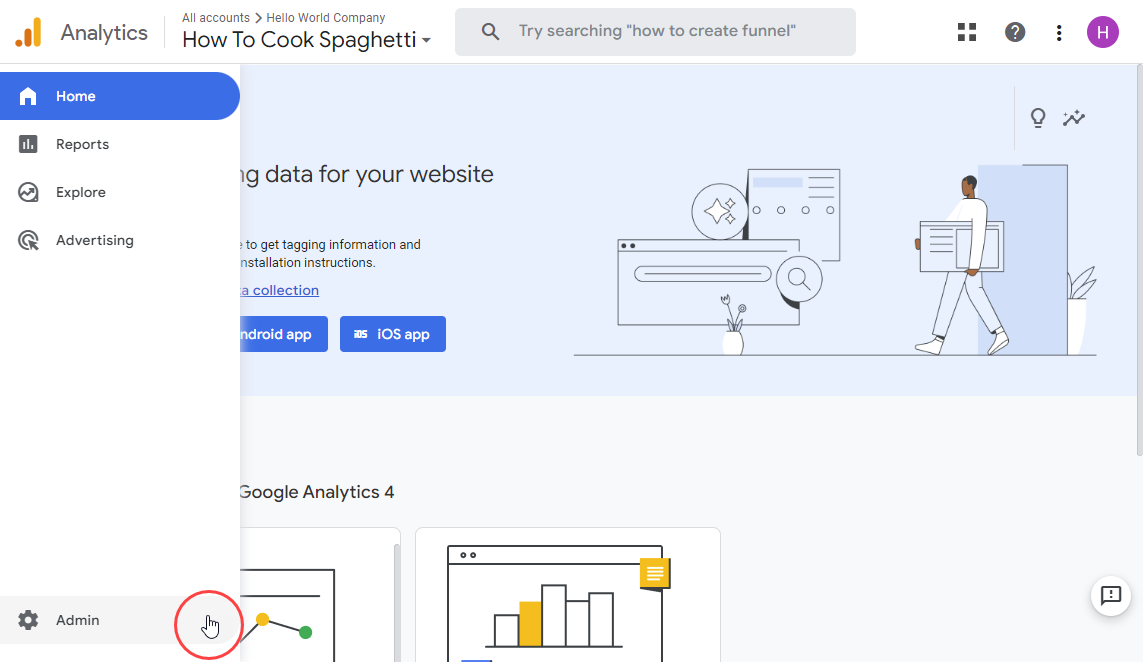
Log in to Google Analytics and click Admin in the bottom-left navigation.
-
Select Account & Property
Choose the GA4 property where you want flipbook data to appear. Ensure you have Edit permissions. -
Navigate to Data Streams
Under your GA4 property column, locate and click Data Streams.
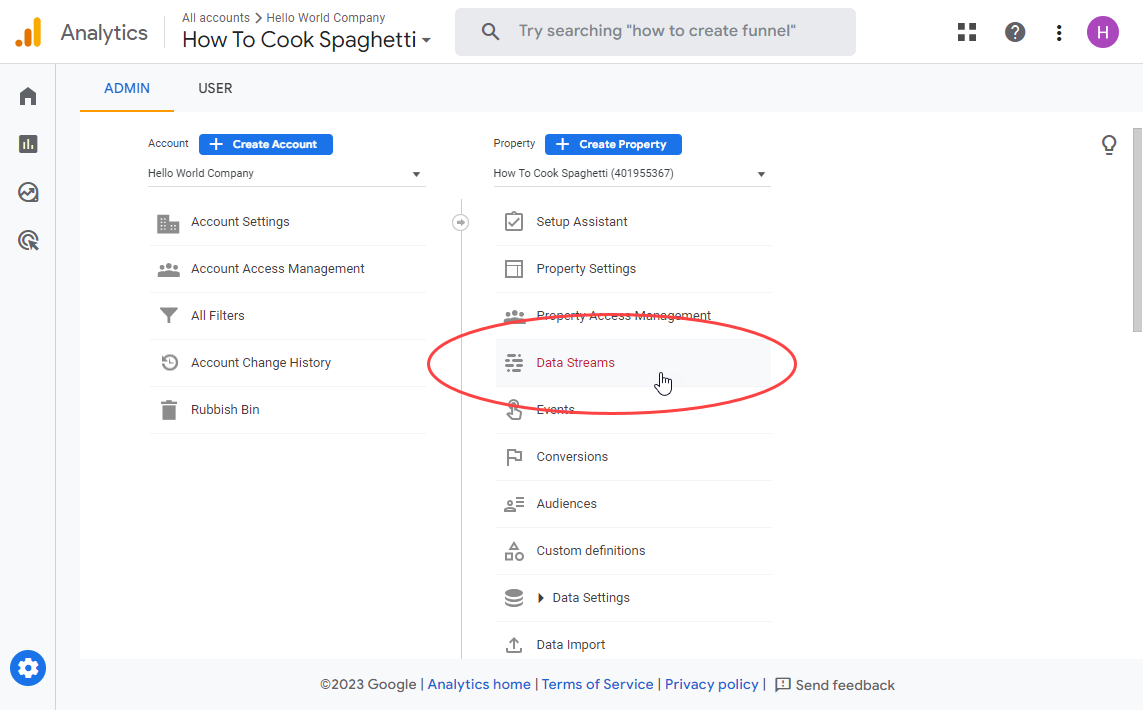
-
Create a Web Stream
Click Add stream → Web if you haven’t configured a web data stream yet.
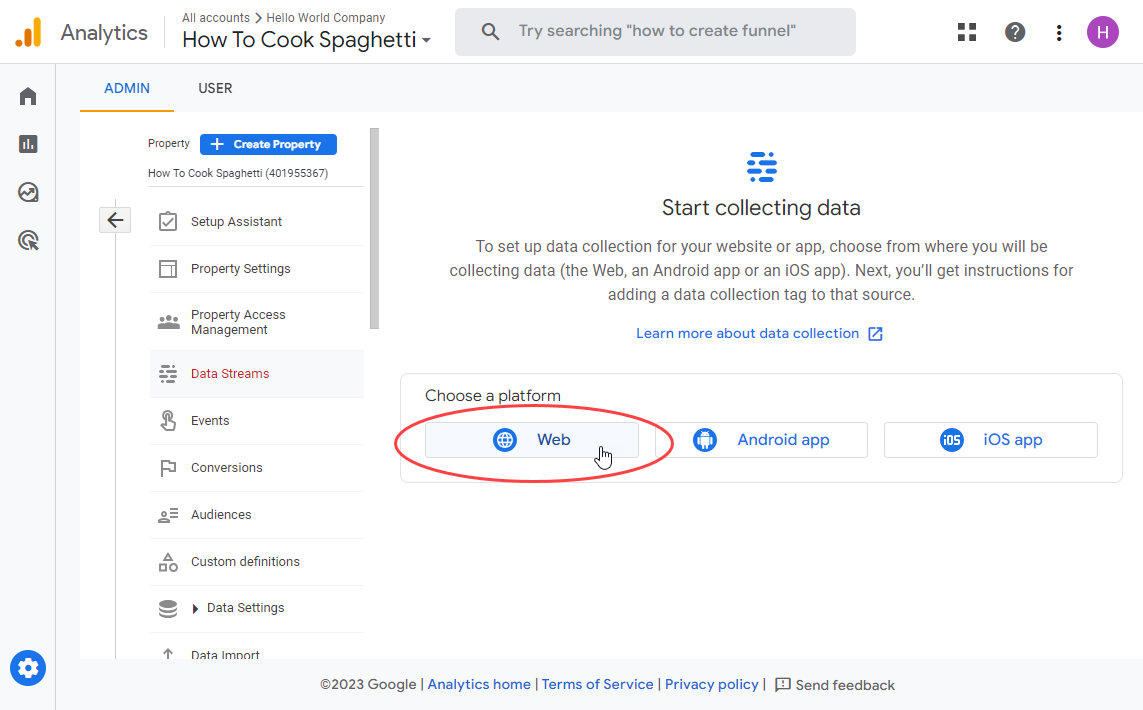
-
Configure Stream Details
-
Enter your flipbook’s public URL (e.g.,
https://online.visual-paradigm.com/your-flipbook) -
Assign a descriptive Stream name like “Fliplify – Product Catalog 2024”
-
Click Create stream to finalize
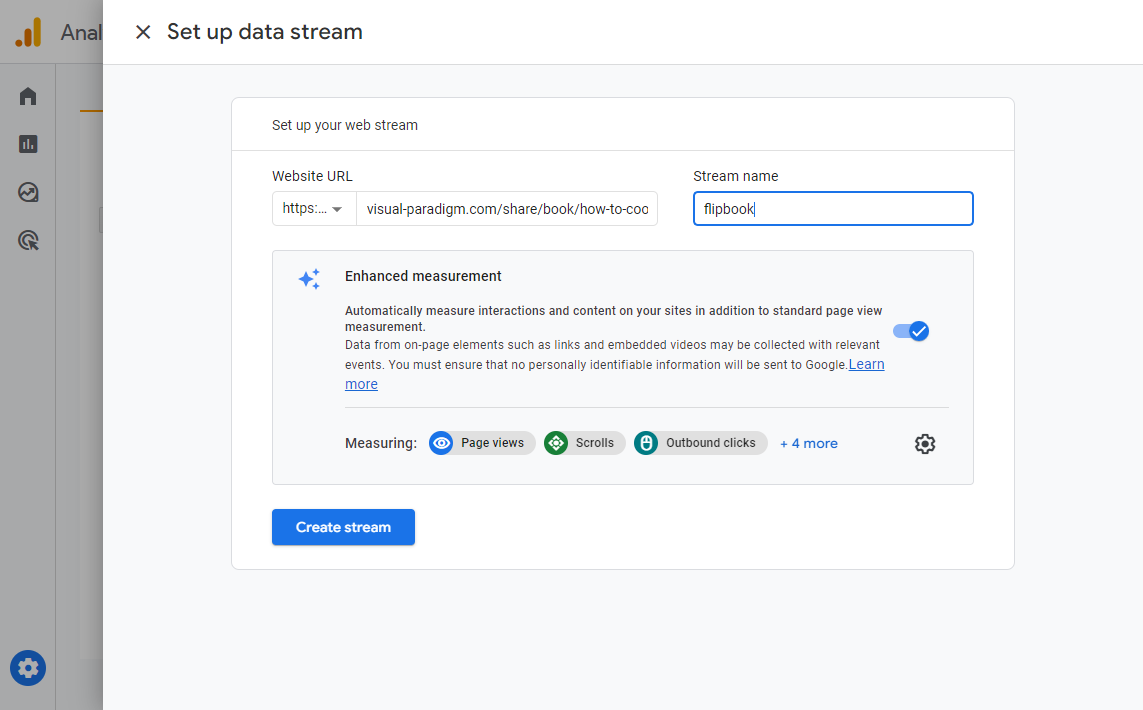
-
-
Copy Your Measurement ID
Locate the ID starting withG-(e.g.,G-A1B2C3D4E5). Copy this value—you’ll need it in Fliplify.
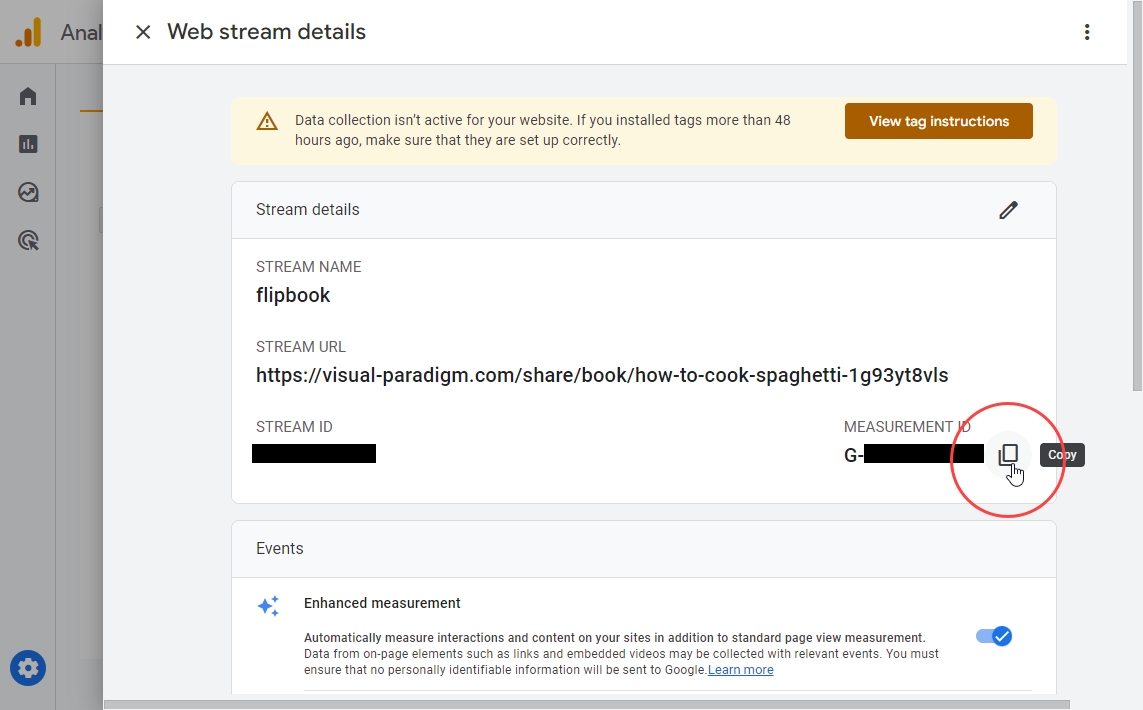
⏱️ Note: GA4 may take 24-48 hours to begin processing and displaying data from newly connected sources.
Part B: Activate Analytics in Fliplify
-
Access Flipbooks Dashboard
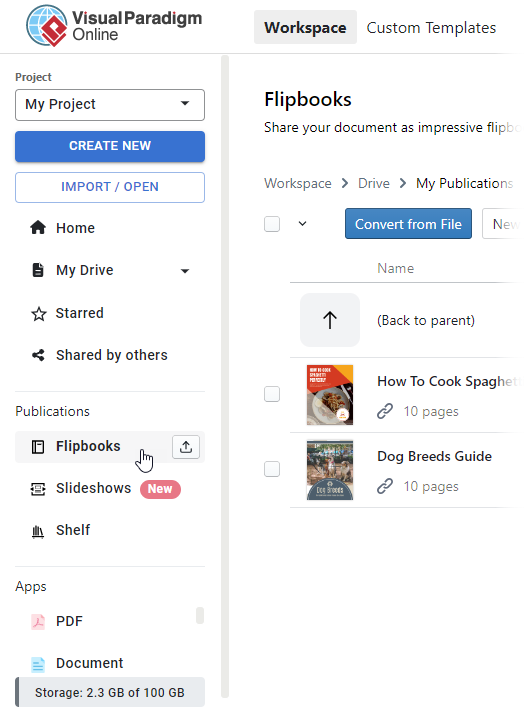
In your VP Online workspace, navigate to Flipbooks via the left-hand menu.
-
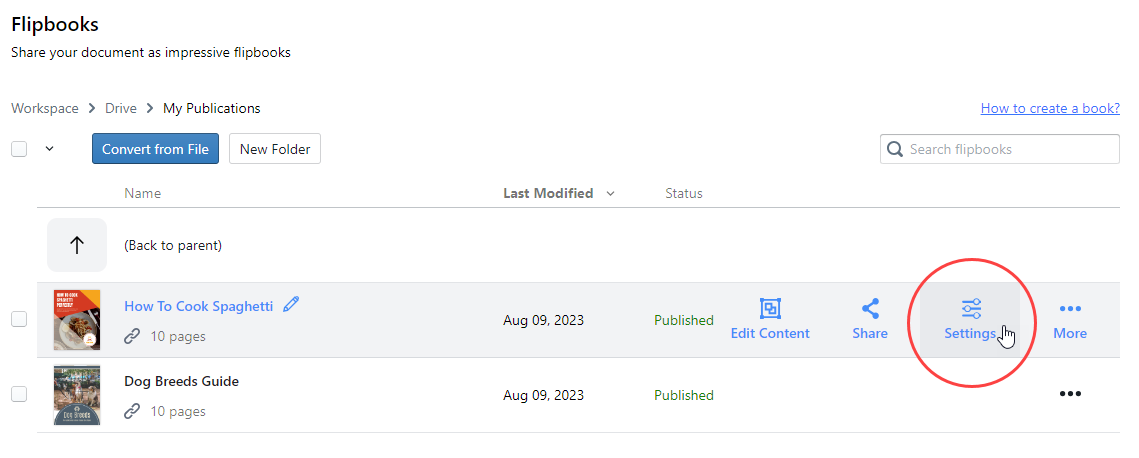
Open Flipbook Settings
Find your target flipbook and click the Settings (gear) icon.
-
Paste Measurement ID
In the Settings panel, select Analytics from the left categories. Paste yourG-Measurement ID into the designated field, then click Finish.
✅ You’re Live! Your flipbook now sends engagement events to Google Analytics. Real-time data may appear within minutes; full reports populate within 1-2 days.
💡 Pro Tips: Maximize Your Analytics ROI
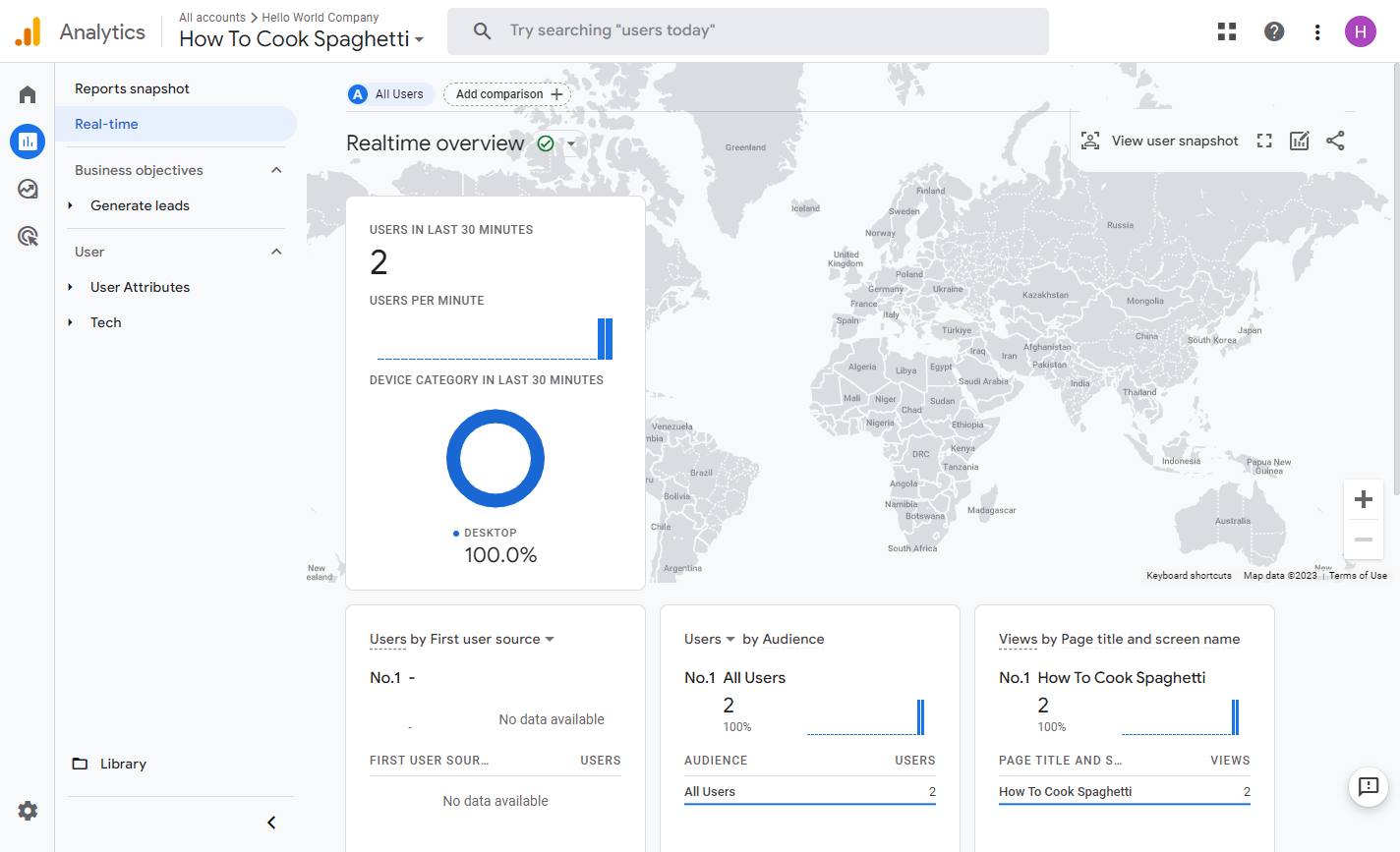
🔹 Validate Early: Use GA4’s Realtime report (Reports → Realtime) immediately after publishing to confirm events are firing.
🔹 Create Custom Events: Use Google Tag Manager to track specific actions like CTA clicks or video plays inside flipbooks.
🔹 Segment Audiences: Build GA4 audiences like “Readers who viewed 5+ pages” for targeted remarketing.
🔹 Use UTM Parameters: Append UTM tags to flipbook links shared in emails or social posts to attribute traffic sources precisely.
🔹 Monitor Page-Level Engagement: Use GA4 Exploration reports to identify high drop-off pages—then optimize content or design.
Conclusion: Make Every Flipbook a Measurable Growth Engine
Visual Paradigm Fliplify does more than beautify documents—it transforms passive content distribution into an intelligent engagement engine. By combining search-optimized flipbook rendering with enterprise-grade analytics via Google Analytics 4, you gain unprecedented visibility into how audiences discover, consume, and act upon your content.
The integration process is refreshingly straightforward: configure a GA4 web stream, copy your Measurement ID, and paste it into Fliplify’s Analytics settings. Within 48 hours, you’ll move from guessing about content performance to making data-driven decisions about design, distribution, and conversion optimization.
Whether you’re launching a product catalog, sharing a research report, or distributing training materials, Fliplify + GA4 empowers you to treat every flipbook as a measurable touchpoint in your customer journey. Start tracking today—and let your content work smarter, not just harder.
💬 Ready to optimize further? Consider A/B testing flipbook designs, experimenting with interactive elements, or layering in heatmapping tools to complement your GA4 insights.
References
- Why Visual Paradigm Online’s Flipbook Maker Stands Out: Overview of Fliplify’s competitive advantages including ease of use, conversion quality, and integrated marketing features.
- Reference List for Learning Fliplify: Curated resource guide for mastering Fliplify’s tools, tutorials, and best practices.
- The Complete Tutorial to Visual Paradigm Flipbook Maker: Step-by-step walkthrough of Fliplify’s core functionality and use cases from Cybermedian.
- Transforming Digital Content: The Comprehensive Guide to Fliplify: In-depth exploration of Fliplify’s SEO tools and analytics integration capabilities.
- Discover the Power of Searchable Flipbooks: Blog post detailing how Fliplify’s text extraction and indexing improve content discoverability.
- Elevate Your Digital Presence with Dynamic Flipbooks: Visual Paradigm’s official guide to leveraging flipbooks for brand engagement and lead generation.
- The Ultimate Guide to VP Online’s Bookshelf: Tutorial on organizing, publishing, and managing flipbook collections via the VP Online portal.
- Comprehensive Guide to Creating Interactive Flipbooks: End-to-end workflow for designing, customizing, and distributing Fliplify publications.
- Improve Customer Experience with Digital Flipbooks: Strategies for using flipbook analytics to enhance user journeys and conversion funnels.
- Flipbook Maker Category Archive: Collection of Visual Paradigm blog posts covering flipbook features, updates, and use cases.
- How Google Analytics Helps You Track Website Growth: Marketing-focused explanation of GA4 metrics relevant to content performance tracking.
- Track Flipbook Performance Using Google Analytics: Official Visual Paradigm tutorial on configuring and interpreting GA4 reports for flipbooks.
- Google Analytics Help: Measurement Code Data Collection: Google’s official documentation on how GA4 measurement IDs collect and process user interaction data.
- VP Online Know-How: Google Analytics Integration: Visual Paradigm’s technical knowledge base article with screenshots and troubleshooting tips.
- Tracking Flipbook Views with Google Analytics Integration: Source article detailing the step-by-step GA4 setup process for Fliplify users.