


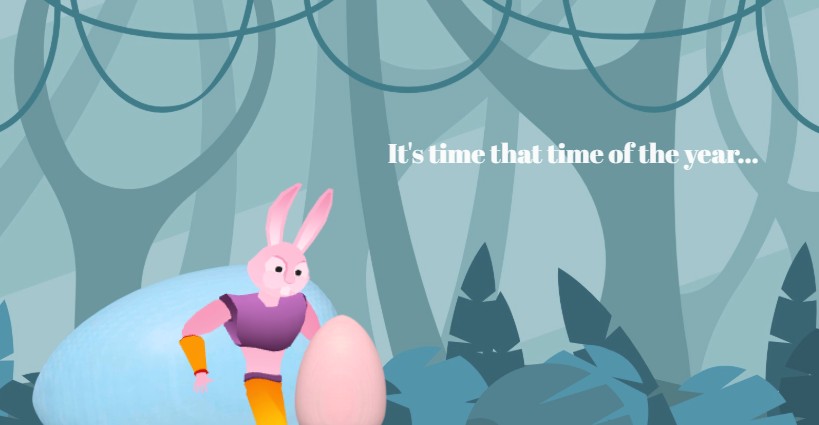
Imagine crafting a charming, animated story about a brave bunny on a quest to find the world’s biggest egg—without needing a single line of code or a design degree. That’s the magic of Visual Paradigm’s Animation Maker, also known as AniFuzion. This online tool transforms complex animation into a simple, joyful experience. The image you see is a perfect example of what you can create: a delightful 3D scene set in a misty forest, where a pink bunny character stands proudly beside a massive, glowing egg. The text “It’s time that time of the year…” hints at a festive narrative, likely a holiday-themed story or a playful commercial. With AniFuzion, you can bring your own imaginative worlds to life, using intuitive tools that make animation accessible to everyone. Ready to start your own animated adventure? Let’s dive in.
Quick summary
-
What is AniFuzion? An online, AI-powered animation maker that lets you create 2D and 3D animations effortlessly.
-
Key Features: Drag-and-drop interface, 3D character library, AI text-to-speech, automatic lipsync, and pre-built actions.
-
Use Case: Perfect for creating engaging videos, presentations, and interactive flipbooks for education, marketing, or personal projects.
-
Why it’s great: No design skills or software installations needed—create stunning animations in minutes.
How to Bring Your Story to Life with AniFuzion
Creating a scene like the one in the image is easier than you might think. The first step is to understand the core elements that make up this animated world. In the screenshot, we see a 3D character—a cute pink bunny—set against a stylized forest background. This blend of 2D and 3D elements is a hallmark of AniFuzion’s versatility. The tool allows you to mix and match different visual styles, so your characters can exist in a rich, immersive environment. The process begins with a simple idea: a character, a setting, and a story to tell.
Start by selecting a 3D character from the extensive library. AniFuzion offers thousands of customizable figures, from cartoonish bunnies to realistic animals. Once you’ve chosen your hero, drag it onto the canvas. The character’s design is fully editable—change its colors, textures, and even body parts to match your vision. For the bunny in the image, you might adjust its fur, outfit, or accessories to give it a unique personality.
Adding Motion and Personality with Pre-Built Actions
Now that your character is in place, it’s time to bring it to life. AniFuzion’s pre-built actions library is a game-changer. With over 2,000 dynamic motions, you can make your bunny walk, jump, or even dance with a single click. In the image, the bunny appears to be in a confident pose, perhaps ready to embark on its adventure. You can achieve this by selecting an action like “standing with hands on hips” or “gazing into the distance.” The timeline at the bottom of the interface lets you control the duration and timing of each motion, ensuring your animation flows smoothly.
Enhancing the Scene with Backgrounds and Props
To create the atmospheric forest setting, you’ll need a background and some props. AniFuzion’s scene library offers a wide range of ready-to-use environments, from lush jungles to snowy mountains. Simply drag a background onto the canvas, and your character instantly feels immersed in the world. You can also add props like the giant egg in the image. These elements help tell the story and add depth to your scene. For a holiday theme, you might include other festive items like ribbons, flowers, or a basket.
Using AI to Add Voice and Emotion
One of AniFuzion’s most powerful features is its AI text-to-speech (TTS) tool. Instead of hiring a voice actor, you can generate a professional-sounding narration with just a few clicks. Enter your script into the TTS panel, choose a voice with the right accent and emotion—like a cheerful, excited tone for the bunny’s announcement—and let the AI do the rest. The tool automatically syncs the character’s mouth movements with the audio, a process called automatic lipsync, making the dialogue feel natural and engaging.
Final Touches and Exporting Your Creation
Before you export, add some finishing touches. Use the shape effects library to animate text or objects, like making the “It’s time that time of the year…” text fade in or bounce onto the screen. This adds a dynamic element that captures attention. Once you’re satisfied with your animation, preview it in real-time to check for any issues. When everything looks perfect, export your creation as an MP4 video or generate a shareable link for an interactive flipbook. This makes it easy to share your story on social media, embed it in a website, or use it in a presentation.
Why AniFuzion is a Game-Changer for Creators
Whether you’re an educator creating an interactive lesson, a marketer building a promotional video, or a hobbyist exploring your creativity, AniFuzion empowers you to communicate your ideas in a visually compelling way. The tool’s intuitive interface and powerful features make animation accessible to everyone, regardless of skill level. You can focus on your story and let the software handle the technical details.
Imagine the possibilities: a classroom video where a character explains a complex concept, a product demo that showcases a new feature in a fun way, or a personal project that tells a unique story. With AniFuzion, you have the tools to turn your imagination into reality.
Ready to start your own animated adventure? Try AniFuzion today and see how easy it is to create stunning, engaging animations that captivate your audience.
Related Links
-
Visual Paradigm Online Animation Maker (AniFuzion): Create professional-quality animated videos and motion graphics easily with Visual Paradigm’s versatile online animation tool.
-
Comprehensive Guide to Using Visual Paradigm Online’s Anifuzion: Explore this comprehensive resource to learn how to navigate AniFuzion’s interface and leverage its powerful animation tools for professional storytelling.
-
Introducing Visual Paradigm’s Anifuzion: The Ultimate Animated Video Maker: Learn how Anifuzion streamlines the creation of dynamic animations with features like AI-powered text-to-speech and a diverse library of 3D characters.
-
Creative Motion Graphics with Anifuzion (Pinterest Inspiration): Explore visual inspiration and creative examples of professional motion graphics and video projects developed using the Anifuzion animation engine.
-
Comprehensive Guide to Swapping Characters in AniFuzion: Master the character swap functionality within Visual Paradigm Online to maintain creative flow and save time by reusing animations across different character models.