
What is a Package Diagram?
A Package Diagram is a structural UML (Unified Modeling Language) diagram used to organize and arrange various model elements—such as classes, use cases, or other packages—into high-level groups. This simplifies complex systems by providing a clear, high-level view of the architecture and how different parts interact.
Purpose
The primary aim of a Package Diagram is to simplify the understanding of intricate systems by grouping related elements together. It facilitates a clearer understanding of the system’s overall structure and the relationships between its components.
Key Elements
-
Package: Represented as a tabbed folder, it serves as a namespace for its members.
-
Dependency: Illustrated with dashed arrows, indicating that changes in one package may affect another.
-
Visibility: Elements within a package can have different levels of visibility:
-
Public (+)
-
Private (-)
-
Protected (#)
-
How to Use Visual Paradigm
Two Approaches
1. Traditional Manual Approach
In Visual Paradigm, you can manually build the structure of a Package Diagram using the following steps:
-
Create Diagram:
-
Navigate to the toolbar and select Diagram > New.
-
Choose Package Diagram from the list.
-
-
Add Packages:
-
Click the Package icon on the diagram toolbar.
-
Click on the canvas to place it and provide a name for your package (e.g., “Payment”).
-
-
Populate Elements:
-
You can drag existing classes or use cases from your project browser into the package.
-
Alternatively, create new elements directly within the package.
-
-
Define Relationships:
-
Use the Resource Catalog (the icon that appears upon clicking a package) to drag a Dependency arrow to another package.
-
2. AI-Powered Approach
Visual Paradigm offers AI-driven tools to generate Package Diagrams quickly from natural language input:
-
Access AI Generator:
-
Go to Tools > AI Diagram Generation or use the AI chatbot at
chat.visual-paradigm.com.
-
-
Select Type:
-
From the diagram type menu, choose Package Diagram.
-
-
Provide Prompt:
-
Type a description of your system. For example:
-
“Generate a Package Diagram for an online bookstore system, organizing it into layers: Presentation, Business, and Persistence.”
-
-
-
Refine & Import:
-
The AI will create an editable diagram. You can ask the chatbot to add missing relationships or packages before clicking Import to integrate it into your main project.
-
Example
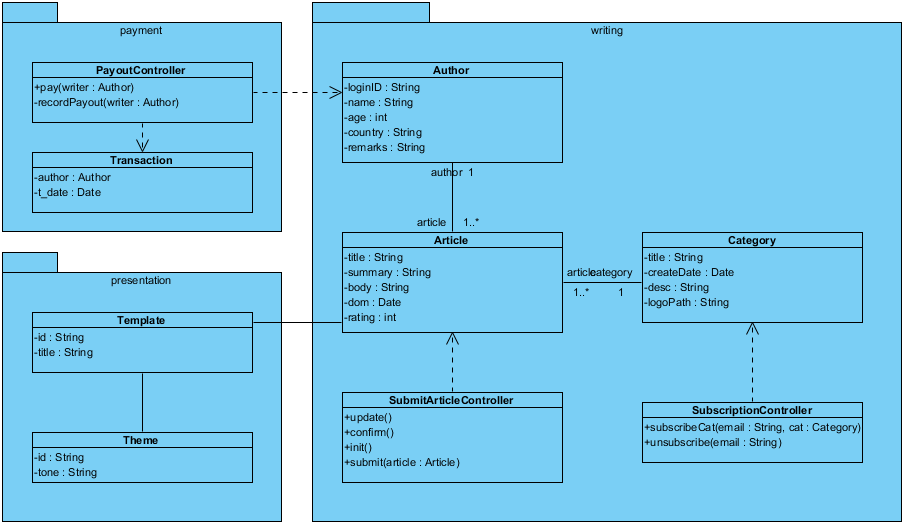
-
Writing Package (Core Logic)
This is the heart of the system, handling the creation and categorization of content.
-
Author: Contains personal details (name, age, country). It has a 1-to-many relationship with articles (one author can write many articles).
-
Article: The central entity containing the body, summary, and rating. Each article is linked to exactly one Category.
-
Category: Used to group articles. It includes a logoPath and description.
-
SubmitArticleController: A controller class used to manage the lifecycle of an article (submit, update, confirm).
-
SubscriptionController: Manages user subscriptions to specific categories via email.
-
Payment Package
This package handles the financial aspect of rewarding authors.
-
PayoutController: Contains the logic to pay a writer and recordPayout. It has a dependency on the Author class from the writing package.
-
Transaction: A record-keeping class that stores the author and the t_date (transaction date) of a payment.
-
Presentation Package
This package deals with how the content is displayed to the end-user.
-
Template: Defines the structure for an article. It is directly associated with the Article class.
-
Theme: Defines the visual “vibe” or tone of the presentation.
Summary of Relationships
| Relationship Type | Description |
|---|---|
| Association | Between Author and Article (1 to 1..*), and Article and Category. |
| Dependency | Indicated by dashed arrows (e.g., PayoutController depends on Author to process payments). |
| Multiplicity | 1..* indicates that one instance of a class (like Category) can be associated with “one or more” instances of another (like Article). |
Conclusion
Understanding and utilizing Package Diagrams is crucial for effectively organizing system architectures in UML. Visual Paradigm provides both manual and AI-powered approaches for creating these diagrams, catering to different user preferences.
References
-
Modeling Software Architecture with Package Diagrams: An overview of software architecture modeling using Package Diagrams.
-
Package Diagram Tutorial: A comprehensive tutorial on how to create Package Diagrams using Visual Paradigm.
-
Beginners Guide to Package Diagrams with Visual Paradigm: Introductory guide for beginners on using Package Diagrams in Visual Paradigm.
-
Drawing Package Diagrams in Visual Paradigm: Step-by-step guide on how to draw Package Diagrams.
-
AI Diagram Generator for Package Diagrams in Visual Paradigm: Information on the AI diagram generator feature for creating Package Diagrams.
-
How to Turn Requirements into Diagrams with an AI Chatbot: Guide on utilizing the AI chatbot for generating diagrams from system requirements.