

Now Reading: Comprehensive Guide to Integrating Use Case Modeling with the C4 Model
-
01
Comprehensive Guide to Integrating Use Case Modeling with the C4 Model



Comprehensive Guide to Integrating Use Case Modeling with the C4 Model

Introduction: Bridging Requirements and Architecture
In modern software development, aligning functional requirements with system architecture is critical—especially in complex, evolving environments. Use case modeling captures what the system does, while the C4 model visualizes how it is structured. When combined, they form a powerful, holistic approach to software design that enhances communication, ensures traceability, and supports agile, scalable development.
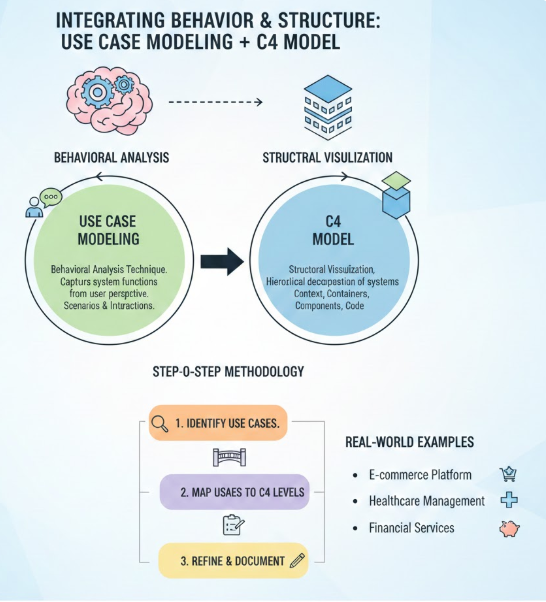
This guide explores the integration of use case modeling—a behavioral analysis technique—and the C4 model—a structural visualization framework—providing a step-by-step methodology, real-world examples, and practical support via Visual Paradigm’s all-in-one AI platform.
1. Understanding Use Case Modeling
Use case modeling is a UML (Unified Modeling Language) technique used to identify, describe, and document the functional behavior of a system from the user’s perspective. It focuses on interactions between actors (users or external systems) and the system to achieve specific goals.
✅ Key Elements of Use Case Modeling
| Element | Description |
|---|---|
| Actors | External entities (people, systems, devices) that interact with the system. Can be primary (initiate use cases) or secondary (supporting roles). |
| Use Cases | Descriptions of system behaviors that deliver value to an actor. Each use case represents a goal (e.g., “Place Order”). |
| Use Case Diagrams | Visual representations showing actors, use cases, and relationships such as: • <<include>>: Mandatory inclusion of one use case within another.• <<extend>>: Optional extension of a base use case under certain conditions. |
| Scenarios | Specific execution paths through a use case, including: • Main flow: Normal, successful path. • Alternative flows: Variants or exceptions. • Exception flows: Error conditions. |
📌 Best Practice: Use textual descriptions (e.g., in Use Case Specification format) alongside diagrams to capture full behavior, especially for complex flows.
2. Mastering the C4 Model: A Layered Approach to Software Architecture
Developed by Simon Brown, the C4 model provides a structured, hierarchical way to visualize software architecture across four abstraction levels—each tailored to a different audience.
📊 The Four Levels of the C4 Model
| Level | Name | Description | Audience |
|---|---|---|---|
| Level 1 | Context | High-level view: system, its users, and external systems. Shows major interactions. | Stakeholders, business analysts, product owners |
| Level 2 | Containers | Breaks the system into deployable components (e.g., web apps, APIs, databases). Reveals technology stack. | Architects, developers |
| Level 3 | Components | Internal structure of containers: modules, services, libraries. Focuses on responsibility and interaction. | Technical teams, developers |
| Level 4 | Code | Class diagrams, sequence diagrams, or actual code. Details implementation-level design. | Developers (optional, often auto-generated) |
🔍 Core Principle: Diagrams as Code – Store diagrams in version control using text-based tools like PlantUML or Structurizr.
3. Why Integrate Use Case Modeling with C4?
While use cases define behavior, C4 defines structure. Integrating them creates a traceable, coherent design pipeline from business goals to code.
✅ Benefits of Integration
| Benefit | Explanation |
|---|---|
| Improved Communication | Business stakeholders understand use cases; technical teams grasp C4. Together, they bridge gaps. |
| Early Risk Detection | Misaligned use cases can reveal architectural flaws (e.g., a use case requiring real-time data but no message queue). |
| Traceability & Compliance | Link use cases to components and code—essential for audits, regulations (e.g., GDPR, HIPAA), and change management. |
| Agile & Iterative Alignment | In sprints, refine use cases and update C4 diagrams in parallel. Supports continuous delivery. |
| Scalability & Reusability | The C4 hierarchy scales from startups to enterprises; use cases ensure no functionality is lost during decomposition. |
🚩 Avoid Integration When: The system is a simple script, prototype, or low-complexity tool where full modeling adds overhead.
4. When to Use This Integration
| Scenario | Why It Works |
|---|---|
| Early Project Phases | Align business goals with architectural vision before coding begins. |
| Large-Scale Systems (Microservices, Enterprise Apps) | Use cases help identify service boundaries and data flows. |
| Cross-Functional Teams | Business analysts write use cases; architects build C4 models—collaboration made easy. |
| Refactoring or Legacy Documentation | Analyze existing behavior (use cases) and map to current structure (C4) to plan migration. |
| Agile Sprints | Update use cases and refine C4 diagrams each sprint for evolving requirements. |
5. Step-by-Step Integration: From Use Cases to C4 Architecture
Follow this proven workflow to integrate use case modeling with the C4 model:
🔄 Step-by-Step Integration Process
-
Elicit Functional Requirements
-
Conduct interviews or workshops with stakeholders.
-
Identify actors and their goals.
-
Create use case diagrams and detailed use case specifications (including flows, preconditions, postconditions).
-
-
Map to C4 Context (Level 1)
-
Place the system as a central box.
-
Add actors (e.g., “Customer”, “Admin”) and external systems (e.g., “Payment Gateway”).
-
Label interaction arrows with use case names (e.g., “Transfer Funds”, “Place Order”).
-
-
Decompose into Containers (Level 2)
-
Assign use case responsibilities to containers.
-
Example: “Login” → Web App Container
-
“Process Payment” → API Gateway + Payment Service
-
-
Use dependency arrows to show communication (synchronous/asynchronous).
-
-
Break Down Components (Level 3)
-
For each container, define internal components.
-
Map use case flows to component interactions.
-
Use sequence diagrams to show step-by-step behavior (e.g., “Customer logs in → Auth Service validates → Session created”).
-
-
Add Code-Level Details (Optional, Level 4)
-
Generate class diagrams for key components.
-
Show classes, methods, and relationships tied to use case steps.
-
Example:
OrderService.processOrder()corresponds to “Complete Checkout” use case.
-
-
Iterate and Validate
-
Review with stakeholders: “Does the architecture support all use cases?”
-
Simulate edge cases (e.g., “What happens if payment fails?”).
-
Refactor diagrams as needed.
-
-
Document as Code
-
Use PlantUML, Structurizr, or Visual Paradigm to store diagrams in text format.
-
Version control them alongside source code.
-
💡 Pro Tip: Use consistent naming conventions (e.g.,
User→Customer,System→Banking App) to maintain clarity across levels.
6. Key Concepts & Best Practices
| Concept | How to Apply |
|---|---|
| Abstraction Levels | Use C4’s zoom-in approach: start with context, then drill down. Use cases guide each level. |
| Relationships | In use cases: <<include>> and <<extend>>. In C4: use arrows with labels (e.g., “HTTP POST”, “async event”). |
| System Boundaries | Clearly define the system in C4 Context. Ensure use cases stay within scope. |
| Behavioral Overlays | Annotate C4 diagrams with use case IDs (e.g., UC-001: Transfer Funds) for traceability. |
| Tooling & Notation | Use boxes (C4), lines (dependencies), and icons (actors). Integrate UML elements (e.g., <<actor>>) in context diagrams. |
✅ Golden Rule: The architecture should enable use cases—not constrain them.
7. Real-World Examples
🏦 Example 1: Online Banking System
Use Cases
-
Actor: Customer
-
Use Case:
Transfer Funds-
Main Flow: Authenticate → Select Source/Target Account → Enter Amount → Confirm → Transfer
-
Exception: Insufficient balance → Show error
-
Extends:
Apply Fraud Check(if amount > $5000)
-
C4 Integration
| Level | Diagram Detail |
|---|---|
| Context | “Banking App” ↔ “Customer” (via web), “External Bank” (via API) → Arrow labeled: “Transfer Funds” |
| Containers | – Web App (React) – API Gateway (Node.js) – PostgreSQL DB – External Bank API |
| Components | In API Gateway: Auth Service, Transaction Service, Fraud Detection Service |
| Code Level | TransactionService.transfer(Account from, Account to, double amount)→ Uses @Transactional annotation for ACID compliance |
✅ Why It Works: The use case drives the need for secure, auditable transaction services and external validation.
🛍️ Example 2: E-Commerce Platform (Microservices Architecture)
Use Cases
-
Browse Products→ includesSearch Products -
Checkout→ extendsApply Coupon,Verify Inventory,Process Payment
C4 Integration
| Level | Diagram Detail |
|---|---|
| Context | “E-Commerce App” ↔ “User” (mobile/web), “Payment Gateway”, “Inventory System” |
| Containers | – Mobile App (React Native) – Backend API (Spring Boot) – NoSQL DB (MongoDB) – Message Queue (Kafka) |
| Components | In Backend: Cart Module, Order Processor, Inventory Service, Notification Service |
| Code Level | OrderProcessor.createOrder()→ Triggers sendConfirmationEmail()→ Publishes order.created event to Kafka |
✅ Why It Works: High-traffic use cases like “Checkout” require asynchronous processing (Kafka), which is only visible at the component level.
8. How Visual Paradigm’s AI Platform Enables Seamless Integration
Visual Paradigm’s all-in-one AI-powered platform transforms the integration of use case modeling and C4 into a fast, intelligent, and collaborative process—ideal for agile teams, enterprises, and remote collaboration.
🚀 Key Features
| Feature | Benefit |
|---|---|
| AI-Powered Use Case Studio | Input: “A customer wants to transfer funds in the banking app.” Output: Full use case with flows, preconditions, diagrams (Use Case, Activity, Sequence), and test cases—all generated in seconds. |
| C4 Diagram Generator | Describe: “An e-commerce platform with mobile app, backend API, and message queue.” AI generates: Context, Container, Component, and Deployment diagrams (with PlantUML or native rendering). |
| Conversational AI Assistant | Ask: “Map the ‘Checkout’ use case to C4 containers.” AI responds with annotated diagrams and suggestions for component decomposition. |
| Integrated AI Apps | – Use Case Refinement – Sequence Diagram Builder – Development Plan Generator – Risk & Dependency Analyzer |
| Collaboration & Export | Real-time editing, role-based access, export to: • PDF, PNG, SVG • Structurizr JSON • Code (Java, C#, Python) • Markdown documentation |
| Offline & Cloud Access | Work seamlessly across devices with desktop and web apps. |
💬 Example Prompt:
“Generate a use case for ‘Apply Coupon’ and map it to a C4 container model for an e-commerce app.”
✅ Result: A complete, traceable model in under 60 seconds—no manual drawing.
9. Final Thoughts: A Future-Proof Design Strategy
Integrating use case modeling with the C4 model is not just a best practice—it’s a necessity for modern software development. It ensures:
-
✅ Alignment between business goals and technical design
-
✅ Clarity across stakeholders at every level of abstraction
-
✅ Traceability from requirement to code
-
✅ Scalability for microservices, cloud-native, and distributed systems
-
✅ Efficiency with AI automation and collaboration tools
By combining the behavioral insight of use cases with the structural clarity of C4, teams can design systems that are not only functional and robust but also maintainable, testable, and adaptable.
Bonus: Quick Reference Checklist
✅ Start with use cases to define what the system does
✅ Build C4 Context to show who interacts with it
✅ Decompose into containers based on use case responsibilities
✅ Break down components to implement use case flows
✅ Use sequence diagrams and class diagrams for detail
✅ Validate alignment with stakeholders
✅ Automate with AI tools like Visual Paradigm
✅ Store diagrams as code in version control
🌐 Ready to Get Started?
Try Visual Paradigm’s AI Platform for free at https://www.visual-paradigm.com
Use natural language to generate use cases, C4 models, and even code—fast, accurate, and collaborative.
Conclusion
The fusion of use case modeling and the C4 model is more than a methodology—it’s a design philosophy. It empowers teams to build software that is not only functional and scalable but also clearly understood by all stakeholders. With AI-driven tools like Visual Paradigm, this integration is now faster, smarter, and more accessible than ever.
🎯 Remember: Good architecture starts with clear requirements—and the best architecture evolves from them.


