


🔍 Overview
A use case diagram is a fundamental modeling tool in requirements engineering used to visualize the interactions between actors (users or external systems) and the system (or its functionalities). It helps stakeholders understand what the system must do from a functional perspective and serves as a communication bridge between technical teams and business users.
Despite its simplicity, the use case diagram is often misapplied due to poor actor identification, vague use cases, or incorrect relationships. This guide aims to clarify the key concepts, provide a step-by-step methodology, and highlight common pitfalls to avoid.
🔑 Key Concepts
| Concept | Explanation |
|---|---|
| Actor | A human user, organization, or external system that interacts with the system. Acts as a “user” in the system’s context. Examples: student, teacher, admin, payment gateway. |
| Use Case | A description of a specific goal or function that the system performs for an actor. Defines what the system does, not how. Examples: “Register for a course”, “Submit grades”, “Generate report”. |
| System Boundary | The boundary that separates the system from external actors and systems. Everything inside the boundary is part of the system. |
| Association | A line connecting an actor to a use case, indicating that the actor can perform that use case. |
| Generalization | A relationship where one actor inherits behavior from another (e.g., “Student” is a type of “User”). |
| Dependency | A relationship indicating that one use case depends on another (e |
| .g., “Generate Report” depends on “Get Student Data”). | |
| Include | A use case that is required for another to be executed (e.g., “Submit Grades” includes “Validate Student ID”). |
| Extend | A use case that conditionally adds functionality (e.g., “Send Notification” extends “Submit Grades” when grades are below threshold). |
⚠️ Important Note: Use cases are not about features — they are about functional goals that satisfy user needs.
🚀 Step-by-Step Process to Create a Use Case Diagram
Step 1: Identify the Actors
Ask yourself these core questions to identify all relevant actors:
| Question | Why It Matters |
|---|---|
| Who uses the main use cases? | Identifies primary users (e.g., students, professors). |
| Who needs support for daily work? | Finds support roles (e.g., HR staff, IT support). |
| Who is responsible for system administration? | Identifies admin roles (e.g., system manager, database admin). |
| What external devices/software systems does the system interact with? | Identifies external systems (e.g., email, payment gateway, ERP). |
| Who has an interest in the system’s outcomes? | Identifies stakeholders (e.g., parents, board members). |
📌 Tip: Start with the most critical users and expand outward. Use real-world scenarios or interviews to validate actor identification.
💡 Example: In a university student management system, actors might include:
Student
Faculty Member
Academic Advisor
Admin Officer
Payment Gateway
ERP System
Step 2: Identify Use Cases
Once actors are identified, ask the following questions about each actor:
| Question | Purpose |
|---|---|
| What are the main tasks an actor must perform? | Identifies functional goals (e.g., register, enroll, view grades). |
| Does the actor want to query or modify data in the system? | Indicates read/write operations (e.g., view records, edit profile). |
| Does the actor want to inform the system about changes in other systems? | Suggests event-driven triggers (e.g., notify system when a course is added). |
| Should the actor be informed about unexpected events? | Indicates notification use cases (e.g., “Alert: Course Overload Detected”). |
📌 Use simple, goal-oriented language. Avoid technical terms.
✅ Good use case: “Enroll in a Course”
❌ Bad use case: “Submit enrollment form with validation” → becomes too technical.
Step 3: Organize Use Cases at Different Levels
Use cases can be modeled at different levels:
| Level | Description |
|---|---|
| Top-Level Use Cases | Broad functional objectives that reflect business goals (e.g., “Manage Student Records”). |
| Refined Use Cases | Detailed actions derived from top-level goals. |
🔁 Iterative Development Approach:
-
Begin with high-level business objectives.
-
Break them down into sub-goals.
-
Refine each use case until it is specific and actionable.
📌 Example Breakdown:
-
Top-level: “Support student administration”
-
Refinement:
-
Student can register
-
Student can enroll in courses
-
System stores grades
-
System sends enrollment confirmation
-
This ensures the system meets business objectives while remaining practical and testable.
Step 4: Build the Use Case Diagram
Now, place actors and use cases on the diagram and connect them appropriately.
Diagram Structure:
[Actor] --> [Use Case]
    ↑
[Include]     [Extend]
    ↓
[Dependency]
Rules for Drawing the Diagram:
-
Place actors outside the system boundary (typically on the left/right/top).
-
Place use cases inside the system boundary (center or below).
-
Use solid lines for associations.
-
Use dashed lines for dependencies.
-
Use inclusion arrows (→) for
includerelationships. -
Use extension arrows (→) for
extendrelationships. -
Avoid overlapping use cases; keep the diagram clean and readable.
📌 Visual Example (Text-Based):
+------------------+
|   Student        |  --> Enroll in Course
+------------------+
          |
          v
+------------------+
|   System         |  --> Store Course Enrollments
| (Boundary)       |
+------------------+
          ^
          |
+------------------+
|   Payment Gateway|  --> Process Fee Payment
+------------------+
🚨 Common Mistake: Drawing actors inside the system boundary — this implies they are part of the system, which they are not.
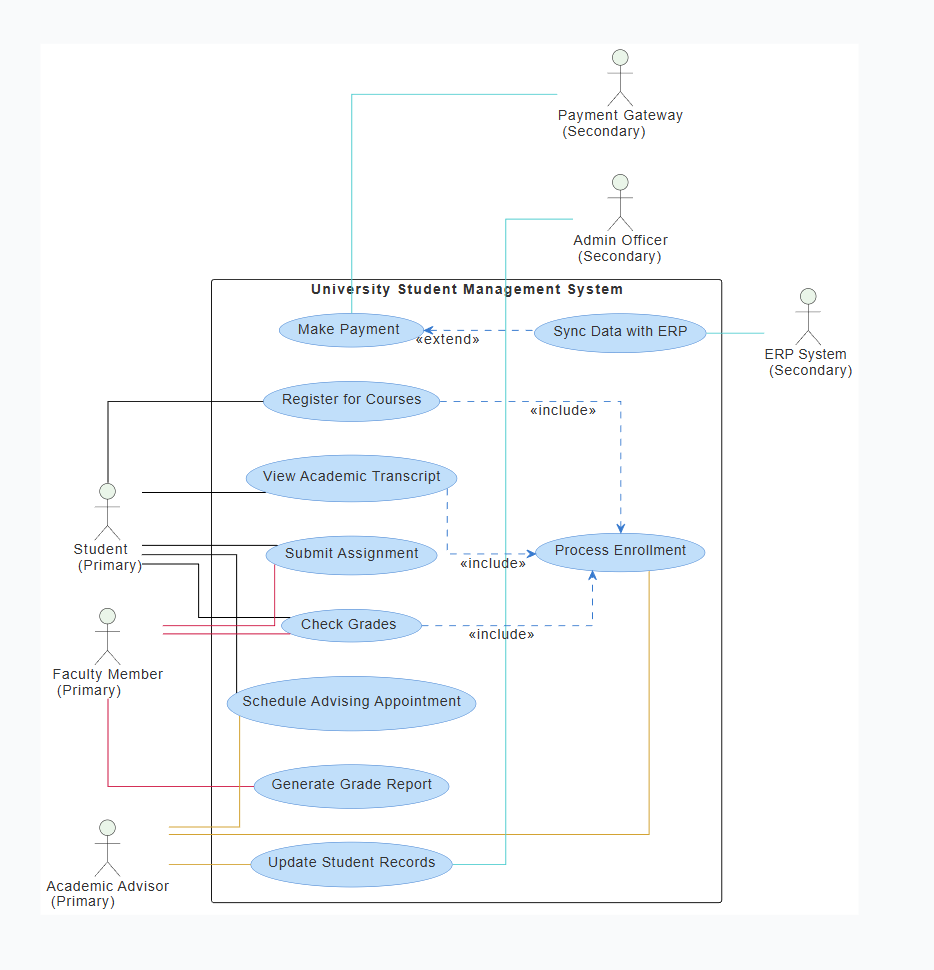
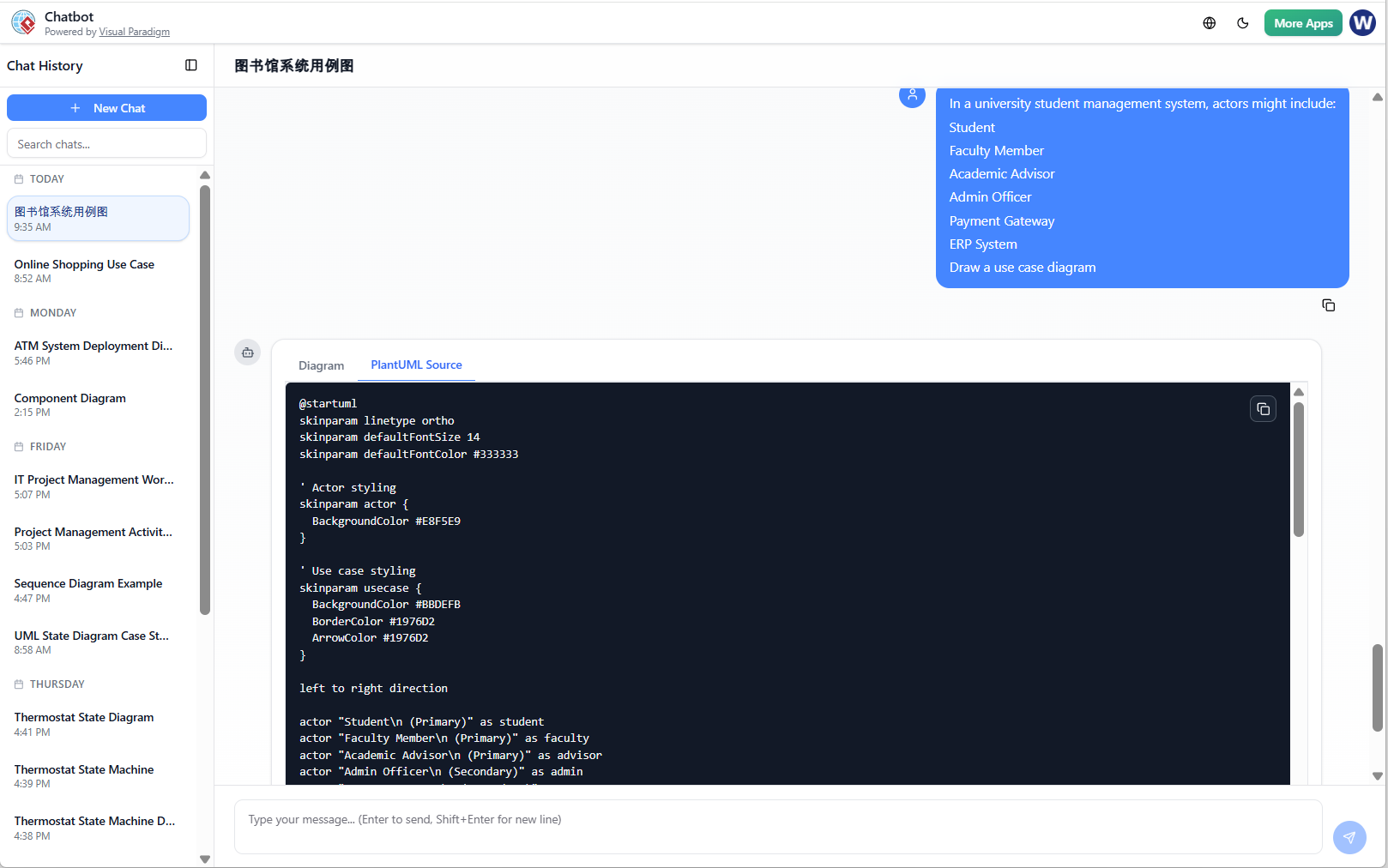
This Diagram is generated by Visual Paradigm AI Chatbot:
🚫 Common Pitfalls & How to Avoid Them
| Pitfall | Why It’s Wrong | How to Fix It |
|---|---|---|
| 🚫 Overcomplicating actors | Creating too many actors (e.g., “John Doe”, “Sarah Smith”) instead of grouping roles | Group similar roles (e.g., “Student”, “Faculty”) |
| 🚫 Using vague use cases | Phrases like “manage data”, “do something” | Replace with specific, goal-oriented phrases (e.g., “Submit course enrollment”) |
| 🚫 Missing dependencies | Not showing how one use case depends on another | Add include or extend relationships where needed |
| 🚫 Incorrect use of ‘extend’ | Using extend for normal workflows |
Use include for mandatory steps; use extend only for optional, conditional ones |
| 🚫 Ignoring external systems | Not including payment gateways, email, etc. | Identify all external systems and show their interactions |
| 🚫 Using only one actor | Assuming only one user uses the system | Identify all stakeholders and their needs |
| 🚫 Using technical jargon | e.g., “Update database”, “call API” | Stick to functional behaviors — “Submit a request” is better |
✅ Best Practices for Effective Use Case Modeling
| Practice | Explanation |
|---|---|
| ✅ Start with business goals | Model from the top down — align with strategic objectives. |
| ✅ Involve stakeholders early | Interview end-users or domain experts to validate use cases. |
| ✅ Keep use cases independent | Each use case should represent a single, clear goal. |
| ✅ Use real-world scenarios | Base use cases on actual user activities (e.g., a student enrolling in a class). |
| ✅ Validate with the team | Review the diagram with developers, testers, and business analysts. |
| ✅ Update iteratively | As requirements evolve, refine the diagram in smaller cycles. |
| ✅ Document use cases in detail | Include preconditions, postconditions, and success/failure criteria in a separate document. |
📚 References & Further Reading
-
[30] Requirements Engineering – Foundational text on use case modeling.
-
[27] Identifying Use Cases in Software Requirements – Practical methods for deriving use cases from actors.
-
[16, 40] – Comprehensive literature on requirements engineering and system design.
-
IEEE/ISO Standards: ISO/IEC 29148 – Use case specification guidelines.
Recommended books:
Software Requirements: Getting it Right the First Time by Ian Sproul
The Unified Software Development Process (RUP) – Introduces use case modeling in UML
📝 Example: Use Case Diagram for a Library Management System
Actors:
-
Member
-
Librarian
-
Administrator
-
Online Catalog System
-
Payment Gateway
Use Cases:
-
Member:
-
Borrow a book
-
Return a book
-
Search books
-
View membership status
-
-
Librarian:
-
Check out books
-
Return books
-
Update book records
-
Generate overdue list
-
-
Administrator:
-
Add new books
-
Manage user accounts
-
Generate annual report
-
-
Online Catalog System:
-
Search books
-
Notify member of new arrivals
-
-
Payment Gateway:
-
Process fines
-
Process renewal fees
-
Relationships:
-
Member → Borrow → Include → Return
-
Librarian → Check Out → Extend → Send Reminder (if overdue)
-
Admin → Add Book → Include → Update Catalog
This diagram clearly shows who does what, what they can do, and how systems interact.
🧩 Final Checklist Before Finalizing the Diagram
✅ Did I identify all relevant actors?
✅ Are the use cases descriptive and goal-oriented?
✅ Are all actors connected to at least one use case?
✅ Are dependencies (include/extend) correctly modeled?
✅ Are there any missing actors or use cases?
✅ Is the diagram easy to read and understand?
✅ Have I reviewed it with stakeholders?
🏁 Conclusion
Creating a use case diagram is more than just drawing lines and boxes — it’s a strategic process that requires deep understanding of user needs, clarity in language, and attention to detail.
While the diagram appears simple, misuse of actors and use cases leads to poor system design, missed requirements, and frustrated users. By following the steps in this guide — identifying actors through real-world questions, deriving use cases from actor needs, and avoiding common pitfalls — you can create accurate, actionable, and stakeholder-aligned use case diagrams.
✅ Remember: A good use case diagram tells a story — the story of how users interact with the system to achieve their goals.
- AI Chatbot Feature – Intelligent Assistance for Visual Paradigm Users: This article introduces the core chatbot functionality designed to provide instant guidance and automate tasks within the modeling software.
- Visual Paradigm Chat – AI-Powered Interactive Design Assistant: An interactive interface that helps users generate diagrams, write code, and solve design challenges in real time through a conversational assistant.
- AI-Powered Use Case Diagram Refinement Tool – Smart Diagram Enhancement: This resource explains how to use AI to automatically optimize and refine existing use case diagrams for better clarity and completeness.
- Mastering AI-Driven Use Case Diagrams with Visual Paradigm: A comprehensive tutorial on leveraging specialized AI features to create intelligent and dynamic use case diagrams for modern systems.
- Visual Paradigm AI Chatbot: The World’s First Purpose-Built AI Assistant for Visual Modeling: This article highlights the launch of a groundbreaking AI assistant tailored specifically for visual modeling with intelligent guidance.
- AI-Powered Use Case Diagram Example for Smart Home System: A community-shared example of a professional use case diagram generated by AI, illustrating complex user-system interactions in an IoT environment.
- Master AI-Driven Use Case Diagrams: A Short Tutorial: A concise guide from Visual Paradigm on leveraging AI to create, refine, and automate use case diagram development for faster project delivery.
- Revolutionizing Use Case Elaboration with Visual Paradigm AI: This guide details how the AI engine automates documentation and enhances the modeling clarity of software requirements.
- How to Turn Requirements into Diagrams with an AI Chatbot: This article explores how project requirements can be evolved from simple text into full system designs through a conversational interface.
- AI-Powered Chatbot Development Using Visual Paradigm: A video tutorial demonstrating how to build an AI-driven chatbot using automated modeling techniques and assisted diagramming tools.