


1. Introduction
In modern software development, especially in educational technology and enterprise systems, UML (Unified Modeling Language) plays a pivotal role in capturing functional requirements through Use Case Diagrams. These diagrams provide a visual representation of the interactions between actors (users) and the system, highlighting the primary and optional functionalities that users can perform.
This case study focuses on the University Student Management System (USMS), a comprehensive digital platform designed to streamline academic operations including course registration, grading, advising, payment processing, and integration with broader institutional systems such as ERP (Enterprise Resource Planning).
We will present, analyze, and interpret the UML Use Case Diagram of the USMS, explaining its components, relationships, and real-world implications. Additionally, we will explore how this diagram supports system design, stakeholder communication, and software development.
2. Objectives of the Case Study
-
To interpret and explain the structure and semantics of a UML Use Case Diagram.
-
To identify key actors, use cases, and their relationships (association, include, extend).
-
To analyze how the system supports different user roles with varying levels of access and responsibilities.
-
To assess the system’s scalability, modularity, and integration capabilities.
-
To evaluate how the use case model supports requirements gathering and system design.
3. Background: The University Student Management System (USMS)
The University Student Management System (USMS) is a centralized digital platform that enables students, faculty, advisors, and administrative staff to manage academic activities efficiently. It replaces paper-based records with an interactive, secure, and integrated digital system.
Key Features:
-
Course registration and scheduling
-
Assignment submission and grading
-
Academic transcript and grade report generation
-
Advising appointments and academic planning
-
Financial transactions (fees, payment, billing)
-
Data synchronization with external systems (ERP, payment gateways)
The system is designed to ensure data consistency, real-time updates, and compliance with academic policies.
4. UML Use Case Diagram Breakdown
4.1 Actors and Their Roles
| Actor | Role | Primary Responsibility |
|---|---|---|
| Student | Primary | Registers for courses, views transcripts, submits assignments, checks grades, schedules advising appointments. |
| Faculty Member | Primary | Grades assignments, reviews student performance, accesses grades, generates reports. |
| Academic Advisor | Primary | Schedules advising appointments, reviews student progress, updates records, supports academic planning. |
| Admin Officer | Secondary | Updates student records, manages administrative data (e.g., enrollment status). |
| Payment Gateway | Secondary | Handles financial transactions (fees, tuition). |
| ERP System | Secondary | Synchronizes academic and financial data with enterprise systems (e.g., payroll, inventory). |
Note: The use of “Primary” and “Secondary” actors reflects the degree of direct interaction with the system. Primary actors use the USMS directly; secondary actors are integrated partners.
4.2 Use Cases and Their Descriptions
| Use Case | Description |
|---|---|
| UC1 – Register for Courses | Students and faculty initiate the registration process for academic courses based on prerequisites and availability. |
| UC2 – View Academic Transcript | Students and advisors access a detailed record of completed courses, grades, and credits. |
| UC3 – Submit Assignment | Students upload assignments via the platform; faculty review and grade them. |
| UC4 – Check Grades | Students and faculty view current and past grades in real time. |
| UC5 – Schedule Advising Appointment | Students book appointments with academic advisors to discuss academic plans. |
| UC6 – Process Enrollment | A centralized enrollment process triggered by course registration and approval. |
| UC7 – Generate Grade Report | Faculty or admin creates a formal grade summary for students or reporting purposes. |
| UC8 – Make Payment | Students pay tuition and fees through the integrated payment gateway. |
| UC9 – Update Student Records | Advisors or admin officers modify student status (e.g., dropout, probation, transfer). |
| UC10 – Sync Data with ERP | The system shares student and financial data with the university’s ERP for payroll, financial planning, and reporting. |
5. UML Relationships Explained
5.1 Associations (Lines connecting actors to use cases)
Associations represent direct interaction between actors and use cases. They are color-coded to reflect user roles:
| Association | Color | Meaning |
|---|---|---|
student - UC1 |
Black | Student initiates course registration. |
student - UC2, UC3, UC4 |
Black | Student interacts with core academic functions. |
faculty - UC3, UC4, UC7 |
Crimson | Faculty manages assignments and grading. |
advisor - UC5, UC6, UC9 |
Goldenrod | Advisors manage advising and record updates. |
UC8 - payment |
Dark Turquoise | Payment gateway processes fees. |
UC9 - admin |
Dark Turquoise | Admin updates records. |
UC10 - ERP |
Dark Turquoise | ERP receives synchronized data. |
These associations show who performs which function, helping to define user roles and responsibilities.
5.2 Include Relationships (<>)
Include relationships represent mandatory, reusable behavior that is embedded within other use cases.
UC1 ..> UC6 : <<include>>
UC2 ..> UC6 : <<include>>
UC4 ..> UC6 : <<include>>
Interpretation:
-
All students who register for courses (UC1) must go through the enrollment process (UC6).
-
Students viewing transcripts (UC2) must also trigger the enrollment process (UC6) — likely for credit verification.
-
Students checking grades (UC4) are implicitly part of the enrollment process — grades are only available after enrollment is confirmed.
✅ These relationships ensure data integrity and flow consistency.
🔍 For example, a student cannot check their grades until they have been enrolled in a course.
This prevents invalid or premature data access.
5.3 Extend Relationships (<>)
UC8 <.. UC10 : <<extend>>
Interpretation:
-
When a student makes a payment (UC8), the system optionally extends by synchronizing data with the ERP (UC10).
-
This means: Payment → Optional ERP Sync
-
Not every payment triggers ERP sync — it may be based on conditions (e.g., tuition fees, semester start).
🚀 This supports flexible integration — the system doesn’t require ERP sync on every transaction, reducing overhead.
💡 It allows institutions to choose when to sync data (e.g., after payment confirmation or at semester end).
This is a real-world example of optional workflow extension, where a core action (payment) may trigger additional, secondary behaviors.
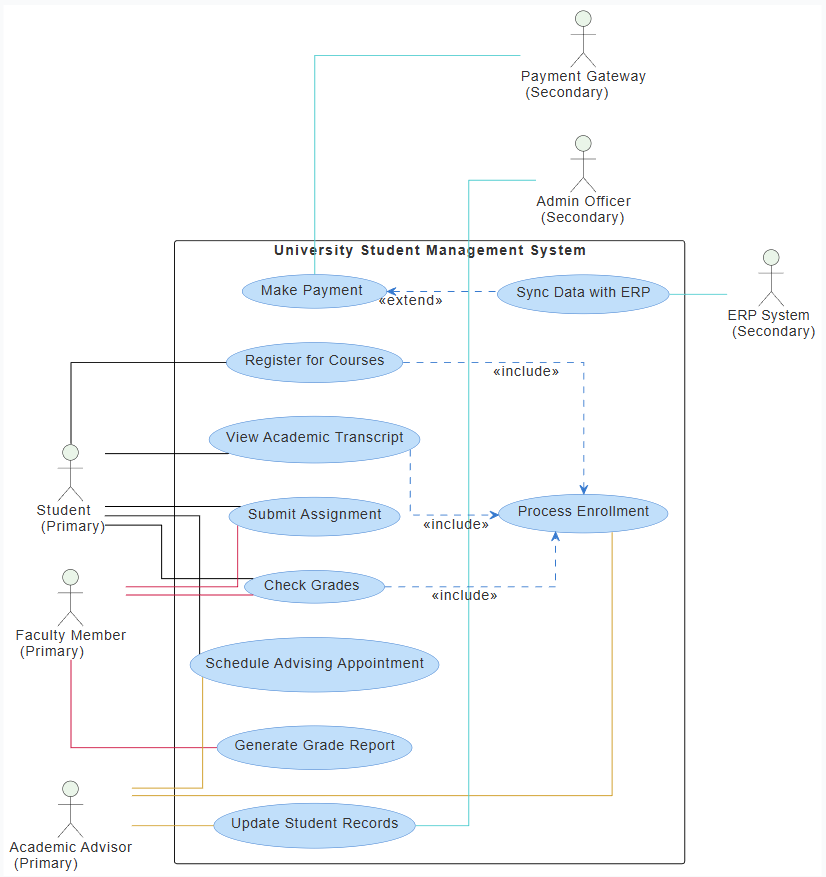
6. System Design Implications
6.1 Role-Based Access Control (RBAC)
-
Students: Can view grades, submit assignments, register for courses.
-
Faculty: Can grade, view grades, generate reports.
-
Advisors: Can schedule appointments, update records.
-
Admins: Full CRUD access to student records.
-
External Systems: No direct interface — only through APIs (e.g., ERP, Payment Gateway).
This ensures security and data privacy by limiting access to relevant actors.
6.2 Data Flow and Integrity
-
Enrollment (UC6) acts as a gateway to all academic functions.
-
All academic records (transcripts, grades) are derived from course registration and assignment grading.
-
Grade reports (UC7) and transcripts (UC2) are generated only after data is validated through enrollment and grading.
This creates a data lifecycle that ensures accuracy and traceability.
6.3 Integration with External Systems
| System | Purpose | Trigger |
|---|---|---|
| Payment Gateway | Accept payments | Triggered via UC8 |
| ERP System | Sync data | Triggered via UC10 (extended from UC8) |
The use of secondary actors shows that the USMS is not isolated — it is integrated into a larger ecosystem of institutional tools.
This highlights the importance of API design, authentication, and data format standards (e.g., XML, JSON) in such integrations.
7. Stakeholder Analysis
| Stakeholder | Needs | Use Cases |
|---|---|---|
| Student | Understand course load, grades, fees, and academic progress | UC1, UC2, UC3, UC4, UC5, UC8 |
| Faculty | Grade work, monitor performance | UC3, UC4, UC7 |
| Advisor | Support students, track progress | UC5, UC6, UC9 |
| Admin Officer | Maintain student records, manage data | UC9 |
| University Admin | Monitor finances, compliance | UC8, UC10 |
| External Systems | Receive standardized data | UC8, UC10 |
This diagram serves as a communication tool for stakeholders to understand shared goals and responsibilities.
8. Limitations and Areas for Enhancement
| Limitation | Suggestion |
|---|---|
| No explicit constraints (e.g., deadlines, prerequisites) | Add validation rules in requirements or sequence diagrams |
| No error handling | Add exception use cases (e.g., “Failed to Register”) |
| No time-based triggers | Define when UC10 runs (e.g., after payment confirmation) |
| Lack of non-functional requirements | Add security, performance, and scalability notes |
| No user interface | Future iterations could include UI wireframes or activity diagrams |
🔍 Recommendation: Expand the use case diagram to include exception use cases (e.g., “Course Overload,” “Payment Failed”) and sequence diagrams to show step-by-step interactions.
9. How This Diagram Supports Software Development
| Phase | Role of Use Case Diagram |
|---|---|
| Requirements Gathering | Helps identify functional needs from stakeholders. |
| System Design | Guides module design (e.g., enrollment module, payment module). |
| Team Communication | Provides a shared visual language between developers, testers, and managers. |
| Testing Planning | Use cases become test cases (e.g., “Student submits assignment → Grade appears”). |
| User Training | Serves as a training aid to explain system capabilities. |
This use case diagram is the foundation for further modeling (e.g., sequence, activity, class diagrams).
10. Real-World Application Example
Scenario: A student named Maya wants to register for a new course.
-
Maya logs in → triggers UC1 (Register for Courses).
-
System checks prerequisites → if valid, proceeds to UC6 (Process Enrollment).
-
Maya submits assignment → triggers UC3 (Submit Assignment).
-
Faculty grades → triggers UC4 (Check Grades).
-
Maya schedules an appointment → triggers UC5 (Schedule Advising Appointment).
-
Maya pays tuition → triggers UC8 (Make Payment) → which extends to UC10 (Sync with ERP) to update financial records.
✅ All steps are aligned with the use case model.
This flow ensures end-to-end traceability and compliance with academic policies.
11. Conclusion
The UML Use Case Diagram for the University Student Management System is more than just a visual tool — it is a comprehensive blueprint that captures:
-
Who uses the system
-
What they do
-
How actions are related
-
How functions are triggered or extended
It enables:
-
Clear role definition
-
Logical flow of academic processes
-
Integration with external systems
-
Scalability and modularity
-
Stakeholder alignment
By clearly separating primary actors from secondary actors, and by using include and extend relationships, the diagram provides a robust foundation for software development, testing, and continuous improvement.
12. Appendices
Appendix A: Color Coding in the Diagram
| Color | Meaning |
|---|---|
| Black | Primary actor interaction |
| Crimson | Faculty-related actions |
| Goldenrod | Advisor-related actions |
| Dark Turquoise | Integration with external systems |
Color coding improves readability and visual hierarchy.
Appendix B: Notation Summary (UML)
| Symbol | Meaning |
|---|---|
actor |
User or external system |
usecase |
Functionality available to actors |
association |
Direct interaction between actor and use case |
<<include>> |
Mandatory behavior in another use case |
<<extend>> |
Optional behavior triggered by a use case |
Appendix C: Sample Sequence Diagram (Future Extension)
@startuml
actor "Student" as student
actor "Faculty" as faculty
usecase "Register for Courses" as UC1
usecase "Submit Assignment" as UC3
usecase "Check Grades" as UC4

student -> UC1 : Registers for course
UC1 --> UC6 : Process Enrollment
student -> UC3 : Submits assignment
faculty -> UC3 : Reviews and grades
UC3 --> UC4 : Grades are visible
@enduml
This shows step-by-step execution — a natural next step after the use case diagram.
Final Thoughts
This case study demonstrates the power of UML use case diagrams in capturing complex real-world systems. In the context of education technology, such diagrams serve as a bridge between academic policy and technical implementation.
They help ensure that no user or process is overlooked, that data flows are logical, and that integration with external systems is transparent and manageable.
As universities continue to digitize, tools like this use case model will remain essential in building responsive, secure, and user-centered academic systems.
📌 Recommendation for Implementation Teams:
Use this use case diagram as a baseline requirement document and evolve it through iterative feedback from students, faculty, and administrators.
✅ This case study is suitable for academic use, software project documentation, or university IT planning.
- AI Chatbot Feature – Intelligent Assistance for Visual Paradigm Users: This article introduces the core chatbot functionality designed to provide instant guidance and automate tasks within the modeling software.
- Visual Paradigm Chat – AI-Powered Interactive Design Assistant: An interactive interface that helps users generate diagrams, write code, and solve design challenges in real time through a conversational assistant.
- AI-Powered Use Case Diagram Refinement Tool – Smart Diagram Enhancement: This resource explains how to use AI to automatically optimize and refine existing use case diagrams for better clarity and completeness.
- Mastering AI-Driven Use Case Diagrams with Visual Paradigm: A comprehensive tutorial on leveraging specialized AI features to create intelligent and dynamic use case diagrams for modern systems.
- Visual Paradigm AI Chatbot: The World’s First Purpose-Built AI Assistant for Visual Modeling: This article highlights the launch of a groundbreaking AI assistant tailored specifically for visual modeling with intelligent guidance.
- AI-Powered Use Case Diagram Example for Smart Home System: A community-shared example of a professional use case diagram generated by AI, illustrating complex user-system interactions in an IoT environment.
- Master AI-Driven Use Case Diagrams: A Short Tutorial: A concise guide from Visual Paradigm on leveraging AI to create, refine, and automate use case diagram development for faster project delivery.
- Revolutionizing Use Case Elaboration with Visual Paradigm AI: This guide details how the AI engine automates documentation and enhances the modeling clarity of software requirements.
- How to Turn Requirements into Diagrams with an AI Chatbot: This article explores how project requirements can be evolved from simple text into full system designs through a conversational interface.
- AI-Powered Chatbot Development Using Visual Paradigm: A video tutorial demonstrating how to build an AI-driven chatbot using automated modeling techniques and assisted diagramming tools.