


In the fast-paced world of data management, the transition from a messy brainstorm to a structured, professional table has long been a manual bottleneck. Visual Paradigm has shattered this barrier with its AI Table Generator, an easy-to-use online table maker that feels less like a software tool and more like a dedicated data entry assistant. Imagine describing a complex project timeline in plain English and watching a perfectly formatted grid materialize in seconds. This isn’t just a convenience; it is a fundamental shift in how developers, project managers, and researchers handle structured information.
Whether you are dealing with technical documentation or personal organization, the interface provides a seamless bridge between raw thought and digital precision. By combining an intuitive grid editor with a high-performance AI engine, the tool allows you to bypass the tedious work of manual cell entry and formatting. From the moment you launch the app, you are greeted with a dual-pane workspace designed for maximum efficiency: a visual editor on the left and a live multi-format preview on the right that speaks the language of your choice, be it Markdown, JSON, or SQL.
Key Takeaways for Data Productivity
-
Effortless Generation: Turn plain-text descriptions into fully populated tables instantly using the “Generate with AI” feature.
-
Developer-Ready Output: Seamlessly export data into JSON, SQL, or CSV for direct integration into databases and applications.
-
Zero Formatting Stress: Automatically generate clean Markdown or HTML code, complete with CSS styling for web use.
-
Hybrid Editing: Benefit from the flexibility of an AI-powered start followed by manual spreadsheet-style grid refinement.
-
Cloud-Centric Workflow: Save, manage, and share your tables via secure cloud storage with unique read-only links for stakeholders.
How Can I Simplify High-Level Project Planning?
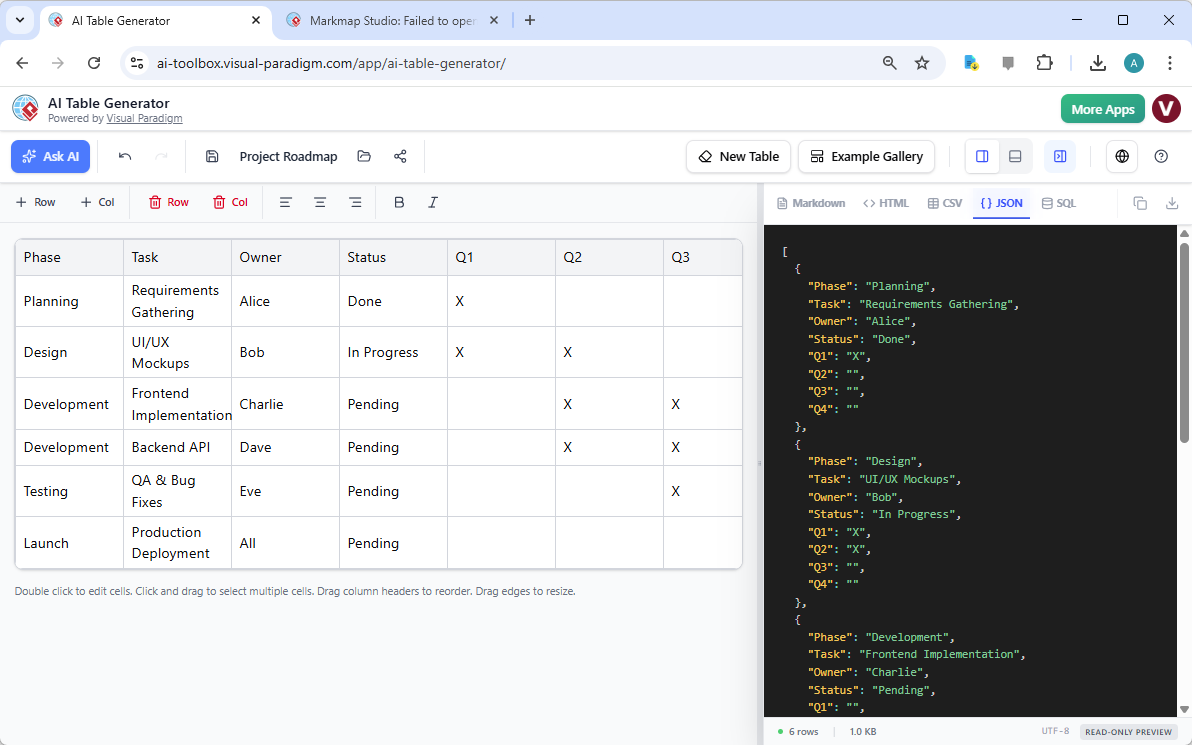
Managing a project roadmap requires more than just a list of tasks; it demands a clear visualization of phases, ownership, and quarterly milestones. The professional AI table editor excels at creating these high-stakes overviews. By prompting the AI with specific project parameters, users can generate a comprehensive roadmap that includes columns for status tracking and timeframes. This eliminates the “blank page” syndrome, allowing project leads to focus on strategy rather than row-and-column alignment.
For software developers, the value of this online table maker extends beyond the visual grid. As seen in the project roadmap interface, the tool can instantly transform your planning data into structured JSON. This feature is a game-changer for those who need to feed roadmap data into custom dashboards or internal applications. Instead of writing code to define objects and arrays, you can simply export the AI-generated data, ensuring accuracy and saving hours of manual coding. The real-time synchronization between the visual grid and the JSON preview ensures that what you see in the editor is exactly what your software receives.
Can AI Handle Daily Schedules and Academic Planning?
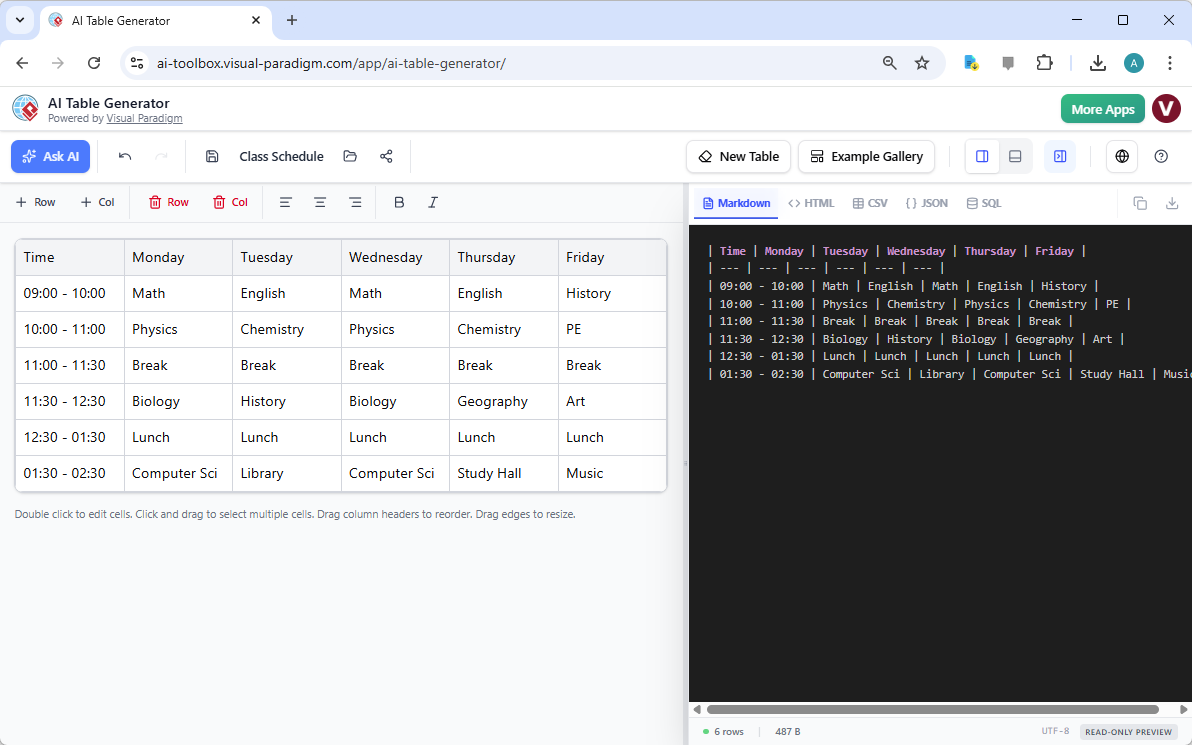
Academic and personal scheduling often involves repetitive structures that are a chore to build by hand. The AI Table Generator acts as a best-in-class schedule creator, capable of interpreting requests for weekly timetables with specific time slots and subjects. Whether you are a student mapping out a semester or a teacher organizing a syllabus, the AI understands the temporal relationship between columns (days) and rows (time), creating a logical flow that is easy to read and even easier to modify.
Technical writers and students often find themselves needing to insert these schedules into documentation or GitHub repositories. This is where the Markdown table generator functionality becomes indispensable. Manually typing pipes and dashes to create Markdown tables is notoriously prone to error. With this tool, you can visualize your class schedule in a familiar spreadsheet layout, and the application generates the perfectly aligned Markdown syntax in the side panel. It’s a foolproof way to ensure your documentation remains professional and readable without ever touching a raw text editor until you are ready to copy and paste.
How Do I Convert Lifestyle Data into Web-Ready Content?
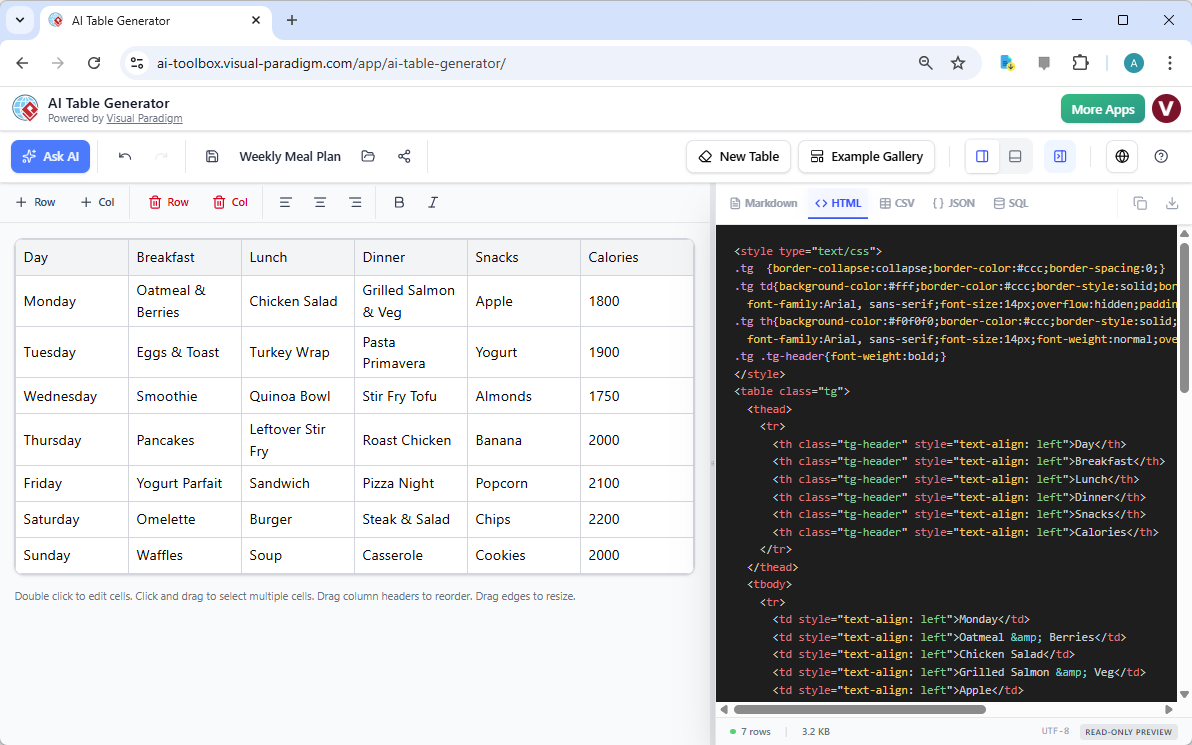
For bloggers and health enthusiasts, tracking a weekly meal plan or a fitness routine involves a high volume of data that needs to be presented clearly to an audience. The easy-to-use AI table maker simplifies this by allowing users to generate meal plans complete with nutritional data or calorie counts. By specifying the number of days and the types of meals required, the AI populates the grid with diverse suggestions, which can then be fine-tuned using the interactive grid editor to suit specific dietary needs.
Once the meal plan is perfected, the HTML table creator feature takes center stage. Instead of wrestling with <table>, <tr>, and <td> tags, users can select the HTML preview tab to receive clean, styled code. The generator even includes basic CSS classes to ensure the table looks polished as soon as it is embedded into a website or newsletter. This feature effectively bridges the gap between personal organization and professional web publication, allowing anyone to produce high-quality web content regardless of their coding expertise.
Why Choose an AI-Driven Table Workflow?
The core advantage of using a professional AI-powered table software lies in its versatility. It is not just about creating a static image; it is about automated data formatting and conversion. The ability to switch between CSV for Excel, SQL for database management, and JSON for web apps within a single interface makes this a multi-tool for the digital age. You are no longer locked into a single format. If you start with a meal plan in HTML but realize you need a CSV backup for your records, it is a one-click transition.
Furthermore, the best AI table generator provides an example gallery that serves as a launchpad for inspiration. If you aren’t sure how to structure a comparison chart or a feature list, you can load a template and customize it. This “learn by example” approach, combined with the safety net of undo/redo support, encourages experimentation. You can confidently build complex data structures, knowing that the tool handles the heavy lifting of formatting and syntax, leaving you free to focus on the accuracy and quality of the information itself.
Conclusion
In a world where data is king, the tools we use to organize that data must be both powerful and accessible. Visual Paradigm’s AI Table Generator represents the pinnacle of this balance, offering a best-in-class online table maker that caters to developers, writers, and organizers alike. By automating the most tedious aspects of table creation and offering one-click data conversion, it empowers users to transform ideas into structured reality with unprecedented speed. From complex project roadmaps to simple meal plans, this tool ensures your data is always perfectly formatted and ready for any platform.
Ready to revolutionize the way you work with data? Don’t spend another minute manually formatting cells or wrestling with Markdown syntax. Experience the future of data organization today.
Try the AI Table Generator now: Launch AI Table Generator
Learn more about the tool’s features: Explore AI Table Generator Guide
Related Links
-
Visual Paradigm AI Table Generator Features: Explore the core features of Visual Paradigm’s AI-powered tool for generating professional tables from natural language prompts.
-
Visual Paradigm AI Table Generator Tool: Access the interactive AI Table Generator tool to quickly transform descriptive text into structured data tables.
-
Official Launch of Visual Paradigm AI Table Generator: Read the official announcement regarding the release of the AI Table Generator and its integration within the Visual Paradigm ecosystem.
-
Comprehensive Guide to Visual Paradigm’s AI Table Generator: A detailed guide explaining how to use the AI Table Generator to convert natural language descriptions into executable code and structured formats.