

Now Reading: Generate UML Sequence Diagrams Instantly with AI Chatbot
-
01
Generate UML Sequence Diagrams Instantly with AI Chatbot



Generate UML Sequence Diagrams Instantly with AI Chatbot
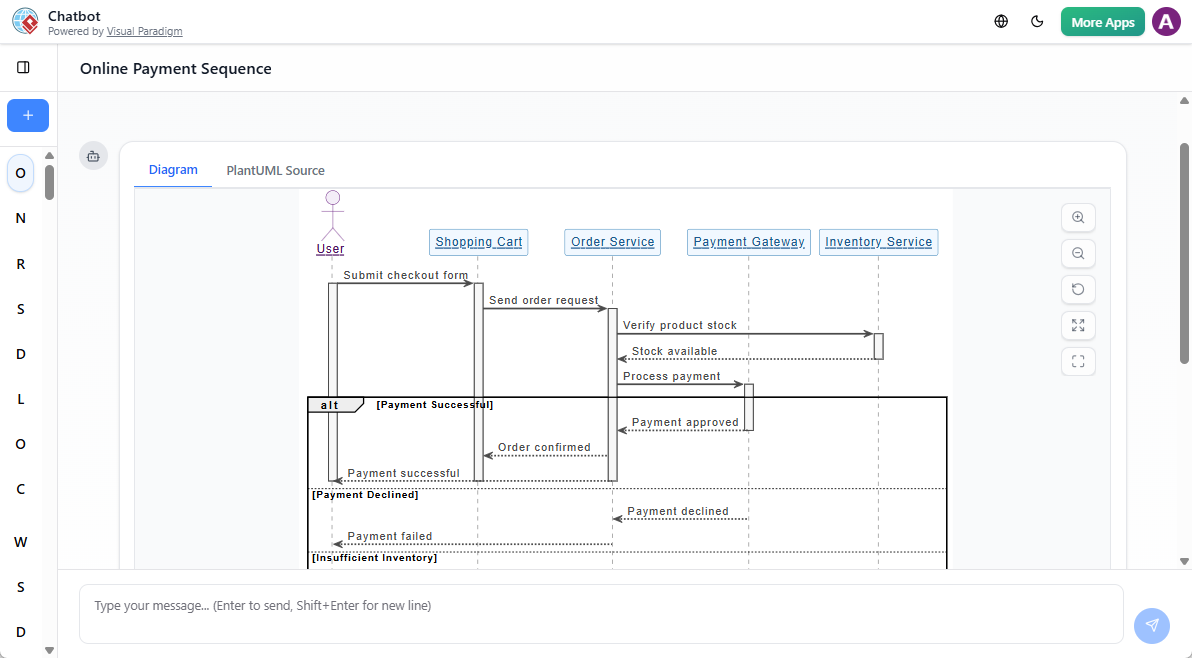
Creating clear, accurate sequence diagrams is essential for modeling system interactions—especially in software design, requirement analysis, and team collaboration. Traditionally, this process involves careful planning, manual layout, and a solid grasp of UML syntax. But with the rise of intelligent tools, generating a UML sequence diagram has become faster and more accessible than ever.
Enter the AI sequence diagram tool—a smart, intuitive way to transform plain-language descriptions into structured UML diagrams. Whether you’re a beginner learning UML or a developer refining system workflows, Visual Paradigm’s AI Chatbot offers a seamless path from idea to visual representation.
How the AI Sequence Diagram Generator Works
The core idea is simple: describe your system’s behavior in natural language, and let the AI do the heavy lifting. No need to memorize UML syntax or wrestle with layout tools. The AI interprets your input and generates a well-structured sequence diagram with lifelines, messages, and interaction fragments—ready for refinement.
Step 1: Access the AI UML Tool
You can use the AI sequence diagram generator in two ways:
-
Online: Visit chat.visual-paradigm.com to start instantly in your browser.
-
Desktop App: Open Visual Paradigm, go to Tools >AI Chatbot to access the feature within your project environment.
Step 2: Craft a Clear Prompt
The quality of the output depends heavily on how precisely you describe the interaction. Use this structure for best results:
-
Specify the diagram type and the target scenario: Start with “Create a UML sequence diagram for…”
📌 Example Prompt:
“Create a UML sequence diagram for an e-commerce checkout.”
If you want the diagram to be more precise, you can describe the flow as well:
“Create a UML sequence diagram for an e-commerce checkout. Customer adds items to cart, proceeds to checkout, enters shipping and payment details, the system validates payment via the gateway, confirms order, and sends a confirmation email.”
This level of detail helps the AI correctly identify lifelines, message sequences, and potential branches.
Step 3: Refine the Diagram with Natural Language
Once the AI generates the initial diagram, you can interact with it directly:
-
Add elements: “Include a ‘Stock Check’ step before confirming the order.”
-
Rename components: “Rename ‘System’ to ‘OrderService’.”
-
Add conditions: “Add an alternative path for failed payment attempts.”
-
Insert loops or guards: “Repeat payment validation up to three times.”
This conversational approach makes iteration fast and intuitive—perfect for refining complex flows.
Step 4: Import into Your Project
When satisfied, click Import to Visual Paradigm. The diagram is now part of your project, where you can:
-
Apply custom styling
-
Add notes or constraints
-
Export to PNG, SVG, or PDF
-
Share with team members
The integration ensures you’re not locked into a one-time output—your diagram remains editable and scalable.
Best Practices for Using the AI Sequence Diagram Maker
To get the most out of the AI sequence diagram generator, follow these tips:
-
Be specific: Always mention the diagram type and key components.
-
Iterate gradually: Start with a basic flow, then layer in error paths, loops, or parallel actions.
-
Validate the output: Check if lifelines match your system and messages reflect correct sequencing.
For example, instead of saying “User logs in,” try:
“User enters email and password → System validates credentials → If valid, redirect to dashboard; if invalid, show error message.”
This clarity reduces ambiguity and improves diagram accuracy.
Real-World Use Cases
The AI sequence diagram tool shines across domains:
-
E-commerce: Model checkout flows, inventory checks, and order confirmation.
-
Ride-sharing: Simulate booking, driver matching, trip start, and payment.
-
Banking systems: Diagram login, transaction validation, and fraud detection.
-
IoT applications: Show device communication, cloud synchronization, and alerts.
Each use case benefits from rapid prototyping and shared understanding—especially in cross-functional teams.
Why Developers and Analysts Are Adopting This Workflow
The AI UML tool reduces the time spent on diagram creation from hours to minutes. It’s not about replacing design thinking—it’s about accelerating it. By removing the friction of manual layout and syntax, teams can focus on logic, validation, and collaboration.
Moreover, the tool supports learning. Newcomers to UML can experiment with different interactions, see instant visual feedback, and build confidence through trial and error—making it a powerful educational aid.
Final Thoughts
The rise of the AI sequence diagram generator marks a shift toward more intuitive, accessible software modeling. With tools like Visual Paradigm’s AI Chatbot, creating UML diagrams is no longer a barrier to entry. Whether you’re documenting a feature, onboarding a new team member, or refining a system’s behavior, the AI sequence diagram maker turns ideas into visuals—fast, clearly, and reliably.
📌 Suggested Next Steps
-
Try generating a sequence diagram for your current project’s key workflow.
-
Use the AI tool to visualize a complex interaction before writing code.
-
Share the diagram with your team to align on system behavior.


