Now Reading: Automate Retail Inventory Database Design via Visual Paradigm AI
-
01
Automate Retail Inventory Database Design via Visual Paradigm AI



Automate Retail Inventory Database Design via Visual Paradigm AI
In the evolving landscape of software engineering, understanding how to generate Entity Relationship Diagram structures efficiently is paramount for robust database architecture. Visual Paradigm Desktop has introduced a sophisticated AI-powered ERD maker that streamlines this process, allowing architects to transform complex requirements into standards-compliant models through natural language processing. This tutorial demonstrates the seamless transition from a textual description of a retail inventory system to a fully realized, professional data model, utilizing the best easy-to-use ERD software available today.
Initiating the AI-Powered ERD Generation Process
The journey toward an automated data model begins within the comprehensive environment of the Visual Paradigm Desktop application. To leverage this professional AI diagramming tool, the user must first navigate to the primary menu structure. By selecting the “Tools” tab and subsequently clicking on the AI Diagram Generation icon, the system activates its intelligent engine, which is designed to interpret high-level business logic and translate it into precise visual representations.
This initial step bypasses the traditional, labor-intensive method of manually placing entities and defining primary keys from scratch. Instead, it prepares the workspace for a rapid design exploration, where the software handles the foundational layout and notation compliance. The integration of artificial intelligence ensures that even those new to specific notation standards can produce professional-grade documentation with minimal overhead.
Defining the Retail Inventory Data Model Requirements
Once the generation interface is active, the user is prompted to specify the diagram type and provide a contextual description. In this scenario, the “Entity Relationship Diagram” is selected as the target model. The AI-powered database design tool requires a clear, natural language prompt to function effectively. For this tutorial, we utilize a prompt focused on a retail inventory system, explicitly mentioning the need to model relationships between products, suppliers, and orders.
The intelligence of the system allows it to infer necessary attributes and associative entities that may not be explicitly stated but are logically required for a functional database. By entering a concise topic such as “A retail inventory ERD that models product, supplier, and order relationships,” the user instructs the AI to build a comprehensive schema that adheres to relational database best practices and logical normalization.
Key Takeaways for AI Diagram Generation
-
Significant Time Savings: Eliminates the need for manual shape placement and connector routing.
-
Intelligent Inference: The AI identifies logical requirements and attributes based on brief descriptions.
-
Standards Compliance: Automatically applies correct ERD notations and relationship types.
-
Seamless Refinement: All generated models are fully editable within the standard editor.
Analyzing the Automatically Generated Entity Relationship Diagram
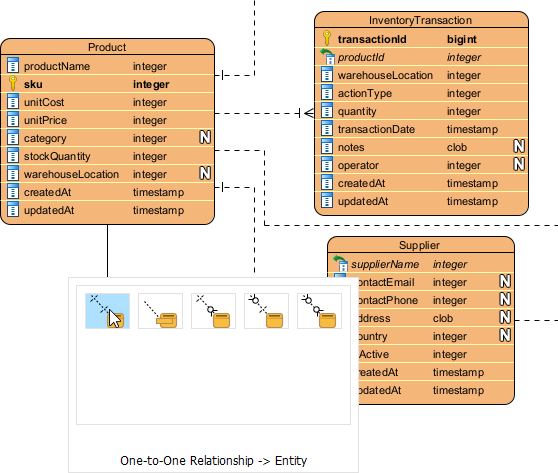
Upon clicking the execution button, the professional ERD maker processes the request and produces a detailed diagram directly within the editor. The result is a logically organized structure featuring essential entities such as “Product,” “Supplier,” “Order,” and “InventoryTransaction.” Notably, the AI understands the necessity of junction tables, such as “OrderItem” and “SupplierProduct,” to resolve many-to-many relationships—a critical aspect of database normalization.
Each entity is populated with relevant attributes, including primary keys, foreign keys, and data types such as integers and timestamps. This one-off rapid generation provides a high-quality blueprint that serves as an excellent starting point for technical reviews or further development. The visual clarity provided by this automated process facilitates better communication between technical stakeholders and non-technical business analysts.
Manual Refinement and Final Model Touch-Ups
While the AI provides a robust foundation, the final stage of how to generate Entity Relationship Diagram models often involves specific manual adjustments to suit unique business constraints. Visual Paradigm’s fully integrated ERD editor allows users to perform “touch-ups” with ease. This includes renaming entities for internal consistency, adding specialized attributes, or adjusting relationship cardinalities using the intuitive resource catalog.
In this phase, a user might decide to add a specific “One-to-One Relationship” or refine the nullability of certain fields. The transition from AI-generated content to manual editing is seamless, ensuring that the final output is not only technically accurate but also perfectly aligned with the project’s specific architectural requirements. This hybrid approach—combining AI speed with human precision—represents the pinnacle of modern easy-to-use professional diagramming.
Conclusion
Mastering how to generate Entity Relationship Diagram structures with Visual Paradigm’s AI feature represents a significant leap in productivity for database designers and software architects. By automating the initial structural layout and attribute identification, professionals can focus their expertise on high-level logic and optimization rather than repetitive drawing tasks. This AI-powered ERD tool ensures that your documentation remains precise, compliant, and ready for implementation in record time.
To experience the efficiency of automated modeling firsthand, you are invited to utilize the advanced features of Visual Paradigm. Follow the instructions below to begin your design journey.
Try Visual Paradigm Today
Transform your requirements into professional models in seconds. Follow these steps to get started:
-
Visit the official download page: https://www.visual-paradigm.com/download/
-
Install Visual Paradigm Desktop on your system.
-
Open the application and navigate to Tools > AI Diagram Generation to create your first automated ERD.