


Imagine being able to transform a simple description of a software feature into a complete, professional-grade architectural blueprint in just a few minutes. That’s the power of Visual Paradigm‘s AI-Powered MVC System Architecture Generator, an intelligent tool that turns your natural language use case into a visual reality. This AI-powered diagramming tool is a game-changer for software architects, developers, and product managers who want to design, communicate, and validate their MVC systems with unprecedented speed and clarity. Instead of wrestling with complex UML diagrams from scratch, you can focus on the logic of your application while the AI handles the visual representation. It’s like having a design partner who instantly sketches out your system’s structure and behavior based on your requirements.
With this innovative online tool, you’re not just creating diagrams; you’re accelerating your entire development lifecycle. The process is designed to be intuitive and efficient, guiding you through a clear, three-step workflow that ensures you get both the structural and behavioral aspects of your MVC architecture. Whether you’re prototyping a new feature, analyzing an existing system, or collaborating with a team, this tool provides a powerful, visual way to bring your ideas to life. Let’s explore how it works, step by step.
Quick Summary: How the MVC System Architecture Generator Works
-
Step 1: Input Your Use Case – Start by describing a specific user goal, like “User Logs In” or “E-commerce Order Management,” in plain language.
-
Step 2: Generate a Controller Class Diagram – The AI automatically creates a UML class diagram showing the key controller and model components for your use case.
-
Step 3: Generate an MVC Sequence Diagram – The AI then visualizes the step-by-step flow of interactions between the View, Controller, and Model.
-
Export & Integrate – Easily export your diagrams as high-quality SVGs or import them directly into Visual Paradigm Online for advanced modeling.
Now, let’s see this process in action, starting with the very first step.
Step 1: Define Your Use Case with Natural Language
The journey begins with a simple, yet powerful, input: your use case description. As seen in
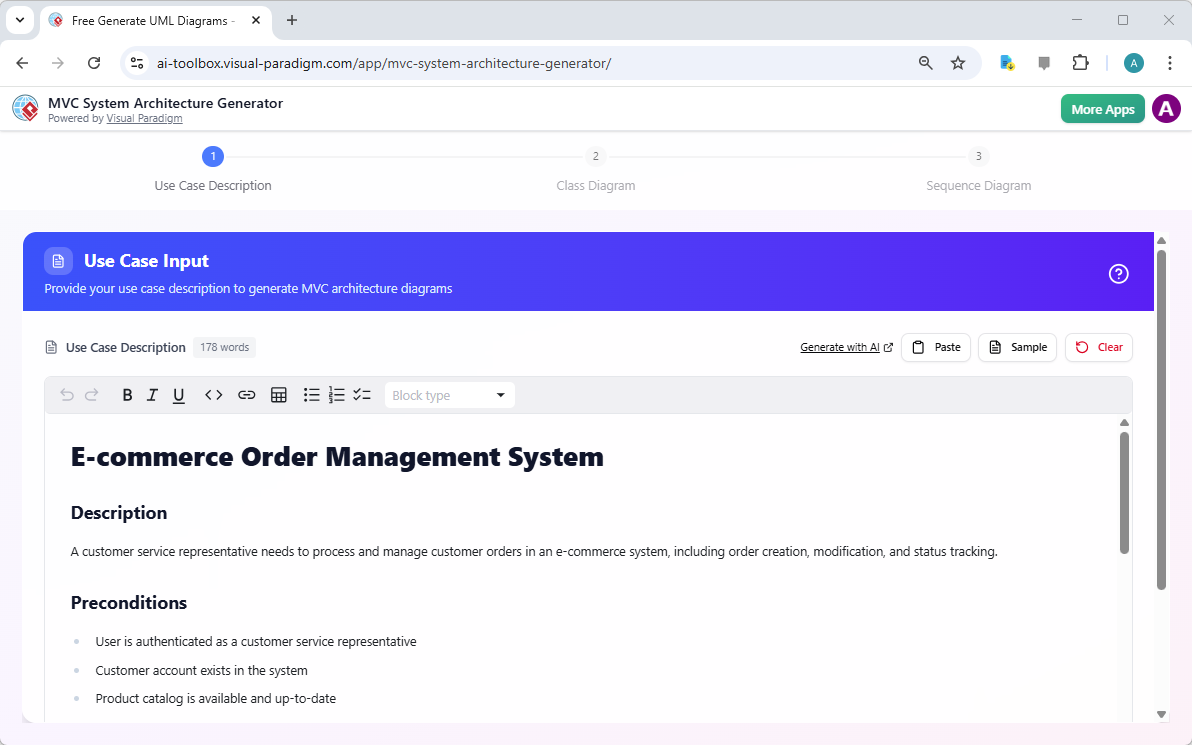
, the interface presents a clean, text-based area where you can write a detailed narrative of the system’s intended functionality. For example, the image shows a use case for an “E-commerce Order Management System,” where a customer service representative needs to process and manage orders. You define the goal, the user’s role, and any necessary preconditions, such as user authentication or data availability. The beauty of this AI-powered tool is that it doesn’t require you to know complex UML syntax or design patterns; you just describe what you want the system to do. The AI then takes this natural language and begins to interpret it, laying the foundation for the diagrams to come. This step is crucial because the quality of the output directly depends on the clarity of your input. The more specific and detailed your use case, the more accurate and relevant the generated diagrams will be.
Step 2: Visualize the Controller Structure
Once you’ve provided your use case, the tool moves to Step 2, which is all about structure. As
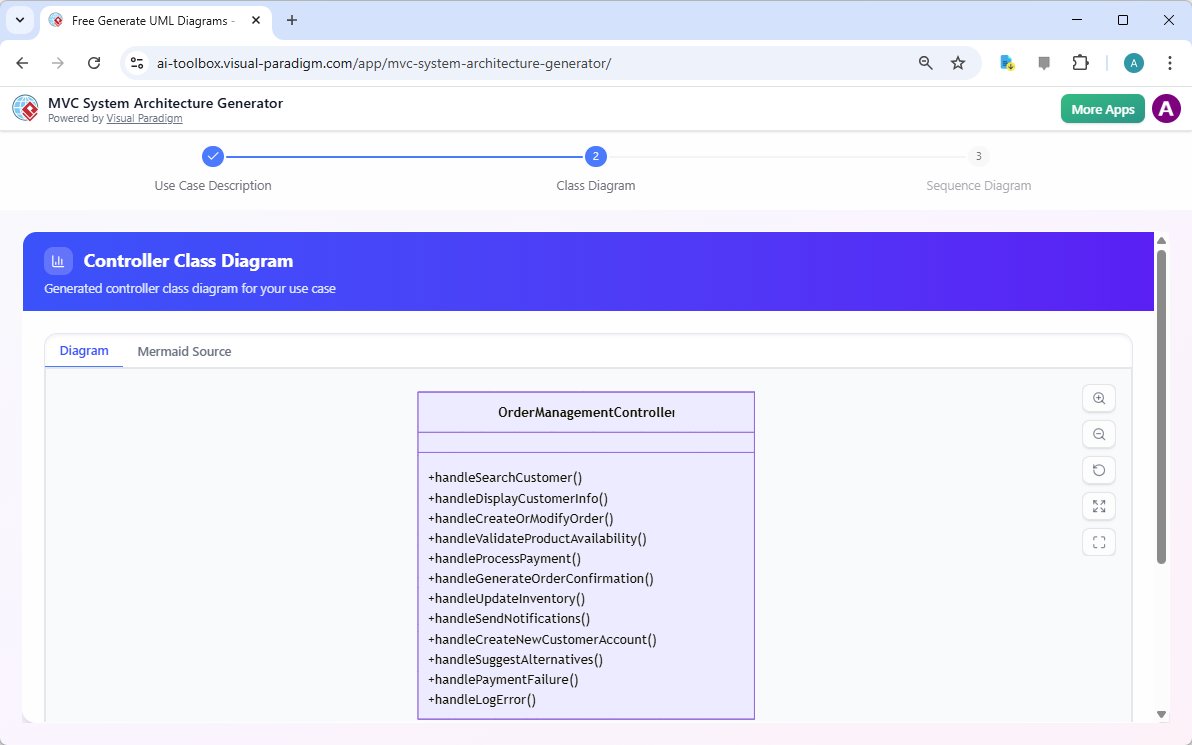
illustrates, the AI generates a Controller Class Diagram. This diagram is a visual representation of the software’s components, specifically focusing on the controller class and its interactions with the model. In the example, we see a class named OrderManagementController, which contains a list of methods like handleSearchCustomer(), handleCreateOrModifyOrder(), and handleProcessPayment(). This isn’t just a random list; it’s a direct translation of the actions and responsibilities defined in your use case. This class diagram provides a high-level, conceptual view of your system’s architecture, helping you to see the logical separation of concerns and the flow of control. It’s a powerful way to validate your design logic before diving into implementation, ensuring that all necessary functionality is accounted for in a clear, visual format.
Step 3: See the Flow in Action with a Sequence Diagram
The final step brings the system to life by showing its behavior over time. In
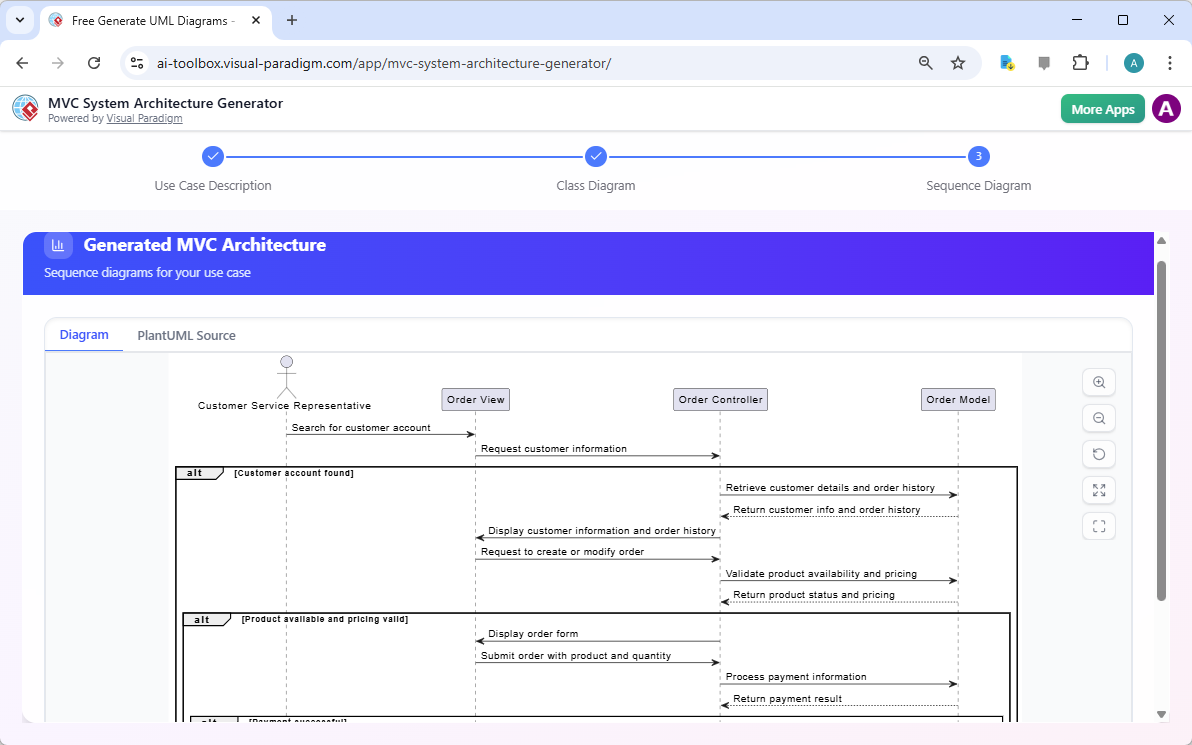
, the tool presents a MVC Sequence Diagram, which illustrates the dynamic interactions between the components. This diagram shows a user (the Customer Service Representative) initiating a search, which triggers a request to the Order View. The Order View then communicates with the Order Controller, which in turn interacts with the Order Model to retrieve data. The sequence diagram clearly shows the order of messages, including conditional flows (like “alt” blocks for different outcomes), making it easy to trace the entire process. This sequence diagram is invaluable for understanding the real-time flow of data and control, helping to identify potential bottlenecks, ensure proper communication between components, and validate that the system’s behavior aligns with the intended use case. It’s the perfect complement to the structural view provided by the class diagram.
Export, Integrate, and Collaborate
After generating your diagrams, the work is far from over. The real power of this tool lies in its ability to integrate with your existing workflow. You can easily export the generated diagrams as SVG files, which are high-quality, scalable images perfect for presentations, documentation, or sharing with stakeholders. But the most powerful feature is the seamless integration with Visual Paradigm Online. The tool provides a direct “Import to Visual Paradigm” button in both the class and sequence diagram views. This means you can instantly take your AI-generated design and bring it into a full-featured modeling environment. From there, you can collaborate with your team, add more detailed elements, generate comprehensive documentation, and continue to evolve your architecture. This bridge from a quick, AI-generated sketch to a professional, collaborative model is what makes this online diagramming software truly exceptional.
Ready to turn your ideas into clear, professional architecture? Try the AI-Powered MVC System Architecture Generator today and see how it can transform your design process. Try Now and experience the power of AI-driven diagramming.
Related Links
-
AI-Powered MVC System Architecture Generator by Visual Paradigm: Leverage AI to automatically generate clean, scalable MVC (Model-View-Controller) system architectures with minimal manual effort.
-
A Comprehensive Guide to Using the MVC System Architecture Generator | Visual Paradigm: Step-by-step guide on leveraging Visual Paradigm’s AI-powered MVC system architecture generator to accelerate application design.
-
Free AI MVC System Architecture Tool Released | Visual Paradigm: Announcement of a free AI-powered tool that helps developers generate MVC system architectures quickly and accurately.
-
What is an MVC System Architecture Generator? | Visual Paradigm: Explains the functionality and benefits of AI-driven MVC architecture generators in modern software design workflows.
-
AI-Powered MVC System Architecture Generator | Visual Paradigm AI Toolbox: A web-based AI tool that automatically generates MVC system architectures from user inputs and requirements.
-
AI-Powered MVC System Architecture Generator: Automatically generate MVC system architecture diagrams using AI-driven design tools.
-
Examples of AI MVC System Architecture Generator: Here are some examples of how the AI MVC System Architecture Generator works in practice. Browse through these cases to better understand how the tool helps …
-
MVC System Architecture Generator Archives – Visual Paradigm AI: A Controller Class Diagram is a specialized diagram used in MVC (Model–View–Controller) architecture to represent the controller layer of a system.
-
Enroll in Course Example | AI MVC System Architecture Generator – Visual Paradigm AI: See how the Enroll in Course use case in an e-learning platform is expanded into MVC architecture. Generate controller class diagrams and MVC sequence …