Now Reading: Creating a Patient Portal Roadmap with AI: A MoSCoW Prioritization Guide
-
01
Creating a Patient Portal Roadmap with AI: A MoSCoW Prioritization Guide



Creating a Patient Portal Roadmap with AI: A MoSCoW Prioritization Guide
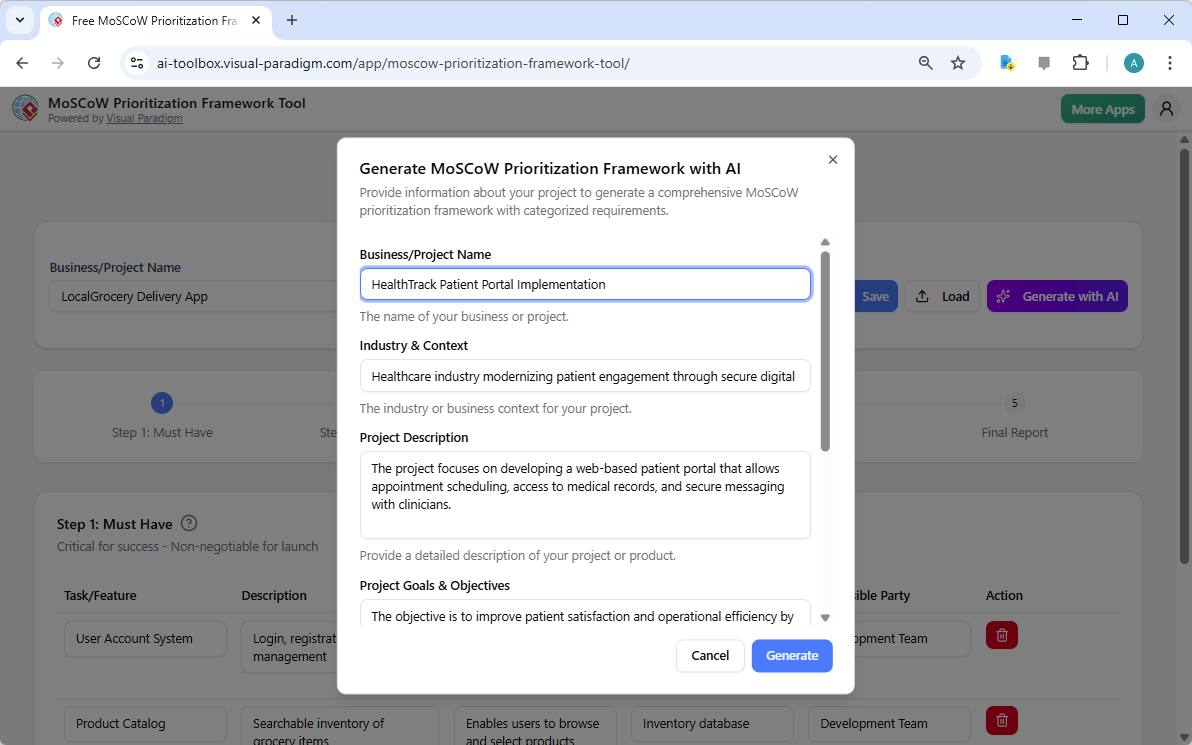
Are you struggling to prioritize features for a complex healthcare project? The MoSCoW Prioritization Framework Tool from Visual Paradigm is an AI-powered solution that transforms the chaos of requirement gathering into a clear, actionable roadmap. This tool guides you through a structured 5-step process, ensuring you focus on what truly matters for project success. With AI assistance, you can generate a comprehensive list of prioritized items across “Must Have,” “Should Have,” “Could Have,” and “Won’t Have” categories, saving significant time and effort. This guide will walk you through the entire workflow, from initial AI generation to the final professional report, using a real-world example of a patient portal implementation.
Quick summary:
-
Visual Paradigm’s AI-Powered MoSCoW Prioritization Framework Tool helps prioritize project requirements efficiently.
-
It uses a 5-step wizard to categorize items into Must Have, Should Have, Could Have, and Won’t Have.
-
AI generates a first draft based on your project context, which you can then refine.
-
Features include detailed item definitions, local file saving, and a professional final report.
-
It is ideal for product owners, project managers, and business analysts in agile environments.
How the AI-Powered MoSCoW Tool Works: A Step-by-Step Journey
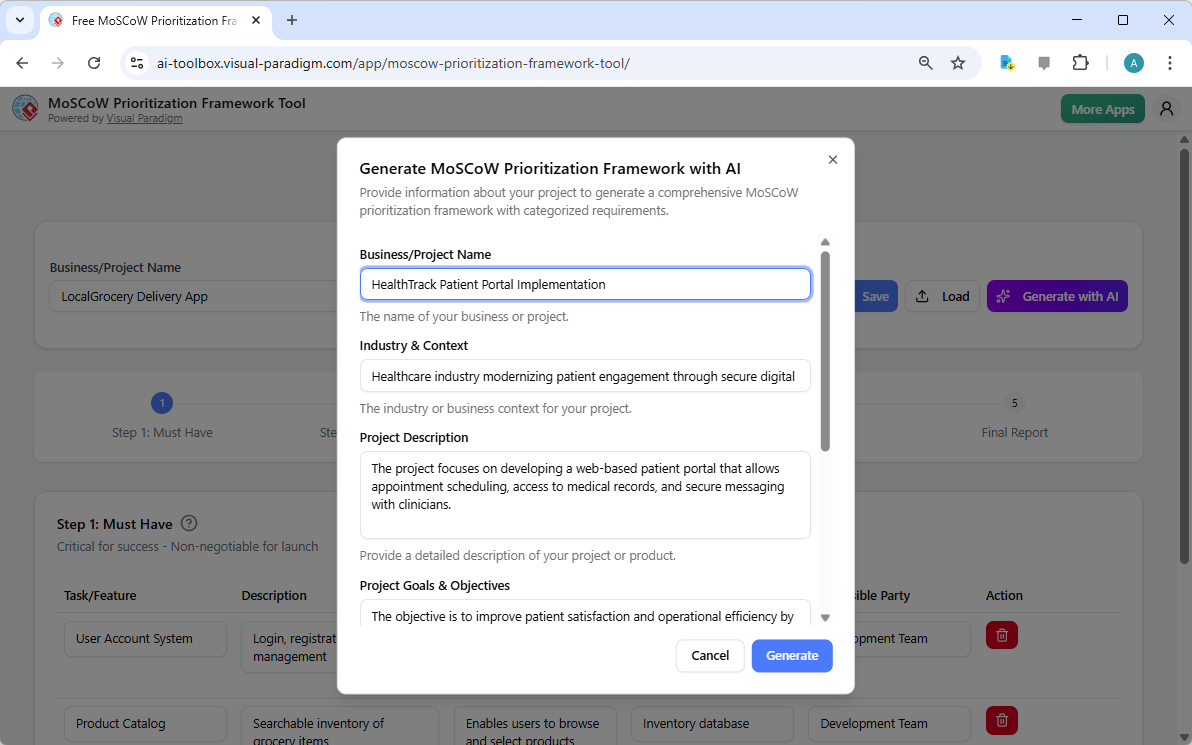
The MoSCoW Prioritization Framework Tool is designed to be intuitive and efficient. It guides you through a logical 5-step workflow, starting with the most critical items and moving to the optional ones. The journey begins with a simple setup. In Image 1, you see the initial screen where you provide your project’s context. This is crucial because the AI uses this information to generate relevant suggestions. For a healthcare project like the “HealthTrack Patient Portal Implementation,” you would input details such as the business name, industry, and specific goals. The AI then uses this data to create a tailored starting point, saving you hours of brainstorming. The tool’s strength lies in its ability to quickly generate a comprehensive first draft, which you can then validate and refine with your team’s insights.
Image 1: The AI generation screen where you input your project context.
Step 1: Must Have – The Non-Negotiables
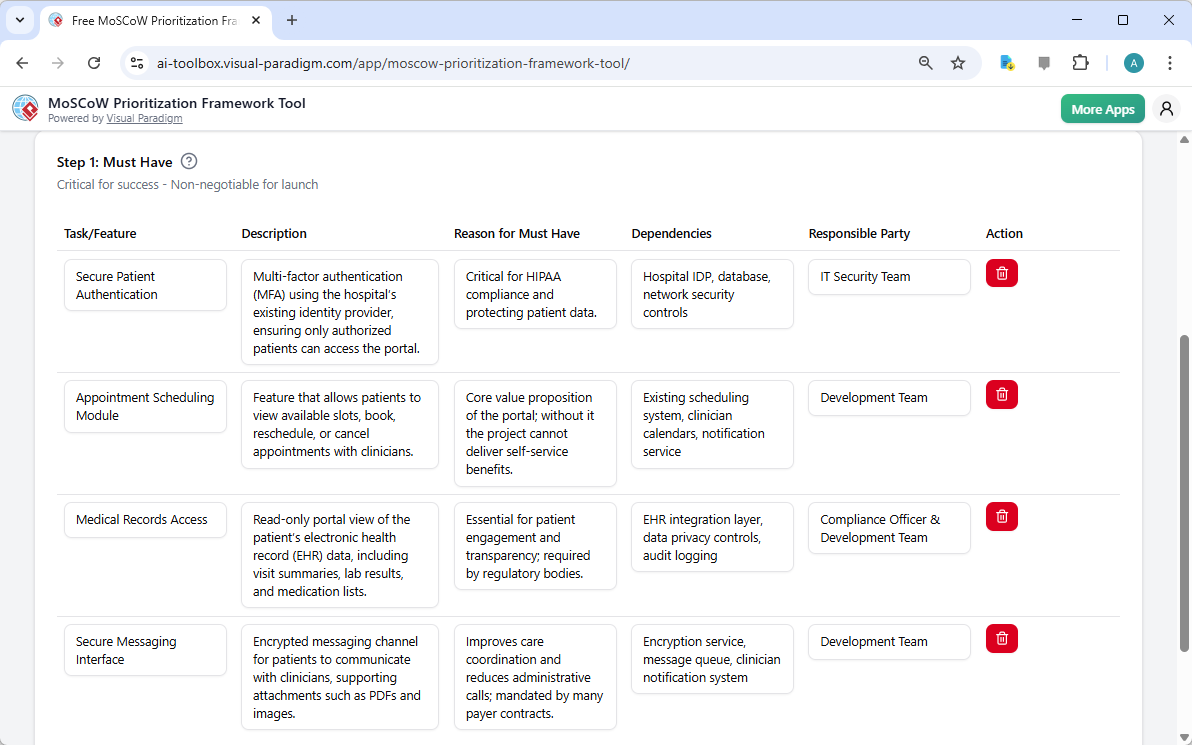
After the AI generates the initial list, you move to the first step: “Must Have.” This category is reserved for features that are absolutely essential for the project’s success. In Image 2, the tool displays a table with several critical items. For the patient portal, these include “Secure Patient Authentication,” “Appointment Scheduling Module,” and “Medical Records Access.” Each item has a detailed description, a reason for its high priority, a list of dependencies, and a responsible party. This level of detail ensures clarity and accountability. The “Must Have” items form the core of your project, and the tool helps you identify them with precision, ensuring that your team is focused on delivering the most critical functionality first.
Image 2: The “Must Have” step, where critical features are defined and prioritized.
Step 2: Should Have – Important but Delayable
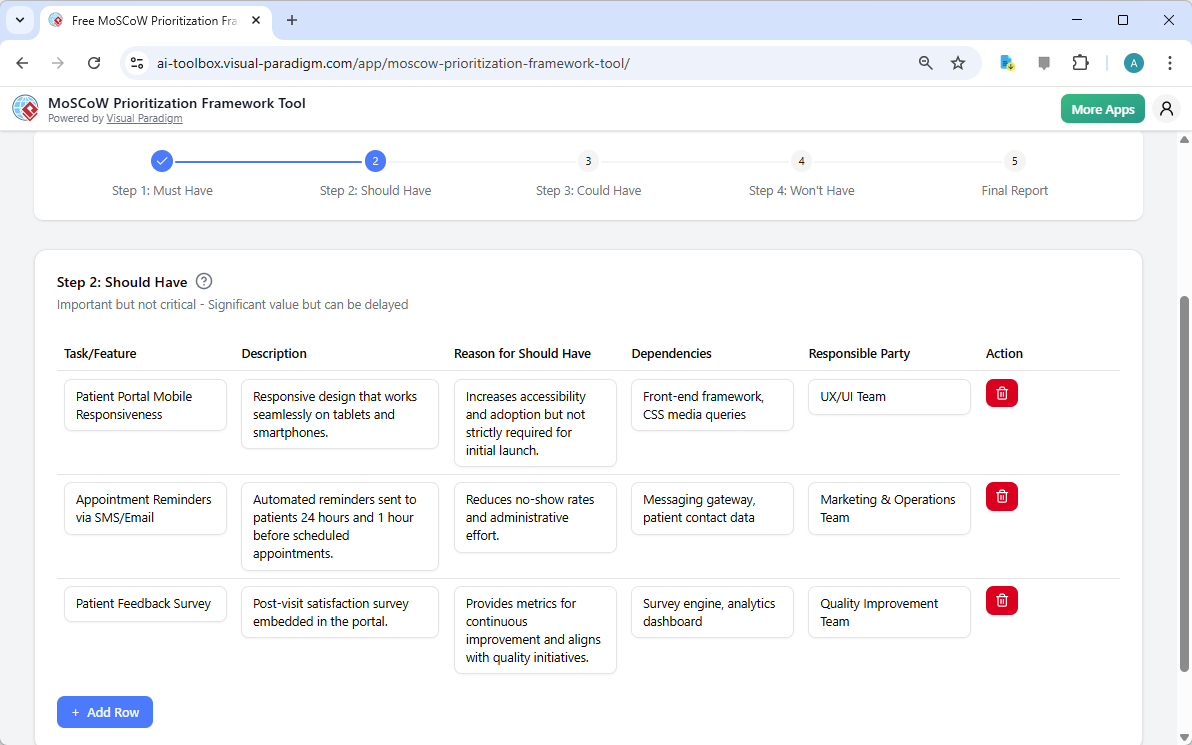
Once the “Must Have” items are defined, you proceed to “Should Have.” These are important features that add significant value but are not essential for the initial launch. In Image 3, the tool shows items like “Patient Portal Mobile Responsiveness” and “Appointment Reminders via SMS/Email.” While these features enhance the user experience, the project can still be delivered without them. The tool allows you to easily add, edit, or delete items in this category. This step helps you manage expectations and focus on delivering high-value features that can be implemented in a later phase if needed.
Image 3: The “Should Have” step, where important features are identified.
Step 3: Could Have – Nice-to-Have Features
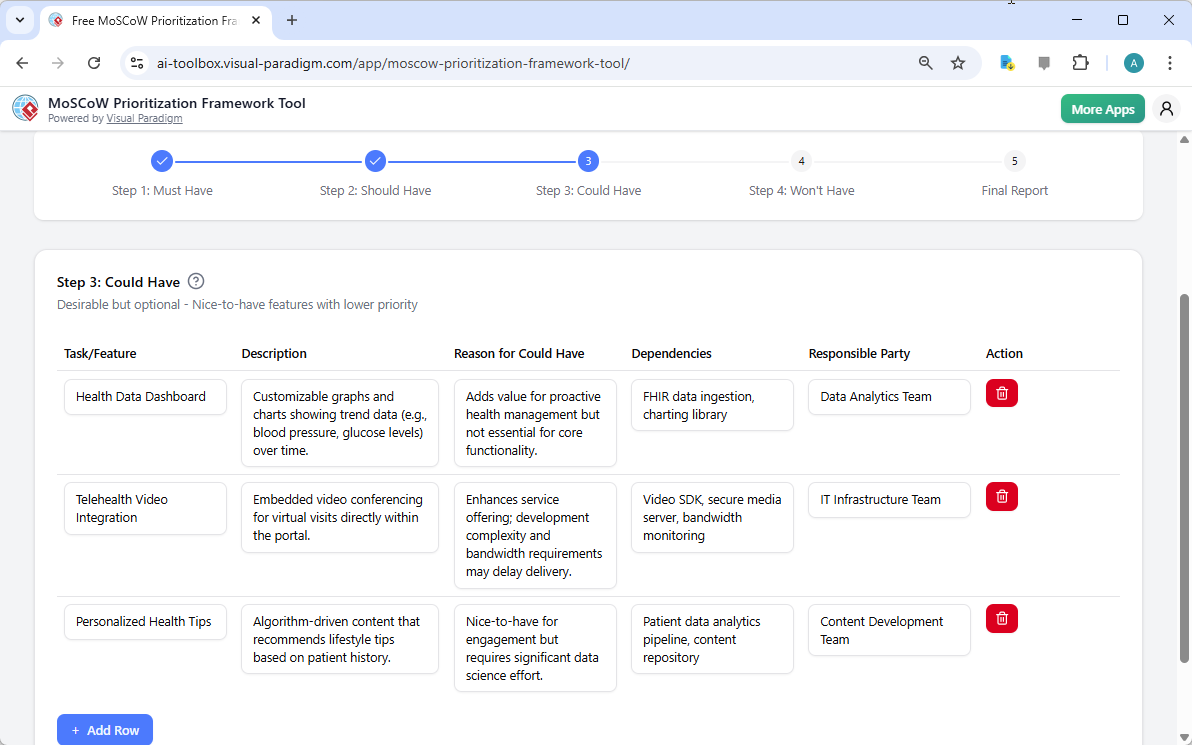
Next, you move to “Could Have,” which includes desirable but less critical features. In Image 4, you see items like “Health Data Dashboard” and “Telehealth Video Integration.” These features are nice to have, but their absence won’t significantly impact the project’s success. The tool provides a clear space to document these items, including their potential benefits and dependencies. This step helps you manage scope creep by explicitly defining what is out of scope for the current delivery period. It allows you to keep these ideas for future phases without distracting from the core objectives.
Image 4: The “Could Have” step, where desirable but non-essential features are listed.
Step 4: Won’t Have – Out of Scope Items
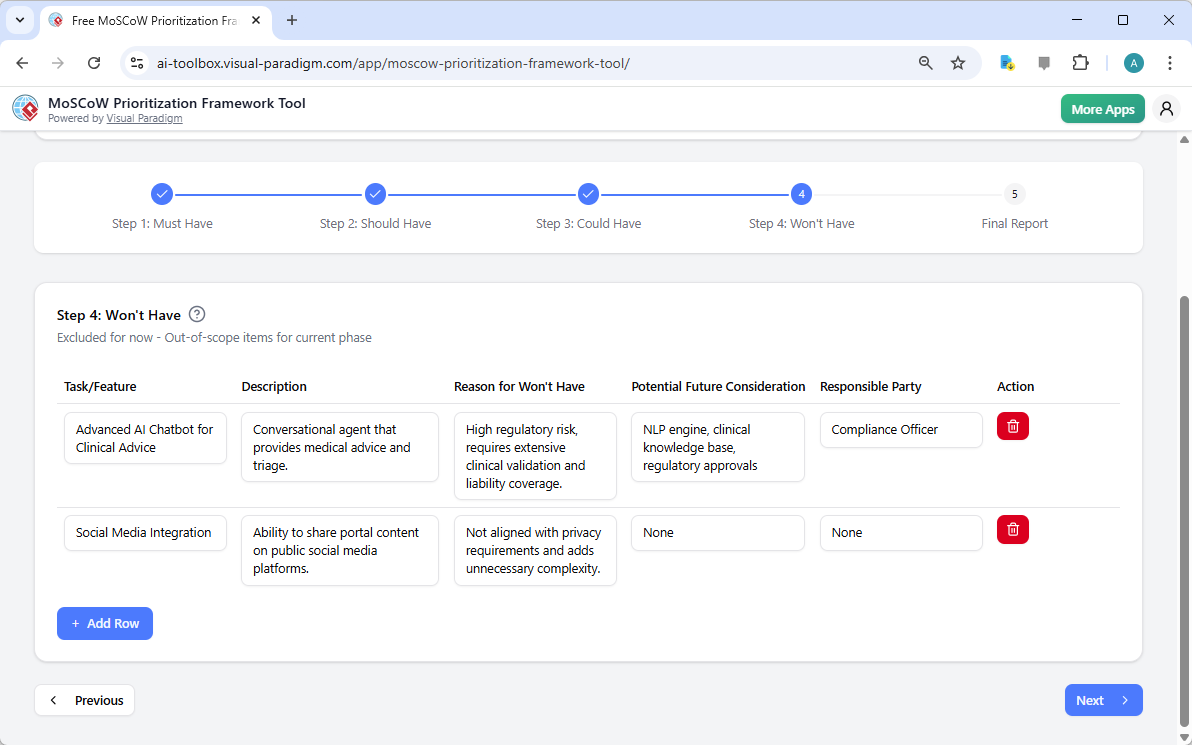
Finally, you reach “Won’t Have,” where you explicitly define items that are out of scope for the current phase. In Image 5, the tool shows features like “Advanced AI Chatbot for Clinical Advice” and “Social Media Integration.” These items are excluded due to high regulatory risk, complexity, or misalignment with project goals. By formally documenting these items, you manage stakeholder expectations and prevent scope creep. This step is crucial for maintaining focus and ensuring that your team is not distracted by low-priority tasks.
Image 5: The “Won’t Have” step, where out-of-scope items are defined.
Generating a Professional Final Report
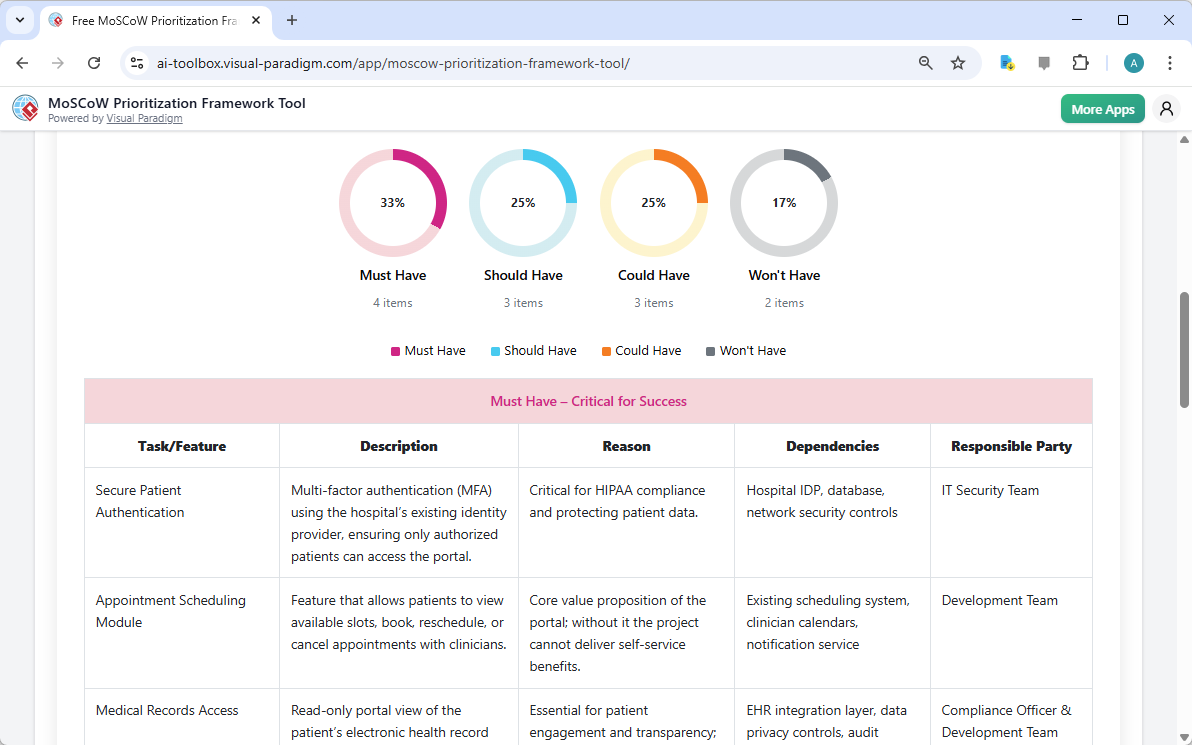
After completing all four steps, you move to the final step: the “Final Report.” This is where all your prioritized data comes together in a single, professional document. In Image 6, the tool presents a comprehensive report with a pie chart summarizing the distribution of items across the four categories. The report includes a detailed table for each category, making it easy to share with stakeholders. You can use your browser’s print function to save the report as a PDF, creating a professional document that is perfect for presentations or team discussions. This final report is a powerful tool for facilitating discussions and ensuring that everyone is aligned on the project’s priorities.
Image 6: The final report, summarizing the entire prioritization analysis.
Why the MoSCoW Prioritization Framework Tool is a Game-Changer
The MoSCoW Prioritization Framework Tool from Visual Paradigm is more than just a tool; it’s a strategic asset. It provides a structured, guided approach to prioritization, ensuring that you focus on the most critical requirements. The AI-powered generation feature is a significant time-saver, providing a comprehensive first draft based on your project context. The ability to save and load your project data locally ensures that your sensitive project information remains private and secure. With detailed item definitions and a professional final report, this tool turns prioritization into an actionable plan. Whether you are a product owner, project manager, or business analyst, this tool will help you make better decisions and deliver successful projects.
Ready to streamline your project prioritization? Try the MoSCoW Prioritization Framework Tool today and create a clear, actionable roadmap for your next project.
Related Links
-
MoSCoW method – Wikipedia: In such cases, the team could then use the MoSCoW method to select which features (or stories, if that is the subset of epics in their organisation) are Must have, Should have, and so on; the minimum marketable features (or MMF) …
-
MoSCoW vs. Other Prioritization Frameworks – Visual Paradigm AI: When to use the Matrix: This framework is excellent for a quick, visual overview of your backlog. It’s especially useful for identifying features that offer high value with low effort, which are often prioritized for immediate development. MoSCoW’s advantage: The matrix can be subjective, as “value” and “effort” are not always easy to define.
-
The Basics of MoSCoW – Visual Paradigm AI: Learn the fundamentals of the MoSCoW prioritization framework. Discover how the Must Have, Should Have, Could Have, and Won’t Have categories help teams align priorities, prevent scope creep, and deliver successful projects on time.
-
MoSCoW Prioritization Framework Tool – Project Management & Requirements Prioritization: The MoSCoW Prioritization Framework Tool helps you prioritize project features and tasks using the Must Have, Should Have, Could Have, Won’t Have (MoSCoW) methodology .
-
MoSCoW Prioritization Template | MOSCOW Method Template: Eye-catching MOSCOW Method template: MoSCoW Prioritization Template. Great starting point for your next campaign. Its designer-crafted, professionally designed and helps you stand out.
-
Prioritizing Requirements with MoSCoW Method: A Guide for Agile Projects – Visual Paradigm Guides: The MoSCoW method is a prioritization technique used in project management, software development, and business analysis . It helps to prioritize requirements based on their importance and urgency, and allows project managers to allocate resources …
-
How to Prioritize Product Backlog Using MoSCoW Method: The MoSCoW method (also known as MoSCoW prioritization or MoSCoW analysis) is a prioritization technique to reach a common understanding with stakeholders on the importance they place on the delivery of each requirement .
-
MoSCoW Template – Visual Paradigm Online: MoSCoW Prioritization Template · MoSCoW Prioritization and Scoping See all MOSCOW Method templates · Get Started For Free · ©2025 by Visual Paradigm. All rights reserved. Terms of Service · Privacy Policy ·
-
Prioritizing Success: A Journey through MoSCoW in E-Commerce Development – Visual Paradigm Guides: In this scenario, we explore how a software development team utilizes the MoSCoW method to prioritize features for a new e-commerce platform, ensuring the delivery of a robust and functional product within tight deadlines.