


✅ Introduction
In software engineering, UML (Unified Modeling Language) provides a powerful visual framework for modeling system structure and behavior. While often simplified as “class diagrams” or “sequence diagrams,” UML actually offers 14 distinct types of diagrams — each serving a unique purpose in capturing different aspects of a system.
This guide provides a clear, accurate, and comprehensive introduction to the 14 UML diagrams as defined in the UML 2.4.1 specification from the Object Management Group (OMG). We also focus exclusively on Visual Paradigm’s AI Diagram Generator, a leading UML tool that leverages artificial intelligence to help model these diagrams efficiently — without requiring deep technical expertise.

🔍 The 14 UML Diagrams: A Correct and Clear Breakdown
Contrary to common misconceptions, UML does not have exactly 7 structure and 7 behavior diagrams. The official count of 14 UML diagrams is accurate, but their categorization is more nuanced than a simple 7+7 split.
✅ Correct Classification of the 14 UML Diagrams
| Diagram | Type | Primary Use |
|---|---|---|
| 1. Class Diagram | Structure | Models static structure: classes, attributes, operations, relationships |
| 2. Object Diagram | Structure | Shows specific instances of classes at a given time |
| 3. Component Diagram | Structure | Models modular architecture and component dependencies |
| 4. Deployment Diagram | Structure | Depicts physical architecture: nodes and deployed software |
| 5. Package Diagramtimi | Structure | Groups related elements (classes, use cases) into packages |
| 6. Composite Structure Diagram | Structure | Shows internal structure of a class via composition or aggregation |
| 7. Use Case Diagram | Behavior | Captures functional requirements from user perspectives |
| 8. Sequence Diagram | Behavior | Illustrates time-ordered interactions between objects |
| 9. Communication Diagram | Behavior | Shows interaction groups and messages between objects |
| 10. Activity Diagram | Behavior | Models workflows, control flows, and decision logic |
| 11. State Diagram | Behavior | Describes the life cycle of an object (states, transitions) |
| 12. Interaction Overview Diagram | Behavior | High-level view of how use cases interact |
| 13. Timing Diagram | Behavior | Models time-based behavior (e.g., response delays) |
| 14. Profile Diagram | Extension | Defines custom stereotypes (e.g., domain-specific extensions) |
🔍 Note: While Profile Diagrams are part of UML, they are primarily used for extending UML and are rarely used in modeling. The 14 diagrams listed above are the core modeling tools.
📚 How to Use Each Diagram in Practice
| Diagram | When to Use It |
|---|---|
| Class Diagram | Early design phase — define domain entities and their relationships |
| Use Case Diagram | Gather user requirements — identify actors and their actions |
| Sequence Diagram | Model interaction details — e.g., login process, order placement |
| Activity Diagram | Model business processes — e.g., refund, application approval |
| State Diagram | For objects with lifecycle — e.g., order status, student enrollment |
| Communication Diagram | Show interactions between groups of objects (e.g., a service calling multiple components) |
| Component & Deployment | Design system architecture — where components live, how they communicate |
| Object Diagram | Validate class diagrams or show runtime state |
| Package Diagram | Organize large systems into manageable modules |
| Timing Diagram | For real-time or time-sensitive systems (e.g., sensor response) |
| Interaction Overview Diagram | Provide a high-level map of how use cases interact |
💡 Best Practice: Start with Use Case → Class → Sequence → State → Activity
🚀 Why Use Visual Paradigm’s AI Diagram Generator?
Among all available UML tools, Visual Paradigm stands out as the most intuitive, powerful, and AI-integrated platform for generating accurate UML diagrams — especially for beginners and teams working on rapid prototyping.
✅ Why Choose Visual Paradigm’s AI Diagram Generator?
| Feature | Benefit |
|---|---|
| Natural Language Input | Simply type: “Generate a sequence diagram of how a student registers for a course” → AI creates the diagram instantly |
| Smart Diagram Recognition | AI understands context, relationships, and common patterns in software design |
| Automatic Element Generation | Classes, actors, associations, messages, and states are created from text |
| Instant Diagram Rendering | Output is rendered directly in Visual Paradigm’s interface |
| Support for All 14 UML Diagram Types | AI can generate any of the 14 diagrams based on your prompt |
| Context-Aware Prompts | AI understands domain-specific terms (e.g., “grade,” “student,” “course”) and maps them correctly |
| Seamless Integration | Works directly within Visual Paradigm’s editor — no export or import needed |
🧪 How to Generate UML Diagrams Using Visual Paradigm’s AI Generator
Step-by-Step Workflow:
-
Open Visual Paradigm and launch the AI Diagram Generator (available in the toolbar).
-
Enter a natural language prompt:
-
Example:
“Generate a class diagram showing a university with students, courses, and grades.”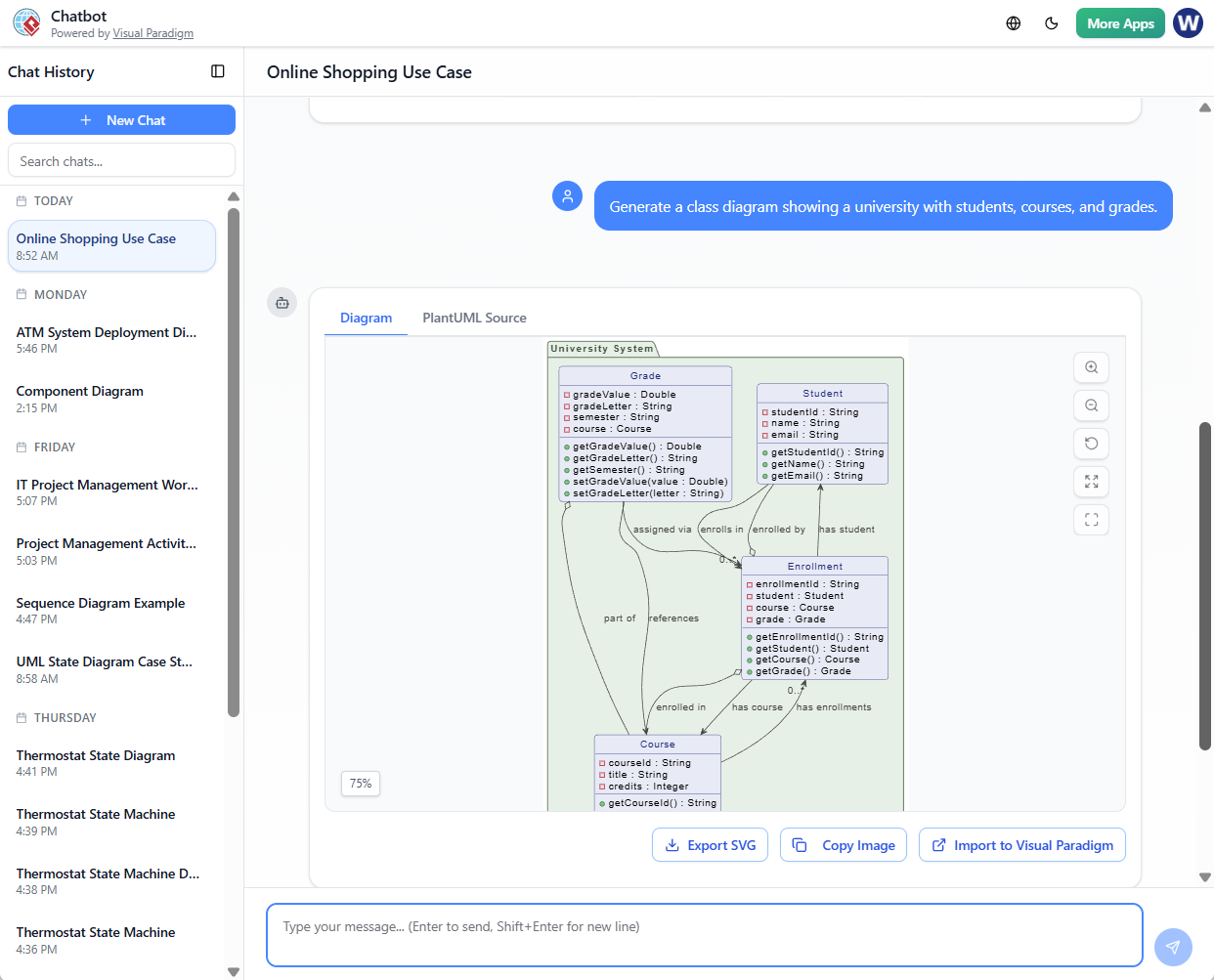
-
Example:
“Create a sequence diagram where a student logs in and views their schedule.”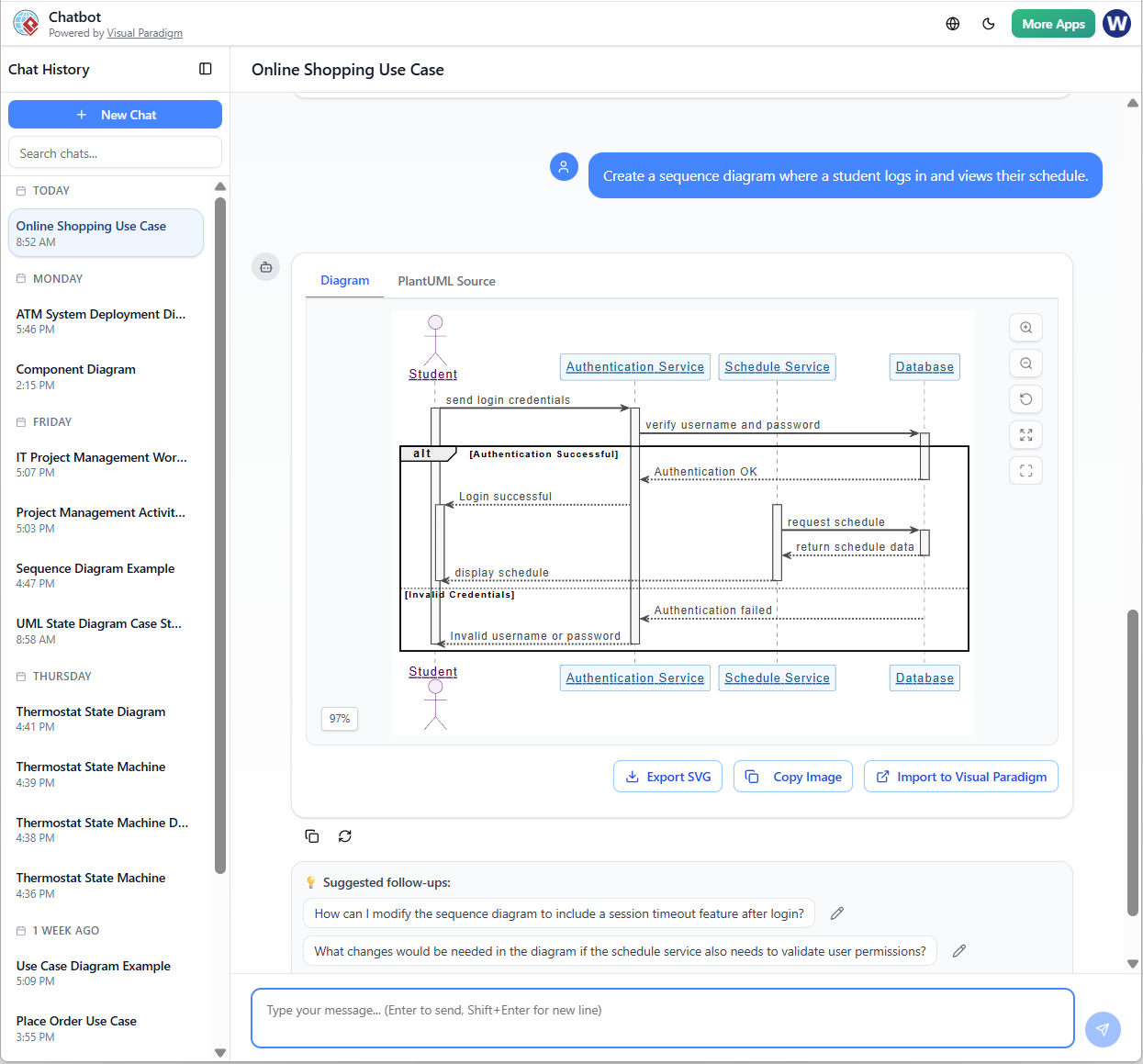
-
Example:
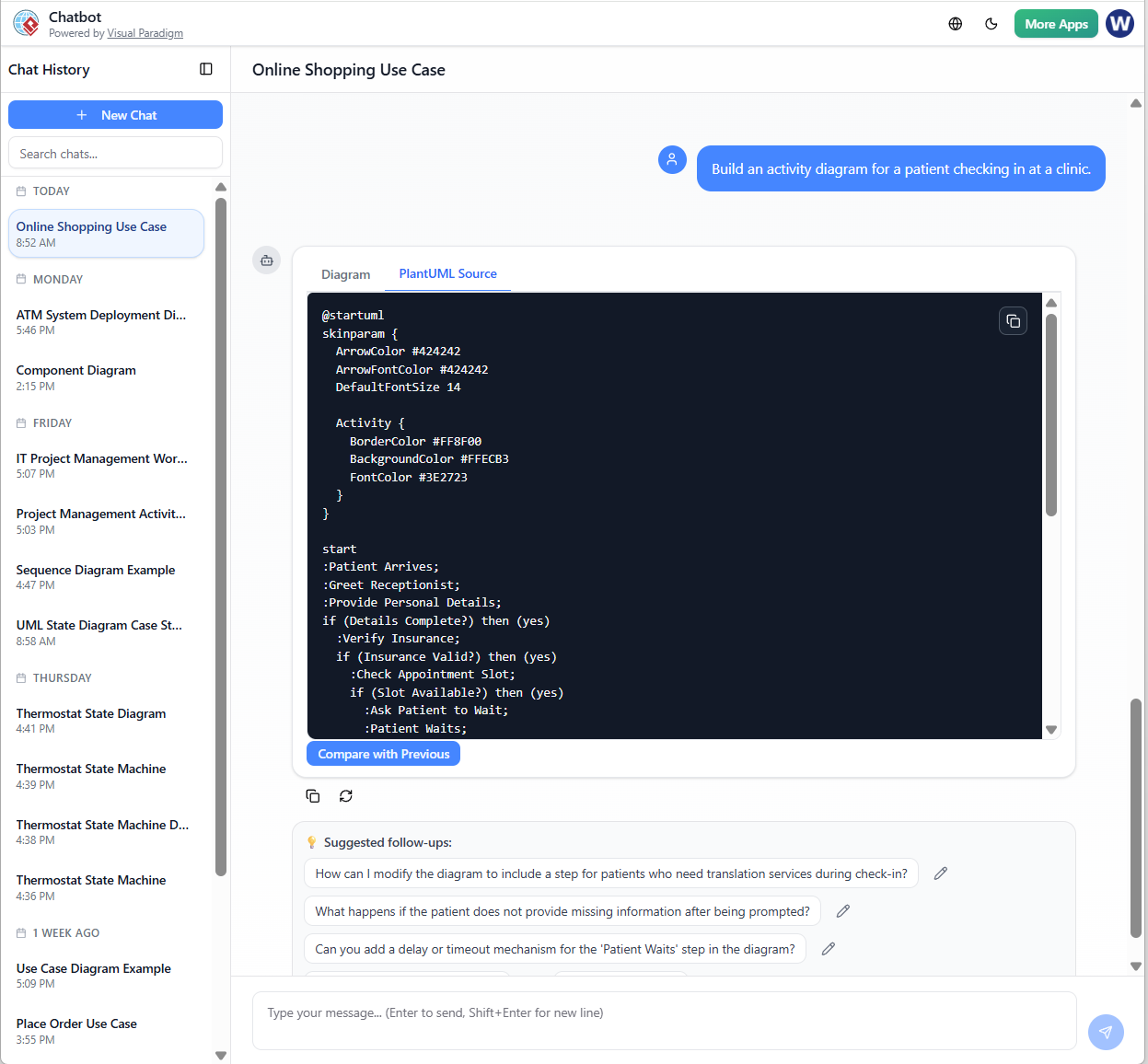
“Build an activity diagram for a patient checking in at a clinic.”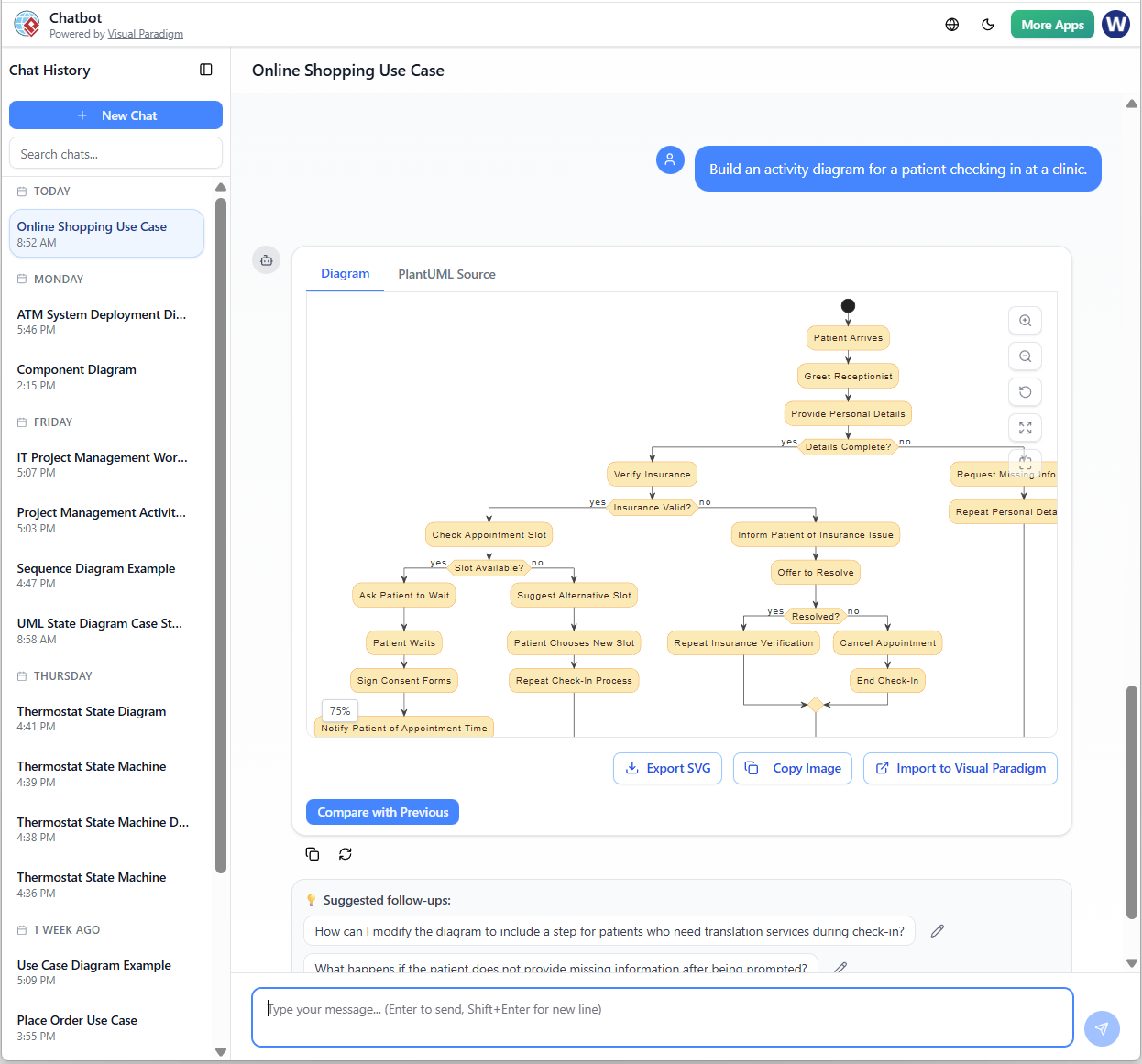
-
-
AI generates the diagram in real time — with proper elements, relationships, and annotations.
-
Review and refine:
-
Adjust labels, add notes, or modify relationships.
-
Add constraints (e.g., “a student can only have one active course”).
-
-
Add OCL (Object Constraint Language) notes:
-
E.g., “grade must be between 0 and 100” → AI will suggest it as a constraint.
-
-
Save, export, or share the diagram in PNG, PDF, or plantUML format.
📌 Pro Tip: Combine multiple prompts to build a full system model:
Prompt 1: “Generate a use case diagram for a library system with users, books, and borrowing.”
Prompt 2: “Generate a sequence diagram showing the borrowing process.”
Prompt 3: “Generate a state diagram for a book’s status (available, borrowed, overdue).”→ You now have a complete system model in seconds.
✅ Example: Generating a Use Case and Sequence Diagram
Prompt:
“Generate a Use Case Diagram for an online shopping system where users can browse products, add items to cart, and complete a purchase.”
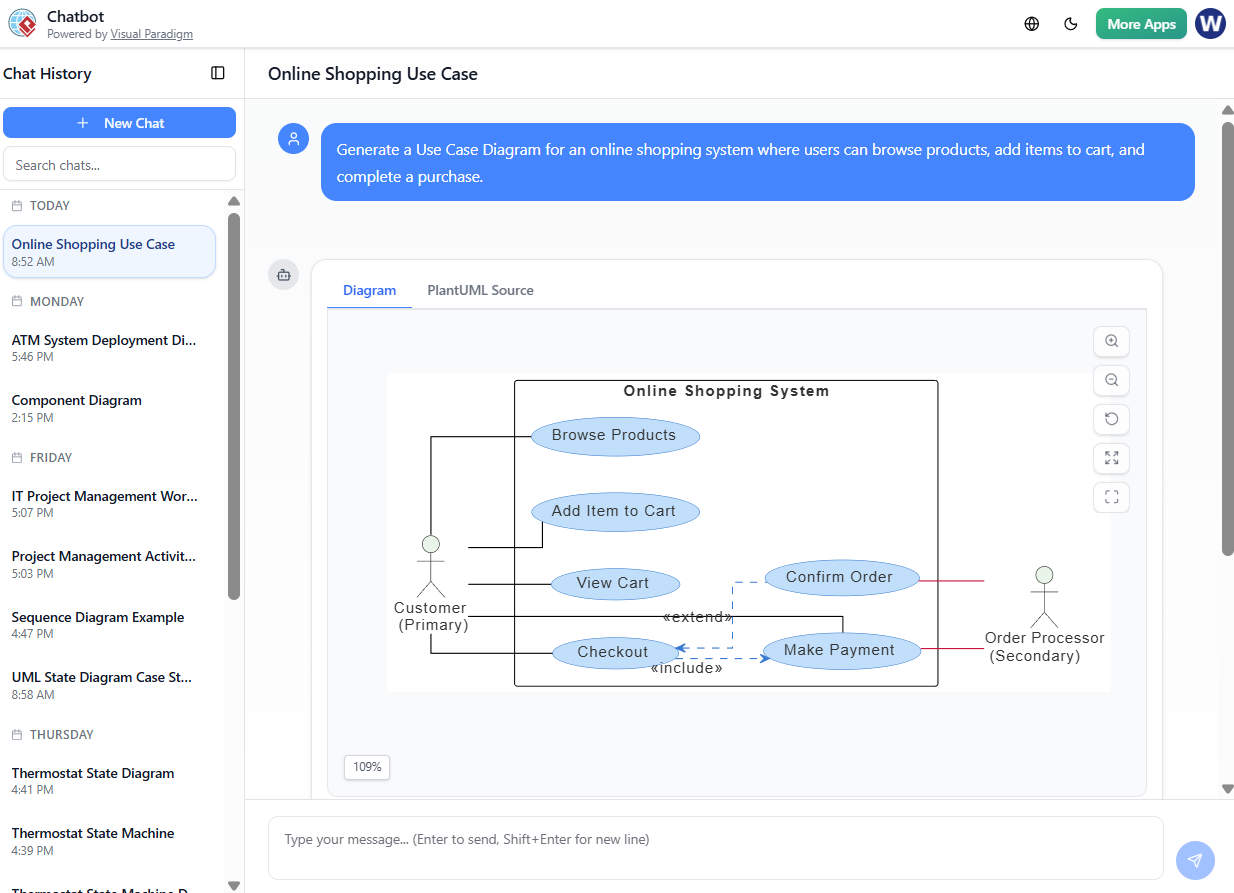
AI Output:
-
Shows actors: User, Payment Gateway
-
Use cases: Browse Products, Add to Cart, Checkout, Confirm Payment
-
Relationships: User → Browse, Add to Cart, Checkout
Follow-up Prompt:
“Generate a sequence diagram showing the checkout process.”
AI Output:
-
Steps: User opens cart → selects items → enters shipping → payment → confirmation
-
Messages between: User, Cart, Payment, Order System
✅ Instantly built — no manual drawing required.
⚠️ Limitations and Best Practices
| Limitation | Recommendation |
|---|---|
| AI may miss edge cases or business rules | Always validate with domain experts |
| AI doesn’t support full OCL constraints natively | Add constraints manually in notes |
| AI may misinterpret ambiguous terms | Use clear, specific prompts |
| AI-generated diagrams are not final | Use them as starting points for refinement |
✅ Best Practice: Use AI to prototype and explore — then refine with human modeling.
🚀 Final Recommendation
For anyone looking to learn, teach, or apply UML effectively, the 14 UML diagrams form a complete modeling toolkit. But navigating them manually can be time-consuming and error-prone.
That’s where Visual Paradigm’s AI Diagram Generator shines.
✅ Why Visual Paradigm is the Best Choice:
-
It’s the only widely-used UML tool with a fully integrated AI diagram generator.
-
It supports all 14 UML diagram types.
-
It understands domain-specific language and generates accurate, context-aware diagrams.
-
It integrates seamlessly into workflows (documentation, requirements, design reviews).
-
It is trusted by enterprise developers, architects, and educators.
📌 Conclusion
The 14 UML diagrams provide a comprehensive language for modeling software systems — from structure to behavior, from business processes to real-time interactions.
With Visual Paradigm’s AI Diagram Generator, you can now leverage natural language to create accurate, professional UML diagrams — without needing to draw every line by hand.
Whether you’re a student, developer, or systems analyst, this tool empowers you to model faster, learn more intuitively, and communicate complex systems visually — all from a single prompt.
🚀 Start with a simple prompt.
🚀 Build confidence in UML.
🚀 Build real-world models — quickly and clearly.
Author’s Note: This guide is designed for beginners and professionals alike who want to understand the full scope of UML 14 diagrams and discover how to use them efficiently with Visual Paradigm’s AI Diagram Generator — the most advanced and reliable AI-powered UML tool available today.
🔗 Need a downloadable version?
→ Download as PDF or Markdown.
→ Or request a template for generating UML diagrams using AI prompts.
✅ Title Recommendation:
“Mastering UML 14: A Complete Guide to the 14 UML Diagrams and How to Use Visual Paradigm’s AI Diagram Generator“