


In software engineering, particularly within the use case-driven development methodology, identifying actors is a foundational and critical step. Actors serve as the bridge between the system under development and the external entities that interact with it. Properly identifying and understanding actors enables teams to design systems that are user-centric, functionally complete, and aligned with real-world needs.
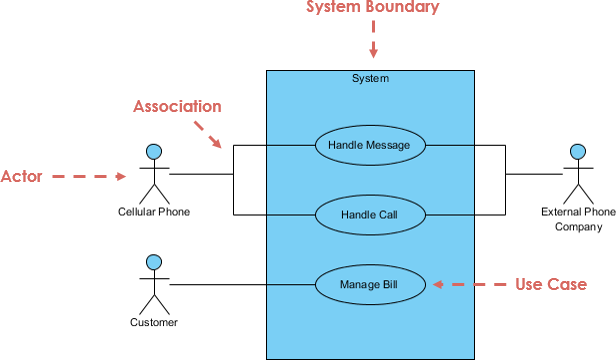
This comprehensive article explores the purpose of identifying actors, the types of actors (human and non-human), their roles and responsibilities, how this process supports various areas of software development, and provides key concepts, guidelines, and practical tips for success.
🔍 1. The Purpose of Identifying Actors
Identifying actors is not just a preliminary task—it’s a strategic activity that shapes the entire development lifecycle. The primary purposes include:
✅ 1. Define System Boundaries
Actors help establish what lies inside the system (the software) and what lies outside. This clarity prevents scope creep and ensures the team focuses on the correct domain.
Example: In a banking system, the customer is an actor outside the system, while the transaction processing module is part of the system.
✅ 2. Capture Real-World Interactions
Actors represent real users or systems that interact with the software. By identifying them, teams model actual use cases that reflect how the system will be used in practice.
✅ 3. Drive Use Case Discovery
Each use case typically involves one or more actors. Knowing the actors helps uncover the full set of functional requirements. If you don’t know who’s using the system, you can’t define what they need to do.
✅ 4. Improve Communication and Collaboration
Actors provide a common language for stakeholders, developers, testers, and business analysts. They make it easier to discuss features, validate requirements, and align expectations.
✅ 5. Support Test and Validation Planning
Testers can use actor roles to design test scenarios. For example, a “Customer” actor may need to perform “Login,” “Transfer Funds,” and “View Statement” — each becoming a test case.
🧍♂️ 2. Types of Actors: Human vs. Non-Human
Actors are broadly categorized into two types: Human Actors and Non-Human Actors.
🧑💼 A. Human Actors
These are individuals who interact with the system directly.
Examples:
-
Customer
-
Administrator
-
Employee
-
Manager
-
Support Agent
-
Patient (in healthcare systems)
Characteristics:
-
Have goals and intentions.
-
Interact through UIs, forms, or voice commands.
-
May have roles with different permissions (e.g., admin vs. regular user).
✅ Tip: Use role-based naming (e.g., “Registered Customer” instead of “User”) to avoid ambiguity.
🤖 B. Non-Human Actors
These are external systems, devices, or automated processes that interact with the software.
Examples:
-
ATM Machine
-
Payment Gateway (e.g., Stripe, PayPal)
-
Email Server
-
Weather Service API
-
IoT Sensor
-
Legacy System (e.g., old database)
Characteristics:
-
Not people, but they initiate or respond to system actions.
-
Often represent integration points or external services.
-
May trigger use cases automatically.
✅ Example: In an e-commerce system, the “Payment Gateway” is an actor that processes payments and sends confirmation back to the system.
⚠️ Common Mistake: Treating a system component as part of the system rather than an external actor. Always ask: “Does this entity initiate a use case?”
🎯 3. Actor Roles and Responsibilities
Understanding an actor’s role and responsibilities deepens the insight into how they use the system and what they expect.
🔹 Role: Who the Actor Is
-
Describes the person or system in context.
-
Often tied to a job function or system type.
Example: “Loan Officer” vs. “Customer”
🔹 Responsibilities: What the Actor Does
-
The actions the actor performs in the system.
-
The goals they aim to achieve.
-
The data they provide or receive.
Example: “Customer” Actor in an E-Commerce System
| Responsibility | Description |
|---|---|
| Browse Products | View product listings and details |
| Add to Cart | Select items and add them to a shopping cart |
| Checkout | Enter shipping and payment info |
| Track Order | View order status and delivery updates |
✅ Best Practice: Document actor responsibilities in a table or use case diagram legend to improve clarity.
🛠️ 4. How Actor Identification Supports Development Areas
Proper actor identification impacts multiple phases of the software development lifecycle:
📌 1. Requirements Gathering
-
Helps identify all user groups and external systems.
-
Prevents missing critical user needs.
-
Encourages stakeholder involvement early.
📌 2. Use Case Modeling
-
Each use case is triggered by an actor.
-
Enables systematic discovery of functional requirements.
-
Helps avoid redundant or overlapping use cases.
📌 3. System Design and Architecture
-
Guides interface design (UI/UX).
-
Influences security and access control (e.g., admin vs. guest).
-
Determines integration points (e.g., third-party APIs).
📌 4. Testing and Validation
-
Testers use actor roles to create test scenarios.
-
Ensures all user paths are covered.
-
Supports automated test script creation.
📌 5. User Documentation and Training
-
Clear actor definitions help write user manuals and training materials.
-
Explains who can do what in the system.
📌 6. Agile and Iterative Development
-
In Agile, actors help define user stories (e.g., “As a Customer, I want to reset my password”).
-
Facilitates backlog prioritization based on user needs.
🧩 5. Key Concepts in Actor Identification
✅ 1. Actor ≠ User
-
A user is a person who uses the system.
-
An actor is any entity that interacts with the system.
-
One user can play multiple roles (e.g., a manager who is also a customer).
❌ Wrong: “User” as the sole actor.
✅ Correct: “Customer,” “Manager,” “System Administrator”
✅ 2. Actor Is an External Entity
-
Actors are outside the system boundary.
-
Do not include internal components (e.g., “Database” is not an actor—unless it’s an external system).
✅ 3. One Actor, Multiple Use Cases
-
A single actor can be involved in many use cases.
-
Example: A “Customer” can “Browse,” “Add to Cart,” “Checkout,” and “Rate Product.”
✅ 4. Use Case vs. Actor
-
Use case describes an action or goal.
-
Actor triggers or participates in the use case.
✅ Use Case: “Process Payment”
✅ Actor: “Customer” and “Payment Gateway”
📝 6. Guidelines for Effective Actor Identification
Follow these best practices to ensure accurate and meaningful actor identification:
✅ 1. Start with Stakeholder Interviews
-
Talk to business analysts, end-users, and system owners.
-
Ask: “Who uses this system? Who sends data to it? Who receives output?”
✅ 2. Use the “Who Initiates?” Question
-
For every potential use case, ask: “Who starts this interaction?”
-
The answer is likely the actor.
✅ 3. Avoid Over-Abstraction
-
Don’t use vague terms like “User,” “System,” or “Person.”
-
Be specific: “Registered Customer,” “Third-Party API,” “Mobile Device.”
✅ 4. Consider All Interaction Points
-
Think beyond direct users: sensors, cron jobs, external services.
-
Example: A weather sensor might trigger a “Send Alert” use case.
✅ 5. Use the “Is It a Human?” Test
-
If it’s not a person, ask: “Does it send or receive messages to the system?”
-
If yes → it’s a non-human actor.
✅ 6. Validate with Use Case Diagrams
-
Draw use case diagrams and check if all actors are represented.
-
Ensure no use case is “actor-less.”
💡 7. Tips and Tricks for Success
| Tip | Explanation |
|---|---|
| Use Role-Based Names | Instead of “User,” use “Customer,” “Admin,” “Supplier” — clearer and more actionable. |
| Group Actors by Role | Create an “Actor List” with descriptions, responsibilities, and permissions. |
| Leverage Personas | Build personas for key actors to empathize with their goals and pain points. |
| Check for Missing Actors | Ask: “What happens if the system fails? Who gets notified?” → Often reveals hidden actors. |
| Use the “Outside the System” Rule | If something is inside the system, it’s not an actor. |
| Iterate and Refine | Revisit actors during each development phase. New features may introduce new actors. |
| Document Actors in a Reference Table | Maintain a living document with actor details for future reference. |
🎯 Real-World Example: Online Banking System
Actors:
-
Customer – views account, transfers money
-
Bank Teller – processes loan applications
-
ATM Machine – sends withdrawal requests
-
Fraud Detection System – monitors transactions and flags suspicious activity
-
Payment Gateway – processes credit card payments
Use Case: “Withdraw Cash”
-
Actor: Customer and ATM Machine
-
Interaction: Customer inserts card → ATM sends request → System verifies → Funds released
✅ The ATM is an actor because it initiates the interaction.
🚫 Common Pitfalls to Avoid
| Pitfall | Why It’s Bad | How to Fix |
|---|---|---|
| Treating internal modules as actors | Violates system boundary concept | Ask: “Is this inside or outside the system?” |
| Using vague terms like “User” | Leads to ambiguity and missing requirements | Use specific roles: “Customer,” “Vendor” |
| Forgetting non-human actors | Misses integrations and automation | Think about APIs, sensors, cron jobs |
| Assuming one actor per use case | Overlooks complex interactions | Allow multiple actors per use case |
| Not revisiting actors during development | Actors may evolve with new features | Review actors in sprint planning and retrospectives |
✅ Conclusion
Identifying actors in a use case-driven approach is far more than a formality—it’s a strategic cornerstone of successful software development. By clearly defining who interacts with the system (both human and non-human), teams gain:
-
Deeper understanding of user needs
-
More complete and accurate requirements
-
Better system design and architecture
-
Improved testing and documentation
-
Stronger stakeholder alignment
When done right, actor identification transforms abstract ideas into concrete, actionable insights. It ensures the software doesn’t just function—but solves real problems for real people and systems.
📚 Further Reading & Tools
-
Books:
-
Use Case Modeling by Alistair Cockburn
-
Writing Effective Use Cases by Alistair Cockburn
-
-
Tools:
-
Visual Paradigm (for use case diagrams)
-
Lucidchart / Draw.io (diagramming)
-
Jira + Confluence (for actor and use case documentation)
-
-
Methodologies:
-
Agile (user stories derived from actors)
-
Domain-Driven Design (DDD) – actors as part of the domain model
-
🌟 Final Thought:
“You don’t build software for systems—you build it for people, and the systems that serve them. Actors are the first step in understanding who those people and systems are.”
By mastering actor identification, you lay the foundation for a system that’s not just functional—but truly valuable.
- What Is a Use Case Diagram? – A Complete Guide to UML Modeling: This guide provides an in-depth explanation of use case diagrams, covering their purpose, components, and best practices for modeling software requirements.
- Step-by-Step Use Case Diagram Tutorial – From Beginner to Pro: This comprehensive resource walks users through the process of creating effective use case diagrams, from basic concepts to advanced modeling techniques.
- Visual Paradigm – Use Case Description Features: This article explores the specific features available in Visual Paradigm for documenting user interactions and system behavior with precision.
- AI Use Case Description Generator by Visual Paradigm: This page details an AI-powered tool that automatically generates detailed use case descriptions from user inputs, significantly speeding up the documentation process.
- Automating Use Case Development with AI in Visual Paradigm: This article explains how the AI-driven generator reduces manual effort and improves consistency during the software development lifecycle.
- Visual Paradigm Use Case Description Generator Tutorial: A step-by-step tutorial that demonstrates how to automatically produce structured, detailed use case documents directly from your diagrams.
- Documenting Use Cases in Visual Paradigm: User Guide: This official user guide explains how to effectively document requirements using established templates and best practices within the modeling environment.
- Producing Use Case Descriptions in Visual Paradigm: This technical guide provides instructions on using the software’s built-in tools to create formal descriptions for system requirements.
- Demystifying Use Cases, Scenarios, and Flow of Events: This in-depth resource explains the critical relationships between use cases, scenarios, and the structured flow of events required for accurate documentation.
- How to Write Effective Use Cases? – Visual Paradigm: This tutorial highlights that the primary purpose of use case modeling is to establish a solid system foundation by clearly identifying user needs.

