


Introduction
Use Case Elaboration is a critical phase in the software development lifecycle, particularly within the context of requirements engineering and object-oriented analysis and design. It bridges the gap between high-level use cases and detailed system specifications, enabling developers, analysts, and stakeholders to understand how a system behaves in response to specific user goals.
This guide provides a comprehensive overview of use case elaboration, including its purpose, key concepts, step-by-step methodology, best practices, and real-world examples.
1. What is Use Case Elaboration?
Use Case Elaboration is the process of refining a high-level use case into a detailed, actionable description of system behavior. It transforms a simple narrative of user interaction into a precise, testable, and implementable specification.
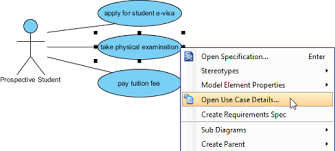
✅ Goal: To define what the system should do, how it should do it, and under what conditions, in sufficient detail for development and testing.
2. Why Use Case Elaboration Matters
-
Reduces Ambiguity: Prevents misinterpretation of requirements.
-
Improves Traceability: Links requirements to design, code, and test cases.
-
Supports Design & Implementation: Provides a foundation for class diagrams, sequence diagrams, and database design.
-
Enables Testing: Facilitates the creation of test scenarios and acceptance criteria.
-
Enhances Collaboration: Ensures shared understanding among stakeholders, developers, and testers.
3. Key Concepts in Use Case Elaboration
3.1 Use Case (UC)
A use case describes a sequence of actions a system performs to yield a valuable result for an actor (a user or external system).
Example: “Withdraw Cash” from an ATM.
3.2 Actor
An external entity that interacts with the system. Can be a human user, another system, or a time trigger.
Example: Customer, ATM Machine, Payment Gateway.
3.3 Primary and Secondary Actors
-
Primary Actor: Initiates the use case.
-
Secondary Actor: Supports the primary actor (e.g., a bank server).
3.4 Preconditions
Conditions that must be true before the use case can begin.
Example: User must have a valid card and correct PIN.
3.5 Postconditions
Conditions that must be true after the use case completes.
Example: Cash is dispensed, account balance is updated.
3.6 Main Success Scenario (Basic Flow)
The most common path through the use case that leads to success.
Example: Insert card → Enter PIN → Select withdrawal → Enter amount → Receive cash.
3.7 Alternative Flows (Exception Flows)
Branches in the use case that handle exceptions, errors, or variations.
Example: Invalid PIN → Retry or cancel.
3.8 Extensions
Points in the main flow where alternative behavior can be inserted (e.g., via “<>” in UML).
Example: “<>: Notify bank of suspicious activity.”
3.9 Non-Functional Requirements (NFRs)
Constraints on system behavior (e.g., performance, security, usability).
Example: “Transaction must complete within 3 seconds.”
4. The Use Case Elaboration Process (Step-by-Step)
Step 1: Identify the Use Case
Start with a high-level use case (e.g., “Place Order”).
Use a template:
Use Case Name: Place Order
Primary Actor: Customer
Stakeholders: Customer, Order Management System, Payment Gateway
Step 2: Define Preconditions
List all conditions that must be met before the use case starts.
Customer is logged in.
Shopping cart contains at least one item.
Payment method is saved.
Step 3: Define Postconditions
State what must be true after the use case completes.
Order is created in the system.
Inventory is updated.
Payment is processed.
Confirmation email is sent.
Step 4: Write the Main Success Scenario (Basic Flow)
Detail the ideal, successful path.
Customer selects “Checkout” from shopping cart.
System displays order summary.
Customer confirms shipping address.
Customer selects payment method.
System processes payment.
Payment is confirmed.
System creates order and generates confirmation.
Confirmation is displayed and email is sent.
Step 5: Identify Alternative Flows (Exception Flows)
List possible deviations from the main flow.
Alternative Flow A: Insufficient Stock
System checks inventory.
Item is out of stock.
System displays message: “Item unavailable.”
Customer can remove item or continue without it.
Alternative Flow B: Payment Declined
Payment is rejected.
System displays error: “Payment declined.”
Customer can retry or choose another method.
Alternative Flow C: Invalid Shipping Address
System validates address.
Address is invalid.
System prompts customer to correct it.
Step 6: Define Extensions (<> Relationships)
Use UML-style extensions to show optional behavior.
<>: Notify Inventory System
Trigger: When an item is out of stock during checkout.
Purpose: Alert warehouse to restock.
<>: Apply Discount Coupon
Trigger: Customer enters a valid coupon code.
Purpose: Reduce total cost.
Step 7: Add Non-Functional Requirements (NFRs)
Include system constraints.
The order must be processed within 5 seconds.
Payment must be encrypted using TLS 1.3.
The system must support 10,000 concurrent users.
Step 8: Review and Validate
Collaborate with stakeholders to ensure completeness and accuracy.
Ask: “Does this cover all user goals?”
Ask: “Are all edge cases considered?”
Ask: “Can a developer build from this?”
5. Tools and Techniques for Elaboration
| Tool/Technique | Purpose |
|---|---|
| Use Case Diagram (UML) | Visualize actors and use cases. |
| Sequence Diagram | Show message flow between objects during the use case. |
| Activity Diagram | Model complex workflows and decision points. |
| User Story Mapping | Link use cases to user journey and priorities. |
| Decision Tables | Clarify complex logic (e.g., discount rules). |
6. Best Practices
-
Keep Use Cases User-Centric: Focus on user goals, not system features.
-
Use Consistent Naming: Use verb-noun format (e.g., “Update Profile”).
-
Avoid Technical Jargon: Write for non-technical stakeholders.
-
Use Plain Language: Be clear and concise.
-
Iterate: Refine use cases as understanding grows.
-
Link to Other Artifacts: Connect use cases to class diagrams, test cases, and user stories.
-
Prioritize: Focus on high-value or high-risk use cases first.
7. Real-World Example: Online Banking – Transfer Money
Use Case: Transfer Money
Primary Actor: Customer
Secondary Actor: Bank Server, Fraud Detection System
Preconditions
-
Customer is logged in.
-
Source account has sufficient funds.
-
Transfer limit not exceeded.
Postconditions
-
Funds transferred from source to destination.
-
Transaction recorded in both accounts.
-
Notification sent to both parties.
Main Success Scenario
-
Customer selects “Transfer Money” from dashboard.
-
System displays transfer form.
-
Customer enters destination account and amount.
-
System validates account and amount.
-
Customer confirms transfer.
-
System checks fraud detection rules.
-
Transaction is approved and executed.
-
Confirmation message is shown.
Alternative Flows
-
A1: Insufficient Funds
→ System displays: “Insufficient funds.”
→ Customer can cancel or adjust amount. -
A2: Fraud Detected
→ System blocks transfer and sends alert.
→ Customer must verify via 2FA or contact support. -
A3: Invalid Destination Account
→ System shows: “Account not found.”
→ Customer can re-enter or use account lookup.
Extensions
-
<>: Send Notification to Recipient
-
Trigger: Transfer completed.
-
Purpose: Inform recipient.
-
-
<>: Apply Transfer Fee
-
Trigger: Transfer amount > $1,000.
-
Purpose: Deduct $5 fee.
-
Non-Functional Requirements
-
All transfers must be logged and auditable.
-
Response time ≤ 2 seconds.
-
Data encrypted in transit and at rest.
8. Common Pitfalls and How to Avoid Them
| Pitfall | Solution |
|---|---|
| Too vague (e.g., “System should process orders”) | Use specific, measurable actions. |
| Overly technical language | Use natural language; avoid code or database terms. |
| Missing exception paths | Use alternative flows to cover failures. |
| No clear success criteria | Define postconditions clearly. |
| No stakeholder review | Involve users, testers, and business analysts. |
9. Conclusion
Use Case Elaboration is not just a documentation exercise—it’s a strategic process that ensures the system meets real user needs with clarity, precision, and completeness. By systematically expanding high-level use cases into detailed, actionable specifications, teams reduce risk, improve communication, and lay a solid foundation for successful software delivery.
✅ Final Tip: Treat use case elaboration as an iterative conversation—not a one-time task. Refine it as you learn more about the system and its users.
Appendix: Template for Use Case Elaboration
# Use Case Name: [e.g., Update Profile]

**Primary Actor**: [e.g., Customer]
**Secondary Actor(s)**: [e.g., Database, Email Service]
**Stakeholders**: [e.g., Customer, Support Team]

### Preconditions
- [List conditions]

### Postconditions
- [List outcomes]

### Main Success Scenario (Basic Flow)
1. [Step 1]
2. [Step 2]
...

### Alternative Flows
- **A1: [Name]**
  1. [Step]
  2. [Step]
- **A2: [Name]**
  ...

### Extensions (<<extend>>)
- **<<extend>>: [Name]**
  - Trigger: [When]
  - Purpose: [Why]

### Non-Functional Requirements
- [Performance, Security, Usability, etc.]

### Notes
- [Additional context or assumptions]
By following this guide, teams can master the art of use case elaboration and build systems that are not only functional but truly aligned with user expectations.
Appendix – Use Case Description for Withdraw Cash of an ATM:
Use Case Name
Withdraw Cash
Primary Actor
Customer (bank account holder)
Secondary Actors
-
ATM Machine
-
Bank Server (Core Banking System)
-
Payment Gateway (for transaction processing)
-
Fraud Detection System
-
Printer (for receipt generation)
Stakeholders & Interests
-
Customer: Wants to withdraw cash securely and efficiently.
-
Bank: Ensures transaction integrity, fraud prevention, and accurate account updates.
-
ATM Operator: Maintains machine availability and cash inventory.
-
Security Team: Monitors for suspicious behavior and prevents fraud.
Preconditions
-
The customer has a valid bank card inserted into the ATM.
-
The customer has successfully authenticated (entered correct PIN).
-
The customer’s account is active and not locked.
-
The ATM has sufficient cash in the vault.
-
The customer’s account has sufficient available balance.
-
The daily withdrawal limit has not been exceeded.
Postconditions
-
The requested amount of cash is dispensed to the customer.
-
The customer’s account balance is reduced by the withdrawn amount.
-
A transaction record is created in the bank’s system.
-
A receipt is printed (if requested).
-
The ATM logs the transaction for audit and reconciliation.
Main Success Scenario (Basic Flow)
| Step | System Action | Actor Response |
|---|---|---|
| 1 | ATM prompts: “Please enter your PIN.” | Customer enters PIN. |
| 2 | ATM validates PIN with the Bank Server. | System confirms PIN is correct. |
| 3 | ATM displays the main menu: “Withdraw Cash, Check Balance, Transfer, Exit.” | Customer selects “Withdraw Cash.” |
| 4 | ATM prompts: “Enter amount to withdraw.” | Customer enters amount (e.g., $100). |
| 5 | ATM validates: |
-
Amount is within daily limit.
-
Account has sufficient funds.
-
ATM has enough cash. | System confirms validity. |
| 6 | ATM requests authorization from the Bank Server. | Bank Server approves transaction. |
| 7 | ATM dispenses cash from the vault. | Customer receives cash. |
| 8 | ATM prompts: “Would you like a receipt?” | Customer selects “Yes” or “No.” |
| 9 | If “Yes”: ATM prints receipt with: -
Date/time
-
Amount withdrawn
-
Remaining balance
-
Transaction ID | Customer collects receipt. |
| 10 | ATM displays: “Thank you. Please remove your card.” | Customer removes card. |
| 11 | ATM returns to idle state. | System resets. |
✅ Success Outcome: Customer receives cash and (optionally) a receipt. Account is updated.
Alternative Flows (Exception Scenarios)
A1: Invalid PIN Entered (3 Attempts)
-
Trigger: Customer enters incorrect PIN three times.
-
System Action: ATM locks the card and displays: “Card locked. Contact your bank.”
-
Actor Action: Customer exits and contacts bank.
-
Postcondition: Card is temporarily blocked; transaction is logged.
⚠️ Note: This is a security measure to prevent unauthorized access.
A2: Insufficient Funds
-
Trigger: Customer enters an amount exceeding available balance.
-
System Action: ATM displays: “Insufficient funds. Current balance: $X.”
-
Actor Action: Customer selects “Cancel” or enters a lower amount.
-
Postcondition: No cash dispensed; no account change.
A3: ATM Cash Insufficient
-
Trigger: Customer enters valid amount, but ATM vault is empty or below minimum.
-
System Action: ATM displays: “Cash not available. Please try again later.”
-
Actor Action: Customer cancels or returns later.
-
Postcondition: Transaction not processed; no account change.
A4: Withdrawal Amount Exceeds Daily Limit
-
Trigger: Customer attempts to withdraw more than the daily limit (e.g., $1,000).
-
System Action: ATM displays: “Exceeds daily withdrawal limit. Try a smaller amount.”
-
Actor Action: Customer reduces amount or cancels.
-
Postcondition: Transaction not processed.
A5: Transaction Declined by Bank Server
-
Trigger: Bank server rejects the transaction (e.g., due to fraud alert, account freeze).
-
System Action: ATM displays: “Transaction declined. Please contact your bank.”
-
Actor Action: Customer cancels and contacts bank.
-
Postcondition: No cash dispensed; no account change.
Extensions (<> Relationships)
| Extension | Trigger | Purpose |
|---|---|---|
| <>: Notify Fraud Detection System | When a withdrawal is made in a foreign country or exceeds typical behavior | Flag suspicious activity for review |
| <>: Send SMS Alert to Customer | After successful withdrawal | Notify customer of transaction (enhanced security) |
| <>: Apply Withdrawal Fee | For non-primary account holders or certain account types | Charge fee for specific services |
| <>: Print Transaction History | If customer selects “Print History” on menu | Provide a printed summary of recent transactions |
Non-Functional Requirements (NFRs)
| Category | Requirement |
|---|---|
| Performance | Transaction must be processed within 3 seconds. |
| Security | All communication encrypted (TLS 1.3). PIN is never stored or transmitted in plaintext. |
| Reliability | ATM must not dispense cash unless bank server confirms authorization. |
| Usability | Interface must be accessible (e.g., large buttons, voice guidance for visually impaired). |
| Availability | ATM must be operational 99.9% of the time. |
| Audit & Compliance | All transactions must be logged and traceable for 7 years (per banking regulations). |
Notes
-
The ATM must be regularly maintained to ensure cash availability and hardware reliability.
-
If the card is not removed within 30 seconds after transaction, it will be automatically retained (anti-theft feature).
-
The system supports multiple currencies and exchange rate calculations (if applicable).
Use Case Diagram (UML Summary)
[Customer] --(Withdraw Cash)--> [ATM]
[ATM] --(Authenticate PIN)--> [Bank Server]
[ATM] --(Check Funds)--> [Bank Server]
[ATM] --(Dispense Cash)--> [Cash Vault]
[ATM] --(Print Receipt)--> [Printer]
[ATM] --(Notify Fraud System)--> [Fraud Detection System]
(Note: In a full UML diagram, use case relationships like <> and <> would be shown.)
✅ Summary
This elaborated use case for “Withdraw Cash” provides a clear, structured, and testable specification that:
-
Captures user goals and system behavior.
-
Handles real-world exceptions.
-
Supports security, compliance, and usability.
-
Serves as a foundation for design, testing, and implementation.
It is suitable for use in agile sprints, system design documents, or formal requirements specifications.
📘 Next Steps:
-
Convert this into a sequence diagram to show object interactions.
-
Create test cases based on each flow (main and alternative).
-
Link to class diagrams (e.g.,
Account,Transaction,ATM,FraudDetector).
- What Is a Use Case Diagram? – A Complete Guide to UML Modeling: This guide provides an in-depth explanation of use case diagrams, covering their purpose, components, and best practices for modeling software requirements.
- Step-by-Step Use Case Diagram Tutorial – From Beginner to Pro: This comprehensive resource walks users through the process of creating effective use case diagrams, from basic concepts to advanced modeling techniques.
- Visual Paradigm – Use Case Description Features: This article explores the specific features available in Visual Paradigm for documenting user interactions and system behavior with precision.
- AI Use Case Description Generator by Visual Paradigm: This page details an AI-powered tool that automatically generates detailed use case descriptions from user inputs, significantly speeding up the documentation process.
- Automating Use Case Development with AI in Visual Paradigm: This article explains how the AI-driven generator reduces manual effort and improves consistency during the software development lifecycle.
- Visual Paradigm Use Case Description Generator Tutorial: A step-by-step tutorial that demonstrates how to automatically produce structured, detailed use case documents directly from your diagrams.
- Documenting Use Cases in Visual Paradigm: User Guide: This official user guide explains how to effectively document requirements using established templates and best practices within the modeling environment.
- Producing Use Case Descriptions in Visual Paradigm: This technical guide provides instructions on using the software’s built-in tools to create formal descriptions for system requirements.
- Demystifying Use Cases, Scenarios, and Flow of Events: This in-depth resource explains the critical relationships between use cases, scenarios, and the structured flow of events required for accurate documentation.
- How to Write Effective Use Cases? – Visual Paradigm: This tutorial highlights that the primary purpose of use case modeling is to establish a solid system foundation by clearly identifying user needs.

