


(Focused on Order Processing, Customer Experience & Store Operations)
🔍 Business Context
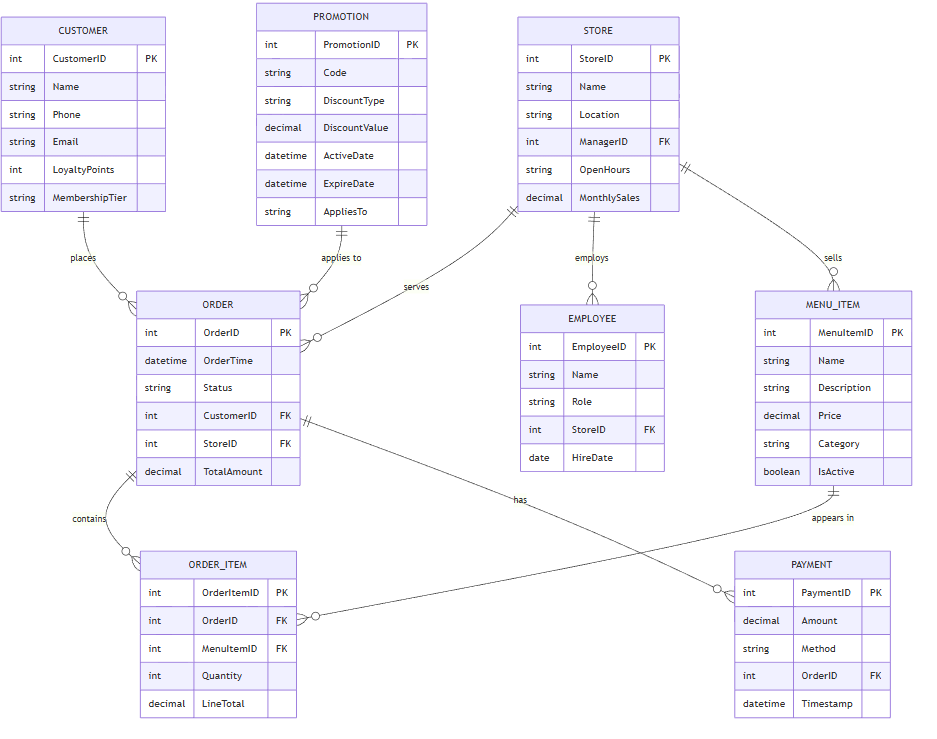
This Entity-Relationship Diagram models core operations in a McDonald’s store, focusing on:
-
Order flow from customer to payment
-
Employee roles and store management
-
Menu availability and pricing
-
Customer loyalty and repeat engagement
-
Basic inventory tracking (for food items)
Note: This is not a full enterprise database (e.g., supply chain or HR), but a realistic, scalable foundation for a fast-food POS system.
📚 Entities & Attributes
| Entity | Attributes |
|---|---|
| Customer | CustomerID (PK), Name, Phone, Email, LoyaltyPoints, MembershipTier (e.g., Bronze, Silver) |
| Store | StoreID (PK), Name, Location (Address), ManagerID (FK → Employee), OpenHours, TotalSales (monthly) |
| Employee | EmployeeID (PK), Name, Role (Cashier, Cook, Manager, Supervisor), StoreID (FK), HireDate, ShiftSchedule |
| MenuItem | MenuItemID (PK), Name, Description, Price, Category (Burger, Drink, Side, Dessert), IsActive, ImageURL |
| Order | OrderID (PK), OrderTime, Status (Pending → Preparing → Ready → Completed → Cancelled), TotalAmount, StoreID (FK), CustomerID (FK) |
| OrderItem | OrderItemID (PK), OrderID (FK), MenuItemID (FK), Quantity, LineTotal (auto-calculated) |
| Payment | PaymentID (PK), Amount, Method (Cash, CreditCard, MobilePay), TransactionID, OrderID (FK), Timestamp |
| Promotion | PromotionID (PK), Code (e.g., “WELCOME10”), DiscountType (Percentage, Fixed), DiscountValue, ActiveDate, ExpireDate, AppliesTo (e.g., Lunch, AllItems) |
🔗 Relationships (with Cardinalities)
| Relationship | Cardinality | Description |
|---|---|---|
Customer → Order |
1 → 0.. | A customer places multiple orders over time. |
Order → OrderItem |
1 → 0.. | Each order contains zero or more menu items. |
Order → Payment |
1 → 1 | Every completed order has exactly one payment. |
Order → Store |
1 → 1 | Each order is placed at one specific store. |
Store → Employee |
1 → 0.. | A store employs multiple staff (cashiers, cooks, managers). |
Store → Order |
1 → 0.. | A store receives many orders. |
MenuItem → OrderItem |
1 → 0.. | A menu item can appear in multiple orders. |
Promotion → Order |
0 → 1 | A promotion may apply to an order (e.g., “Buy 1 Big Mac, Get 1 Free”). |
Employee → Store |
1 → 1 | Each employee works at one store. |
✅ Optional: Add a
LoyaltyProgramentity if deeper loyalty logic is needed (e.g., points redemption, rewards).
🔒 Constraints & Business Rules
-
Price must be > 0
-
Order status cannot be ‘Completed’ if payment is missing
-
Quantity in OrderItem ≥ 1
-
Promotions can only be applied if active and within time window
-
Customer must be linked to at least one order to earn loyalty points
-
Menu items are marked as ‘Inactive’ if out-of-stock or discontinued
📝 Use Cases (Why This ERD Matters)
| Use Case | Benefit |
|---|---|
| POS System Design | Enables real-time order tracking, payment, and receipt generation |
| Inventory Alerts | When a menu item is ordered frequently, monitor stock levels |
| Loyalty Programs | Track point accumulation, offer personalized discounts |
| Store Analytics | Identify top-selling items, peak hours, popular promotions |
| Employee Management | Assign roles, track shifts, manage performance |
📂 Output Formats
You can copy and paste any of the following into your documentation, presentation, or database design tools.
✅ 1. Text-Based ERD (for documentation)
Entities:

- Customer
  - CustomerID (PK)
  - Name
  - Phone
  - Email
  - LoyaltyPoints
  - MembershipTier

- Store
  - StoreID (PK)
  - Name
  - Location
  - ManagerID (FK → Employee)
  - OpenHours
  - MonthlySales

- Employee
  - EmployeeID (PK)
  - Name
  - Role (Cashier, Cook, Manager)
  - StoreID (FK)
  - HireDate

- MenuItem
  - MenuItemID (PK)
  - Name
  - Description
  - Price
  - Category
  - IsActive

- Order
  - OrderID (PK)
  - OrderTime
  - Status (Pending, Preparing, Ready, Completed, Cancelled)
  - CustomerID (FK)
  - StoreID (FK)
  - TotalAmount

- OrderItem
  - OrderItemID (PK)
  - OrderID (FK)
  - MenuItemID (FK)
  - Quantity
  - LineTotal

- Payment
  - PaymentID (PK)
  - Amount
  - Method (Cash, CreditCard, MobilePay)
  - OrderID (FK)
  - Timestamp

- Promotion
  - PromotionID (PK)
  - Code
  - DiscountType
  - DiscountValue
  - ActiveDate
  - ExpireDate
  - AppliesTo

Relationships:
- Customer "1" -- "0..*" Order
- Order "1" -- "0..*" OrderItem
- Order "1" -- "1" Payment
- Order "1" -- "1" Store
- Store "1" -- "0..*" Employee
- MenuItem "1" -- "0..*" OrderItem
- Promotion "0..*" -- "1" Order (conditional on active status)
✅ 2. Mermaid.js Version (for Markdown, Notion, Obsidian)
erDiagram
    CUSTOMER ||--o{ ORDER : "places"
    STORE ||--o{ ORDER : "serves"
    STORE ||--o{ EMPLOYEE : "employs"
    STORE ||--o{ MENU_ITEM : "sells"
    ORDER ||--o{ ORDER_ITEM : "contains"
    ORDER ||--o{ PAYMENT : "has"
    MENU_ITEM ||--o{ ORDER_ITEM : "appears in"
    PROMOTION ||--o{ ORDER : "applies to"

    CUSTOMER {
        int CustomerID PK
        string Name
        string Phone
        string Email
        int LoyaltyPoints
        string MembershipTier
    }

    STORE {
        int StoreID PK
        string Name
        string Location
        int ManagerID FK
        string OpenHours
        decimal MonthlySales
    }

    EMPLOYEE {
        int EmployeeID PK
        string Name
        string Role
        int StoreID FK
        date HireDate
    }

    MENU_ITEM {
        int MenuItemID PK
        string Name
        string Description
        decimal Price
        string Category
        boolean IsActive
    }

    ORDER {
        int OrderID PK
        datetime OrderTime
        string Status
        int CustomerID FK
        int StoreID FK
        decimal TotalAmount
    }

    ORDER_ITEM {
        int OrderItemID PK
        int OrderID FK
        int MenuItemID FK
        int Quantity
        decimal LineTotal
    }

    PAYMENT {
        int PaymentID PK
        decimal Amount
        string Method
        int OrderID FK
        datetime Timestamp
    }

    PROMOTION {
        int PromotionID PK
        string Code
        string DiscountType
        decimal DiscountValue
        datetime ActiveDate
        datetime ExpireDate
        string AppliesTo
    }
✅ 3. PlantUML Version
' McDonald's Order System ERD (PlantUML)

package "McDonald's Operations" {
  entity "Customer" {
    - CustomerID (PK)
    - Name
    - Phone
    - Email
    - LoyaltyPoints
    - MembershipTier
  }

  entity "Store" {
    - StoreID (PK)
    - Name
    - Location
    - ManagerID (FK → Employee)
    - OpenHours
    - MonthlySales
  }

  entity "Employee" {
    - EmployeeID (PK)
    - Name
    - Role (Cashier, Cook, Manager)
    - StoreID (FK → Store)
    - HireDate
  }

  entity "MenuItem" {
    - MenuItemID (PK)
    - Name
    - Description
    - Price
    - Category (Burger, Drink, Side)
    - IsActive
  }

  entity "Order" {
    - OrderID (PK)
    - OrderTime
    - Status (Pending, Preparing, Ready, Completed)
    - CustomerID (FK → Customer)
    - StoreID (FK → Store)
    - TotalAmount
  }

  entity "OrderItem" {
    - OrderItemID (PK)
    - OrderID (FK → Order)
    - MenuItemID (FK → MenuItem)
    - Quantity
    - LineTotal
  }

  entity "Payment" {
    - PaymentID (PK)
    - Amount
    - Method (Cash, CreditCard)
    - OrderID (FK → Order)
    - Timestamp
  }

  entity "Promotion" {
    - PromotionID (PK)
    - Code (e.g., WELCOME10)
    - DiscountType (Percentage, Fixed)
    - DiscountValue
    - ActiveDate
    - ExpireDate
    - AppliesTo
  }

  Customer "1" -- "0..*" Order : "places"
  Order "1" -- "0..*" OrderItem : "contains"
  Order "1" -- "1" Payment : "has"
  Order "1" -- "1" Store : "is placed at"
  Store "1" -- "0..*" Employee : "employs"
  MenuItem "1" -- "0..*" OrderItem : "appears in"
  Promotion "0..*" -- "1" Order : "applies to"
}
🔍 Future Extensions (Optional)
If you’d like to expand this ERD, consider adding:
-
Inventory → Tracks stock levels, reorder points, supplier info
-
Shift Schedule → Daily shifts, break times, shift assignments
-
Supplier → Who supplies ingredients (e.g., “Cheese Supplier”)
-
Seasonal Menus → Special promotions (e.g., “Summer BBQ Menu”)
-
Geolocation → For delivery or pickup tracking
🚀 Final Thoughts
This ERD is realistic, scalable, and aligned with McDonald’s operations — it reflects actual POS workflows, employee roles, and customer behavior.
✅ You now have a complete, ready-to-use ERD for a McDonald’s system — whether for a school project, business analysis, or technical design.
- Visual Paradigm ERD Tool – Create Entity-Relationship Diagrams Online: This is a powerful, web-based tool that enables users to design and visualize database schemas with ease using intuitive drag-and-drop features.
- Database Design with ERD Tools – Visual Paradigm Guide: This resource provides a comprehensive guide on using ERD tools to design robust, scalable databases with best practices in data modeling and schema design.
- Free ERD Tool – Design Databases Online with Visual Paradigm: Users can access a free, no-cost ERD tool online for creating professional entity-relationship diagrams without installation or subscription.
- How to Draw Entities in Visual Paradigm ERD: This is a step-by-step user guide focused on creating and customizing entities in the ERD tool for accurate database modeling.
- How to Model a Relational Database with ERD – Visual Paradigm Tutorial: This practical tutorial shows how to use ERDs to model relational databases effectively from the initial concept to full implementation.
- Generating Database from ERD in Visual Paradigm: This article provides a detailed guide on automatically generating a database schema directly from an ERD using reverse engineering capabilities.
- Generate Class Diagram from ERD – Visual Paradigm Tutorial: This resource teaches users how to convert an ERD into a class diagram to support object-oriented design and development workflows.
- Streamlining Entity-Relationship Modeling with Visual Paradigm: This guide explains how to simplify the process of designing and implementing entity-relationship models from the initial concept to final database deployment.
- Reverse Engineering Database to ERD in Visual Paradigm: This tutorial teaches how to reverse engineer an existing database into a visual Entity-Relationship Diagram (ERD) using an intuitive interface and powerful modeling tools.
- Chen Notation ERD Editor – Advanced Entity-Relationship Modeling: This specialized editor supports precise database modeling with full support for entities, attributes, relationships, and cardinality using Chen notation.

