


In the evolving landscape of enterprise architecture (EA), the integration of modeling languages with established EA frameworks is critical for clarity, consistency, and effective communication across stakeholders. While TOGAF (The Open Group Architecture Framework) provides a robust, structured methodology for enterprise architecture—particularly through its ADM (Architecture Development Method)—it does not prescribe a specific modeling language. However, UML (Unified Modeling Language) can play a pivotal role in enhancing the clarity, precision, and implementation readiness of EA models developed within the TOGAF ADM process.
1. Introduction: The Role of Modeling in TOGAF ADM
The TOGAF ADM is a 6-phase iterative process designed to guide organizations through the development, implementation, and governance of enterprise architecture. These phases—Architecture Vision, Business Architecture, Information Systems Architecture, Technology Architecture, Opportunities and Solutions, and Migration Planning—require detailed, structured, and traceable models to communicate complex system interactions, business processes, and technology dependencies.
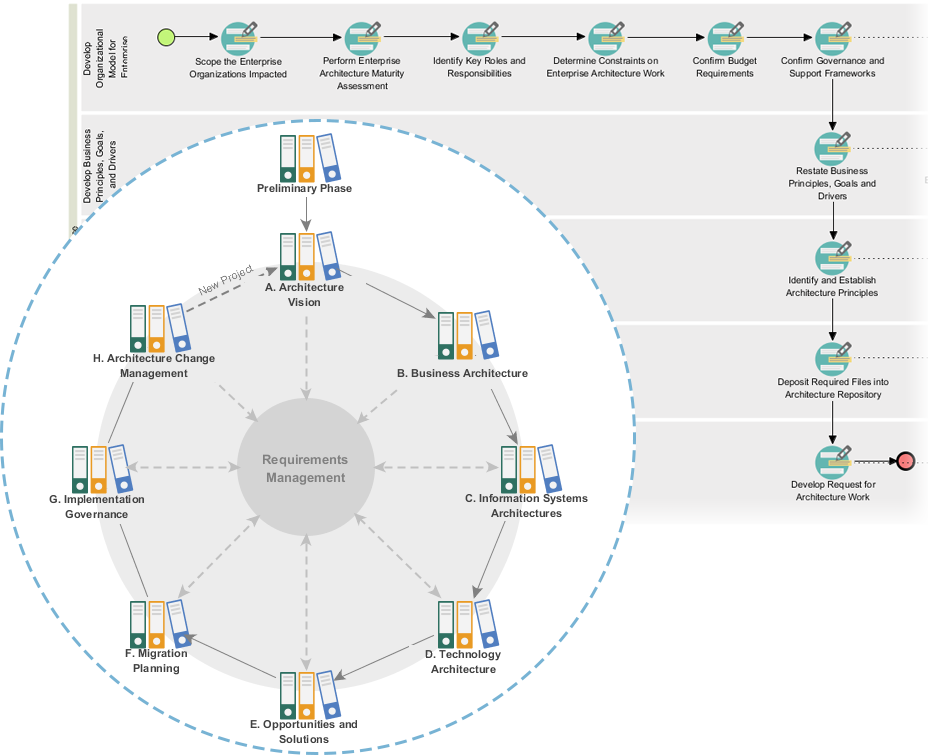
While TOGAF provides a high-level framework, modeling is essential for translating abstract concepts into actionable, implementable designs. This is where UML steps in as a powerful, standardized, and widely recognized modeling language.
2. UML Supports Key TOGGAF ADM Phases
Phase 1: Architecture Vision
-
Purpose: Define strategic goals, scope, and value drivers.
-
UML Support:
UML can be used to model business scenarios and high-level value streams through use-case diagrams. These help visualize how stakeholders interact with systems and identify key value propositions, directly connecting to the business goals outlined in the Architecture Vision.
Phase 2: Business Architecture
-
Purpose: Define organizational structure, business processes, and key stakeholders.
-
-
Activity diagrams in UML effectively represent business processes, workflows, and process boundaries—directly aligned with ArchiMate’s business process and actor modeling.
-
UML sequence diagrams can illustrate the interactions between business actors and systems during specific events (e.g., order processing), helping to validate process assumptions.
-
Class diagrams can be used to model organizational entities (e.g., departments, roles, roles) and their relationships, supporting the Business Architecture view.
-
✅ Example: A hospital’s patient intake process modeled via UML activity diagrams can be directly mapped to ArchiMate business processes, enabling seamless integration and refinement.
Phase 3: Information Systems Architecture
-
Purpose: Define the data, information, and application structures that support business functions.
-
UML Support:
-
Use-case diagrams model how users interact with information systems to perform specific functions (e.g., “view account balance”).
-
Class diagrams define entities (e.g., Customer, Order, Product) and their attributes and relationships, forming the backbone of data modeling.
-
Sequence diagrams illustrate data flow between system components during transactions (e.g., order fulfillment), ensuring data consistency and integrity.
-
✅ Benefit: These models provide a clear, visual, and testable view of the system’s information flow, directly supporting the design of data and application architectures.
Phase 4: Technology Architecture
-
Purpose: Specify the underlying technology infrastructure and integration points.
-
UML Support:
-
Component diagrams represent software components, their interactions, and dependencies—directly analogous to ArchiMate application components.
-
Deployment diagrams show how software components are distributed across nodes (servers, devices), supporting the design of scalable, fault-tolerant systems.
-
Sequence and collaboration diagrams can model service interactions, API calls, and communication patterns between system components.
-
✅ Benefit: UML enables architects to model complex technology layers and dependencies with precision, supporting the identification of integration bottlenecks and scalability issues.
Phase 5: Opportunities and Solutions
-
Purpose: Identify opportunities for improvement and propose solution options.
-
UML Support:
-
Activity diagrams and use-case diagrams help evaluate different solution options by modeling the impact on business processes and user experience.
-
State diagrams can model the lifecycle of system states (e.g., order status: pending → processed → shipped), enabling evaluation of system behavior under different scenarios.
-
✅ Benefit: Enables side-by-side comparison of solution alternatives using a common, standardized modeling language.
Phase 6: Migration Planning
-
Purpose: Plan the transition from current systems to the new architecture.
-
UML Support:
-
Sequence diagrams and activity diagrams can model the step-by-step transitions during migration (e.g., data migration, user retraining).
-
Class and object diagrams help identify which components are obsolete or require reconfiguration.
-
✅ Benefit: Provides a clear roadmap for change management and ensures that migration steps are traceable and verifiable.
3. Synergy with ArchiMate and Other EA Frameworks
Although UML is not a formal part of TOGAF, its close relationship with ArchiMate—particularly in the Business and Application Domains—makes it an ideal complement:
-
ArchiMate processes map naturally onto UML activity diagrams.
-
ArchiMate actors and roles align with UML actors.
-
ArchiMate services (e.g., via serving relationships) can be modeled in UML via interfaces and operations, though with a key distinction: UML encapsulates service behavior in interfaces, while ArchiMate treats services as independent, deliverable entities.
🔍 Key Insight: UML can serve as a lower-level, implementation-focused language that “grounds” the high-level, strategic views of ArchiMate in the TOGAF ADM—allowing architects to move from vision to code with confidence.
4. Advantages of Using UML in TOGAF ADM
| Advantage | Explanation |
|---|---|
| Clarity & Precision | UML provides standardized notations that make it easier to communicate and validate designs. |
| Implementation Readiness | UML models are directly usable in software development, facilitating handover from EA to development teams. |
| Interoperability | UML integrates seamlessly with modern development tools (e.g., Enterprise Architect, Visual Paradigm, StarUML) and DevOps pipelines. |
| Traceability | UML supports full traceability between business requirements, system functions, and technical components. |
| Stakeholder Communication | Visual models improve understanding among business users, developers, and project managers. |
5. Limitations and Best Practices
While UML is powerful, it has limitations when used in isolation:
-
Not suitable for enterprise-level strategic views (e.g., business value, governance, strategy) — this remains the domain of ArchiMate or TOGAF’s own high-level constructs.
-
Overemphasis on implementation may overlook strategic alignment — thus, UML should be used selectively, primarily in the Information Systems and Technology Architecture phases.
✅ Best Practice: Use UML as a supporting language within the TOGAF ADM.
Use ArchiMate for high-level, cross-domain enterprise modeling (e.g., business processes, service delivery).
Use UML for detailed, implementation-level modeling of applications, data, and system interactions.
6. Conclusion: UML as a Strategic Enabler in TOGAF ADM
UML is not a replacement for TOGAF or ArchiMate—it is a powerful enabler that enhances the quality, depth, and practicality of EA models within the TOGAF ADM process. By providing a clear, visual, and technically grounded way to model business processes, data flows, system interactions, and component relationships, UML bridges the gap between strategic enterprise architecture and operational implementation.
In a world where digital transformation demands both vision and execution, UML supports TOGAF ADM by turning abstract architecture into tangible, actionable models—ensuring that every business decision, system design, and technology choice is both strategic and technically sound.
Final Thought:
In the TOGAF ADM journey, think of ArchiMate as the blueprint, and UML as the construction plan—each serving a distinct purpose, together forming a complete and robust enterprise architecture lifecycle.
References
-
Comprehensive Guide to Visual Paradigm for TOGAF, ADM, ArchiMate, BPMN, and UML: This detailed guide explores how Visual Paradigm serves as a unified platform for implementing enterprise architecture frameworks like TOGAF and ADM alongside modeling standards like UML and BPMN.
-
Step-by-Step TOGAF ADM Enterprise Architecture Guide: This resource provides a step-by-step guide to applying TOGAF in Enterprise Architecture development, including detailed explanations of the ADM phases and support for standards like UML and BPMN.
-
Comprehensive Guide to UML and Visual Paradigm for System Modeling and Development: A detailed guide focused on using UML and Visual Paradigm to achieve effective system modeling and development workflows.
-
UML Modeling, Software Process and Tool – Visual Paradigm: This article explains how Visual Paradigm provides developers with a complete set of visual modeling tools for robust solutions, supporting standards like UML, ArchiMate, and TOGAF.
-
Comprehensive Tutorial: Using ArchiMate with TOGAF ADM and the Role of AI in Enterprise Architecture Modeling: This tutorial explores how Visual Paradigm, as a certified tool, facilitates EA modeling through its AI Diagram Generator and structured frameworks.
-
How AI Visual Modeling Platform Dramatically Boosts Speed, Efficiency, and Standards Compliance: This report discusses how the platform’s AI capabilities revolutionize the creation of professional-grade diagrams and models for architects, developers, and project managers.
-
TOGAF, ADM, and ArchiMate in Visual Paradigm’s Guide-Through Process Tool: An overview of how Visual Paradigm’s automated tools streamline the Architecture Development Method (ADM) process and deliverables management.
-
Applying GAP Analysis in TOGAF ADM: A Comprehensive Guide to Phases B, C, and D: This technical guide details the systematic approach to identifying differences between current and desired architectural states within specific ADM phases.
-
Comprehensive Guide to Applying Gap Analysis in TOGAF ADM: A focused technical overview on performing gap analysis to identify discrepancies between current and target enterprise architectures.
-
Using UML in Agile Project Development: A Complete Tutorial: A step-by-step tutorial on integrating UML modeling into Agile workflows using Visual Paradigm to improve planning and cross-team communication.
Related posts:
 Comprehensive Guide to Navigating Enterprise Architecture in Mergers and Digital Transformation
Navigating Enterprise Architecture in Mergers and Digital Transformation: A Comprehensive Guide with TOGAF and ArchiMate
Introduction to ArchiMate: A Comprehensive Guide to Enterprise Architecture Modeling
Comprehensive Guide to ArchiMate: Aligning Business and IT Architectures
Comprehensive Guide to Navigating Enterprise Architecture in Mergers and Digital Transformation
Navigating Enterprise Architecture in Mergers and Digital Transformation: A Comprehensive Guide with TOGAF and ArchiMate
Introduction to ArchiMate: A Comprehensive Guide to Enterprise Architecture Modeling
Comprehensive Guide to ArchiMate: Aligning Business and IT Architectures