


For business analysts, system architects, and software designers, the initial phase of a project often presents the most significant hurdle: the “blank page.” Transitioning from a high-level concept to a rigorously defined specification typically requires days of manual drafting, structuring, and formatting. However, the introduction of the AI-Powered Use Case Modeling Studio (released in January 2026) has fundamentally shifted this workflow. By utilizing an intelligent engine to auto-write comprehensive use case descriptions in seconds, this tool allows professionals to bypass the tedious drafting phase and focus on architectural intent.
The Mechanics of Goal-Based Generation
The core innovation of this technology lies in its ability to extrapolate detailed requirements from minimal input. This process is defined as Goal-Based Generation. Rather than requiring a user to manually outline every step of an interaction, the AI Modeling Engine analyzes a simple goal statement or a high-level Scope Statement.
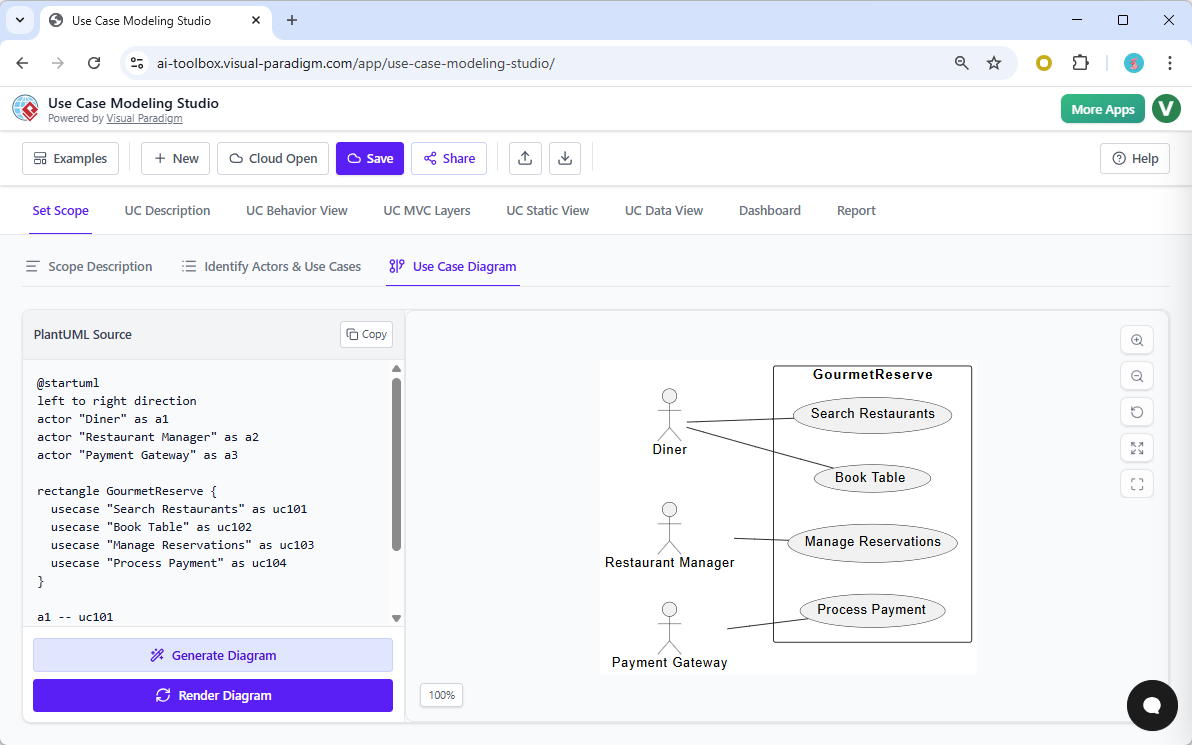
Upon analyzing the scope, the system identifies “Candidate Use Cases“—fundamental functions such as “Book Table” or “Manage Reservations.” The user simply selects a candidate, and the Auto-Write feature triggers the generation of a complete, professional draft. This mirrors the efficiency of a highly experienced legal assistant who can draft a complex contract from a single instruction, leaving the principal to review and refine rather than write from scratch.
Anatomy of an AI-Generated Specification
The output provided by the studio is not merely a summary; it is a multi-section specification that adheres to strict software engineering standards. To ensure the design is actionable for developers and QA teams, the AI structures the data into specific logical components.
| Section | Description |
|---|---|
| Preconditions | Defines the state of the system required before the interaction can commence (e.g., “User must be logged in”). |
| Main Flow (Happy Path) | A step-by-step breakdown of the standard user interactions and system responses when no errors occur. |
| Alternative & Exception Flows | Identifies divergent paths such as “Payment Declined” or “User Cancels,” ensuring edge cases are handled early in the design phase. |
| Postconditions | Describes the final state of the system upon successful completion of the use case. |
Mastering Logical Complexity and Consistency
Complex software systems are rarely composed of isolated tasks; they involve intricate relationships and dependencies. Writing specifications that accurately reflect these dependencies is often a source of human error. The studio employs a Consistency Engine to automatically manage these technical relationships.
Handling Inclusions and Extensions
The AI is capable of detecting patterns that suggest standard Unified Modeling Language (UML) relationships:
- <<include>> Relationships: If multiple use cases (e.g., “Book Table” and “Pre-Order Meal”) require the user to be verified, the AI automatically generates an “Authenticate User” inclusion, linking it to both flows.
- <<extend>> Relationships: The system identifies optional behaviors, such as “Apply Promo Code,” and defines them as conditional extensions to the main “Checkout” flow.
This automated logic ensures that the blueprint follows established rules of software design without requiring manual intervention for every link.
From Text to Downstream Technical Artifacts
The “Auto-Written” description serves as more than just documentation; it acts as the textual backbone for the entire project’s lifecycle. Because the AI understands the logic embedded within the text, it can instantly translate functional requirements into technical artifacts.
1. Behavioral Diagrams
The tool converts the step-by-step text flows into visual representations. Activity and Sequence diagrams are derived directly from the generated events, visualizing the flow of control and data without manual drawing.
2. AI-Driven Test Plans
Perhaps the most valuable feature for Quality Assurance (QA) teams is the automatic generation of test cases. The tool analyzes the Main, Alternative, and Exception flows to create a detailed list of scenarios, steps, and expected results. This allows testing preparation to begin simultaneously with design.
3. MVC Mapping
Bridging the gap between requirements and code, the system identifies the Model-View-Controller (MVC) layers based on the descriptions. This provides developers with an immediate architectural roadmap for implementation.
Continuous Refinement and the Single Source of Truth
While the AI provides a robust “finished draft,” the studio is designed as an interactive environment. Users retain full control to manually edit flows, prompting the AI to suggest further refinements. Crucially, any change made to the text is automatically propagated across all linked diagrams and artifacts. This synchronization ensures that the specification remains a single source of truth, eliminating the discrepancies that often arise between documentation and design diagrams.
