


In the rapidly evolving landscape of software development, the gap between high-level business goals and technical implementation has traditionally been bridged by manual modeling. However, the emergence of the AI-Powered Use Case Modeling Studio has revolutionized this process. This tool acts as a bridge, automatically generating a comprehensive suite of Unified Modeling Language (UML) and technical diagrams directly from textual descriptions.
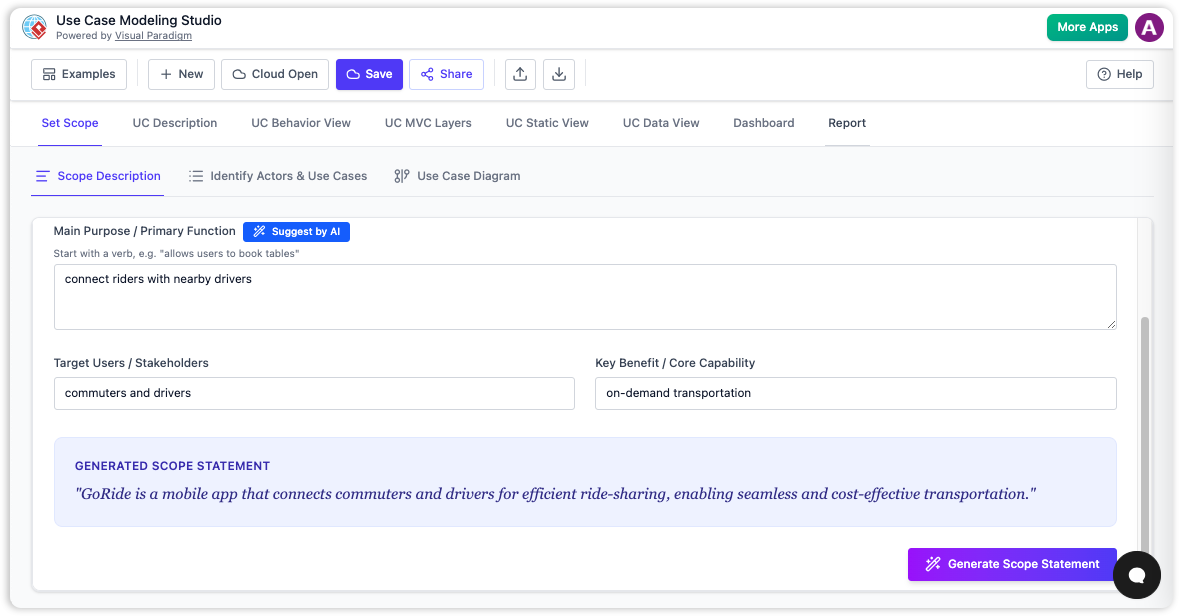
Understanding the AI as a Master Translator
To grasp the power of this technology, it is helpful to use an analogy. Think of the AI as a master translator. In a traditional workflow, a business analyst writes a story describing how software should function in plain English. The AI takes this “story” and simultaneously translates it into several distinct “technical languages” required by different stakeholders.
For the architects, it creates blueprints (Class Diagrams); for the developers, it writes step-by-step instruction manuals (Activity Diagrams); and for the testers, it generates interaction timelines (Sequence Diagrams). This ensures that every member of the construction crew understands the project from their specific perspective, all derived from a single source of truth.
Primary UML and Technical Diagram Generation
The core functionality of the studio lies in its ability to analyze logic and layout to produce visual models. By parsing high-level system goals, the AI automates the creation of several critical diagram types.
Use Case Diagrams
The foundation of requirements engineering, the Use Case Diagram, is generated directly from the initial scope statement. The AI identifies key actors (visualized as stick figures) and pairs them with candidate use cases (visualized as ovals). This establishes the system boundary and defines who interacts with the software and for what purpose.
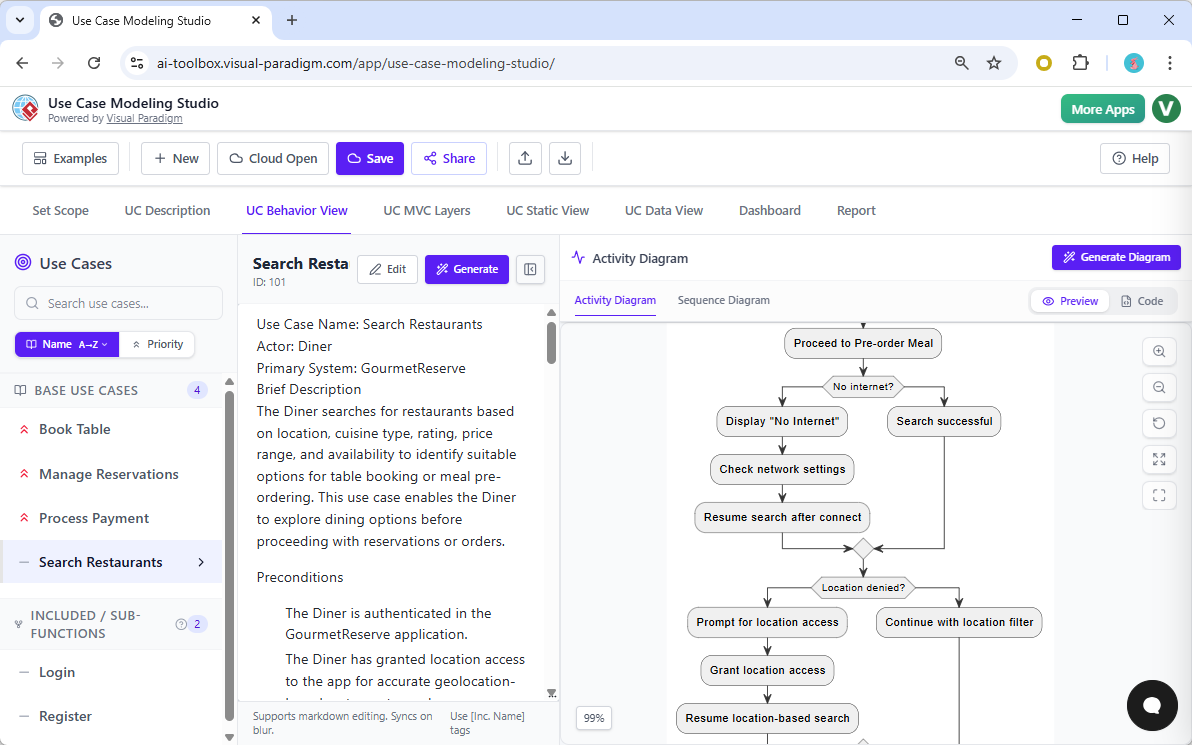
Activity Diagrams
Once the use cases are defined, the AI analyzes the “flow of events” within the text to generate Activity Diagrams. These visual models represent step-by-step workflows. They are crucial for mapping out operational logic, highlighting decision points (conditional logic), and identifying parallel activities that occur simultaneously within the system.
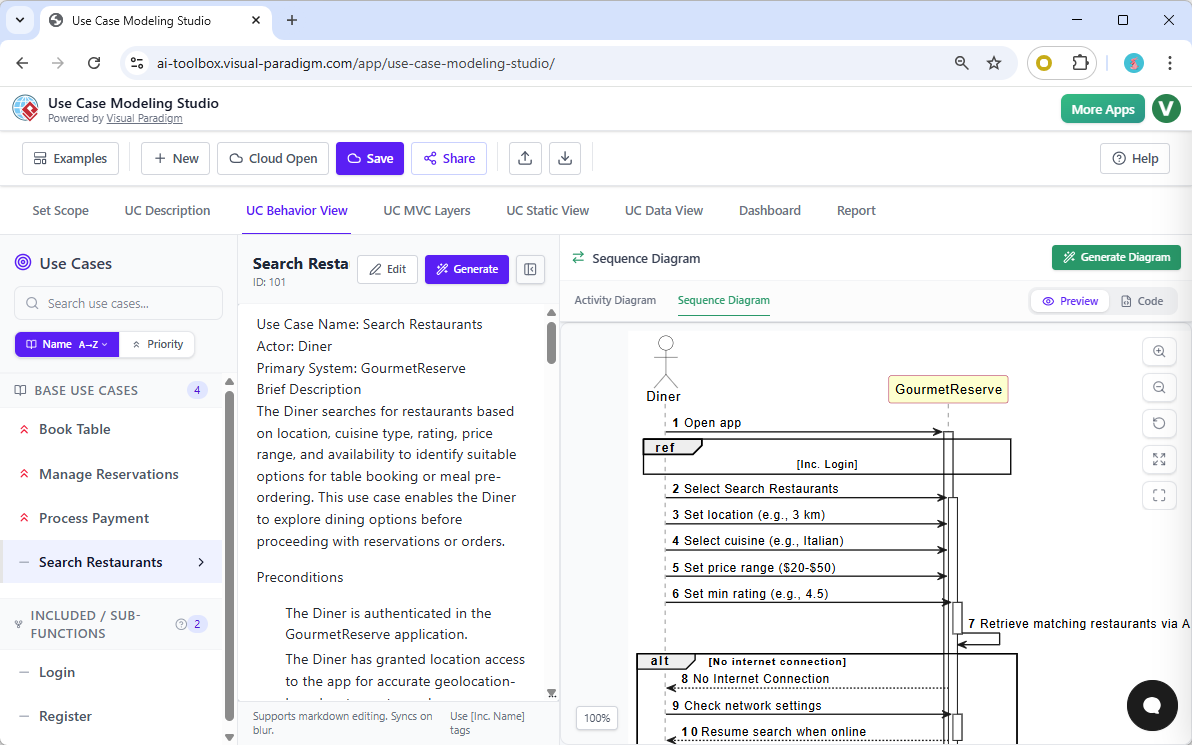
Sequence Diagrams
To capture the dynamic behavior of the system, the studio generates Sequence Diagrams. These models map out interactions between actors and system objects over time. By visualizing how the system responds to specific user actions in a linear timeline, developers can better understand the message passing and method invocations required to fulfill a request.
Class and Entity-Relationship Diagrams (ERDs)
Moving from behavioral to structural modeling, the AI infers a domain model from the identified actors, use cases, and flows. It generates Class Diagrams that specify entities, attributes, operations, and relationships such as association or composition. Furthermore, while not strictly UML, the studio produces Entity-Relationship Diagrams (ERDs). These are data-focused models that identify system entities and database requirements, ensuring the data layer supports the functional requirements.
Advanced Modeling Capabilities
Beyond standard diagram generation, the AI-Powered Use Case Modeling Studio offers advanced features that refine the technical accuracy of the models.
- Architectural Mapping (MVC): The AI is capable of identifying parts of the system and mapping them into Model-View-Controller (MVC) layers. This capability bridges the gap between abstract functional requirements and concrete technical implementation, providing a head start on software architecture.
- Automated Relationship Refinement: To ensure adherence to software design best practices, the tool automatically detects and creates complex UML relationships. This includes adding <<include>> and <<extend>> relationships, which clarify mandatory vs. optional behavior in use cases.
- Component Diagrams: Leveraging recent updates in the ecosystem, the AI can also generate UML Component Diagrams via chat interfaces, further aiding in high-level structural design.
By automating the translation of text to technical diagrams, the AI-Powered Use Case Modeling Studio significantly reduces the time required for requirements analysis and system design, ensuring that documentation remains consistent with the project’s goals.
Related posts:
 Q&A: Real Questions Tech Startups Ask About the Business Model Canvas (And Answers)
 The “No-Code” Approach to Building a Robust Business Model Canvas for MVPs
 Beyond Revenue Streams: Using the Business Model Canvas to Secure Series A Funding
 The Silent Killer: Ignoring Key Partnerships on Your Business Model Canvas