


Bridging the Gap Between Business and Technology
In the complex world of software development, clear communication is often the first casualty. The C4 model serves as a vital bridge between business strategy and technological implementation. By providing a hierarchical, standardized approach to software architecture, it tailors technical details to specific audiences. This structure allows stakeholders—from C-suite executives to backend developers—to progressively “zoom in” on a system, understanding its boundaries, technical building blocks, and internal implementation without getting lost in irrelevant details.
Deciphering the Four Levels of Abstraction
The core strength of the C4 model lies in its four distinct levels of abstraction. These levels facilitate communication across an organization by providing the right amount of information to the right people.

Level 1: System Context Diagram
This is the “bird’s-eye view” of your architecture. The System Context diagram illustrates the system within its surrounding environment. It focuses strictly on the system’s interactions with external actors (such as specific user personas) and external systems (third-party dependencies or legacy systems).
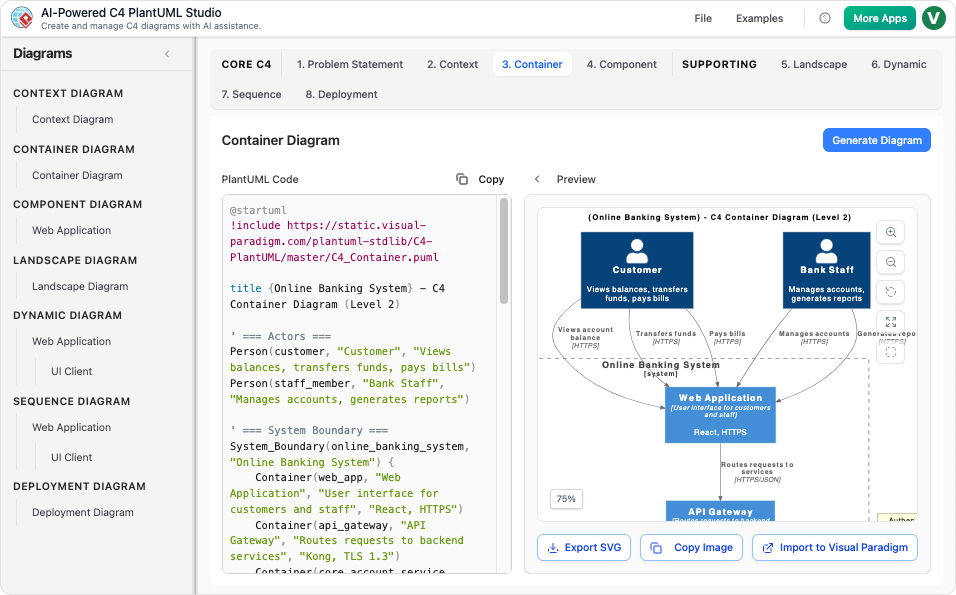
Because this level deliberately avoids technical minutiae like protocols, specific languages, or databases, it is the ideal tool for communicating with non-technical stakeholders. It answers the fundamental question: “What does this system do, and who uses it?”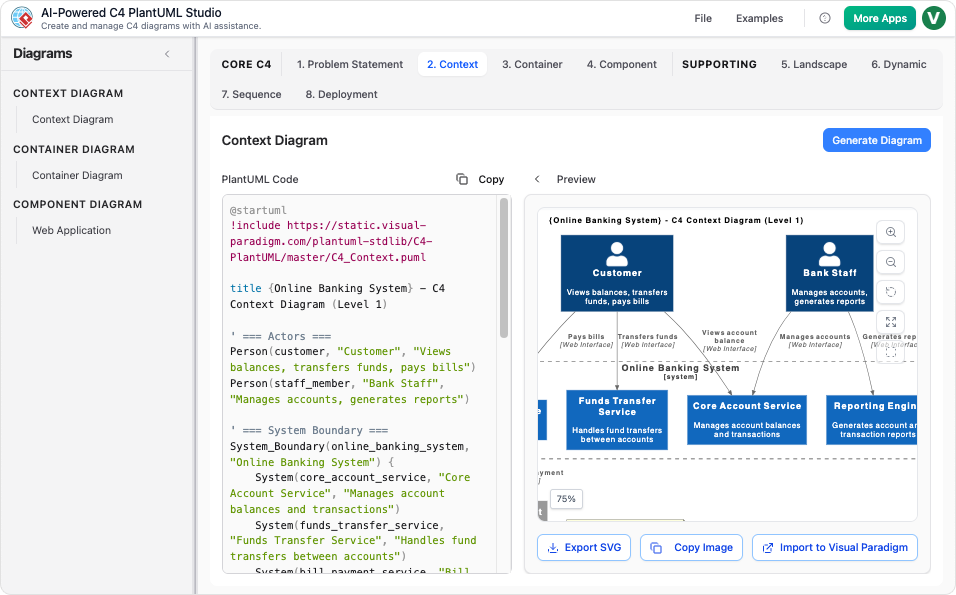 evel 2: Container Diagram
Zooming in one step, we reach the Container level. This diagram reveals the high-level technical structure of the system. In C4 terminology, a “container” represents a separately runnable or deployable unit. Examples include:
- Server-side web applications
- Client-side mobile apps
- Microservices
- Databases or file systems
This level highlights major technology choices and illustrates how these units communicate. It is essential for architects, developers, and operations staff who need to understand the deployment architecture and network boundaries.
Level 3: Component Diagram
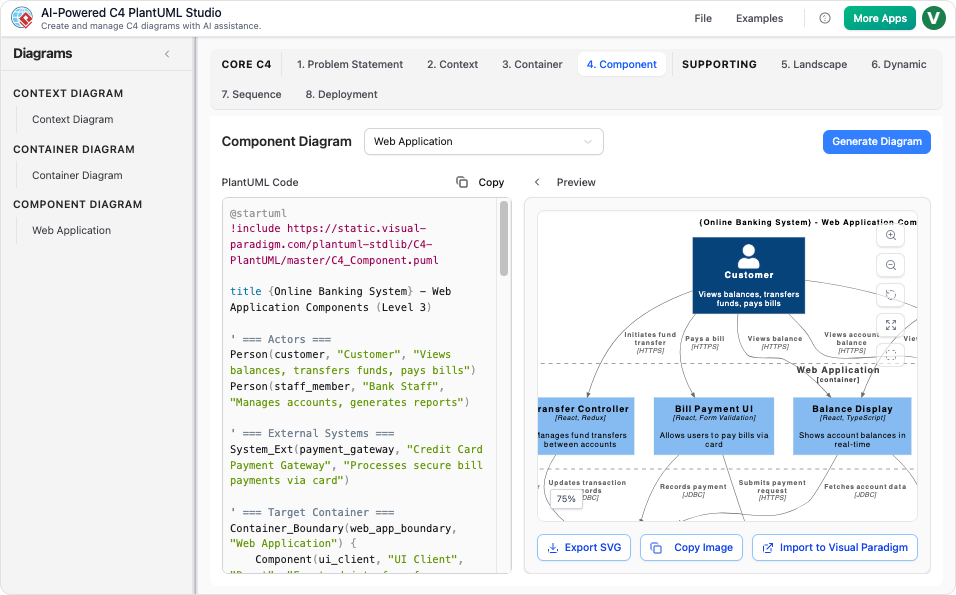
The Component level decomposes a single container into its internal logical building blocks. This diagram identifies the modules, controllers, or services that make up a container. It provides the technical depth required by architects and developers to understand how responsibilities are distributed before any implementation code is written.
Level 4: Code Diagram
The most granular level provides an in-depth view of the actual source code, often utilizing artifacts like UML Class Diagrams. While this level offers a microscopic view of the implementation, it is rarely used for general documentation. In modern development, this information is often effectively captured by the code itself or auto-generated IDE tools.
The Modern Architectural Workflow: From Idea to Blueprint
Modern software architecture has evolved beyond drawing shapes on a whiteboard. A new, three-pillared workflow utilizes specialized AI tools to eliminate the “blank canvas” hurdle and ensure documentation remains a living asset.
1. The AI Chatbot (The Architect)
Acting as an active thinking partner, the AI chatbot facilitates brainstorming and early-stage discovery. Rather than manually dragging boxes, users evolve designs through natural language conversation. You might request the AI to “add a payment gateway” or “rename the user database,” and the tool automatically adjusts the logical relationships and enforces architectural standards.
2. C4-PlantUML Studio (The Blueprint Generator)
Once the concepts are defined, the C4-PlantUML Studio acts as a “text-to-code” engine. It translates plain-language project descriptions into standardized PlantUML code and interactive diagrams. This tool is critical for enforcing hierarchical consistency. It compels users to select parent containers before generating components, ensuring the “blueprints” are technically sound. Furthermore, because the output is code, the architecture becomes version-controllable via Git.
3. Traditional Professional Tool (The Construction Site)
For long-term projects requiring absolute precision, architects turn to comprehensive suites like Visual Paradigm Desktop. This represents the “construction site” phase. Here, architects possess manual control to adjust every element, fine-tune layouts, and link models to enterprise standards like ArchiMate or SysML. This tool is used to maintain the architecture’s entire lifecycle and ensure compliance with rigid enterprise specifications.
The Construction Analogy
To understand how these tools fit together, consider the process of constructing a custom home:
| Tool / Phase | Construction Analogy | Function |
|---|---|---|
| AI Chatbot | The Architect’s Meeting | This is your brainstorming session. You describe your vision, the number of rooms, and the style. The architect (AI) sketches the initial layout through conversation. |
| C4-PlantUML Studio | Blueprint Generator | This tool takes those high-level ideas and instantly produces the technical, code-based plans required for the build. It ensures structural integrity and consistency. |
| Professional Tool | The Construction Site | This is where you step onto the floor to manually adjust every brick, wire, and pipe. You ensure every element meets exact safety codes and enterprise specifications. |
By leveraging this tiered workflow and the hierarchical clarity of the C4 model, organizations can ensure that their software architecture is robust, understandable, and aligned with business goals.
-
Ultimate Guide to C4 Model Visualization Using Visual Paradigm’s AI Tools: A comprehensive guide on leveraging Visual Paradigm’s AI-powered tools to automate and enhance C4 model visualization for faster, smarter software architecture design.
-
Leveraging Visual Paradigm’s AI C4 Studio for Streamlined Architecture Documentation: A detailed guide on using Visual Paradigm’s AI-enhanced C4 Studio to create clean, scalable, and maintainable software architecture documentation.
-
The Ultimate Guide to C4-PlantUML Studio: Revolutionizing Software Architecture Design – Visual Paradigm Blog: 2 weeks ago – Software architecture documentation is often a bottleneck—time-consuming, error-prone, and quickly outdated. The C4-PlantUML Studio, developed by Visual Paradigm, changes this by combining AI-driven automation, the C4 model’s clarity, and PlantUML’s flexibility into a single, powerful tool.
-
A Comprehensive Guide to Visual Paradigm’s AI-Powered C4 …: Dec 3, 2025 · Enter Visual Paradigm ’s AI-Powered C4 PlantUML Studio, released November 14, 2025 — a purpose-built tool that transforms natural language into correct, layered C4 diagrams. But how is it different from just asking ChatGPT or Claude to “draw a system diagram”? And can it really generate valid C4? Let’s unpack it all.
-
C4-PlantUML Studio | AI-Powered C4 Diagram Generator – Visual Paradigm: An AI-powered tool to automatically generate C4 software architecture diagrams from simple text descriptions.
-
Comprehensive Tutorial: Generating and Modifying C4 Component …: Dec 16, 2025 · This tutorial is based on the official Visual Paradigm product demo video, demonstrating how to use the AI-powered Chatbot to create and iteratively refine a C4 Component Diagram for a car park booking system. The C4 model (Context, Containers, Components, and Code) is a popular approach for visualizing software architecture, and the Component level focuses on the internal structure of a …
-
AI-Powered C4 Diagram Generator – Visual Paradigm AI: C4 & Supporting Diagrams The AI-Powered C4 Diagram Generator supports the four core levels of the C4 Model (Context, Container, Component, Deployment) plus essential supporting views to provide comprehensive architectural documentation. Core C4 Diagrams The Core C4 Diagrams are fundamental for documenting the static structure of your software system, detailing how it is broken down …
-
Visual Paradigm Full C4 Model Support Release: This release announcement details the integration of full C4 model support in Visual Paradigm, enabling users to create and manage architecture diagrams at multiple abstraction levels.
-
New: Full C4 Model Support Added to Visual Paradigm Desktop – ArchiMetric: 6 days ago · The C4 Model: A Comprehensive Guide to Visualizing Software Architecture with AI-Powered Tools …
-
Visual-paradigm: Our AI supports a wide range of diagrams across various domains, including UML, C4 models for software architecture, and strategic frameworks like SWOT and PESTLE analysis.
-
Visual Paradigm AI Suite: A Comprehensive Guide to Intelligent Modeling Tools – Cybermedian: 6 days ago – Strategic Frameworks: SWOT Analysis, PEST/PESTLE Analysis, Ansoff Matrix, and Blue Ocean Four Actions Framework. Systems Engineering: SysML Block Definition, Internal Block, and Requirement diagrams. Architecture: ArchiMate diagrams and C4 models. General Business: Organization Charts, Mind Maps, and PERT Charts. While the AI Chatbot is a cloud-based feature of VP Online, it is seamlessly integrated into the Visual Paradigm Desktop environment.
-
Visual-paradigm: Our AI supports a wide range of diagrams across various domains, including UML, C4 models for software architecture, and strategic frameworks like SWOT and PESTLE analysis.