


In the complex world of software architecture, understanding how a single application functions is often insufficient. To truly grasp the impact and reach of technology within an organization, architects must look at the broader ecosystem. This is where the System Landscape diagram in Visual Paradigm (VP) AI C4 Studio becomes indispensable. Serving as a vital supporting view to the standard C4 model, the landscape diagram provides a comprehensive “big picture” of the entire organizational environment.

Understanding the System Landscape View
While the four core levels of the C4 model—Context, Container, Component, and Code—primarily focus on drilling down into the specifics of a single software system, the System Landscape diagram takes a step back. It is designed to allow stakeholders, both technical and non-technical, to understand how multiple internal and external systems interact across an entire company.
This view effectively maps out the high-level dependencies between software systems, people (actors), and external entities. By doing so, it ensures that everyone involved has a clear understanding of the technical environment in which their specific projects reside.
The City Map Analogy
To better visualize the difference between a System Context diagram and a System Landscape diagram, consider the analogy of mapping a residential area:
- System Context Diagram: Imagine a map of a single neighborhood. It details one specific house (the system in focus) and its immediate interactions with neighbors (users and adjacent systems).
- System Landscape Diagram: Imagine a map of the entire city. It illustrates how different neighborhoods, business districts, and utility networks connect to one another across the municipality.
In this analogy, Visual Paradigm AI C4 Studio acts as a satellite mapping tool. It instantly renders this city-wide view based on your description, ensuring every “district” is accurately placed and connected without the need for manual surveying.
Streamlining Architecture with VP AI C4 Studio
Creating these complex enterprise views has traditionally been a manual, time-consuming process. Visual Paradigm AI C4 Studio revolutionizes this workflow through several advanced mechanisms designed for modern development teams.
1. Defining the Enterprise Boundary
One of the most critical aspects of a landscape diagram is the delineation of scope. VP AI C4 Studio assists architects in visualizing the Enterprise_Boundary. This explicitly separates internal assets—systems owned and operated by the organization—from external systems and actors. This visual distinction ensures that technical leads and business stakeholders remain aligned on how a specific system fits into the firm’s larger technical environment.
2. Instant AI Generation
Overcoming the “blank canvas” syndrome is a significant challenge when mapping complex organizations. Leveraging a robust AI engine, the Studio transforms plain-language descriptions into professional Landscape diagrams instantly. An architect can describe the ecosystem, and the tool will generate a structured visual representation, identifying the necessary systems and actors automatically.
3. Conversational Refinement via Chatbot
Architecture is rarely static, and neither is the diagramming process in VP AI C4 Studio. Teams can utilize the AI Diagramming Chatbot to evolve their landscape diagrams through natural dialogue. Users can issue commands such as: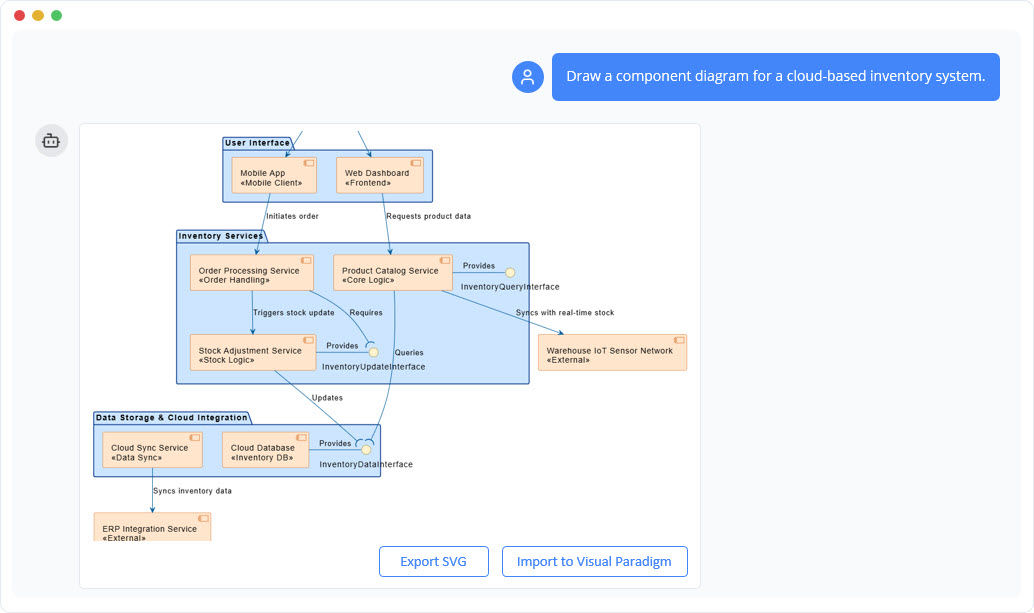
- “Add a new legacy mainframe system to the enterprise boundary.”
- “Show the relationship between the CRM and the Billing system.”
The AI updates the visual model and the underlying code in real-time, allowing for rapid iteration during planning sessions.
4. Technical Portability and Version Control
Modern documentation must be treated as code. VP AI C4 Studio translates architectural descriptions into valid PlantUML code. This feature renders the landscape view as “living documentation” that is version-controllable via Git. It allows architectural diagrams to be easily integrated into CI/CD pipelines, ensuring that documentation evolves in lock-step with development.
5. Hierarchical Traceability
To maintain consistency across the architecture, the tool supports hierarchical traceability. Users can drill down from the high-level Landscape view into specific System Context or Container diagrams. This ensures that the entire architectural suite remains linked, consistent, and easy to navigate.
Summary of Capabilities
| Feature | Benefit |
|---|---|
| Enterprise Boundary | Clearly defines internal vs. external scope for better stakeholder alignment. |
| AI Generation | Eliminates manual drafting by converting text to diagrams instantly. |
| Standards Compliance | Automatically applies official C4 notation and standards. |
| PlantUML Export | Enables version control and “Docs-as-Code” workflows. |
By utilizing Visual Paradigm AI C4 Studio, organizations can move beyond isolated system views and achieve a holistic understanding of their IT landscape, fostering better decision-making and architectural integrity.
-
Ultimate Guide to C4 Model Visualization Using Visual Paradigm’s AI Tools: A comprehensive guide on leveraging Visual Paradigm’s AI-powered tools to automate and enhance C4 model visualization for faster, smarter software architecture design.
-
Leveraging Visual Paradigm’s AI C4 Studio for Streamlined Architecture Documentation: A detailed guide on using Visual Paradigm’s AI-enhanced C4 Studio to create clean, scalable, and maintainable software architecture documentation.
-
The Ultimate Guide to C4-PlantUML Studio: Revolutionizing Software Architecture Design – Visual Paradigm Blog: 2 weeks ago – Software architecture documentation is often a bottleneck—time-consuming, error-prone, and quickly outdated. The C4-PlantUML Studio, developed by Visual Paradigm, changes this by combining AI-driven automation, the C4 model’s clarity, and PlantUML’s flexibility into a single, powerful tool.
-
A Comprehensive Guide to Visual Paradigm’s AI-Powered C4 …: Dec 3, 2025 · Enter Visual Paradigm ’s AI-Powered C4 PlantUML Studio, released November 14, 2025 — a purpose-built tool that transforms natural language into correct, layered C4 diagrams. But how is it different from just asking ChatGPT or Claude to “draw a system diagram”? And can it really generate valid C4? Let’s unpack it all.
-
C4-PlantUML Studio | AI-Powered C4 Diagram Generator – Visual Paradigm: An AI-powered tool to automatically generate C4 software architecture diagrams from simple text descriptions.
-
Comprehensive Tutorial: Generating and Modifying C4 Component …: Dec 16, 2025 · This tutorial is based on the official Visual Paradigm product demo video, demonstrating how to use the AI-powered Chatbot to create and iteratively refine a C4 Component Diagram for a car park booking system. The C4 model (Context, Containers, Components, and Code) is a popular approach for visualizing software architecture, and the Component level focuses on the internal structure of a …
-
AI-Powered C4 Diagram Generator – Visual Paradigm AI: C4 & Supporting Diagrams The AI-Powered C4 Diagram Generator supports the four core levels of the C4 Model (Context, Container, Component, Deployment) plus essential supporting views to provide comprehensive architectural documentation. Core C4 Diagrams The Core C4 Diagrams are fundamental for documenting the static structure of your software system, detailing how it is broken down …
-
Visual Paradigm Full C4 Model Support Release: This release announcement details the integration of full C4 model support in Visual Paradigm, enabling users to create and manage architecture diagrams at multiple abstraction levels.
-
New: Full C4 Model Support Added to Visual Paradigm Desktop – ArchiMetric: 6 days ago · The C4 Model: A Comprehensive Guide to Visualizing Software Architecture with AI-Powered Tools …
-
Visual-paradigm: Our AI supports a wide range of diagrams across various domains, including UML, C4 models for software architecture, and strategic frameworks like SWOT and PESTLE analysis.
-
Visual Paradigm AI Suite: A Comprehensive Guide to Intelligent Modeling Tools – Cybermedian: 6 days ago – Strategic Frameworks: SWOT Analysis, PEST/PESTLE Analysis, Ansoff Matrix, and Blue Ocean Four Actions Framework. Systems Engineering: SysML Block Definition, Internal Block, and Requirement diagrams. Architecture: ArchiMate diagrams and C4 models. General Business: Organization Charts, Mind Maps, and PERT Charts. While the AI Chatbot is a cloud-based feature of VP Online, it is seamlessly integrated into the Visual Paradigm Desktop environment.
-
Visual-paradigm: Our AI supports a wide range of diagrams across various domains, including UML, C4 models for software architecture, and strategic frameworks like SWOT and PESTLE analysis.