


Software architecture is often complex, involving intricate relationships between systems, containers, and code components. To communicate these designs effectively to diverse audiences—from non-technical stakeholders to lead developers—architects require a structured visualization method. The C4 model offers a powerful, hierarchical approach to software modeling, allowing teams to “zoom in” on a system through four distinct levels of abstraction.

Key Concepts
Before diving into the specific diagrams, it is essential to understand the foundational terminology used within the C4 framework. These definitions ensure that all stakeholders share a common language when reviewing architectural artifacts.
- Hierarchical Abstraction: The core philosophy of C4. It treats software visualization like a digital map, offering different levels of detail depending on the “zoom” level.

- Container: In the context of C4, a container is not necessarily a Docker container. It represents any separately runnable or deployable unit, such as a single-page web application, a server-side API, a database schema, or a mobile app.

- Component: A logical grouping of functionality within a container. Components are encapsulated behind well-defined interfaces and usually consist of a collection of implementation classes.

- External Actor: A person, role, or external system that interacts with the software system being modeled.
The Four Levels of the C4 Model
The C4 model consists of four primary diagram types, each providing a different perspective tailored to specific stakeholders. This structure prevents information overload by separating high-level context from low-level implementation details.
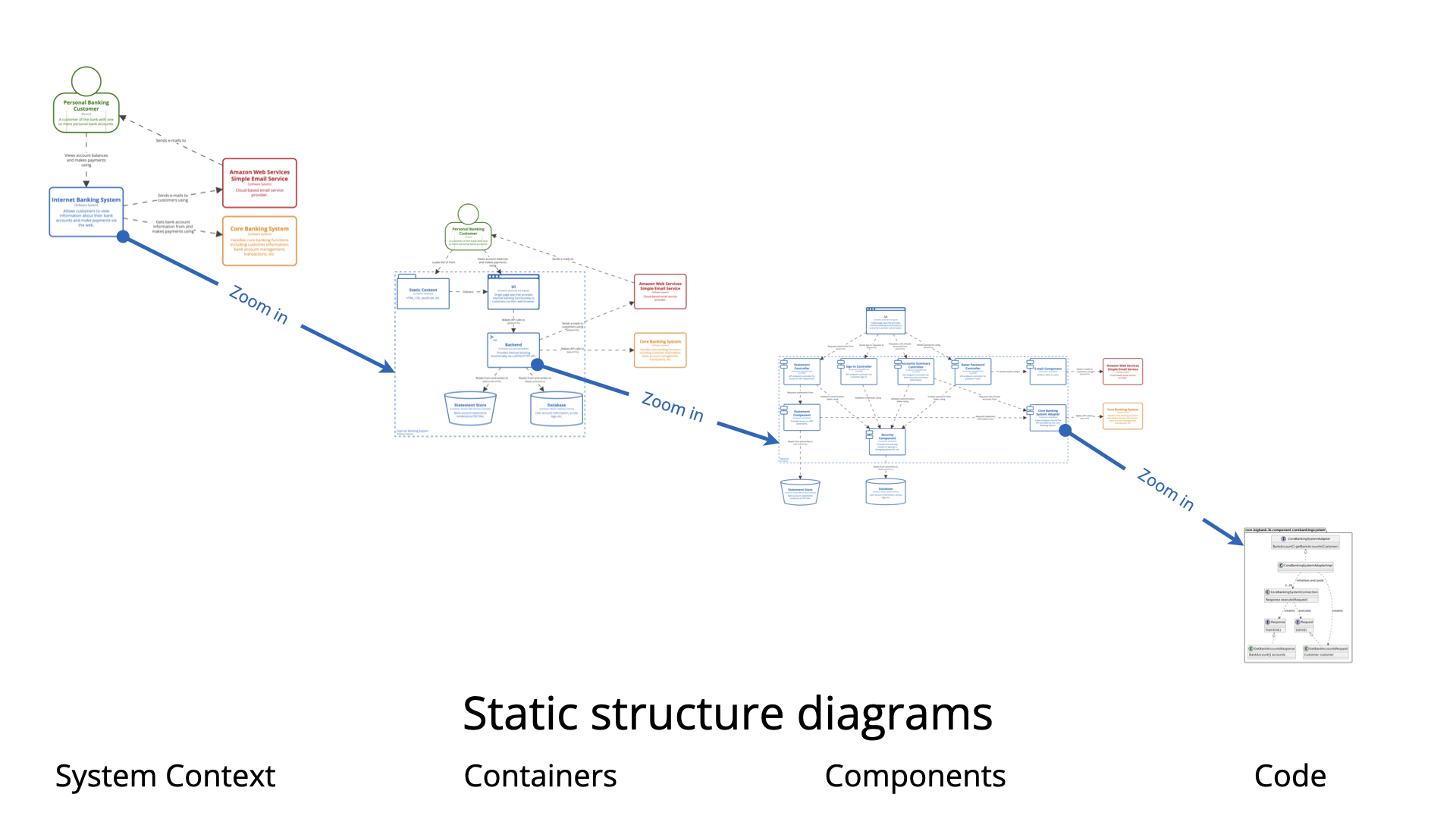
1. Level 1: System Context Diagram
The starting point of the C4 model is the System Context Diagram. Its primary purpose is to provide a “big picture” view of the software system.
This level focuses on the system as a single opaque unit. It maps out how the system fits into its surrounding environment, highlighting interactions with external actors (such as users or personas) and external systems (such as third-party APIs or legacy mainframes). Because it avoids technical jargon like protocols or specific technologies, it is the most accessible diagram.
Target Audience: Everyone, including non-technical stakeholders, product owners, business analysts, and developers.
2. Level 2: Container Diagram
Once the context is established, the Container Diagram “zooms in” to decompose the system into its high-level technical building blocks. This level reveals the major technology choices and how responsibilities are distributed across the architecture.
A container diagram shows the separately deployable units—web servers, databases, file systems, and microservices—and how they communicate. It bridges the gap between the conceptual product and the technical reality.
Target Audience: Technical staff, including software architects, developers, and operations or support teams.
3. Level 3: Component Diagram
Level 3 zooms further into an individual container to reveal its internal structural elements. This diagram breaks a container down into components, illustrating how functionality is organized logically inside the deployable unit.
Component diagrams are vital for understanding the implementation of a specific service or application. They show the grouping of classes or modules and their relationships, typically encapsulated behind interfaces.
Target Audience: Software architects and developers who need to understand the finer-grained aspects of the architecture before or during implementation.
4. Level 4: Code Diagram
The final and most granular level is the Code Diagram. This view details the implementation specifics, often utilizing UML class diagrams or entity-relationship diagrams to show classes, interfaces, and methods.
It is important to note that this level is rarely used for manual documentation. Due to the rapid pace of code changes, manual code diagrams become obsolete almost immediately. Instead, most teams rely on Integrated Development Environments (IDEs) to generate these visualizations on demand.
Target Audience: Highly technical individuals deeply involved in the specific codebase.
The “Digital Map” Analogy
To better understand how these levels relate to one another, the C4 model is often compared to a digital map:
- System Context (Level 1): This is the World Map. It shows your country (the system) and how it interacts with neighboring countries (external systems and users).
- Container (Level 2): This is the City Map. It identifies the major districts, hubs, and transport links (deployable units and communication channels).
- Component (Level 3): This is the Street Map. It zooms in to show individual buildings and their specific purposes (logical modules within a container).
- Code (Level 4): This is the Floor Plan. It details the exact layout, furniture, and construction materials of a specific room (classes and code logic).
Supporting Views
While the four core levels cover the static structure of the system, complex architectures often require additional viewpoints to be fully understood:
- System Landscape Diagrams: These provide an enterprise-level overview, showing how multiple software systems within an organization relate to one another.
- Dynamic Diagrams: Unlike the structural C4 diagrams, dynamic diagrams illustrate runtime interactions and behavioral flows between elements.
- Deployment Diagrams: These map how the software containers identified in Level 2 are distributed across physical infrastructure, such as cloud nodes or on-premise servers.
VP AI: Automating and Enhancing C4 Modeling
Creating and maintaining architectural diagrams can be time-consuming. Visual Paradigm AI transforms this process by leveraging artificial intelligence to automate the generation and refinement of C4 diagrams.
VP AI can assist in the following ways:
- Text-to-Diagram Generation: Architects can describe their system architecture in natural language (e.g., “A banking system with a web app, mobile app, and PostgreSQL database”), and VP AI can automatically generate a draft Level 1 or Level 2 diagram.
- Architectural Consistency: AI tools can analyze diagrams across different levels to ensure that a container defined in Level 2 is accurately represented when zooming into Level 3.
-
Ultimate Guide to C4 Model Visualization Using Visual Paradigm’s AI Tools: A comprehensive guide on leveraging Visual Paradigm’s AI-powered tools to automate and enhance C4 model visualization for faster, smarter software architecture design.
-
Leveraging Visual Paradigm’s AI C4 Studio for Streamlined Architecture Documentation: A detailed guide on using Visual Paradigm’s AI-enhanced C4 Studio to create clean, scalable, and maintainable software architecture documentation.
-
The Ultimate Guide to C4-PlantUML Studio: Revolutionizing Software Architecture Design – Visual Paradigm Blog: 2 weeks ago – Software architecture documentation is often a bottleneck—time-consuming, error-prone, and quickly outdated. The C4-PlantUML Studio, developed by Visual Paradigm, changes this by combining AI-driven automation, the C4 model’s clarity, and PlantUML’s flexibility into a single, powerful tool.
-
A Comprehensive Guide to Visual Paradigm’s AI-Powered C4 …: Dec 3, 2025 · Enter Visual Paradigm ’s AI-Powered C4 PlantUML Studio, released November 14, 2025 — a purpose-built tool that transforms natural language into correct, layered C4 diagrams. But how is it different from just asking ChatGPT or Claude to “draw a system diagram”? And can it really generate valid C4? Let’s unpack it all.
-
C4-PlantUML Studio | AI-Powered C4 Diagram Generator – Visual Paradigm: An AI-powered tool to automatically generate C4 software architecture diagrams from simple text descriptions.
-
Comprehensive Tutorial: Generating and Modifying C4 Component …: Dec 16, 2025 · This tutorial is based on the official Visual Paradigm product demo video, demonstrating how to use the AI-powered Chatbot to create and iteratively refine a C4 Component Diagram for a car park booking system. The C4 model (Context, Containers, Components, and Code) is a popular approach for visualizing software architecture, and the Component level focuses on the internal structure of a …
-
AI-Powered C4 Diagram Generator – Visual Paradigm AI: C4 & Supporting Diagrams The AI-Powered C4 Diagram Generator supports the four core levels of the C4 Model (Context, Container, Component, Deployment) plus essential supporting views to provide comprehensive architectural documentation. Core C4 Diagrams The Core C4 Diagrams are fundamental for documenting the static structure of your software system, detailing how it is broken down …
-
Visual Paradigm Full C4 Model Support Release: This release announcement details the integration of full C4 model support in Visual Paradigm, enabling users to create and manage architecture diagrams at multiple abstraction levels.
-
New: Full C4 Model Support Added to Visual Paradigm Desktop – ArchiMetric: 6 days ago · The C4 Model: A Comprehensive Guide to Visualizing Software Architecture with AI-Powered Tools …
-
Visual-paradigm: Our AI supports a wide range of diagrams across various domains, including UML, C4 models for software architecture, and strategic frameworks like SWOT and PESTLE analysis.
-
Visual Paradigm AI Suite: A Comprehensive Guide to Intelligent Modeling Tools – Cybermedian: 6 days ago – Strategic Frameworks: SWOT Analysis, PEST/PESTLE Analysis, Ansoff Matrix, and Blue Ocean Four Actions Framework. Systems Engineering: SysML Block Definition, Internal Block, and Requirement diagrams. Architecture: ArchiMate diagrams and C4 models. General Business: Organization Charts, Mind Maps, and PERT Charts. While the AI Chatbot is a cloud-based feature of VP Online, it is seamlessly integrated into the Visual Paradigm Desktop environment.
-
Visual-paradigm: Our AI supports a wide range of diagrams across various domains, including UML, C4 models for software architecture, and strategic frameworks like SWOT and PESTLE analysis.
-
PESTLE Analysis Explained: The Ultimate AI Guide: Sep 10, 2025 · Visual Paradigm ’s AI chatbot supports the generation of diagrams for several key business frameworks, including SWOT, PESTLE , Ansoff, BCG, and C4 models. These are not standalone tools but components of a holistic strategic analysis toolkit.
- Documentation Assistance: VP AI can analyze the visual elements of a diagram and automatically generate descriptive documentation, ensuring that the metadata and explanations for each component are clear and comprehensive.
