


The Evolution of ArchiMate Modeling
Enterprise Architecture (EA) has traditionally been a discipline requiring meticulous manual effort. Architects often face the daunting task of staring at a “blank canvas,” attempting to translate abstract business strategies into structured technical diagrams. Visual Paradigm AI has fundamentally shifted this dynamic by introducing a conversational modeling paradigm. This innovation allows architects to use natural language to generate, refine, and analyze complex ArchiMate models, effectively acting as an intelligent partner in the design process.
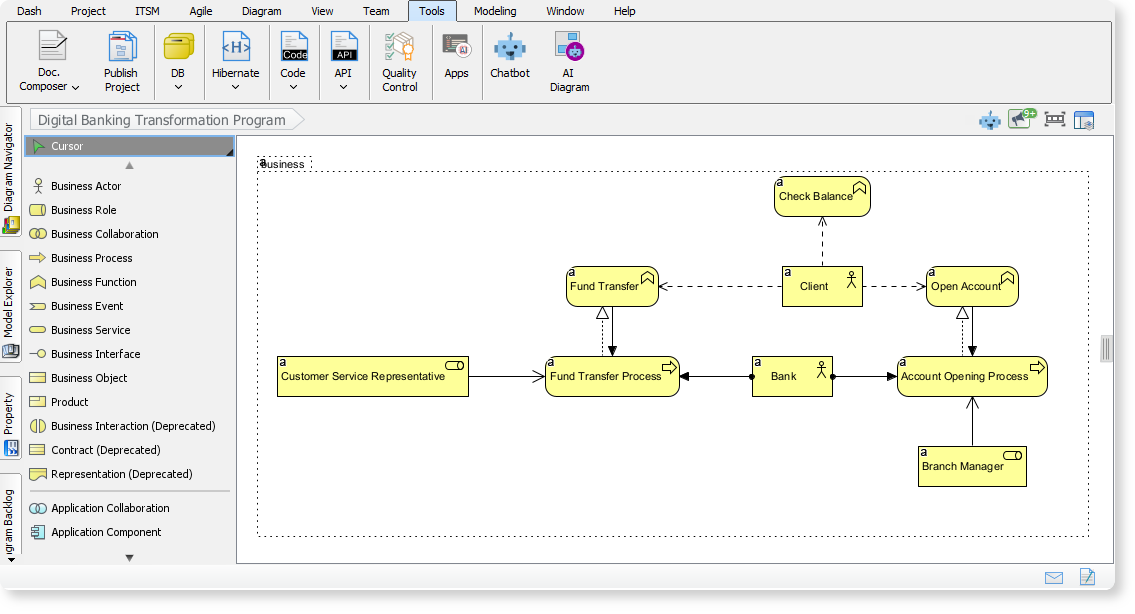
To understand the magnitude of this shift, consider an analogy: Think of Visual Paradigm AI as an expert urban planner’s assistant. While frameworks like TOGAF provide the zoning laws and building codes, the AI acts as the draftsman that instantly sketches the blueprints based on a simple command like “Design a sustainable residential district.” The lead architect then reviews these plans to ensure they meet specific requirements before final implementation.
Key Features of AI-Driven Architecture
Visual Paradigm AI is not merely a drawing tool; it is a semantics-aware engine designed specifically for Enterprise Architecture. Below are the core capabilities that distinguish it from standard diagramming software.
Instant Multi-Layer Generation
One of the most time-consuming aspects of EA is connecting the dots between different strata of the enterprise. The AI interprets plain English prompts to instantly produce structured ArchiMate models that bridge the gap between the Business, Application, and Technology layers simultaneously. This holistic approach ensures that strategic goals are visually traced down to infrastructure components in seconds.
Comprehensive Viewpoint Support
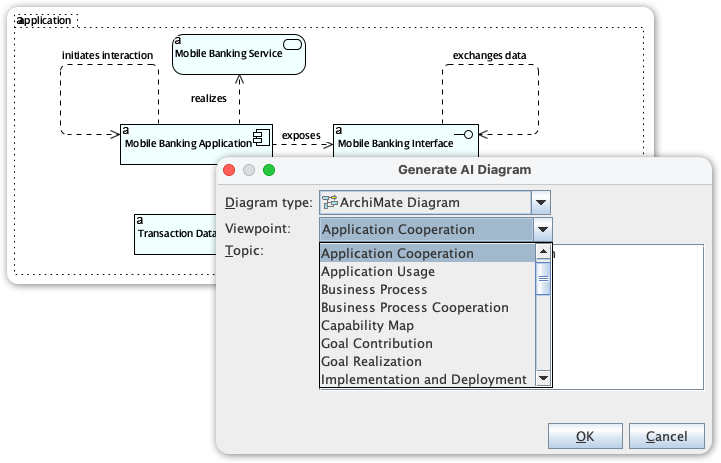
Standard compliance is critical in EA. The AI is trained to support all 26 official ArchiMate viewpoints. Whether you require a high-level Capability Map for stakeholders or a detailed Technology Usage diagram for engineers, the AI tailors the output to adhere to the specific stakeholder concerns associated with that viewpoint.
Conversational Refinement and Iteration
Architecture is rarely perfect on the first draft. Visual Paradigm treats modeling as an iterative dialogue. Users can “talk to their diagram” to refine elements without touching a mouse. Commands such as “Add a payment gateway” or “Refactor this relationship” allow for rapid prototyping and adjustment, treating the diagram as a living document.
Intelligent Impact Analysis
Beyond drawing, the AI assists in analysis. Architects can perform complex queries to visualize the ripple effects of potential changes. For example, asking “How would decommissioning our legacy ERP affect the customer fulfillment process?” allows the AI to highlight dependencies and risks, facilitating better decision-making.
Standards Compliance and TOGAF Integration
The AI acts as a built-in compliance expert, ensuring all generated models strictly adhere to ArchiMate 3.2 vocabulary, notation, syntax, and semantics. Furthermore, for practitioners of the TOGAF methodology, AI-generated artifacts are automatically mapped to specific TOGAF ADM phases. Through the “Guide-Through process navigator“, these artifacts are seamlessly archived in the centralized Architecture Repository.
Native, Editable Outputs
Unlike generic AI image generators that produce static pixels, Visual Paradigm AI produces native model elements. These output objects are fully editable, semantic data entities that are synchronized across the user’s account. This means the AI provides a robust foundation that architects can manually refine for absolute precision.
How to Utilize AI Features for ArchiMate
Visual Paradigm offers two primary interfaces for accessing these AI capabilities: the Desktop client for power users and the Cloud-based Chatbot for rapid iteration.
1. Visual Paradigm Desktop (Enterprise Edition)
The desktop environment offers deep integration with existing project repositories. To generate models here:
- Launch the application and navigate to Tools in the main menu.
- Select AI Diagram (or AI Diagram Generation).
- In the settings, specify ArchiMate Diagram as the Diagram Type.
- Choose the appropriate ArchiMate Viewpoint (e.g., Product Viewpoint or Business Process) from the dropdown menu to ensure the correct scope.
- Input your specific topic or requirement (e.g., “Digital Banking Transformation Program”).
- Click OK. The system will generate a fully editable draft which you can then refine manually.
2. The AI Chatbot (VP Online / Cloud)
For a more conversational approach or when working remotely, the web interface provides a flexible alternative:
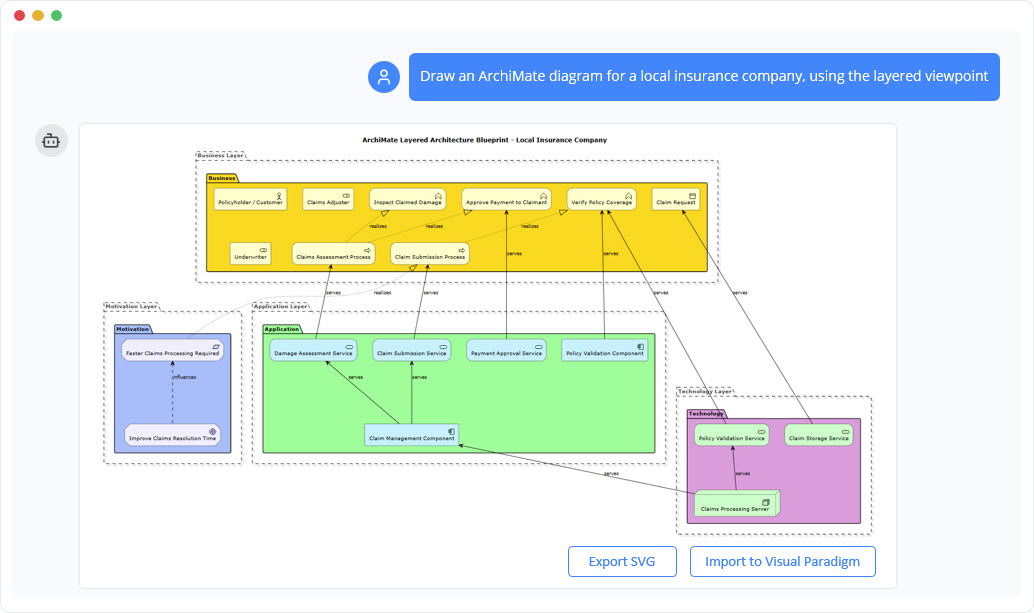
- Access the chatbot interface (e.g., via the Visual Paradigm Online chat portal).
- Describe your concept using a natural language prompt. For instance: “Generate an ArchiMate diagram of the Business Process viewpoint showing the order fulfillment workflow in an online bookstore.”
- Iterate and refine the result by typing follow-up commands. You might say, “Add a secondary authentication factor” or “Switch to the Application Cooperation Viewpoint.”
- Import to Desktop: If you are using the Professional or Enterprise edition, you can export these web-generated diagrams directly into your desktop projects for advanced modeling and documentation.
By leveraging these tools, Enterprise Architects can transition from being drafters of diagrams to architects of value, spending less time on syntax and more time on strategy and innovation.
-
AI Chatbot Feature – Intelligent Assistance for Visual Paradigm Users: Leverage AI-powered chatbot functionality to get instant guidance, automate tasks, and enhance productivity within Visual Paradigm.
-
Visual Paradigm AI Chatbot Enhances Multi-Language Support …: 7 hours ago · Discover the latest updates to Visual Paradigm ‘s AI -Powered visual modeling software, including multi-language UI and improved chat content localization. Experience seamless AI diagram generation in languages like Spanish, French, Chinese, and more with our AI chatbot for UML and other diagrams.
-
AI Chatbot for Diagramming: How It Works with Visual Paradigm: The Visual Paradigm AI chatbot is an AI -powered modeling assistant that turns natural language into diagrams. It doesn’t require users to learn specific modeling standards or syntax.
-
Case Study: Enhancing System Modeling Efficiency with Visual Paradigm’s AI-Powered Chatbot: This case study demonstrates how Visual Paradigm’s AI chatbot improves productivity and accuracy in system modeling by enabling conversational diagram creation.
-
Visual Paradigm AI Chatbot: The World’s First Purpose-Built AI Assistant for Visual Modeling: Visual Paradigm launches its groundbreaking AI chatbot, designed specifically to assist users in visual modeling tasks with natural language interactions and intelligent guidance.
