


In the evolving landscape of digital content creation, the ability to produce high-quality, visually engaging articles quickly is paramount. Visual Paradigm has recently announced a game-changing enhancement to their AI article generator. This update brings seamless AI image generation directly into the editor, allowing content creators to craft professional, illustrated narratives without ever leaving the platform.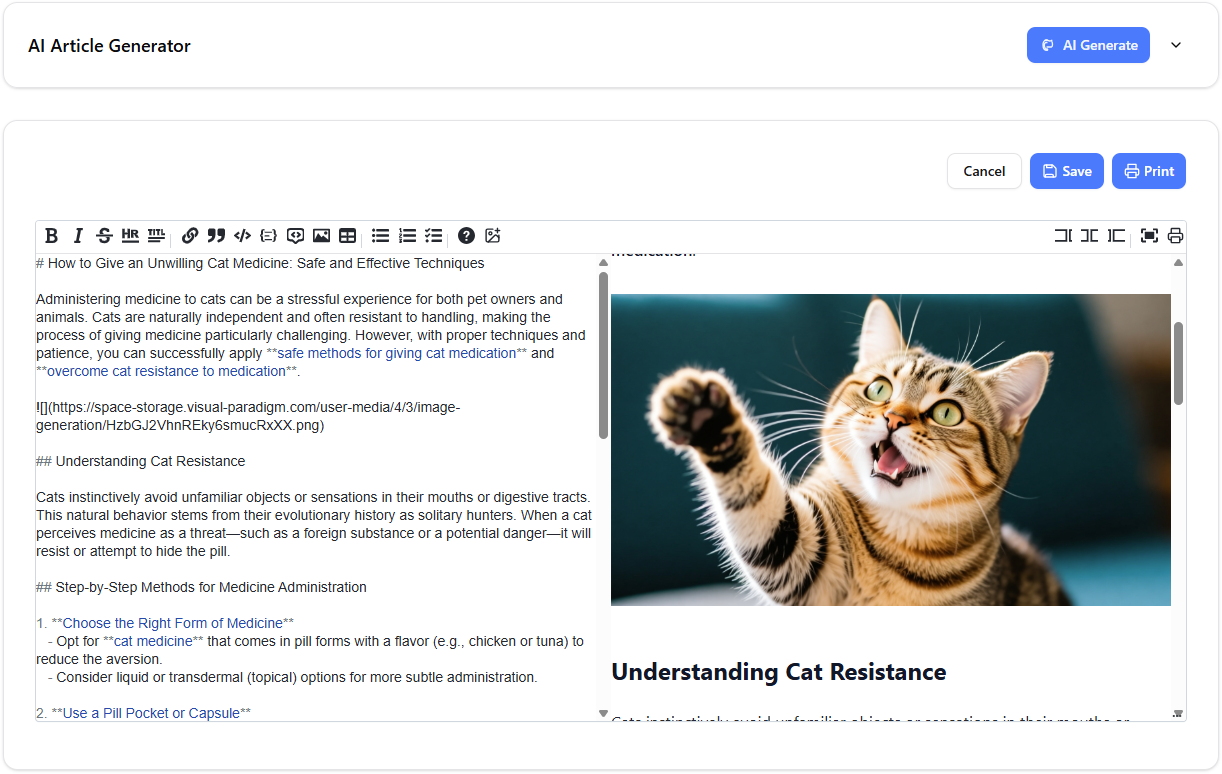
If you are a blogger, marketer, or technical writer looking to elevate your content strategy, this guide will walk you through how to utilize the new AI image generation feature within the Visual Paradigm AI Article Writer.
The Evolution of the AI Article Writer
Before diving into the new visuals feature, it is essential to understand the core power of the AI Article Writer. This tool is a robust, markdown-based editor designed to streamline the writing process from ideation to publication.
Unlike standard text generators, this tool offers a structured approach to creation. Users input specific parameters to tailor the output:
- Topic and Keywords: Define the core subject matter for SEO optimization.
- Target Audience & Tone: Customize the voice to match your brand identity.
- Content Type: Select formats such as how-to guides, listicles, or technical documentation.
- Article Length: Control the depth of the content.
Once the AI generates a polished draft, the intuitive markdown editor allows for immediate refinement. With the latest update, this workflow now includes the ability to generate custom visuals on the fly, addressing the common pain point of sourcing royalty-free images that match specific narratives.
Step-by-Step Tutorial: Generating and Inserting AI Images
The integration of AI image generation into the article editing tool is designed for simplicity and efficiency. Follow this step-by-step tutorial to transform plain text into a visually rich story.
Step 1: Prepare Your Content
Begin by generating your article draft using the AI Article Writer. Enter your topic and preferences, and let the advanced AI craft the text. Once your text is ready in the markdown editor, identify the sections where a visual aid would enhance the reader’s understanding or engagement.
Step 2: Position Your Cursor
Navigate through your article in the editor. Click to place your cursor at the exact location where you want the image to appear. This ensures the visual is inserted contextually, breaking up text walls and supporting specific paragraphs.
Step 3: Launch the Image Generator
Look for the “Add AI Image” button within the editor interface. Clicking this will open the built-in AI image generation tool overlay.
Step 4: Configure Image Settings
To ensure high-quality results that align with your content, you will need to provide specific details:
- Enter a Prompt: Type a detailed description of the image you want to create. The more specific you are about the style, subject, and lighting, the better the result.
- Add a Title: Input a title for the image. Crucially, this title doubles as the Alt Text, which is vital for web accessibility and SEO optimization.
- Select Aspect Ratio: Choose the format that best fits your layout. The tool supports a wide range of ratios including:
- 1:1 (Square)
- 16:9 (Widescreen landscape)
- 9:16 (Vertical story format)
- 4:3 and 3:4 (Standard photo formats)
- 3:2 and 2:3 (Classic photography ratios)

Step 5: Generate and Insert
Once your settings are configured, hit the “Generate Image” button. The AI will create a custom visual in moments.
Review the generated image in the preview window. If it meets your needs, select to insert it. If you want a different look, you can choose to regenerate the image to get variations until it is perfect. Once confirmed, the image is automatically inserted into your article at the cursor position.

Why This Update Matters for Content Creators
The ability to generate images within the same interface used for writing offers several distinct advantages for professionals:
- Unified Workflow: There is no need to switch between stock photo sites, graphic design software, and your text editor. You can create cohesive, multimedia-rich articles in one place.
- Contextual Relevance: Because you generate the image based on your specific text, the visuals perfectly match the narrative, something often difficult to achieve with generic stock photos.
- SEO and Accessibility: The automatic inclusion of the image title as alt text ensures that your articles are optimized for search engines and accessible to all readers immediately upon creation.
Whether you are writing technical docs, marketing copy, or blog posts, the Visual Paradigm AI Article Writer is now a comprehensive solution for producing finished, ready-to-publish content. By leveraging these new visual capabilities, you can significantly boost engagement and readability.
Ready to supercharge your writing? Start creating with the AI Article Writer today and experience the power of integrated AI images.
Resources
- Visual Paradigm User-Contributed Diagrams / Designs
- Graphic Design Archives – Page 2 of 60 – Visual Paradigm Blog
- Graphic Design Archives – Page 10 of 60 – Visual Paradigm Blog
- Graphic Design Archives – Visual Paradigm Blog
- Graphic Design Archives – Page 4 of 60 – Visual Paradigm Blog
- AI Article Writer Adds Image Generation | Visual Paradigm
- Free Infographic Maker – Visual Paradigm
- Free Online Design Tools & Diagram Makers – Visual Paradigm
- Unleash the Power of AI: Create Stunning Flipbooks Instantly!
- Visual Paradigm Online Learning Center
- 6 Ways to make your infographic more attractive – Visual Paradigm Blog
- Streamlining Graphic Design and Infographics Creation with Visual Paradigm’s Professional Templates – Visual Paradigm Blog
- Work Smart with Visual Paradigm Online | Free Infographic Templates
- Create Infographics Poster in 5 Minutes | Free Infographic Templates
- Tips for creating eye-catching infographic – Visual Paradigm Blog
